Page 184 of 543
182
2-5. Driving information
ES350_U
CAUTION
■Storage precautions
Observe the following precautions.
Failing to do so may result in death or serious injury.
●Do not place cargo or luggage in or on the following locations as the item may
get under the brake or accelerator pedal and prevent the pedals from being
depressed properly, block the driver’s vision, or hit the driver or passengers,
causing an accident.
• Driver’s feet
• Front passenger or rear seats (when stacking items)
• Package tray
• Instrument panel
• Dashboard
●Secure all items in the occupant compartment, as they may shift and injure some-
one during sudden braking, sudden swerving or an accident.
■Capacity and distribution
●Do not exceed the maximum axle weight rating or the total vehicle weight rating.
●Even if the total load of occupant's weight and the cargo load is less than the total
load capacity, do not apply the load unevenly.
Improper loading may cause deterioration of steering or braking control which
may cause death or serious injury.
Page 187 of 543
185
2-5. Driving information
2
When driving
ES350_U
■Before driving the vehicle
Perform the following according to the driving conditions.
●Do not try to forcibly open a window or move a wiper that is fro-
zen. Pour warm water over the frozen area to melt the ice. Wipe
away the water immediately to prevent it from freezing.
● To ensure proper operation of the climate control system fan,
remove any snow that has accumulated on the air inlet vents in
front of the windshield.
● Remove any ice that has accumulated on the vehicle chassis.
● Periodically check for and remove any excess ice or snow that
may have accumulated in the wheel well or on the brakes.
■ When driving the vehicle
Accelerate the vehicle slowly and drive at a reduced speed suitable
to road conditions.
■ When parking the vehicle
Park the vehicle and move the shift lever to P without setting the
parking brake. The parking brake may freeze up, preventing it from
being released. If necessary, block the wheels to prevent inadvert-
ent sliding or creeping.
Page 198 of 543
196
2-5. Driving information
ES350_U●
Always place wheel blocks under both the vehicle and the trailer
wheels when parking. Apply the parking brake firmly, and put the
transmission in P. Avoid parking on a slope, but if unavoidable, do so
only after performing the following:
Apply the brakes and keep them applied.
Have someone place wheel blocks under both the vehicle and
trailer wheels.
When the wheel blocks are in place, release the brakes slowly
until the blocks absorb the load.
Apply the parking brake firmly.
Shift into P and turn off the engine.
● When restarting after parking on a slope:
With the transmission in the P position, start the engine. Be sure
to keep the brake pedal pressed.
Shift into 3, 2, 1, or the R position (if reversing).
Release the parking brake and brake pedal, and slowly pull or
back away from the wheel blocks.
Stop and apply the brakes.
Have someone retrieve the blocks.
CAUTION
■To avoid an accident
●Do not exceed 45 mph (72 km/h) or posted towing speed limit, whichever is
lower. As instability (swaying) of the towing vehicle-trailer combination increases
as speed increases, exceeding 45 mph (72 km/h) may cause loss of control.
●Slow down and downshift before descending steep or long downhill grades. Do
not make sudden downshifts.
●Avoid holding the brake pedal down too long or too frequently. This could cause
the brakes to overheat and result in reduced braking efficiency.
STEP1
STEP2
STEP3
STEP4
STEP5
STEP1
STEP2
STEP3
STEP4
Page 201 of 543

Interior features3
199
ES350_U
3-3. Using the Bluetooth®
audio system
Bluetooth
® audio system .... 256
Using the Bluetooth
®
audio system ......................... 259
Operating a Bluetooth
®
enabled portable player .... 264
Setting up a Bluetooth
®
enabled portable player .... 267
Bluetooth
® audio system
setup ......................................... 274
3-4. Using the hands-free system
(for mobile phone)
Hands-free system for mobile phones ...................... 275
Using the hands-free system (for mobile phone)............... 279
Making a phone call .............. 287
Setting a mobile phone......... 292
Security and system setup ... 297
Using the phone book............ 301
3-5. Using the interior lights Interior lights list .................... 308
• Interior lights ......................... 310
• Personal lights ....................... 310 3-6. Using the storage features
List of storage features........... 311
• Glove box ............................... 312
• Console box .......................... 313
• Overhead console............... 314
• Cup holders ........................... 315
• Auxiliary box ......................... 317
3-7. Other interior features Sun visors .................................. 318
Vanity mirror ............................ 319
Clock ......................................... 320
Ashtray ...................................... 321
Cigarette lighter .................... 322
Power outlet ............................ 323
Seat heaters ............................ 324
Seat heaters and ventilators ............................. 326
Armrest .................................... 328
Rear sunshade ........................ 329
Extended trunk........................ 331
Coat hooks .............................. 332
Floor mat .................................. 333
Trunk features ......................... 334
Garage door opener ............ 336
Compass .................................. 342
Safety Connect ...................... 346
Page 208 of 543
206
3-1. Using the air conditioning system and defogger
ES350_U
CAUTION
■To prevent the windshield from fogging up
Do not use during cool air operation in extremely humid weather. The dif-
ference between the temperature of the outside air and that of the windshield can
cause the outer surface of the windshield to fog up, blocking your vision.
NOTICE
■To prevent battery discharge
Do not leave the automatic air conditioning system on longer than necessary when
the engine is stopped.
Page 253 of 543
251
3-2. Using the audio system
3
Interior features
ES350_U■
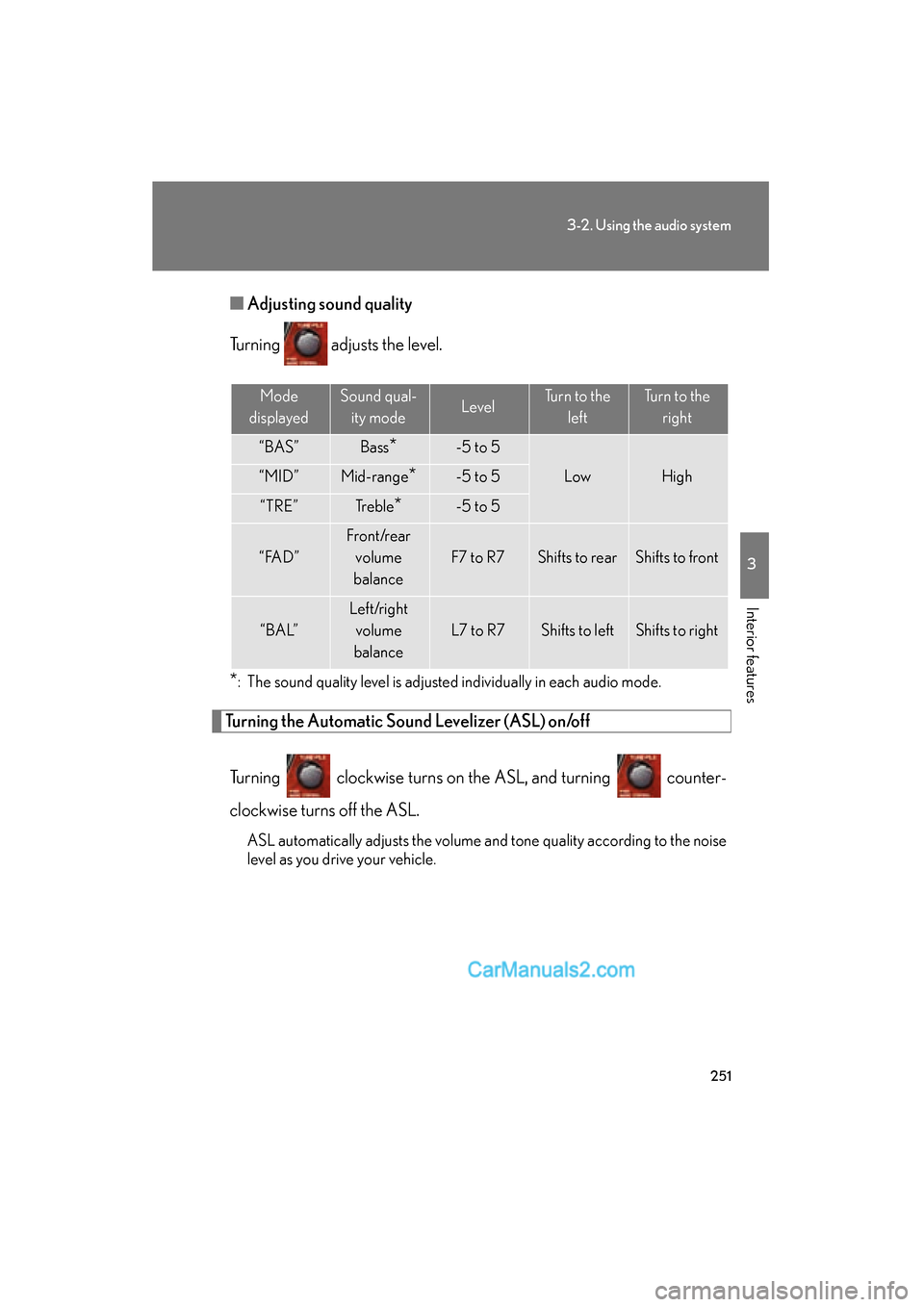
Adjusting sound quality
Turning adjusts the level.
*: The sound quality level is adjusted individually in each audio mode.
Turning the Automatic Sound Levelizer (ASL) on/off
Turning clockwise turns on the ASL, and turning counter-
clockwise turns off the ASL.
ASL automatically adjusts the volume and tone quality according to the noise
level as you drive your vehicle.
Mode
displayedSound qual- ity modeLevelTurn to the leftTurn to the right
“BAS”Bass*-5 to 5
LowHigh“MID”Mid-range*-5 to 5
“TRE”Tr e b l e*-5 to 5
“ FA D ”
Front/rear volume
balance
F7 to R7Shifts to rearShifts to front
“ B A L”
Left/right volume
balance
L7 to R7Shifts to leftShifts to right
Page 286 of 543
284
3-4. Using the hands-free system (for mobile phone)
ES350_U
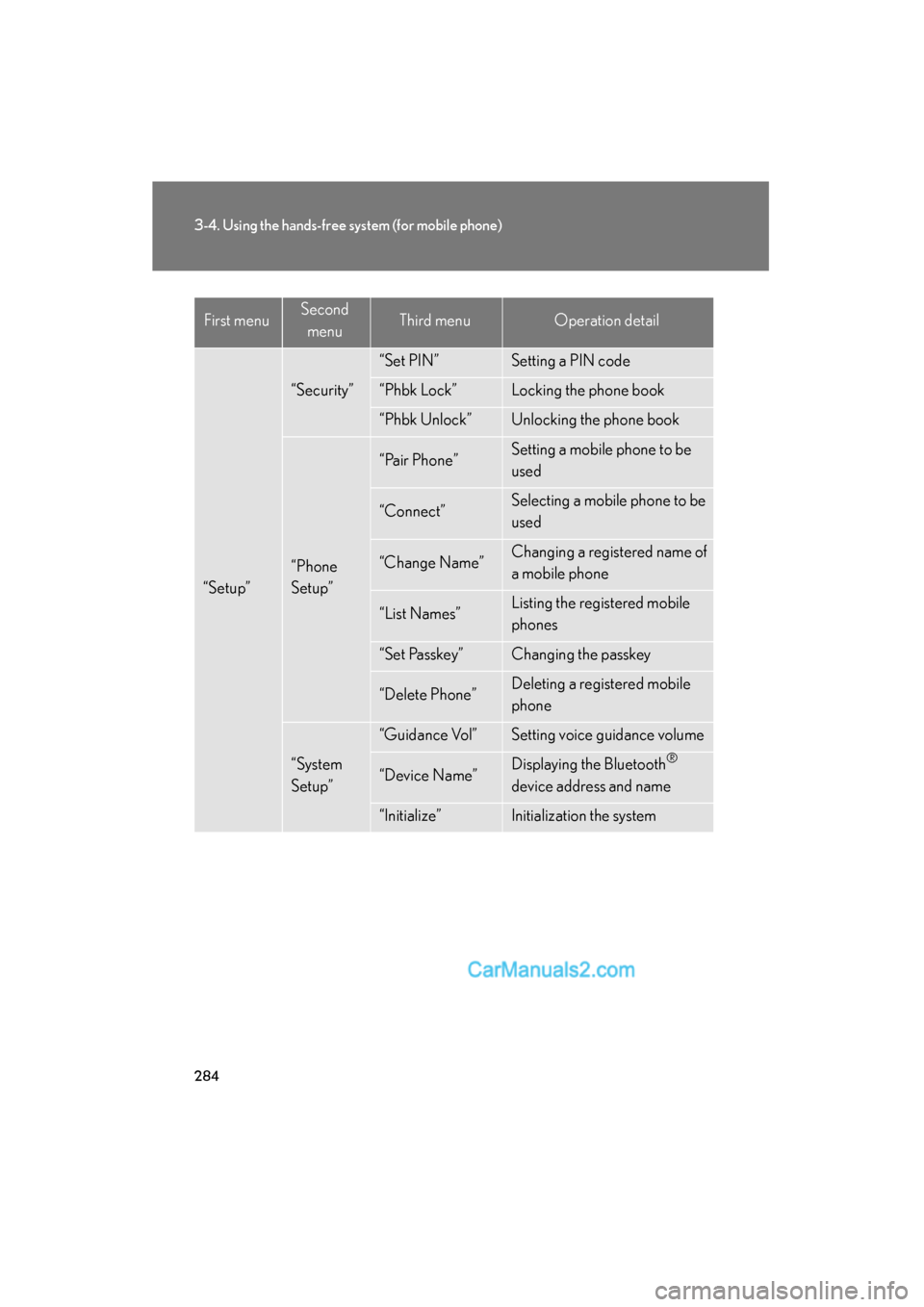
“Setup”
“Security”
“Set PIN”Setting a PIN code
“Phbk Lock”Locking the phone book
“Phbk Unlock”Unlocking the phone book
“Phone
Setup”
“Pair Phone”Setting a mobile phone to be
used
“Connect”Selecting a mobile phone to be
used
“Change Name”Changing a registered name of
a mobile phone
“List Names”Listing the registered mobile
phones
“Set Passkey”Changing the passkey
“Delete Phone”Deleting a registered mobile
phone
“System
Setup”
“Guidance Vol”Setting voice guidance volume
“Device Name”Displaying the Bluetooth®
device address and name
“Initialize”Initialization the system
First menuSecond menuThird menuOperation detail
Page 287 of 543
285
3-4. Using the hands-free system (for mobile phone)
3
Interior features
ES350_U■
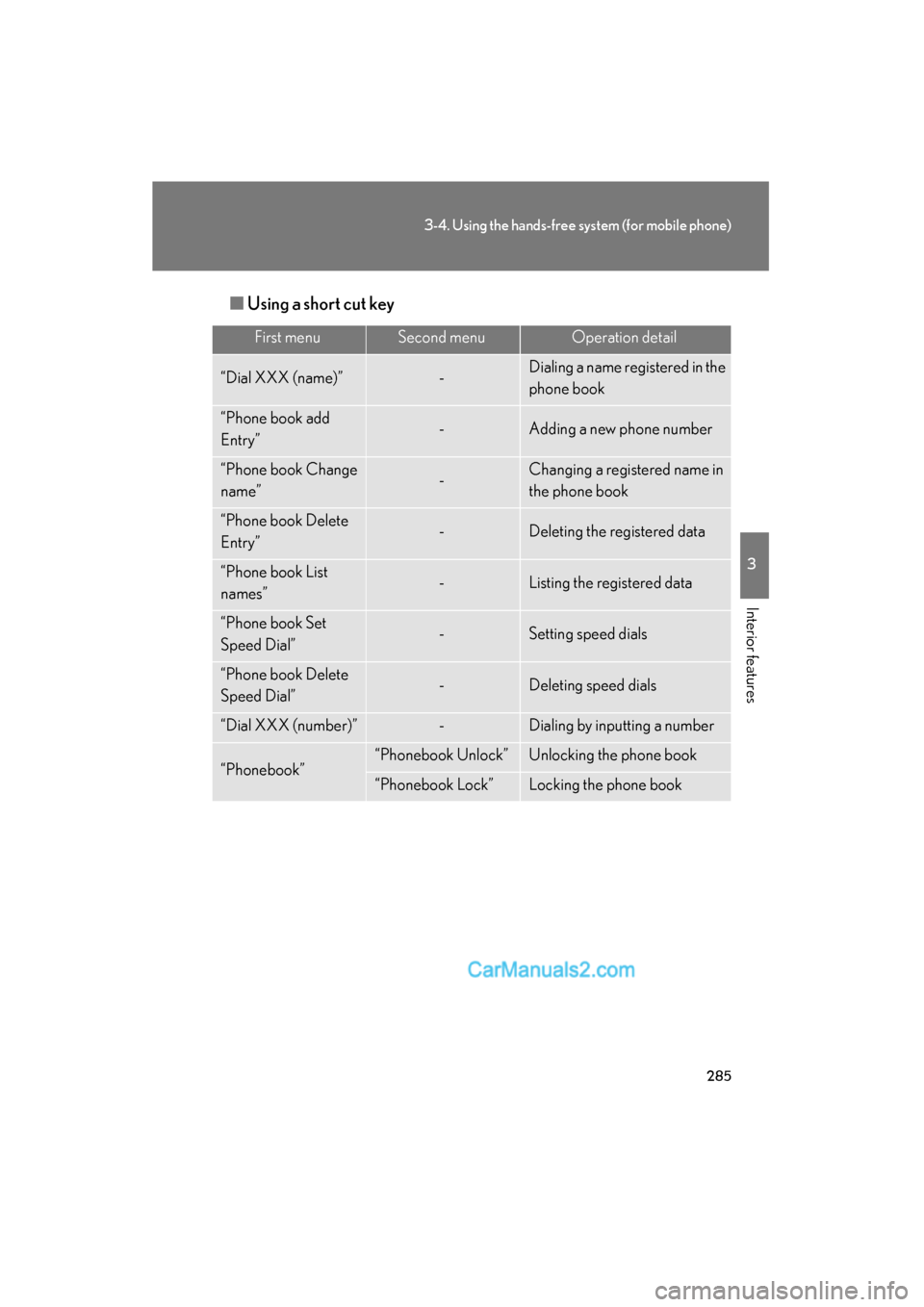
Using a short cut key
First menuSecond menuOperation detail
“Dial XXX (name)”-Dialing a name registered in the
phone book
“Phone book add
Entry”-Adding a new phone number
“Phone book Change
name”-Changing a registered name in
the phone book
“Phone book Delete
Entry”-Deleting the registered data
“Phone book List
names”-Listing the registered data
“Phone book Set
Speed Dial”-Setting speed dials
“Phone book Delete
Speed Dial”-Deleting speed dials
“Dial XXX (number)”-Dialing by inputting a number
“Phonebook”“Phonebook Unlock”Unlocking the phone book
“Phonebook Lock”Locking the phone book