Page 253 of 543
251
3-2. Using the audio system
3
Interior features
ES350_U■
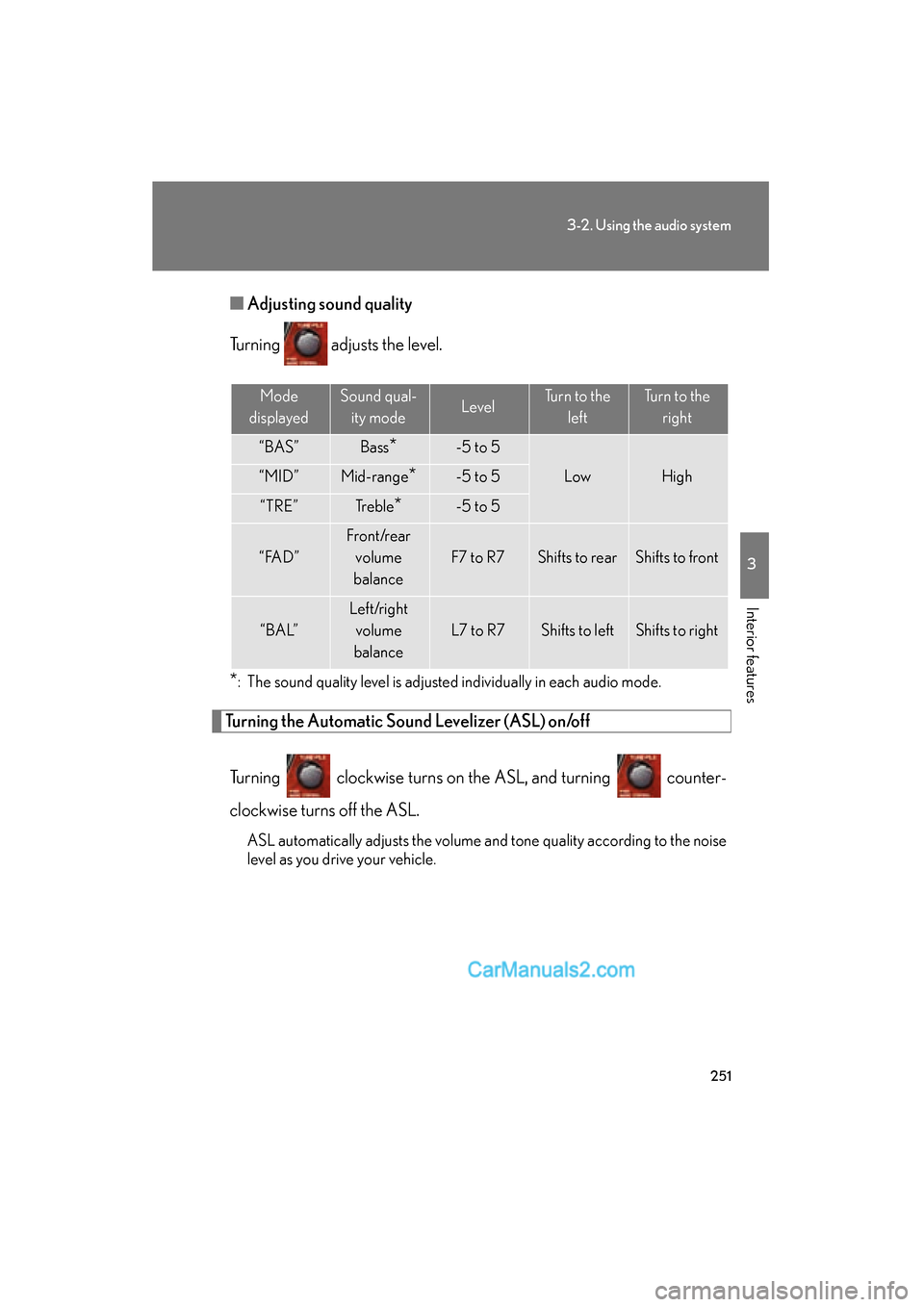
Adjusting sound quality
Turning adjusts the level.
*: The sound quality level is adjusted individually in each audio mode.
Turning the Automatic Sound Levelizer (ASL) on/off
Turning clockwise turns on the ASL, and turning counter-
clockwise turns off the ASL.
ASL automatically adjusts the volume and tone quality according to the noise
level as you drive your vehicle.
Mode
displayedSound qual- ity modeLevelTurn to the leftTurn to the right
“BAS”Bass*-5 to 5
LowHigh“MID”Mid-range*-5 to 5
“TRE”Tr e b l e*-5 to 5
“ FA D ”
Front/rear volume
balance
F7 to R7Shifts to rearShifts to front
“ B A L”
Left/right volume
balance
L7 to R7Shifts to leftShifts to right
Page 255 of 543
253
3-2. Using the audio system
3
Interior features
ES350_U
Using the steering wheel audio switches
Turning on the powerPress when the audio system is turned OFF.
The audio system can be turned off by holding the button down for 1 second
or more.
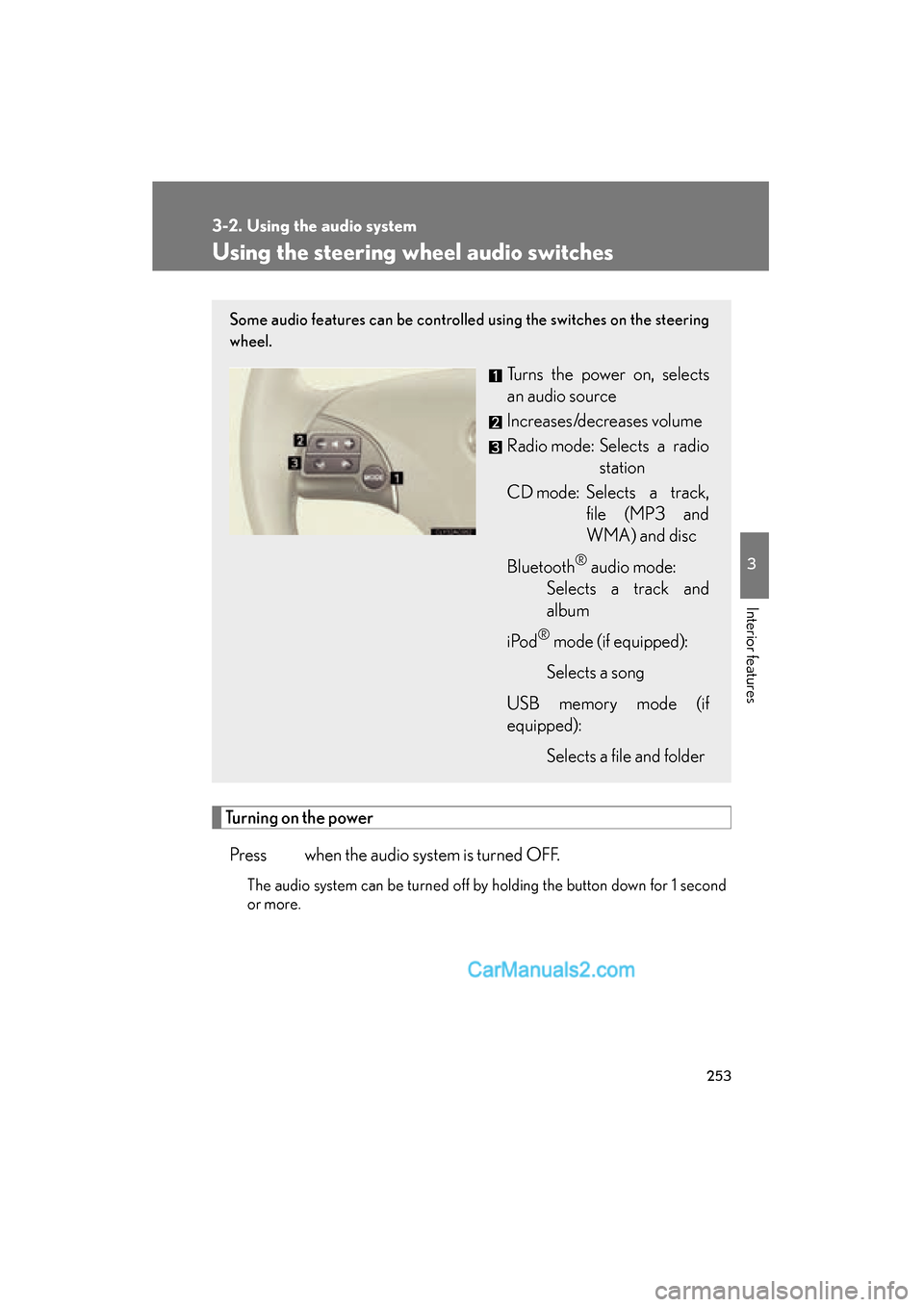
Some audio features can be controlled using the switches on the steering
wheel.
Turns the power on, selects
an audio source
Increases/decreases volume
Radio mode: Selects a radio station
CD mode: Selects a track, file (MP3 and
WMA) and disc
Bluetooth
® audio mode:
Selects a track and
album
i Po d
® mode (if equipped):
Selects a song
USB memory mode (if
equipped): Selects a file and folder
Page 256 of 543
254
3-2. Using the audio system
ES350_U
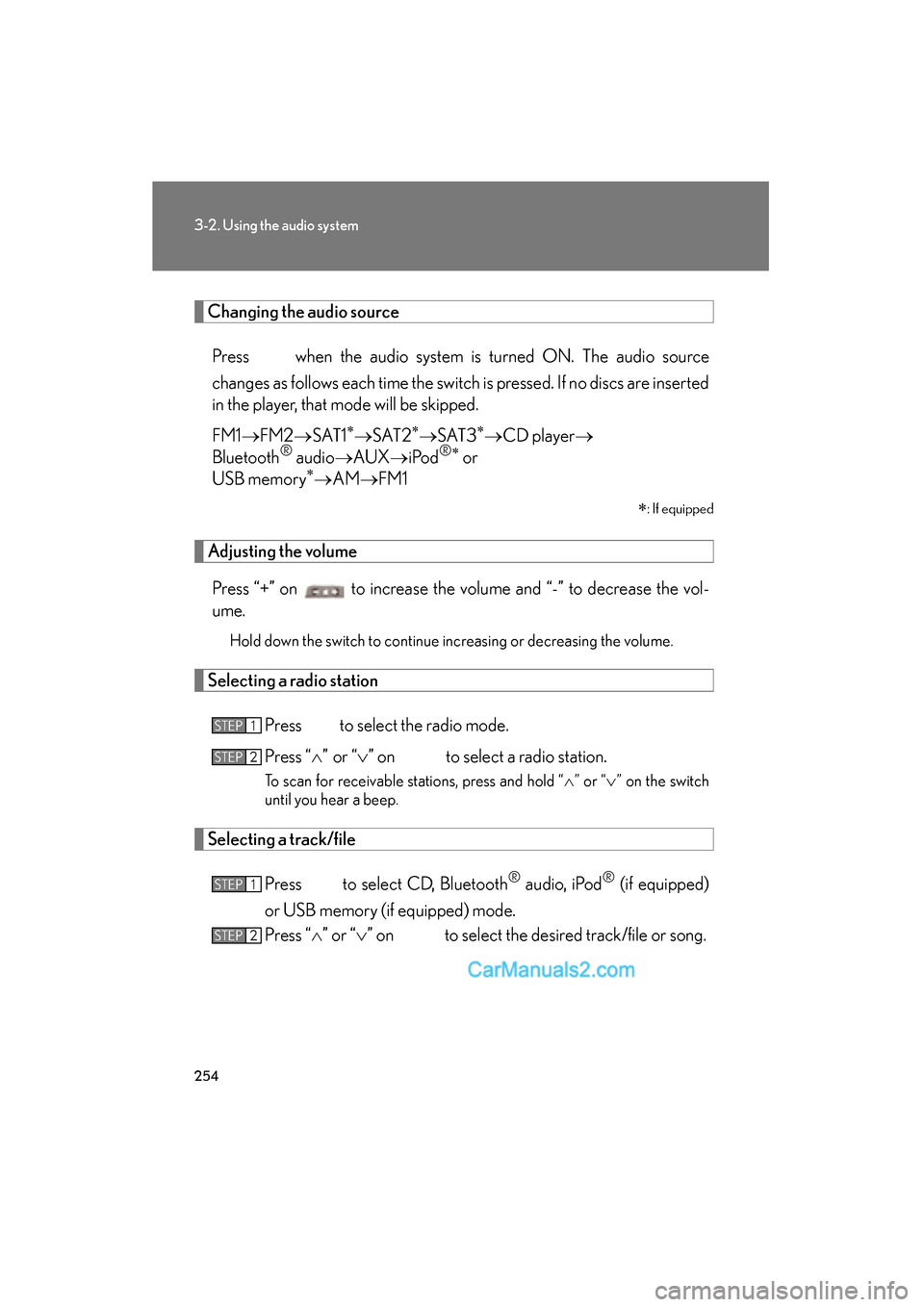
Changing the audio sourcePress when the audio system is turned ON. The audio source
changes as follows each time the switch is pressed. If no discs are inserted
in the player, that mode will be skipped.
FM1 oFM2 oSAT1
∗oS AT 2∗oS AT 3∗oCD player o
Bluetooth® audio oAUX oiPod®∗ or
USB memory∗o AM oFM1
∗
: If equipped
Adjusting the volume
Press “+” on to increase the volume and “-” to decrease the vol-
ume.
Hold down the switch to continue increasing or decreasing the volume.
Selecting a radio station
Press to select the radio mode.
Press “
Page 257 of 543
255
3-2. Using the audio system
3
Interior features
ES350_U
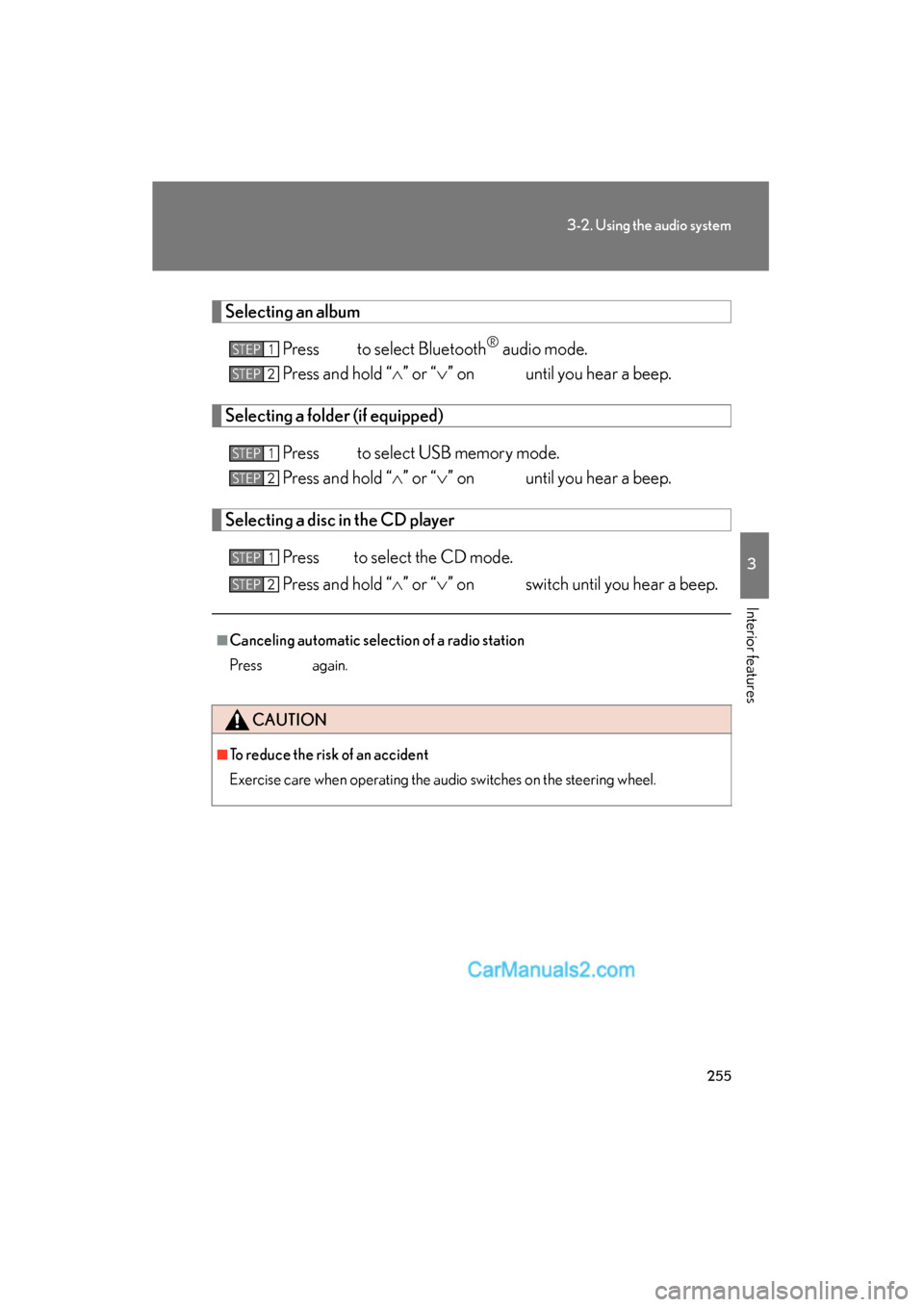
Selecting an albumPress to select Bluetooth
® audio mode.
Press and hold “
Page 258 of 543

256
ES350_U
3-3. Using the Bluetooth® audio system
Bluetooth® audio system
■Conditions under which the system will not operate
●If using a portable player that does not support Bluetooth®
●If the portable player is switched off
●If the portable player is not connected
●If the portable player’s battery is low
●If the portable player is behind the seat or in the glove box or console box
●If metal is covering or touching the portable player
The Bluetooth® audio system enables you to enjoy music played on a por-
table digital audio player (portable player) from the vehicle speakers via
wireless communication.
This audio system supports Bluetooth
®, a wireless data system capable of
playing portable audio music without cables. If your portable player does
not support Bluetooth
®, the Bluetooth® audio system will not function.
Vehicles with a navigation system
Owners of models equipped with a navigation system should refer to
the “Navigation System Owner's Manual”.
Vehicles without a navigation system
TitlePa g e
Using the Bluetooth® audio systemP. 2 5 9
Operating a Bluetooth® enabled portable playerP. 2 6 4
Setting up a Bluetooth® enabled portable playerP. 2 6 7
Bluetooth® audio system setupP. 2 74
Page 259 of 543
257
3-3. Using the Bluetooth® audio system
3
Interior features
ES350_U
■When transferring ownership of the vehicle
Be sure to initialize the system to prevent personal data from being improperly
accessed. (oP. 300)
■About Bluetooth®
■Compatible models
●Bluetooth® specifications:
Ver. 1.1, or higher (Recommended: Ver. 1.2 or higher)
●Following Profiles:
• A2DP (Advanced Audio Distribution Profile) Ver. 1.0, or higher (Conformed:
Ver. 1.2)
• AVRCP (Audio/Video Remote Control Profile) Ver. 1.0 or higher (Con- formed: Ver. 1.3)
Portable players must correspond to the above specifications in order to be con-
nected to the Bluetooth
® audio system. However, please note that some functions
may be limited depending on the type of portable player.
■Certification for the Bluetooth® audio system
FCC ID: AJDK018
IC ID: 775E-K018
MADE IN JAPAN
This device complies with Part 15 of the FCC Rules and RSS-Gen and RSS-210 of
IC Rules. Operation is subject to the follo wing two conditions: (1) This device may
not cause harmful interference, and (2) This device must accept any interference
received, including interference that may cause undesired operation. Bluetooth is a registered trademark of
Bluetooth SIG. Inc.
Page 272 of 543
270
3-3. Using the Bluetooth® audio system
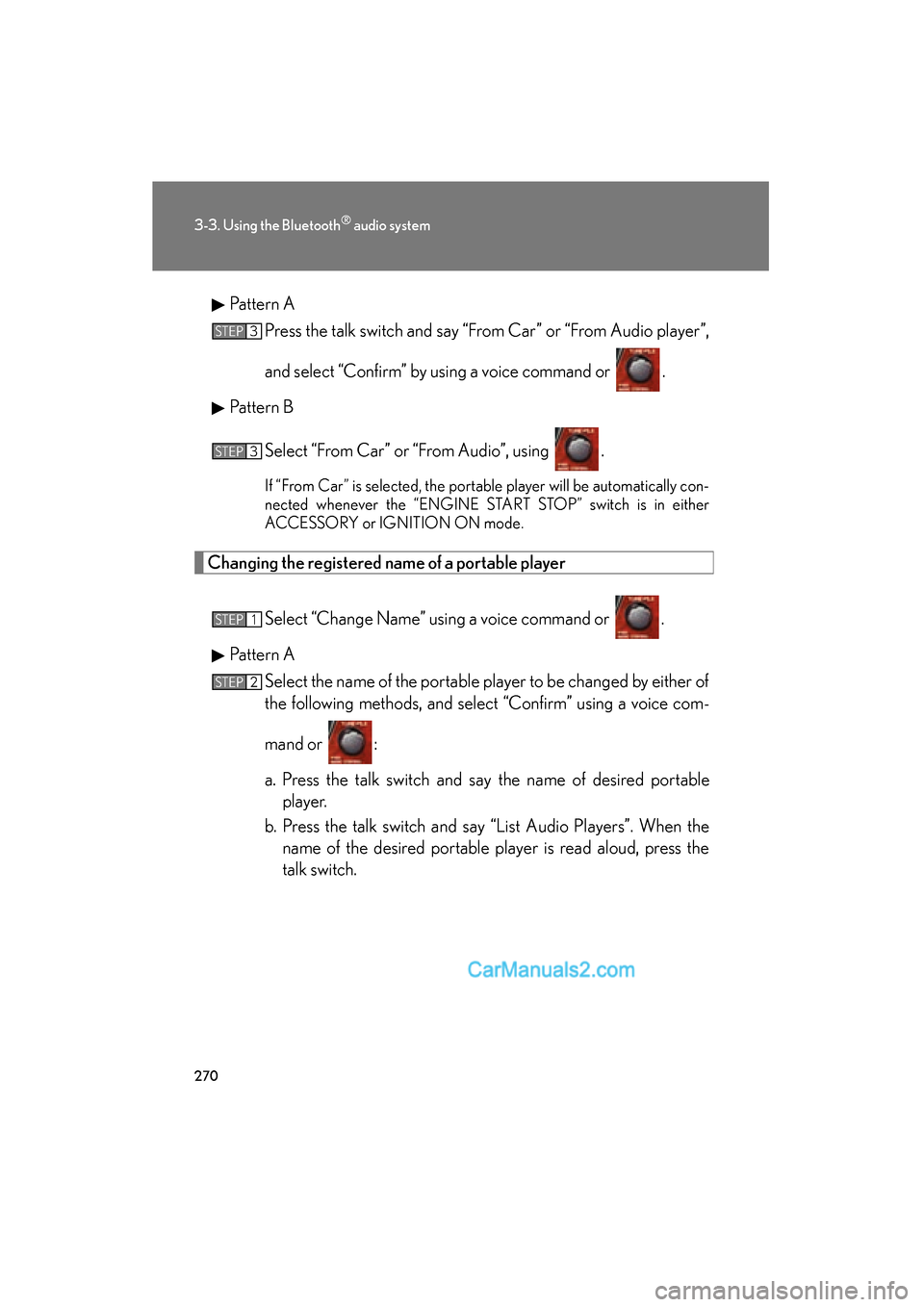
ES350_UPattern A
Press the talk switch and say “From Car” or “From Audio player”,
and select “Confirm” by using a voice command or .
Pattern B
Select “From Car” or “From Audio”, using .
If “From Car” is selected, the portable player will be automatically con-
nected whenever the “ENGINE START STOP” switch is in either
ACCESSORY or IGNITION ON mode.
Changing the registered name of a portable player
Select “Change Name” using a voice command or .
Pattern A Select the name of the portable player to be changed by either of
the following methods, and select “Confirm” using a voice com-
mand or :
a. Press the talk switch and say the name of desired portableplayer.
b. Press the talk switch and say “List Audio Players”. When the name of the desired portable player is read aloud, press the
talk switch.
STEP3
STEP3
STEP1
STEP2
Page 277 of 543
275
3
Interior features
ES350_U
3-4. Using the hands-free system (for mobile phone)
Hands-free system for mobile phones
The hands-free system is a function that allows you to use your mobile
phone without touching it.
This system supports Bluetooth
® mobile phones. Bluetooth® is a wireless
data system that allows the mobile phone to wirelessly connect to the
hands-free system and make/receive calls.
Vehicles with a navigation system
Owners of models equipped with a navigation system should refer to
the “Navigation System Owner's Manual”.
Vehicles without a navigation system
Ti t l ePa g e
Using the hands-free systemP. 2 7 9
Making a phone callP. 2 8 7
Setting a mobile phoneP. 2 9 2
Security and system setupP. 2 9 7
Using the phone bookP. 3 0 1