Page 259 of 543
257
3-3. Using the Bluetooth® audio system
3
Interior features
ES350_U
■When transferring ownership of the vehicle
Be sure to initialize the system to prevent personal data from being improperly
accessed. (oP. 300)
■About Bluetooth®
■Compatible models
●Bluetooth® specifications:
Ver. 1.1, or higher (Recommended: Ver. 1.2 or higher)
●Following Profiles:
• A2DP (Advanced Audio Distribution Profile) Ver. 1.0, or higher (Conformed:
Ver. 1.2)
• AVRCP (Audio/Video Remote Control Profile) Ver. 1.0 or higher (Con- formed: Ver. 1.3)
Portable players must correspond to the above specifications in order to be con-
nected to the Bluetooth
® audio system. However, please note that some functions
may be limited depending on the type of portable player.
■Certification for the Bluetooth® audio system
FCC ID: AJDK018
IC ID: 775E-K018
MADE IN JAPAN
This device complies with Part 15 of the FCC Rules and RSS-Gen and RSS-210 of
IC Rules. Operation is subject to the follo wing two conditions: (1) This device may
not cause harmful interference, and (2) This device must accept any interference
received, including interference that may cause undesired operation. Bluetooth is a registered trademark of
Bluetooth SIG. Inc.
Page 343 of 543
341
3-7. Other interior features
3
Interior features
ES350_U
CAUTION
■When programming a garage door or other remote control device
The garage door on other devices may operate, so ensure people and objects are
out of danger to prevent potential harm.
■Conforming to federal safety standards
Do not use the HomeLink
Page 407 of 543
405
4-3. Do-it-yourself maintenance
4
Maintenance and care
ES350_U
■If the electronic key battery is discharged
The following symptoms may occur.
●The smart access system with push-button start and wireless remote control will
not function properly.
●The operational range is reduced.
■Use a CR1632 lithium battery
●Batteries can be purchased at your Lexus dealer, jewelers, or camera stores.
●Replace only with the same or equivalent type recommended by a Lexus dealer.
●Dispose of used batteries according to the local laws.
CAUTION
■Removed battery and other parts
Keep away from children.
These parts are small and if swallowed by a child they can cause choking.
NOTICE
■For normal operation after replacing the battery
Observe the following precautions to prevent accidents.
●Always work with dry hands.
Moisture may cause the battery to rust.
●Do not touch or move any other components inside the remote control.
●Do not bend either of the battery terminals.
Page 477 of 543
5
When trouble arises
475
5-2. Steps to take in an emergency
ES350_U
If the electronic key does not operate properly
Locking and unlocking the doors and key linked functions
Remove the cover on the driver’s
door handle using the mechanical
key (oP. 24) in order to perform
the following operations.
Locks all doors
Closes the windows/standard
moon roof (turn and hold)
Unlocks the door
Turning the key rearward unlocks
the driver's door. Turning the key
once again unlocks the other
doors.
Opens the windows/standard
moon roof (turn and hold)
Return the cover to the original
position after use.
If communication between the electronic key and vehicle is interrupted
( o P. 30) or the electronic key cannot be used because the battery is
depleted, smart access system with push-button start and wireless remote
control cannot be used. In such cases, the doors can be opened or the
engine can be started by following the procedure below.
Page 514 of 543
512
6-2. Customization
ES350_U
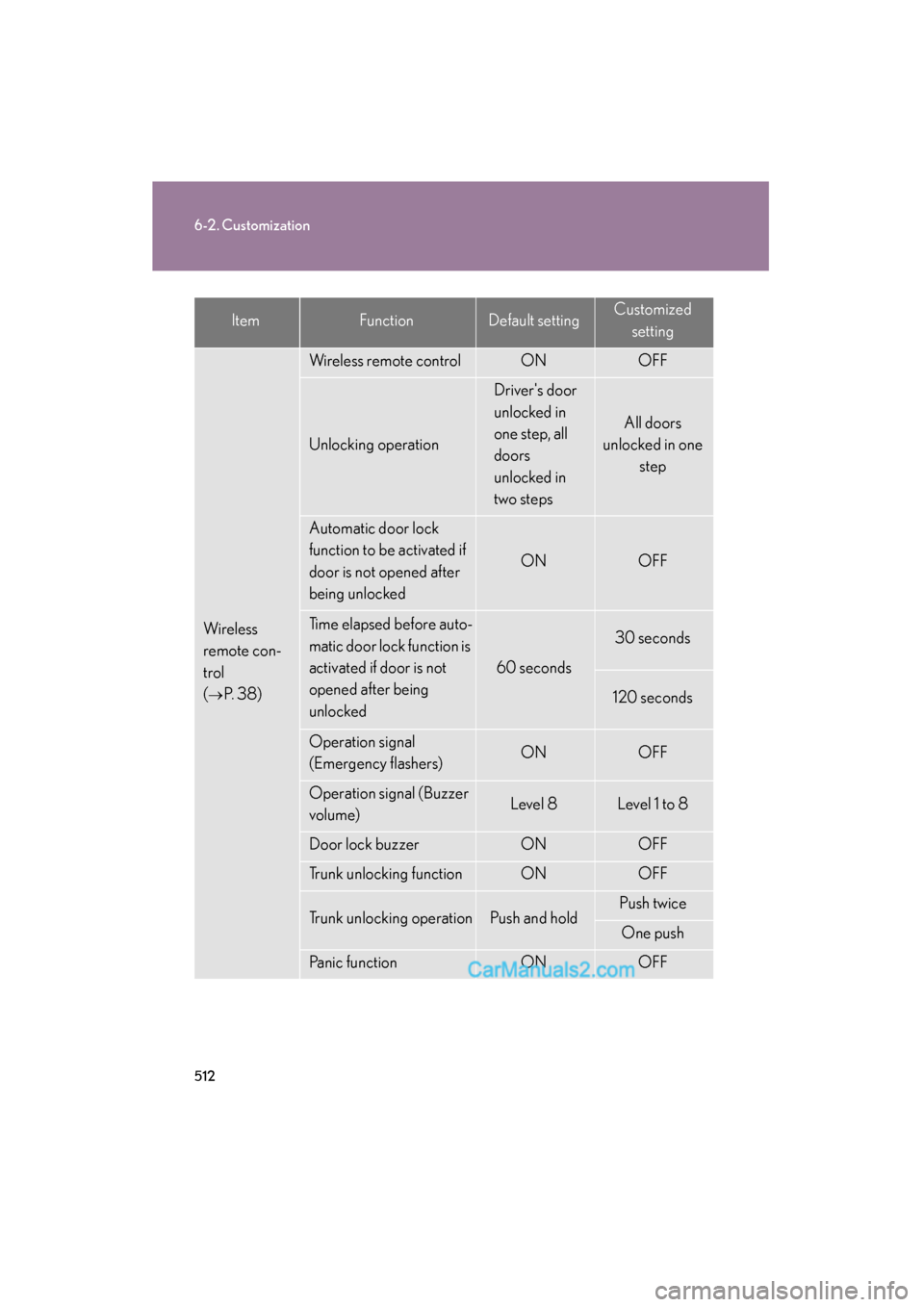
Wireless
remote con-
trol
(
oP. 3 8 )
Wireless remote controlONOFF
Unlocking operation
Driver's door
unlocked in
one step, all
doors
unlocked in
two steps
All doors
unlocked in one step
Automatic door lock
function to be activated if
door is not opened after
being unlocked
ONOFF
Time elapsed before auto-
matic door lock function is
activated if door is not
opened after being
unlocked
60 seconds
30 seconds
120 seconds
Operation signal
(Emergency flashers)ONOFF
Operation signal (Buzzer
volume)Level 8Level 1 to 8
Door lock buzzerONOFF
Trunk unlocking functionONOFF
Trunk unlocking operationPush and holdPush twice
One push
Panic functionONOFF
ItemFunctionDefault settingCustomized
setting
Page 515 of 543
513
6-2. Customization
6
Vehicle specifications
ES350_U
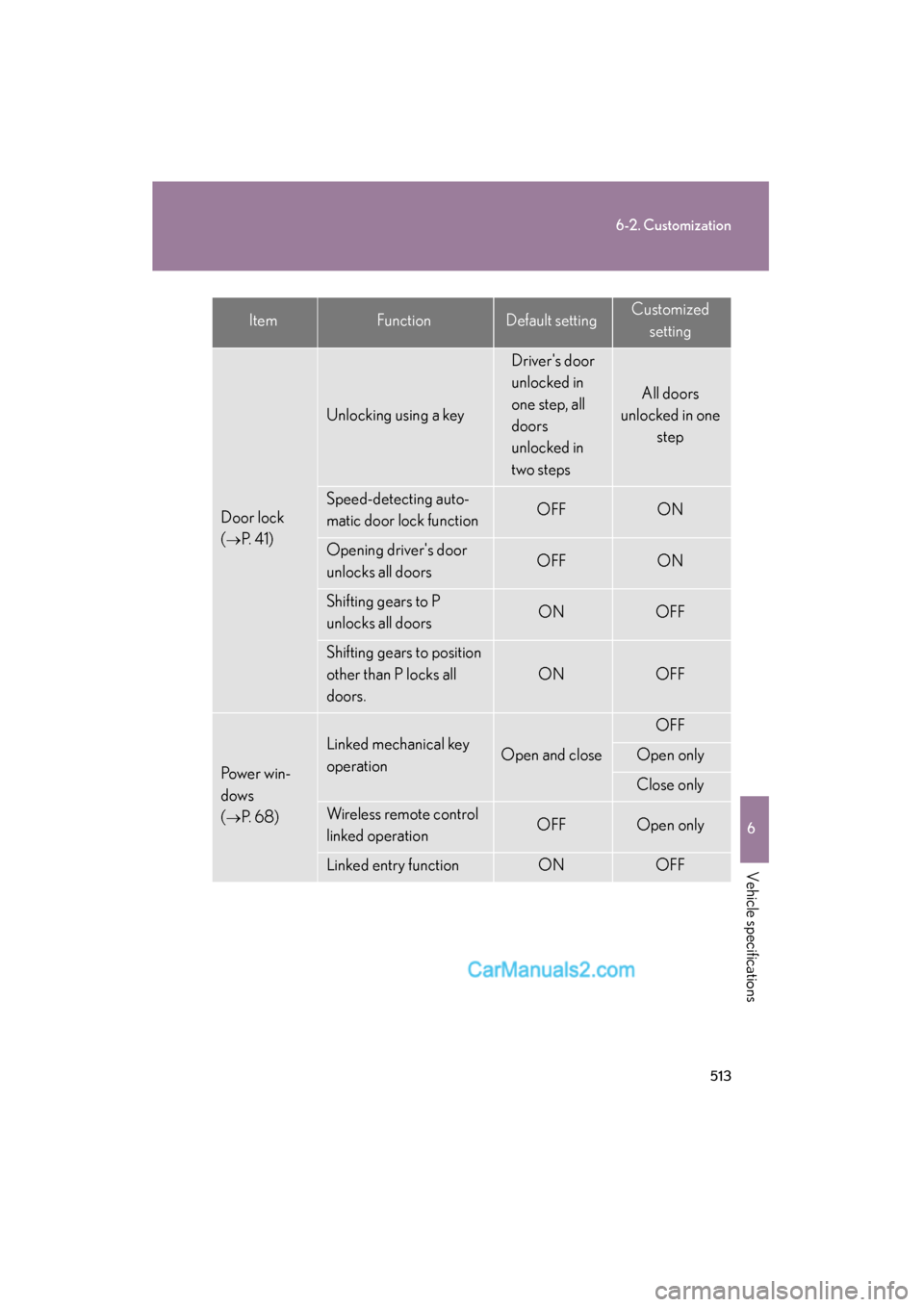
Door lock
(
oP. 4 1 )
Unlocking using a key
Driver's door
unlocked in
one step, all
doors
unlocked in
two steps
All doors
unlocked in one
step
Speed-detecting auto-
matic door lock functionOFFON
Opening driver's door
unlocks all doorsOFFON
Shifting gears to P
unlocks all doorsONOFF
Shifting gears to position
other than P locks all
doors.
ONOFF
Power win-
dows
(
oP. 6 8 )
Linked mechanical key
operationOpen and close
OFF
Open only
Close only
Wireless remote control
linked operationOFFOpen only
Linked entry functionONOFF
ItemFunctionDefault settingCustomizedsetting
Page 516 of 543
514
6-2. Customization
ES350_U
Moon roof
(standard
type)
(
oP. 71)
Linked mechanical key
operationOpen and close
OFF
Open only
Close only
Linked operation of com-
ponents when mechanical
key is used
Slide onlyTilt only
Wireless remote control
linked operationOFFOpen only
Linked operation of com-
ponents when wireless
remote control used
Slide onlyTilt only
Linked entry functionONOFF
Multi-
information
display
(
oP. 1 4 0 )
Eco Driving Indicator
LightONOFF
Automatic
light control
system
(
oP. 1 4 5 )
Light sensor sensitivityLevel 3Level 1 to 5
Time elapsed before
headlights automatically
turn off after doors are
closed
30 seconds
0 seconds
60 seconds
90 seconds
Lights
(
oP. 1 4 5 )
Daytime running light sys-
tem (USA only)ONOFF
Intuitive park-
ing assist
(
oP. 1 6 5 )
Back sensor operation
display and buzzerONOFF
Buzzer volumeLevel 3Level 1 to 5
Distance which a sensor
detects4.5 ft. (150 cm)1.8 ft. (60 cm)
ItemFunctionDefault settingCustomizedsetting
Page 534 of 543
532
Alphabetical index
ES350_U
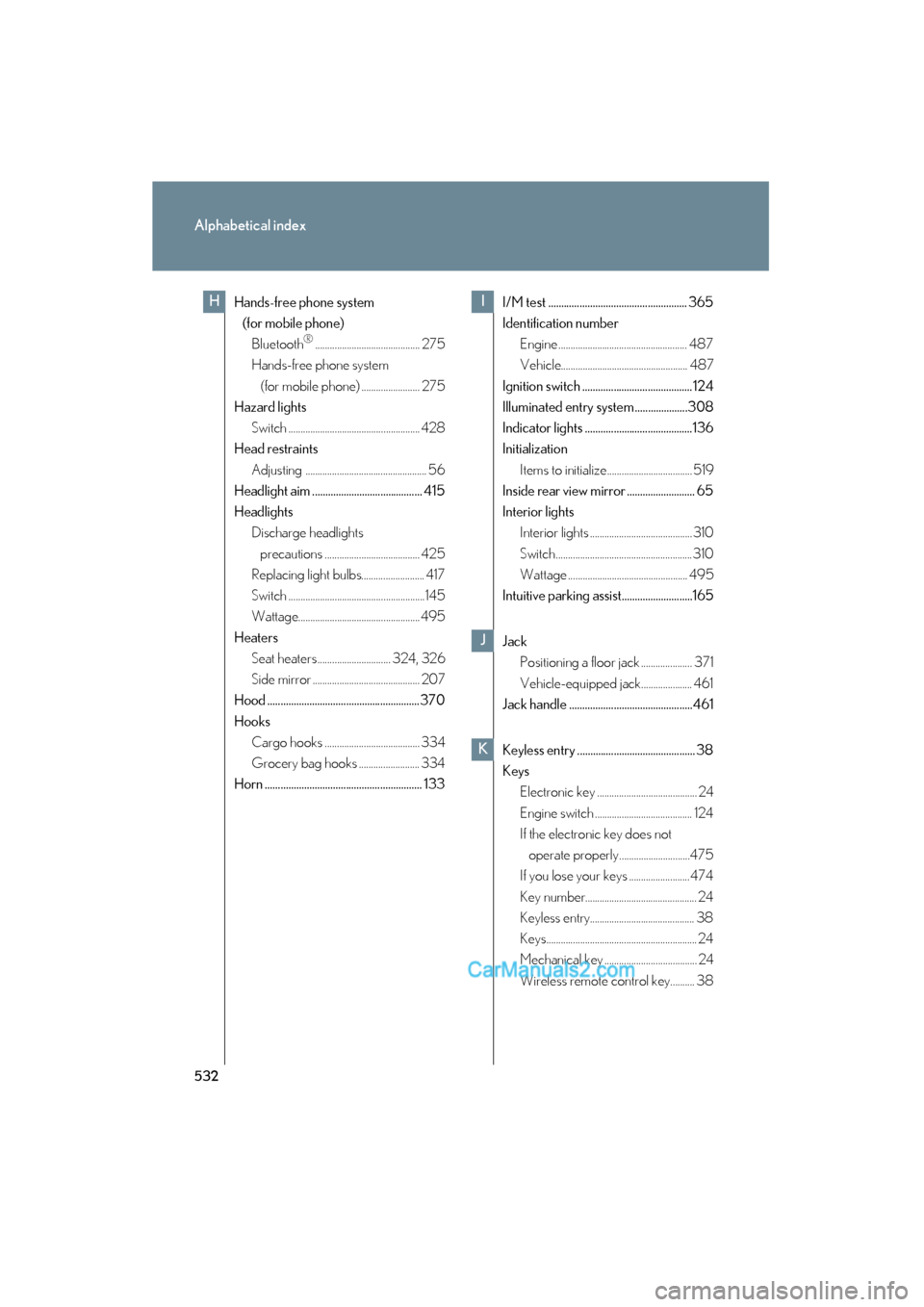
Hands-free phone system (for mobile phone)
Bluetooth
®........................................... 275
Hands-free phone system
(for mobile phone) ........................ 275
Hazard lights
Switch ...................................................... 428
Head restraints
Adjusting .................................................. 56
Headlight aim .......................................... 415
Headlights Discharge headlights
precautions ....................................... 425
Replacing light bulbs.......................... 417
Switch ........................................................145
Wattage.................................................. 495
Heaters Seat heaters.............................. 324, 326
Side mirror ............................................ 207
Hood ..........................................................370
Hooks Cargo hooks ....................................... 334
Grocery bag hooks ......................... 334
Horn ............................................................ 133 I/M test ..................................................... 365
Identification number
Engine ..................................................... 487
Vehicle.................................................... 487
Ignition switch .......................................... 124
Illuminated entry system ....................308
Indicator lights .........................................136
Initialization Items to initialize................................... 519
Inside rear view mirror .......................... 65
Interior lights Interior lights .......................................... 310
Switch........................................................ 310
Wattage ................................................. 495
Intuitive parking assist...........................165
Jack Positioning a floor jack ..................... 371
Vehicle-equipped jack..................... 461
Jack handle ...............................................461
Keyless entry ............................................. 38
Keys Electronic key ......................................... 24
Engine switch ........................................ 124
If the electronic key does not
operate properly.............................475
If you lose your keys ......................... 474
Key number.............................................. 24
Keyless entry........................................... 38
Keys.............................................................. 24
Mechanical key ...................................... 24
Wireless remote control key.......... 38
HI
J
K