2010 KIA VENGA lock
[x] Cancel search: lockPage 150 of 379
Features of your vehicle
78
4
Operation Tips
To keep dust or unpleasant fumes from
entering the car through the ventilation
system, temporarily set the air intakecontrol to the recirculated air position.
Be sure to return the control to the
fresh air position when the irritation
has passed to keep fresh air in the
vehicle. This will help keep the driver
alert and comfortable.
Air for the heating/cooling system is drawn in through the grilles just ahead
of the windshield. Care should be
taken that these are not blocked by
leaves, snow, ice or other obstructions.
To prevent interior fog on the wind- shield, set the air intake control to the
fresh air position and fan speed to the
desired position, turn on the air condi-tioning system, and adjust the temper-
ature control to desired temperature.Air conditioning (if equipped)
All KIA Air Conditioning Systems are
filled with environmentally friendly
R-134a refrigerant which does not dam-
age the ozone layer.
1. Start the engine. Push the air condi- tioning button.
2. Set the mode to the position.
3. Set the air intake control to the outside air or recirculated air position.
4. Adjust the fan speed control and tem- perature control to maintain maximum
comfort.✽✽ NOTICE
When using the air conditioning sys- tem, monitor the temperature gauge
closely while driving up hills or in
heavy traffic when outside tempera-
tures are high. Air conditioning sys-
tem operation may cause engine over-
heating. Continue to use the blower
fan but turn the air conditioning sys-
tem off if the temperature gauge indi-
cates engine overheating.
When opening the windows in humid weather air conditioning may create
water droplets inside the vehicle.
Since excessive water droplets may
cause damage to electrical equipment,
air conditioning should only be run
with the windows closed.
Air conditioning system operation tips
If the vehicle has been parked in directsunlight during hot weather, open the
windows for a short time to let the hot
air inside the vehicle escape.
To help reduce moisture inside of the windows on rainy or humid days,
decrease the humidity inside the vehi-
cle by operating the air conditioningsystem.
Page 165 of 379

493
Features of your vehicle
INTERIOR FEATURES
LCD monitor (clock, outside tem-
perature, etc.) (if equipped)
The monitor will display the outside tem-
perature, date* and time.
If your vehicle enters into the icy road at
outside temperature range of -5°C to 3°C
(23°F to 37°F), the temperature digits will
blink five times and the symbol ( ) will
illuminate. The date display when the radio power is
turned off.
To change the date*, time, distance unit (km
mi)* or temperature unit(°C
°F), press the SET button for more than1 second.
Then you will enter the set-up mode and
mode changes in the following order as
you press the SET button less than 1second. YEAR* MONTH* DAY* HOUR
MINUTE DISTANCE UNIT CHANGE*
TEMPERATURE UNIT CHANGE
Escape set-up mode
Press the SET button less than 1 second to select the mode and set the data usingthe UP( ▲) and DOWN( ▼) button while
the selected setting mode blinks.
To cancel the SET UP mode, do one of
the following :
- Press the SET button less than 1 sec-
ond in set-up temperature unit change mode
- Press the SET button more than 1 sec- ond in any set-up mode
- After 15 seconds without any key press
- Ignition is ON or OFF in set-up mode
- Battery is disconnected * if equipped Cigarette lighter (if equipped)
For the cigarette lighter to work, the igni-
tion switch must be in the ACC or ONposition.
To use the cigarette lighter, push it all the
way into its socket. When the element isheated, the lighter will pop out to the
“ready” position.
If it is necessary to replace the cigarette
lighter, use only a genuine KIA replace-
ment or its approved equivalent.
OYN049080
OYN049106
OYN049132
■
Type A
■Type B
Page 171 of 379

499
Features of your vehicle
Antenna
Roof antenna
Your vehicle uses a roof antenna to
receive both AM and FM signals. This
antenna can be removed. To remove the
antenna, turn it counter clockwise, To
install the antenna, turn it clockwise.How car audio works
AM (MW) and FM radio signals are
broadcast from transmitter towers locat-
ed around your city. They are intercepted
by the radio antenna on your car. This
signal is then received by the radio and
sent to your speakers.
When a strong radio signal has reached
your vehicle the precise engineering of
your audio system ensures the best pos-
sible audio reproduction. However in
some cases the signal coming to your
vehicle may not be strong an clear. This
can be due to factors such as the dis-
tance from the radio station, closeness of
other strong radio stations or the pres-
ence of buildings, bridges or other large
obstructions in the area.
AUDIO SYSTEM
OYN049126
CAUTION
• Before entering a place with a low
height clearance, be sure that the
antenna is removed.
Be sure to remove the antenna before washing the car in an auto-matic car wash or it may be dam-
aged.
When reinstalling your antenna, it is important that it is fully tight-ened to ensure proper reception.
When cargo is loaded on the roof rack, do not place the cargo near
the antenna pole to ensure properreception.
JBM001
FM reception
Page 173 of 379
4101
Features of your vehicle
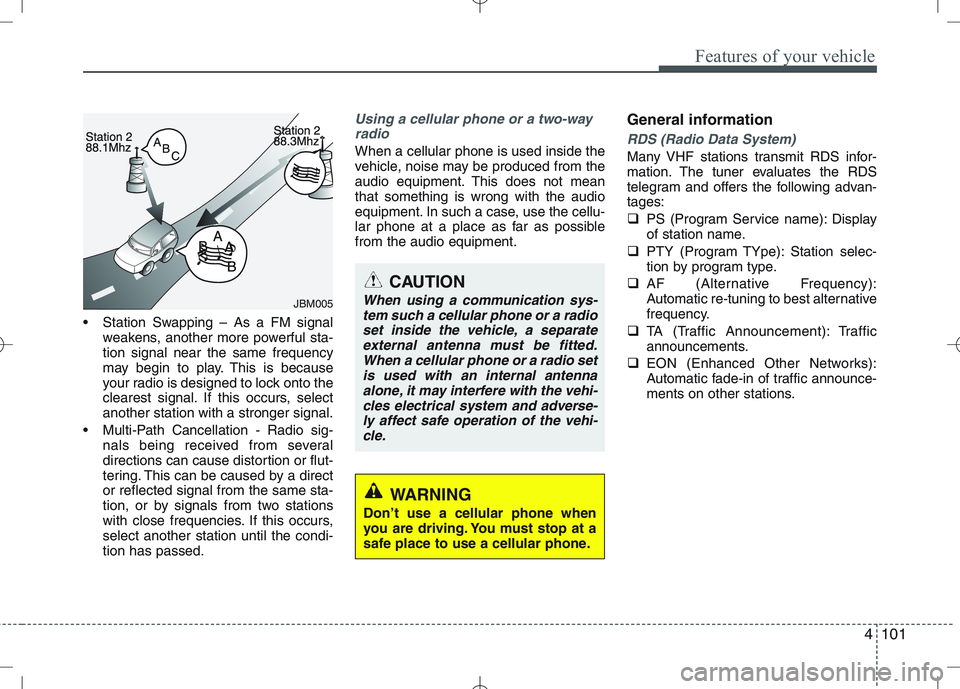
Station Swapping – As a FM signalweakens, another more powerful sta- tion signal near the same frequency
may begin to play. This is because
your radio is designed to lock onto the
clearest signal. If this occurs, selectanother station with a stronger signal.
Multi-Path Cancellation - Radio sig- nals being received from several
directions can cause distortion or flut-
tering. This can be caused by a director reflected signal from the same sta-
tion, or by signals from two stations
with close frequencies. If this occurs,select another station until the condi-tion has passed.
Using a cellular phone or a two-way
radio
When a cellular phone is used inside the
vehicle, noise may be produced from the
audio equipment. This does not meanthat something is wrong with the audio
equipment. In such a case, use the cellu-
lar phone at a place as far as possiblefrom the audio equipment. General informationRDS (Radio Data System)
Many VHF stations transmit RDS infor-
mation. The tuner evaluates the RDS
telegram and offers the following advan-tages:
PS (Program Service name): Display
of station name.
PTY (Program TYpe): Station selec-
tion by program type.
AF (Alternative Frequency):
Automatic re-tuning to best alternative
frequency.
TA (Traffic Announcement): Traffic
announcements.
EON (Enhanced Other Networks):
Automatic fade-in of traffic announce-
ments on other stations.
JBM005
CAUTION
When using a communication sys-
tem such a cellular phone or a radioset inside the vehicle, a separateexternal antenna must be fitted.When a cellular phone or a radio set
is used with an internal antennaalone, it may interfere with the vehi- cles electrical system and adverse-ly affect safe operation of the vehi-
cle.
WARNING
Don’t use a cellular phone when
you are driving. You must stop at a
safe place to use a cellular phone.
Page 176 of 379

Features of your vehicle
104
4
The Head Unit has been verified and
certified by the Bluetooth Qualification
Program (BQP) for compliance to the
Bluetooth standards. For more infor-
mation, please check the Bluetooth
web site (http://www.bluetooth.com/
Bluetooth/Connect/Products/) for theBQP product listing.
* Only if this option is available on your Head Unit.
Notes on iPod Care of disc (if equipped)
If the temperature inside the car is too
high, open the car window for ventila-
tion before using your car audio.
It is illegal to copy and use MP3/WMA
files without permission. Use CDs that
are created only by lawful means.
Do not apply volatile agents such as
benzene and thinner, normal cleaners
and magnetic sprays made for ana-
logue disc onto CDs.
To prevent the disc surface from get-
ting damaged. Hold and carry CDs bythe edges or the edges of the center
hole only.
Clean the disc surface with a piece of
clean soft cloth before playback (wipeit from the center to the outside edge).
Do not damage the disc surface or
attach pieces of sticky tape or paperon it.
Make sure on undesirable matter
other than CDs are inserted into the
CD player.
Do not insert more than one CD at a
time. It is likely to block CD operation.
Keep CDs in their cases after use to
protect them from scratches or dirt.
Depending on the type of CD-R/CD-
RW CDs, certain CDs may not oper-
ate normally according to manufactur-ing companies or making and record-
ing methods. In such circumstances,
if you still continue to use those CDs,
they may cause the malfunction of
your car audio system.
Playing an incompatible Copy
Protected Audio CD
Some copy protected CDs which do not
comply with the international audio CD
standards (Red Book), may not play on
your car audio. Please note that if you try
to play copy protected CDs and the CD
player does not perform correctly the
CDs may be defective, not the CD player.
WARNING
The newly introduced iPod with
new firmware may not be 100%
compatible and may not be sup-
ported by the system.
Page 181 of 379

4109
Features of your vehicle
Sound settings
Short press the button to enter the
Sound Menu.
Short press the button to select
the sound option you want to set.
✎ When pressing the button the
selection order is reversed.
To exit, press SETUP, CD, FM or AM
buttons or short the button again.
Setting the Bass level
Enter the Bass sub-menu by means
of the or button.
Short press the or button to set
the Bass level to the required setting.
Setting the Middle level
Enter the Middle sub-menu by means
of the or button.
Short press the or button to set
the Middle level to the required set-ting. Setting the Treble level
Enter the Treble sub-menu by means
of the or button.
Short press the or button to set
the Treble level to the required setting.
Setting the Fader level
With this function you can gradually
increase or decrease in the sound vol-
ume level between the front and rear
speakers.
Enter the Fader sub-menu by means
of the or button.
Short press the or button to
adjust the sound volume level
between the rear and front speakersto the desired setting. Adjusting the Balance
Enter the Balance sub-menu by
means of the or button.
Short press the or button to
adjust the sound volume level
between the right hand and left hand
speakers)
Adjusting the Volume
Adjusts the volume level between its min-
imum and maximum settings.
Rotate the Volume knob clock-
wise to increase and counter-clock-
wise to decrease the volume level.
BASS
FADERTREBLE
BALANCE MIDDLE
Page 200 of 379
Features of your vehicle
128
4
Security Code
The unit is equipped with a security code
option. This code can be used to protect
the Head Unit against theft. In case theHead Unit is being disconnected from the
car’s power supply and the security code
option being active you will be prompted
to enter the four digit security code.
Any code except 0000 enables the
security code feature.
Code 0000 disables the security code
feature.
Behavior of security code function
Security Code will be prompted if
security code function is enabled and
battery is disconnected.
radio functions are deactivated dur-
ing the Security Code Prompt
User is given 2 attempts to enter the
correct security code.
Upon correct entry of the security
code, all the radio functions will be
activated.
Upon 2 attempts of incorrect entry of
the security code, radio will enter the
LOCKED state.
Once in LOCKED state, radio will only
prompt for security code after 1 hour. Enabling the Security Code option
Short press the SETUPbutton to
enter the SETUP menu.
Short press the or button to
access the Security Code mode.
✎ Now you have to enter the current
security code.
1.Short press the or button to
set the value for each digit of the cur-
rent security code.
2.Short press the or button to
select a specific digit.
3.Short press the OKbutton to con-
firm the security code.
Upon correct entry of the security
code, you will be asked to enter the
new security code that will replace the
previous code memorized in the HeadUnit.
Repeat the steps 1., 2. and 3.to enter
the new code.
To abort the Security Code Menu in
Setup mode, press either one of the
following buttons: , , FM, AM,
CD, AUX, MUTE, TA, 1 through 6,
AST, SCAN, INFO, SETUP, SOUND
or .
WARNING
If security code function is activat-
ed and battery was disconnected,
audio set will ask for the Security
code. Be careful and remember the
password that you have changed.
Page 202 of 379

Features of your vehicle
130
4
CD player
Status
CD is rejected by the unit
Distorted sound/ skips during CD
play
CD player does not work.
No sound during CD playback
Problems with new copy-protect- ed audio CDs
Bluetooth
Status
Bluetooth device is not able to connect to the Head unit Explanation / How to check
The CD may be dirty. Clean the CD with a damp cloth. The CD does not comply with the
CD player‘s specifications. See“Notes on audio and MP3 CDs”
Player cannot read CD. CD is damaged or spoiled.
In cold weather conditions, con-
densation may occur on the laser.
With the set on, wait for 5 min-
utes until the condensation evap-
orates.
Some CDs contain multimedia
data which is not recognized by
the unit. Advance the tracks until
music is heard.
See “Notes on audio and MP3 CDs”
Some copy protection procedures
are incompatible with accepted
standards for audio CDs.
This is not a fault of the unit.
Explanation / How to check
Check if Bluetooth device is stored in the Head unit.
Check if “KIA BLUETOOTH” is
stored in the Bluetooth device
Redo Pairing
USB / iPod / AUX
Status
USB device is connected and
selected but no sound is audible
Distorted sound during play iPod
is connected and selected but no
sound is audible
Security Code
Status
Radio is in LOCKED or Security Code Prompt state
Explanation / How to check
The connected USB-device is not
supported by the Head Unit.
The USB device may be defec-
tive.
Your iPod may be defective
Check the functioning of your
iPod without being connected the
interface connector.
The KIA iPod interface cable may
be defective Have the KIA iPod
interface cable checked at the
KIA repair shop See “Notes on
USB and/or iPod”
Explanation / How to check
If the Radio is in LOCKED state,
wait for 1 hour for it to enter the
Security Code Prompt state
Once the Radio enters Security
Code Prompt state, enter the cor-
rect security code.
If you have forgotten the security
code, please contact your dealer.