Page 199 of 379
4127
Features of your vehicle
Regionalization (REG) This function controls the automatic sta-
tion follow-me in order to keep tuned to
the same regional station, or to switch
between regional stations which might
have different audio programs.
Enter the REG sub-menu as
described above.
Press the or buttons to select
REG Off, On or Auto.
Regionalization Off – This setting willignore the region setting.
Regionalization On – This setting willnot ignore the region setting.
Regionalization Auto – The tuner willtune to the station with the bestreception condition and with the same
regional characteristic. If none of the
stations satisfy the above condition,
the regional characteristic will beignored.
Standard setting: REG OFF Alternative Frequency (AF)
This function enables or disables the
Alternate Frequency function. With AF
enabled, the tuner will automatically tune
to the alternative frequency from the AF-list of the tuned station, with the bestreception signal.
Enter the AF sub-menu as described
above.
Press the or buttons to selectAF Off or AF On.
AF on: Automatic re-tuning to alterna-
tive frequencies for the same station.
AF off: No automatic re-tuning to
alternative frequencies. The tuner will
not leave the frequency set. MP3 Text Scrolling
Activating/ deactivating text display with
MP3 playback. The text appears in themiddle line of the screen.
Enter the “Text Scrolling” sub-menu
as described above.
Press the or buttons to select
Text scrolling On or Off.
The following settings are available:
Fixed: This allows to display one page
only (with a maximum of 12 charac-ters)
Scrolling: This allows to display two
pages (with a maximum of 12 charac-
ters per page, 24 characters in total).
Only one page is displayed at a time,
the pages will alternate every 5 sec-
onds.
Page 201 of 379
4129
Features of your vehicle
Troubleshooting
In rare instances, your Head Unit may not be functioning the way you
expect it to do. Before calling the service department, please read the
operating instructions thoroughly and go through the following check
list; it may be possible to quickly solve the problem malfunction.
General
Status
The operating panel generates some heat.
The volume decreases automati-
cally. The volume can no longerbe increased.
Tuner
Status
“PI search” on the display
Stored radio stations disap- pearedExplanation / How to check
No error. The unit feels warm.
An integrated safety circuit pre-
vents the temperature in the unit
from exceeding a certain value.
Allow the unit to cool down
(set low volume).
The volume and equalizer is self-
adjusted based on radio signal
intensity and its quality level withinfluence of region and location.
Explanation / How to check When recall is preset, the PI
information is not available (due
to very weak signal) or has been
changed (due to different region).
Meanwhile, check the REG set-
tings in Setup menu.
By switching the FM button, 3 dif-
ferent memory banks (FM1, FM2,
FMA) are able to store 6 differentstations each. Status
Increasing / decreasing volume Bad or no reception of the broad- cast signal The frequency instead of the sta-
tion name is displayed The required station cannot be tuned to using automatic search
No traffic announcements are
switched through (during iPod
playback)
Explanation / How to check
By switching the AM button, 2 dif-
ferent memory banks (MW, MWA)
are able to store 6 different sta-tions each.
Check SDVC setting (1-5 / off) in
Setup menu.
Check if the antenna is correctly connected.
Check whether the supply volt-
age‘s negative pole (brown cable)
is correctly connected to earth
(vehicle chassis). The unit is tuned to a station that
does not transmit RDS signals or
the transmitter is too weak.
The desired station is too weak.
Set desired station manually
(manual tuning)
Check whether the antenna is completely and correctly connect-ed.
Activate the traffic announcement
by pressing TA button.
Page 241 of 379
Driving your vehicle
38
5
You can set the speed limit when you
don’t want to drive over a specific speed.
If you drive over the preset speed limit,
the warning system operates (set speed
limit will blink and chime will sound) until
the vehicle speed returns within thespeed limit.
✽✽
NOTICE
While speed limit control in operation,
the cruise control system cannot be acti-
vated.
To set speed limit :
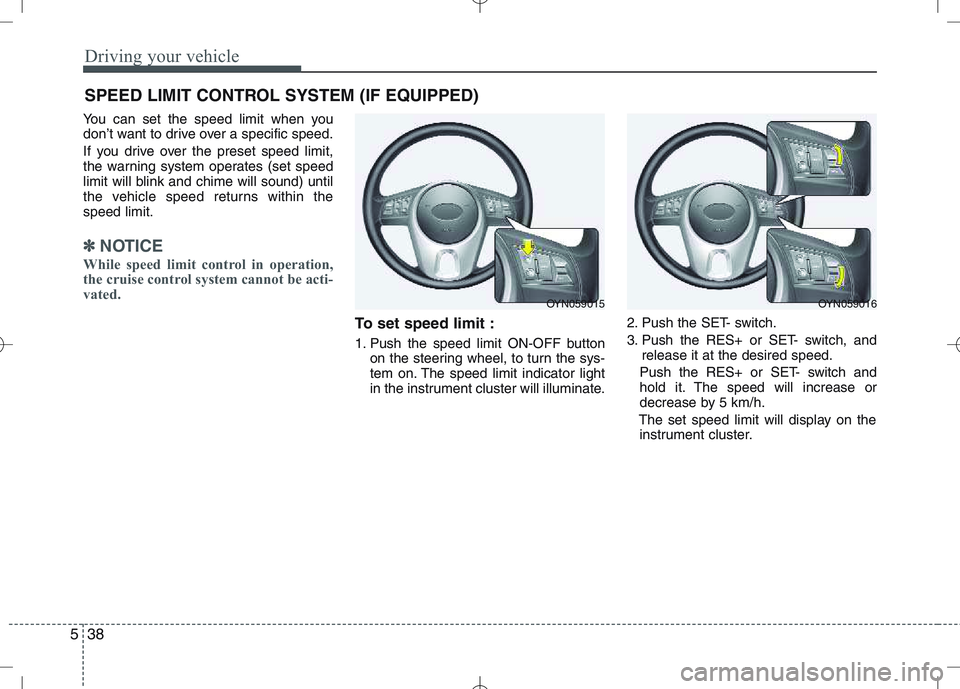
1. Push the speed limit ON-OFF button on the steering wheel, to turn the sys-
tem on. The speed limit indicator light
in the instrument cluster will illuminate. 2. Push the SET- switch.
3. Push the RES+ or SET- switch, and
release it at the desired speed.
Push the RES+ or SET- switch and
hold it. The speed will increase or
decrease by 5 km/h.
The set speed limit will display on the instrument cluster.
SPEED LIMIT CONTROL SYSTEM (IF EQUIPPED)
OYN059015OYN059016
Page 278 of 379
What to do in an emergency
16
6
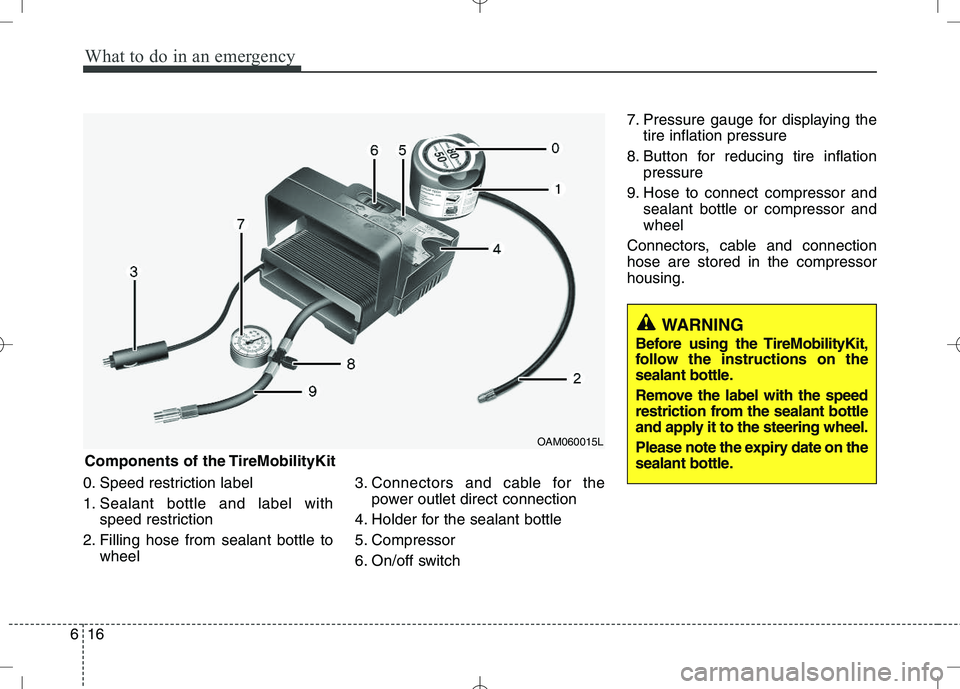
0. Speed restriction label
1. Sealant bottle and label with
speed restriction
2. Filling hose from sealant bottle to wheel 3. Connectors and cable for the
power outlet direct connection
4. Holder for the sealant bottle
5. Compressor
6. On/off switch 7. Pressure gauge for displaying the
tire inflation pressure
8. Button for reducing tire inflation pressure
9. Hose to connect compressor and sealant bottle or compressor and wheel
Connectors, cable and connectionhose are stored in the compressorhousing.
WARNING
Before using the TireMobilityKit,
follow the instructions on the
sealant bottle.
Remove the label with the speed
restriction from the sealant bottle
and apply it to the steering wheel.
Please note the expiry date on the
sealant bottle.
Components of the TireMobilityKit
OAM060015L
Page 338 of 379
747
Maintenance
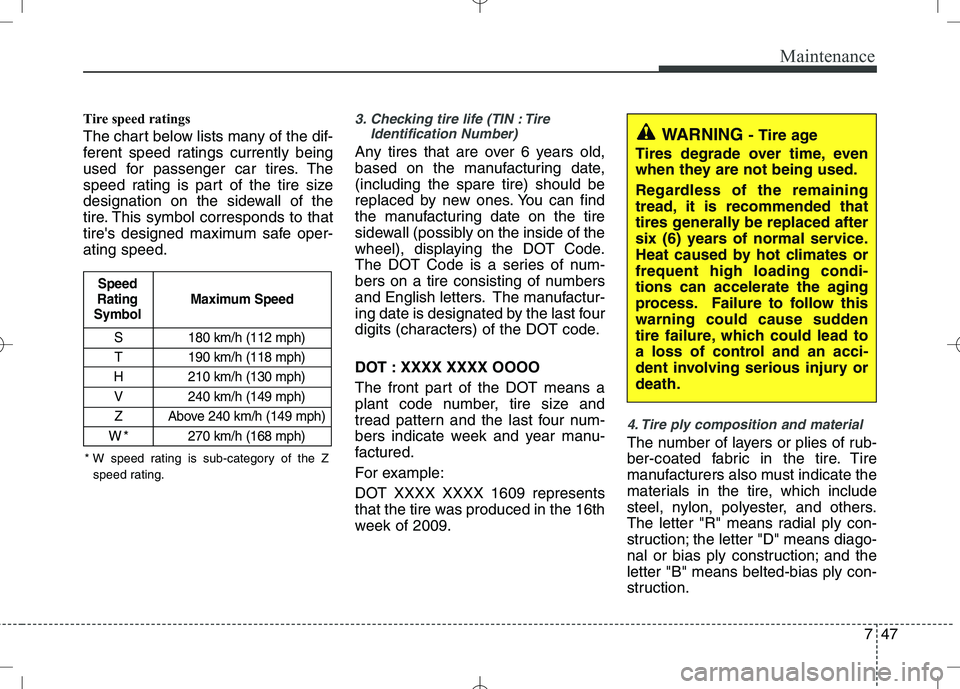
Tire speed ratings
The chart below lists many of the dif-
ferent speed ratings currently being
used for passenger car tires. The
speed rating is part of the tire size
designation on the sidewall of the
tire. This symbol corresponds to that
tire's designed maximum safe oper-ating speed.3. Checking tire life (TIN : TireIdentification Number)
Any tires that are over 6 years old,
based on the manufacturing date,(including the spare tire) should be
replaced by new ones. You can find
the manufacturing date on the tire
sidewall (possibly on the inside of the
wheel), displaying the DOT Code.
The DOT Code is a series of num-
bers on a tire consisting of numbers
and English letters. The manufactur-
ing date is designated by the last four
digits (characters) of the DOT code.
DOT : XXXX XXXX OOOO
The front part of the DOT means a
plant code number, tire size and
tread pattern and the last four num-
bers indicate week and year manu-
factured.
For example:
DOT XXXX XXXX 1609 represents
that the tire was produced in the 16th
week of 2009.
4. Tire ply composition and material
The number of layers or plies of rub-
ber-coated fabric in the tire. Tire
manufacturers also must indicate the
materials in the tire, which include
steel, nylon, polyester, and others.
The letter "R" means radial ply con-
struction; the letter "D" means diago-
nal or bias ply construction; and theletter "B" means belted-bias ply con-
struction.
S 180 km/h (112 mph)
T 190 km/h (118 mph)
H 210 km/h (130 mph) V 240 km/h (149 mph)
Z Above 240 km/h (149 mph)
W*270 km/h (168 mph)
Maximum Speed
Speed
Rating
Symbol
WARNING - Tire age
Tires degrade over time, even
when they are not being used.
Regardless of the remaining
tread, it is recommended that
tires generally be replaced after
six (6) years of normal service.
Heat caused by hot climates orfrequent high loading condi-
tions can accelerate the aging
process. Failure to follow this
warning could cause sudden
tire failure, which could lead to
a loss of control and an acci-
dent involving serious injury ordeath.
* W speed rating is sub-category of the Z speed rating.