2010 KIA VENGA warning
[x] Cancel search: warningPage 170 of 379
Features of your vehicle
98
4
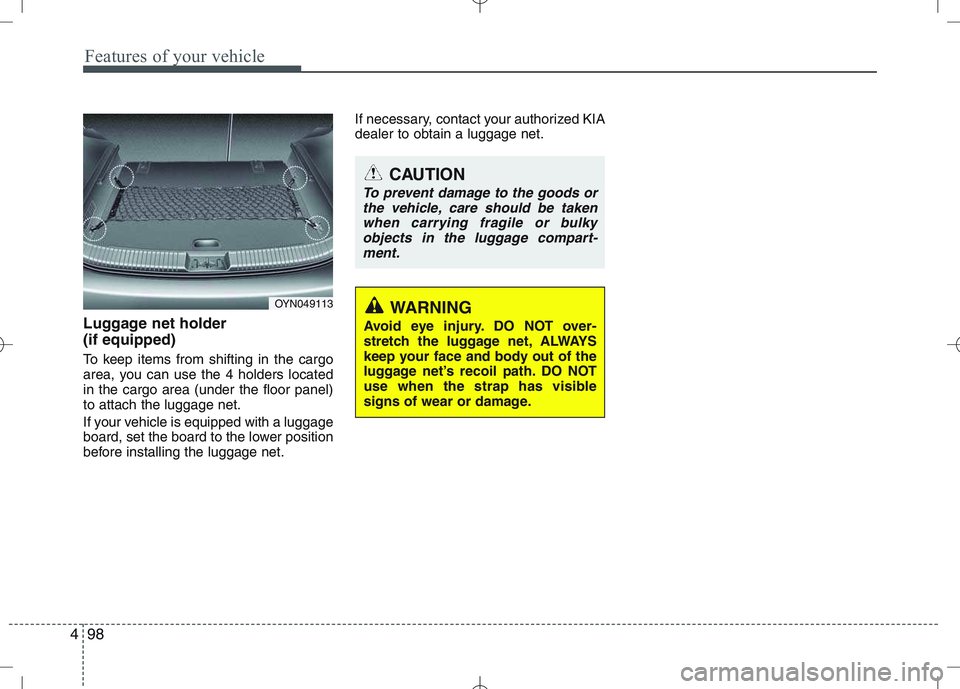
Luggage net holder (if equipped)
To keep items from shifting in the cargo
area, you can use the 4 holders locatedin the cargo area (under the floor panel)to attach the luggage net.
If your vehicle is equipped with a luggage
board, set the board to the lower position
before installing the luggage net. If necessary, contact your authorized KIAdealer to obtain a luggage net.
OYN049113
CAUTION
To prevent damage to the goods or
the vehicle, care should be takenwhen carrying fragile or bulky
objects in the luggage compart-ment.
WARNING
Avoid eye injury. DO NOT over-
stretch the luggage net, ALWAYS
keep your face and body out of the
luggage net’s recoil path. DO NOT
use when the strap has visible
signs of wear or damage.
Page 173 of 379
4101
Features of your vehicle
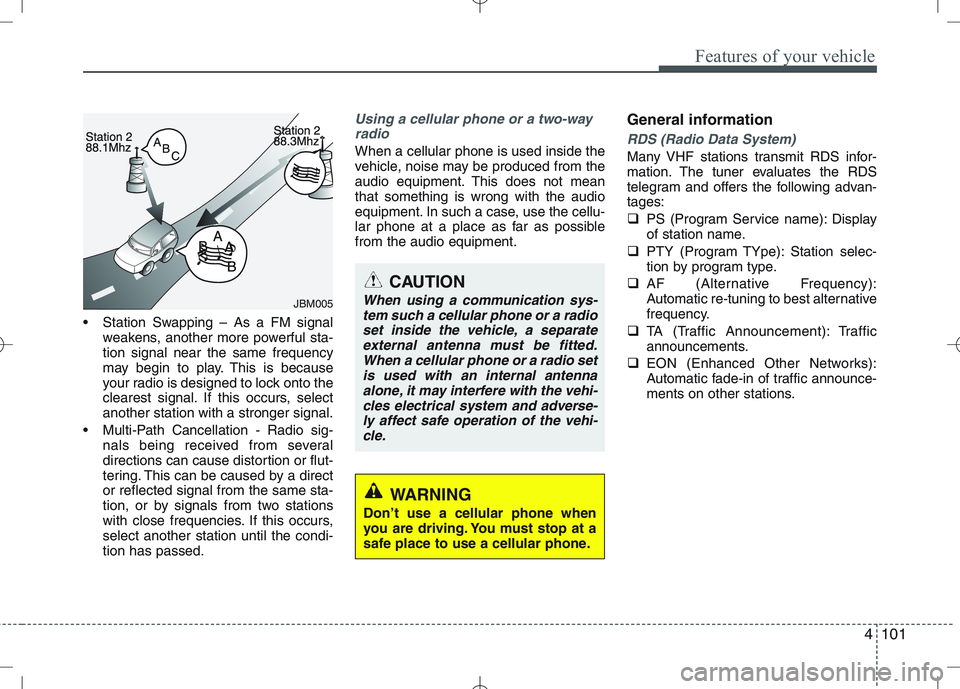
Station Swapping – As a FM signalweakens, another more powerful sta- tion signal near the same frequency
may begin to play. This is because
your radio is designed to lock onto the
clearest signal. If this occurs, selectanother station with a stronger signal.
Multi-Path Cancellation - Radio sig- nals being received from several
directions can cause distortion or flut-
tering. This can be caused by a director reflected signal from the same sta-
tion, or by signals from two stations
with close frequencies. If this occurs,select another station until the condi-tion has passed.
Using a cellular phone or a two-way
radio
When a cellular phone is used inside the
vehicle, noise may be produced from the
audio equipment. This does not meanthat something is wrong with the audio
equipment. In such a case, use the cellu-
lar phone at a place as far as possiblefrom the audio equipment. General informationRDS (Radio Data System)
Many VHF stations transmit RDS infor-
mation. The tuner evaluates the RDS
telegram and offers the following advan-tages:
PS (Program Service name): Display
of station name.
PTY (Program TYpe): Station selec-
tion by program type.
AF (Alternative Frequency):
Automatic re-tuning to best alternative
frequency.
TA (Traffic Announcement): Traffic
announcements.
EON (Enhanced Other Networks):
Automatic fade-in of traffic announce-
ments on other stations.
JBM005
CAUTION
When using a communication sys-
tem such a cellular phone or a radioset inside the vehicle, a separateexternal antenna must be fitted.When a cellular phone or a radio set
is used with an internal antennaalone, it may interfere with the vehi- cles electrical system and adverse-ly affect safe operation of the vehi-
cle.
WARNING
Don’t use a cellular phone when
you are driving. You must stop at a
safe place to use a cellular phone.
Page 174 of 379
Features of your vehicle
102
4
Notes on operating instructions
The following reading aids are used to
simplify these operating instructions:
Asks you to perform an action
Shows the unit’s reaction
✎ Provides extra info
Identifies a list
Class 1 laser product
CAUTION
Any inappropriate use of the device
may expose the user to invisiblelaser rays which exceed the limitsfor Class 1 laser products.CAUTION
Do not place beverages close to the audio system. The audio sys-tem mechanism may be damagedif you spill them.
Do not strike or allow anything to impact the audio system, damageto the system mechanisms could occur.
WARNING
Don’t use a cellular phone when
you are driving. You must stop at a
safe place to use a cellular phone.
WARNING
When driving your vehicle, be sure
to keep the volume of the unit set
low enough to allow you to hear
sounds coming from the outsides
(e.g. aware of the road and trafficconditions).
Page 175 of 379

4103
Features of your vehicle
Safety instructions Notes on USB stick (thumb drive) Notes on Bluetooth devicesNotes on Bluetooth® Technology*
Bluetooth is a short-range wireless
radio connectivity technology used
mainly for mobile phones, hand-held
PC’s and other devices.
Bluetooth SIG Inc. owns the Bluetooth
word, marking and logo; and any use
of such marks is under license. Other
trademarks and trade names are
those of their respective owners.
Bluetooth operates in 2.4 GHz fre-
quency range and transmits voiceand data at speeds of up to 1 mbps
within a range of up to 10 m.
The Head Unit supports the Hands
free Profile (HFP), the Advanced
Audio Distribution Profile (A2DP) and
the Audio Video Remote Control
Profile (AVRCP).
WARNING
Make all inputs via the remote con-
trol only when the vehicle is sta-
tionary, or have the passenger
make them. Otherwise, you may
endanger the occupants and other
road users.WARNING
In rare cases it is possible that an
Bluetooth device is not recognized
by the unit or may cause a malfunc-
tion. Please only use Bluetooth
devices that comply with theBluetooth specifications.WARNING
We strongly recommend only using USB sticks (thumb drives)
of well-known manufacturers.
On no account must other USB devices such as hard discs or
other digital equipment or multiplug USB hub be connected to
the USB hub. Connecting other
devices can cause malfunction or
even destroy the audio equip-ment.
Avoid using the USB memory when it might hinder your safetydriving.
It is possible that noise is heard during playback when using the
AUX-IN together with the poweroutlet due to system-related not a
malfunction. If this happens, use
the power source of the AUX
device.
In rare cases it is possible that an USB stick (thumb drive) is not
recognized by the unit or may
cause a malfunction. Please only
use USB sticks that comply withthe USB thumb drive specifica-tions.
WARNING
Avoid inserting any foreign objects
into the slot of this player. Failure to
observe this may cause malfunc-
tion due to the precise mechanismof this unit.
WARNING
Keep the volume level low enough
to be aware of road and traffic con-ditions.
WARNING
Do not open covers and do not
repair yourself. Refer servicing to
qualified personnel.
Page 176 of 379

Features of your vehicle
104
4
The Head Unit has been verified and
certified by the Bluetooth Qualification
Program (BQP) for compliance to the
Bluetooth standards. For more infor-
mation, please check the Bluetooth
web site (http://www.bluetooth.com/
Bluetooth/Connect/Products/) for theBQP product listing.
* Only if this option is available on your Head Unit.
Notes on iPod Care of disc (if equipped)
If the temperature inside the car is too
high, open the car window for ventila-
tion before using your car audio.
It is illegal to copy and use MP3/WMA
files without permission. Use CDs that
are created only by lawful means.
Do not apply volatile agents such as
benzene and thinner, normal cleaners
and magnetic sprays made for ana-
logue disc onto CDs.
To prevent the disc surface from get-
ting damaged. Hold and carry CDs bythe edges or the edges of the center
hole only.
Clean the disc surface with a piece of
clean soft cloth before playback (wipeit from the center to the outside edge).
Do not damage the disc surface or
attach pieces of sticky tape or paperon it.
Make sure on undesirable matter
other than CDs are inserted into the
CD player.
Do not insert more than one CD at a
time. It is likely to block CD operation.
Keep CDs in their cases after use to
protect them from scratches or dirt.
Depending on the type of CD-R/CD-
RW CDs, certain CDs may not oper-
ate normally according to manufactur-ing companies or making and record-
ing methods. In such circumstances,
if you still continue to use those CDs,
they may cause the malfunction of
your car audio system.
Playing an incompatible Copy
Protected Audio CD
Some copy protected CDs which do not
comply with the international audio CD
standards (Red Book), may not play on
your car audio. Please note that if you try
to play copy protected CDs and the CD
player does not perform correctly the
CDs may be defective, not the CD player.
WARNING
The newly introduced iPod with
new firmware may not be 100%
compatible and may not be sup-
ported by the system.
Page 180 of 379

Features of your vehicle
108
4
Inserting and removing CDs
Inserting a CD
Insert the CD into the drive (printed side up).
✎ Insert only one disk
✎ For audio/MP3 CDs, playback starts
automatically.
Removing a CD
Press the button and carefully
remove the CD.
Switching on/off
Press the button to switch the unit
on or off.
Switching on and off with the ignition key
If the unit is switched on, it can be
switched off and on automatically by
removing or inserting and turning the
ignition key. Automatic switch off
If the unit was turned on using the
button with the ignition off, it automatical-
ly switches itself off after 60 minutes.
Volume
Turn the knob to set the vol-
ume.
Menu operation
The central elements for operating the
menus are the , , , or OK
buttons.
WARNING
When setting the volume, please make sure that traffic noises
(horns, sirens, emergency vehicles,
etc.) are still audible.
Page 190 of 379

Features of your vehicle
118
4
Notes on USB Sticks (Thumb drives)
Only use USB sticks (thumb drives) of
wellknown manufacturers. The use of
other drives may result in malfunction ofthe set.
Do not connect other USB devices such as hard discs or other digital equipment
to the USB hub. Connecting other
devices can cause malfunction or even
destroy the audio equipment. Inserting and removing an USB stick
(thumb drive)
Insert the USB stick into the USB hub The USB hub is located in the con-
sole (also see Car Manual).
✎ Please keep lid closed when not in
use.
Playback of files ✎ Playback starts automatically, in case
there are MP3 or WMA files on the
USB stick,
OR
When the device is inserted but a dif-
ferent source was selected before,press the AUXbutton to start play-
back.
Previous/Next Folder
Press the or buttons to select
previous or next folder.
Previous/Next File
Press the or buttons to select
previous or next song file✽✽
NOTICE
In rare cases it is possible that an USB stick (thumb drive) is not recognized
by the unit or may cause a malfunc-
tion.
This is not a system fault. Some USB
sticks do not comply with the USB
thumb drive specifications.
CAUTION
The USB hub is designed for a
charge and supply current of upto 500 mA.
When using external equipment with a current consumptionexceeding the specified 500 mA,
the unit switches off the USB huband gives a warning.
CAUTION
We strongly recommend only using USB sticks (thumb drives)
of well-known manufacturers.
On no account must other USB devices such as hard discs orother digital equipment be con- nected to the USB hub.
Connecting other devices can cause malfunction or evendestroy the audio equipment.
Page 200 of 379
Features of your vehicle
128
4
Security Code
The unit is equipped with a security code
option. This code can be used to protect
the Head Unit against theft. In case theHead Unit is being disconnected from the
car’s power supply and the security code
option being active you will be prompted
to enter the four digit security code.
Any code except 0000 enables the
security code feature.
Code 0000 disables the security code
feature.
Behavior of security code function
Security Code will be prompted if
security code function is enabled and
battery is disconnected.
radio functions are deactivated dur-
ing the Security Code Prompt
User is given 2 attempts to enter the
correct security code.
Upon correct entry of the security
code, all the radio functions will be
activated.
Upon 2 attempts of incorrect entry of
the security code, radio will enter the
LOCKED state.
Once in LOCKED state, radio will only
prompt for security code after 1 hour. Enabling the Security Code option
Short press the SETUPbutton to
enter the SETUP menu.
Short press the or button to
access the Security Code mode.
✎ Now you have to enter the current
security code.
1.Short press the or button to
set the value for each digit of the cur-
rent security code.
2.Short press the or button to
select a specific digit.
3.Short press the OKbutton to con-
firm the security code.
Upon correct entry of the security
code, you will be asked to enter the
new security code that will replace the
previous code memorized in the HeadUnit.
Repeat the steps 1., 2. and 3.to enter
the new code.
To abort the Security Code Menu in
Setup mode, press either one of the
following buttons: , , FM, AM,
CD, AUX, MUTE, TA, 1 through 6,
AST, SCAN, INFO, SETUP, SOUND
or .
WARNING
If security code function is activat-
ed and battery was disconnected,
audio set will ask for the Security
code. Be careful and remember the
password that you have changed.