2010 KIA Rio lock
[x] Cancel search: lockPage 76 of 236

367
Knowing your vehicle
Closing the hood
1. Before closing the hood, check the fol-lowing:
• All filler caps in engine compartment must be correctly installed.
bustible material must be removed
from the engine compartment.
2. Secure the support rod in its clip.
3. Lower the hood to about 30 cm (12 inches) height and then let it drop to
properly lock in place.
Make sure the hood is properly locked
before driving.
1. Stop the engine.
2. To open the fuel filler lid, pull therelease lever.CAUTION- Hood
• Before closing the hood, make sure that all engine parts andtools have been removed fromthe engine area and that no one’shands are near the hood opening.
Do not leave gloves, rags or any other combustible material in theengine compartment. Doing so may cause a heat-induced fire.
CAUTION
To avoid injury from sharp edges, itis recommended that protective gloves be worn if there is a need toopen the fuel filler door manually.
1JBA3082
1JBA3207
5 Door
4 Door
FUEL FILLER LID
Page 77 of 236
Knowing your vehicle
68
3
3. Pull the fuel filler lid out to open.
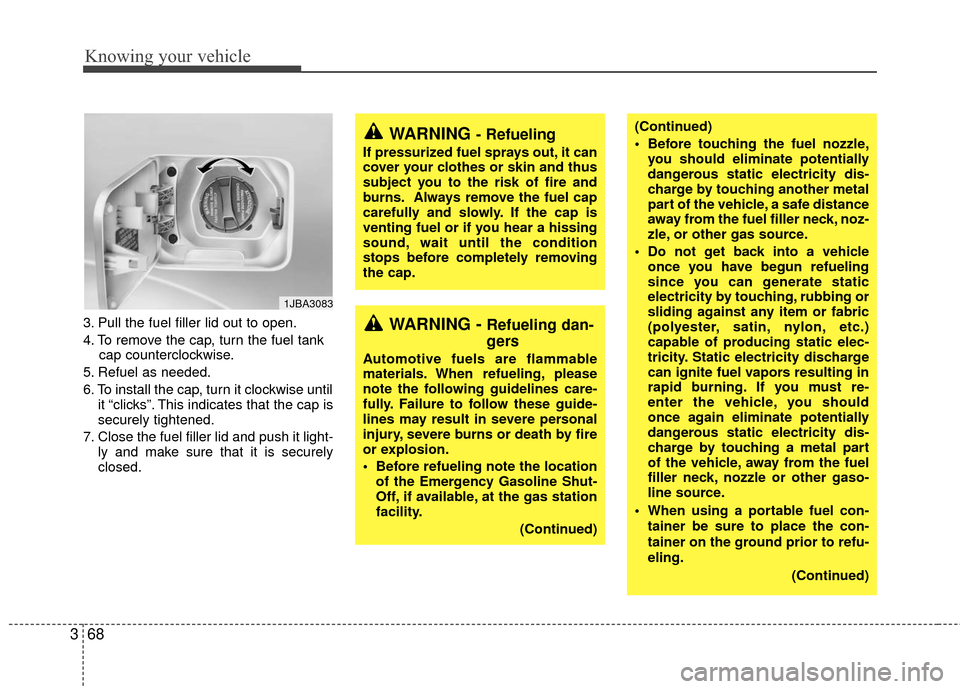
4. To remove the cap, turn the fuel tank
cap counterclockwise.
5. Refuel as needed.
6. To install the cap, turn it clockwise until it “clicks”. This indicates that the cap is
securely tightened.
7. Close the fuel filler lid and push it light- ly and make sure that it is securely
closed.
1JBA3083
WARNING - Refueling
If pressurized fuel sprays out, it can
cover your clothes or skin and thus
subject you to the risk of fire and
burns. Always remove the fuel cap
carefully and slowly. If the cap is
venting fuel or if you hear a hissing
sound, wait until the condition
stops before completely removing
the cap.
WARNING - Refueling dan-
gers
Automotive fuels are flammable
materials. When refueling, please
note the following guidelines care-
fully. Failure to follow these guide-
lines may result in severe personal
injury, severe burns or death by fire
or explosion.
Before refueling note the locationof the Emergency Gasoline Shut-
Off, if available, at the gas station
facility.
(Continued)
(Continued)
Before touching the fuel nozzle,you should eliminate potentially
dangerous static electricity dis-
charge by touching another metal
part of the vehicle, a safe distance
away from the fuel filler neck, noz-
zle, or other gas source.
Do not get back into a vehicle once you have begun refueling
since you can generate static
electricity by touching, rubbing or
sliding against any item or fabric
(polyester, satin, nylon, etc.)
capable of producing static elec-
tricity. Static electricity discharge
can ignite fuel vapors resulting in
rapid burning. If you must re-
enter the vehicle, you should
once again eliminate potentially
dangerous static electricity dis-
charge by touching a metal part
of the vehicle, away from the fuel
filler neck, nozzle or other gaso-
line source.
When using a portable fuel con- tainer be sure to place the con-
tainer on the ground prior to refu-
eling.
(Continued)
Page 82 of 236
373
Knowing your vehicle
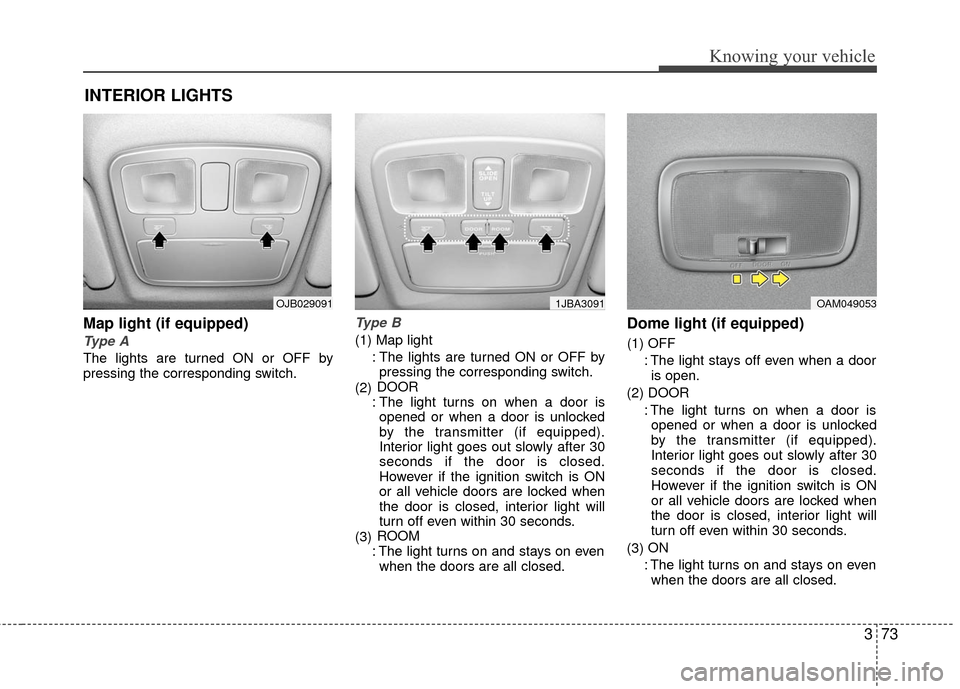
Map light (if equipped)
Type A
The lights are turned ON or OFF by
pressing the corresponding switch.
Type B
(1) Map light: The lights are turned ON or OFF bypressing the corresponding switch.
(2) DOOR
: The light turns on when a door is opened or when a door is unlocked
by the transmitter (if equipped).
Interior light goes out slowly after 30
seconds if the door is closed.
However if the ignition switch is ON
or all vehicle doors are locked when
the door is closed, interior light will
turn off even within 30 seconds.
(3) ROOM
: The light turns on and stays on even when the doors are all closed.
Dome light (if equipped)
(1) OFF
: The light stays off even when a dooris open.
(2) DOOR : The light turns on when a door isopened or when a door is unlocked
by the transmitter (if equipped).
Interior light goes out slowly after 30
seconds if the door is closed.
However if the ignition switch is ON
or all vehicle doors are locked when
the door is closed, interior light will
turn off even within 30 seconds.
(3) ON
: The light turns on and stays on even when the doors are all closed.
INTERIOR LIGHTS
OAM0490531JBA3091OJB029091
Page 87 of 236

Knowing your vehicle
78
3
Digital clock (if equipped)
Whenever the battery terminals or mem-
ory fuse are disconnected, you must
reset the time.
When the ignition switch is in the ACC or
ON position, the clock buttons operates
as follows: HOUR:
Pressing the “H” button with your fin-
ger, a pencil or similar object will
advance the time displayed by one
hour.
MINUTE: Pressing the “M” button with your fin-
ger, a pencil or similar object will
advance the time displayed by one
minute.
RESET:
To clear away minutes, press the “R”
button with your finger, a pencil or sim-
ilar object. Then the clock will be set
precisely on the hour.
For example, if the “R” button is
pressed while the time is between 9:01
and 9:29, the display will be reset to
9:00.
9:01 ~ 9:29 ➾ 9:00
9:30 ~ 9:59 ➾ 10:00
1JBN3103A
Page 94 of 236
385
Knowing your vehicle
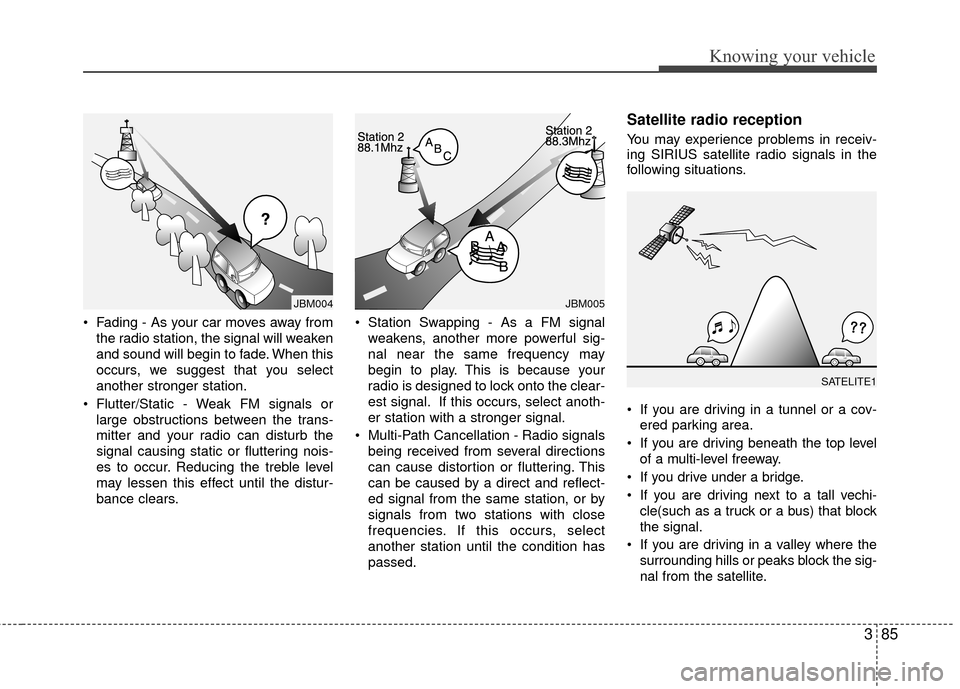
• Fading - As your car moves away fromthe radio station, the signal will weaken
and sound will begin to fade. When this
occurs, we suggest that you select
another stronger station.
Flutter/Static - Weak FM signals or large obstructions between the trans-
mitter and your radio can disturb the
signal causing static or fluttering nois-
es to occur. Reducing the treble level
may lessen this effect until the distur-
bance clears. Station Swapping - As a FM signal
weakens, another more powerful sig-
nal near the same frequency may
begin to play. This is because your
radio is designed to lock onto the clear-
est signal. If this occurs, select anoth-
er station with a stronger signal.
Multi-Path Cancellation - Radio signals being received from several directions
can cause distortion or fluttering. This
can be caused by a direct and reflect-
ed signal from the same station, or by
signals from two stations with close
frequencies. If this occurs, select
another station until the condition has
passed.
Satellite radio reception
You may experience problems in receiv-
ing SIRIUS satellite radio signals in the
following situations.
If you are driving in a tunnel or a cov-ered parking area.
If you are driving beneath the top level of a multi-level freeway.
If you drive under a bridge.
If you are driving next to a tall vechi- cle(such as a truck or a bus) that block
the signal.
If you are driving in a valley where the surrounding hills or peaks block the sig-
nal from the satellite.
¢¢¢
JBM004JBM005
SATELITE1
Page 95 of 236
Knowing your vehicle
86
3
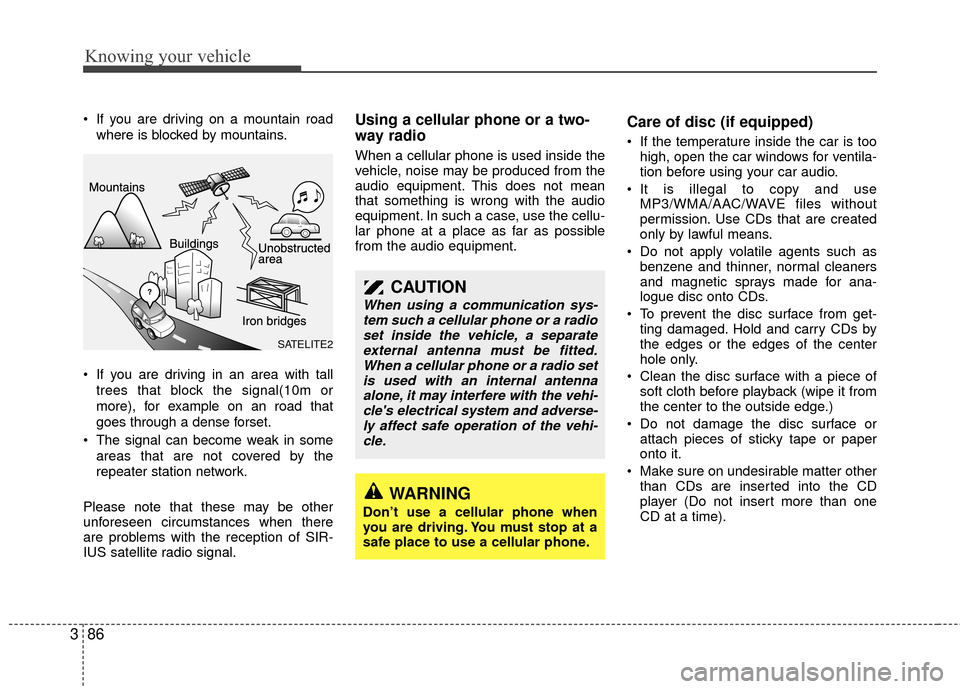
If you are driving on a mountain road
where is blocked by mountains.
If you are driving in an area with tall trees that block the signal(10m or
more), for example on an road that
goes through a dense forset.
The signal can become weak in some areas that are not covered by the
repeater station network.
Please note that these may be other
unforeseen circumstances when there
are problems with the reception of SIR-
IUS satellite radio signal.Using a cellular phone or a two-
way radio
When a cellular phone is used inside the
vehicle, noise may be produced from the
audio equipment. This does not mean
that something is wrong with the audio
equipment. In such a case, use the cellu-
lar phone at a place as far as possible
from the audio equipment.
Care of disc (if equipped)
If the temperature inside the car is too high, open the car windows for ventila-
tion before using your car audio.
It is illegal to copy and use MP3/WMA/AAC/WAVE files without
permission. Use CDs that are created
only by lawful means.
Do not apply volatile agents such as benzene and thinner, normal cleaners
and magnetic sprays made for ana-
logue disc onto CDs.
To prevent the disc surface from get- ting damaged. Hold and carry CDs by
the edges or the edges of the center
hole only.
Clean the disc surface with a piece of soft cloth before playback (wipe it from
the center to the outside edge.)
Do not damage the disc surface or attach pieces of sticky tape or paper
onto it.
Make sure on undesirable matter other than CDs are inserted into the CD
player (Do not insert more than one
CD at a time).
CAUTION
When using a communication sys-tem such a cellular phone or a radioset inside the vehicle, a separateexternal antenna must be fitted.When a cellular phone or a radio setis used with an internal antenna alone, it may interfere with the vehi-cle's electrical system and adverse-ly affect safe operation of the vehi- cle.
WARNING
Don’t use a cellular phone when
you are driving. You must stop at a
safe place to use a cellular phone.
SATELITE2
Page 99 of 236

Knowing your vehicle
90
3
1. FM/AM Selection Button
Turns to FM or AM mode, and toggles in
the order of FM1
➟ FM2 ➟ AM ➟ FM1...
when the button is pressed each time.
2. Automatic Channel Selection Button
When the [SEEK ] button is pressed,
it increases the band frequency to auto-
matically select a channel. Stops at the
previous frequency if no channel is
found.
When the [TRACK ] button is press- ed, it reduces the band frequency to
automatically select a channel. Stops
at the previous frequency if no channel
is found.
3. Power ON/OFF Button & Volume Control Knob
Turns the set on/off when the IGNITION
SWITH is on ACC or ON. If the button is
turned to the right, it increases the vol-
ume and left,decreases the volume.
4. Preset Button
Push [1]~[6] buttons less than 0.8 sec-
ond to play the channel saved in each
button. Push [Preset] button for 0.8 sec-
ond or longer to save current channel to
the respective button with a beep.
5. Manual Channel Selection &Sound Quality Control Knob
Turn this control while listening to a radio
channel to manually adjust frequency.
Turn clockwise to increase frequency and
counterclockwise to reduce frequency.
Pressing the button changes the BASS,
MIDDLE, TREBLE, FADER and BAL-
ANCE TUNE mode. The mode selected
is shown on the display. After selecting
each mode, rotate the Audio control knob
clockwise or counterclockwise.
BASS Control
To increase the BASS, rotate the knob
clockwise, while to decrease the BASS,
rotate the knob counterclockwise.
MIDDLE Control
To increase the Midrange, rotate the
knob clockwise, while to decrease the
Midrange, rotate the knob counterclock-
wise. TREBLE Control
To increase the TREBLE, rotate the knob
clockwise, while to decrease the
TREBLE, rotate the knob counterclock-
wise.
FADER Control
Turn the control knob clockwise to
emphasize rear speaker sound(front
speaker sound will be attenuated). When
the control knob is turned counterclock-
wise, front speaker sound will be empha-
sized(rear speaker sound will be attenu-
ated).
BALANCE Control
Rotate the knob clockwise to emphasize
right speaker sound(left speaker sound
will be attenuated). When the control
knob is turned counter clockwise, left
speaker sound will be emphasized(right
speaker sound will be attenuated).
Page 102 of 236
393
Knowing your vehicle
1. CD Loading Slot
Please face printed side upward and gen-
tly push in. When the ignition switch is on
ACC or ON and power is off, power is
automatically turned on if the CD is
loaded. This CDP supports only 12cm CD.
If a VCD, Data CD are loaded, "Reading
Error" message will appear and CD will be
ejected.
2. CD Eject Button
Push button to eject the CD. This but-
ton is enabled when ignition switch is off.
3. CD Selection Button
If the CD is loaded, turns to CD mode. If
no CD, it displays "No Disc" for 3 sec-
onds and returns to th previous mode.
4. AUX Selection Button
If the auxiliary device is connected, it
turns to AUX mode from the other mode
to play the sound from the auxiliary play-
er. If no auxiliary device is connected, it
displays "NO Media" for 3 seconds and
returns to the previous mode.
5. Automatic Track SelectionButton
] button for less than
0.8 second to play from the beginning
of current song.
] button for less than 0.8 second and press again within 1
seconds to play the previous song.
] button for 0.8 or longer to initiate reverse direction high
speed sound search of current song.
] button for less than 0.8 second to play the next song.
] button for 0.8 or longer to initiate high speed sound
search of current song.
6. RANDOM Play Button
Press this button for less than 0.8 second
to activate ‘RDM’ mode and more than
0.8 second to activate ‘ALL RDM’ mode.
Only files/tracks in a folder/discare played back in a random sequence.
All files in a disc are played back in the random
sequence.
7. REPEAT Button
Press this button for less than 0.8 second
to activate ‘RPT’ mode and more than 0.8
second to activate ‘FLD RPT’ mode.
Only a track(file) is repeatedlyplayed back.
Only files in a folder are repeatedly played back.
8. SEARCH Knob & ENTER Button
Turn this button clockwise to display the
songs next to the currently played song.
Turn the button counterclockwise to dis-
play the songs before the currently
played song. Press the button to skip and
play the selected song.
9. FOLDER Moving Button
] button child folder
of the current folder and displays the
first song in the folder. Press TUNE/
ENTER knob to move to the folder dis-
played. It will play the first song in the
folder.
], button parent folder and displays the first song in the folder.
Press TUNE/ENTER knob to move to
the folder displayed.