Page 54 of 321

Safety features of your vehicle42
3
(Continued)
Air bags can only be used once –
have an authorized KIA dealer
replace the air bag immediately
after deployment.
The SRS is designed to deploy the front air bags only when an
impact is sufficiently severe and
when the impact angle is less
than 30° from the forward longitu-
dinal axis of the vehicle.
Additionally, the air bags will only
deploy once. Seat belts must be
worn at all times.
Front air bags are not intended to deploy in side-impact, rear-
impact or rollover crashes. In
addition, front air bags will not
deploy in frontal crashes below
the deployment threshold.
(Continued)
(Continued)
No objects should be placed overor near the air bag modules on
the steering wheel, instrument
panel, and the front passenger's
panel above the glove box,
because any such object could
cause harm if the vehicle is in a
crash severe enough to cause
the air bags to deploy.
Do not tamper with or disconnect SRS wiring or other components
of the SRS system. Doing so
could result in injury, due to acci-
dental deployment of the air bags
or by rendering the SRS inopera-
tive.
If the SRS air bag warning light remains illuminated while the
vehicle is being driven, have an
authorized KIA dealer inspect the
air bag system as soon as possi-
ble.
(Continued)
(Continued)
A child restraint system mustnever be placed in the front seat.
The infant or child could be
severely injured or killed by an air
bag deployment in case of an
accident.
Children age 12 and under must always be properly restrained in
the rear seat. Never allow chil-
dren to ride in the front passen-
ger seat. If a child over 12 must
be seated in the front seat, he or
she must be properly belted and
the seat should be moved as far
back as possible.
For maximum safety protection in all types of crashes, all occu-
pants including the driver should
always wear their seat belts
whether or not an air bag is also
provided at their seating position
to minimize the risk of severe
injury or death in the event of a
crash. Do not sit or lean unneces-
sarily close to the air bag while
the vehicle is in motion.
(Continued)
Page 63 of 321

351
Safety features of your vehicle
C041100ATDSRS CareThe SRS is virtually maintenance-free
and so there are no parts you can safely
service by yourself. If the SRS air bag
warning light does not illuminate, or con-
tinuously remains on, have your vehicle
immediately inspected by an authorized
KIA dealer.
Any work on the SRS system, such as
removing, installing, repairing, or any
work on the steering wheel must be per-
formed by an authorized KIA dealer.
Improper handling of the SRS system
may result in serious personal injury.
WARNING
Modification to SRS componentsor wiring, including the addition
of any kind of badges to the pad
covers or modifications to the
body structure, can adversely
affect SRS performance and lead
to possible injury.
For cleaning the air bag pad cov- ers, use only a soft, dry cloth or
one which has been moistened
with plain water. Solvents or
cleaners could adversely affect
the air bag covers and proper
deployment of the system.
No objects should be placed over or near the air bag modules on
the steering wheel, instrument
panel, and the front passenger's
panel above the glove box,
because any such object could
cause harm if the vehicle is in a
crash severe enough to cause
the air bags to inflate.
(Continued)
(Continued)
If the air bags inflate, they mustbe replaced by an authorized KIA
dealer.
Do not tamper with or disconnect SRS wiring, or other components
of the SRS system. Doing so
could result in injury, due to acci-
dental inflation of the air bags or
by rendering the SRS inopera-
tive.
If components of the air bag sys- tem must be discarded, or if the
vehicle must be scrapped, certain
safety precautions must be
observed. An authorized KIA
dealer knows these precautions
and can give you the necessary
information. Failure to follow
these precautions and proce-
dures could increase the risk of
personal injury.
If your vehicle was flooded and has soaked carpeting or water on
the floor, you shouldn't try to
start the engine; have the vehicle
towed to an authorized KIA deal-
er.
Page 103 of 321

Features of your vehicle38
4D150100ATD-EUInstrument panel illumination
(if equipped)When the vehicle’s parking lights or
headlights are on, rotate the illumination
control knob to adjust the brightness of
the instrument panel illumination.
The brightness of the instrument panel
(Type B) illumination can be adjusted by
rotating the control knob when the igni-
tion switch is in ON position.
GaugesD150201AHMSpeedometer The speedometer indicates the forward
speed of the vehicle.
The speedometer is calibrated in kilome-
ters per hour and/or miles per hour.
D150202AFDTachometer The tachometer indicates the approxi-
mate number of engine revolutions per
minute (rpm).
Use the tachometer to select the correct
shift points and to prevent lugging and/or
over-revving the engine.
The tachometer pointer may move slight-
ly when the ignition switch is in ACC or
ON position with the engine OFF. This
movement is normal and will not affect
the accuracy of the tachometer once the
engine is running.
OTD049052
OTD049053L
CAUTION
Do not operate the engine within
the tachometer's RED ZONE. Thismay cause severe engine damage.
OTD049054
Page 121 of 321

Features of your vehicle56
4D190100APBBattery saver function The purpose of this feature is to pre-
vent the battery from being dis-
charged. The system automatically
turns off the exterior lights when the
driver removes the ignition key and
opens the driver- side door.
With this feature, the parking lights will turn off automatically if the driver parks
on the side of the road at night.
If necessary, to keep the lights on
when the ignition key is removed, per-
form the following :
1) Open the driver-side door.
2) Turn the parking lights OFF and ON again using the light switch on the
steering column.
D190400ATD-EULighting controlThe light switch has a Headlight and a
Parking light position.
To operate the lights, turn the knob at the
end of the control lever to one of the fol-
lowing positions:
(1) OFF position
(2) Parking light position
(3) Headlight position
D190401ATDParking light position ( )When the light switch is in the parking
light position (1st position), the tail, posi-
tion, license and instrument panel lights
will turn ON.
LIGHTING
0AM049040
OAM049041
Page 122 of 321
457
Features of your vehicle
D190402ATDHeadlight position ( )When the light switch is in the headlight
position (2nd position) the head, tail,
position, license and instrument panel
lights will turn ON.✽ ✽NOTICEThe ignition switch must be in the ON
position to turn on the headlights.
D190500AUNHigh beam operation To turn on the high beam headlights,
push the lever away from you. Pull it back
for low beams.
The high-beam indicator will light when
the headlight high beams are switched
on.
To prevent the battery from being dis-
charged, do not leave the lights on for a
prolonged time while the engine is not
running. To flash the headlights, pull the lever
towards you. It will return to the normal
(low-beam) position when released. The
headlight switch does not need to be on
to use this flashing feature.
OAM049042
OAM049044
OAM049043
Page 123 of 321

Features of your vehicle58
4
CAUTION
When in operation, the fog lights
consume large amounts of vehicleelectrical power. Only use the foglights when visibility is poor.
D190600AUN-U1Turn signals and lane change sig-
nalsThe ignition switch must be on for the
turn signals to function. To turn on the
turn signals, move the lever up or down
(A). The green arrow indicators on the
instrument panel indicate which turn sig-
nal is operating. They will self-cancel
after a turn is completed. If the indicator
continues to flash after a turn, manually
return the lever to the OFF position.
To signal a lane change, move the turn
signal lever slightly and hold it in position
(B). The lever will return to the OFF posi-
tion when released. If an indicator stays on and does not
flash or if it flashes abnormally, one of the
turn signal bulbs may be burned out and
will require replacement.
✽ ✽
NOTICEIf an indicator flash is abnormally quick
or slow, a bulb may be burned out or
have a poor electrical connection in the
circuit.
D190700ATD-EUFront fog light (if equipped) Fog lights are used to provide improved
visibility when visibility is poor due to fog,
rain or snow etc. The fog lights will turn
on when the fog light switch (1) is turned
to the on position after the headlights are
turned on.
To turn off the fog lights, turn the switch
(1) to the off position.
OAM049045
OAM049046N
Page 127 of 321

Features of your vehicle62
4D210300ABHTrunk room lamp (if equipped)The trunk room lamp comes on when the
trunk lid is opened.
D220000AUN✽ ✽
NOTICEIf you want to defrost and defog the
front windshield, refer to “Windshield
Defrosting and Defogging” in this sec-
tion.
D220100ATDRear window defrosterThe defroster heats the window to
remove frost, fog and thin ice from the
interior and exterior of the rear window,
while the engine is running.
To activate the rear window defroster,
press the rear window defroster button
located in the center facia switch panel.
The indicator on the rear window
defroster button illuminates when the
defroster is ON.
If there is heavy accumulation of snow on
the rear window, brush it off before oper-
ating the rear defroster.
The rear window defroster automatically
turns off after approximately 20 minutes
or when the ignition switch is turned off.
To turn off the defroster, press the rear
window defroster button again.
OMG035061
DEFROSTER
CAUTION
To prevent damage to the conduc-
tors bonded to the inside surface ofthe rear window, never use sharpinstruments or window cleaners containing abrasives to clean thewindow.
OTD049089
Page 132 of 321
467
Features of your vehicle
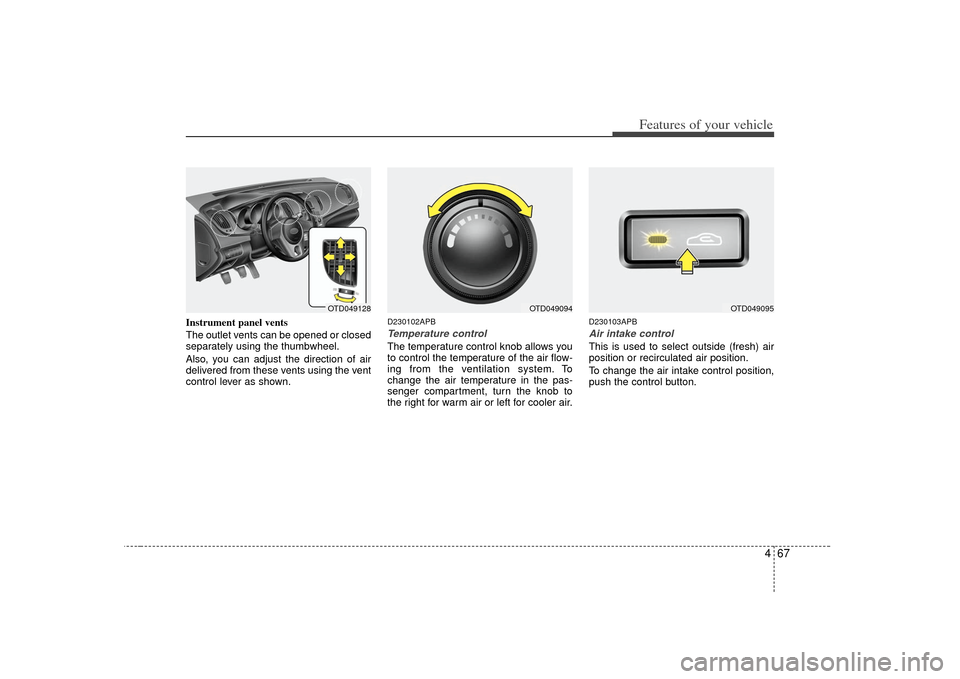
Instrument panel vents
The outlet vents can be opened or closed
separately using the thumbwheel.
Also, you can adjust the direction of air
delivered from these vents using the vent
control lever as shown.
D230102APBTemperature controlThe temperature control knob allows you
to control the temperature of the air flow-
ing from the ventilation system. To
change the air temperature in the pas-
senger compartment, turn the knob to
the right for warm air or left for cooler air.
D230103APBAir intake control This is used to select outside (fresh) air
position or recirculated air position.
To change the air intake control position,
push the control button.
OTD049128
OTD049095
OTD049094