Page 105 of 554

When calling a number with your Uconnect™ Phone that
normally requires you to enter in a touch-tone sequence
on your cellular phone keypad, you can press the
button and say the sequence you wish to enter, followed
by the word�Send.�For example, if required to enter
your PIN followed with a pound, (3746#),youcan
press the
button and say, �3746#Send.� Saying
a number, or sequence of numbers, followed by �Send,�is
also to be used for navigating through an automated
customer service center menu structure, and to leave a
number on a pager.
You can also send stored Uconnect™ Phonebook entries
as tones for fast and easy access to voice mail and pager
entries. To use this feature, dial the number you wish to
call and then press the
button and say, “Send.” The
system will prompt you to enter the name or number and
say the name of the phonebook entry you wish to send. The Uconnect™ Phone will then send the corresponding
phone number associated with the phonebook entry, as
tones over the phone.
NOTE:
•You may not hear all of the tones due to cellular phone
network configurations. This is normal.
•Some paging and voice mail systems have system time
out settings that are too short and may not allow the
use of this feature.
Barge In - Overriding Prompts
The “Voice Command” button can be used when you
wish to skip part of a prompt and issue your voice
command immediately. For example, if a prompt is
asking
�Would you like to pair a phone, clear a...,� you
could press the
button and say, �Pair a Phone�to
select that option without having to listen to the rest of
the voice prompt.
104 UNDERSTANDING THE FEATURES OF YOUR VEHICLE
Page 106 of 554

Turning Confirmation Prompts ON/OFF
Turning confirmation prompts off will stop the system
from confirming your choices (e.g., the Uconnect™
Phone will not repeat a phone number before you dial it).
•Press thebutton to begin.
•After the�Ready�prompt and the following beep, say
�Setup Confirmations.� The Uconnect™ Phone will
play the current confirmation prompt status and you
will be given the choice to change it.
Phone and Network Status Indicators
If available on the radio and/or on a premium display
such as the instrument panel cluster, and supported by
your cellular phone, the Uconnect™ Phone will provide
notification to inform you of your phone and network
status when you are attempting to make a phone call
using Uconnect™ Phone. The status is given for roaming,
network signal strength, phone battery strength, etc.
Dialing Using the Cellular Phone Keypad
You can dial a phone number with your cellular phone
keypad and still use the Uconnect™ Phone (while dialing
via the cellular phone keypad, the user must exercise
caution and take precautionary safety measures). By
dialing a number with your paired Bluetooth� cellular
phone, the audio will be played through your vehicle’s
audio system. The Uconnect™ Phone will work the same
as if you dial the number using Voice Command.
NOTE: Certain brands of cellular phones do not send
the dial ring to the Uconnect™ Phone to play it on the
vehicle audio system, so you will not hear it. Under this
situation, after successfully dialing a number the user
may feel that the call did not go through even though the
call is in progress. Once your call is answered, you will
hear the audio.
3
UNDERSTANDING THE FEATURES OF YOUR VEHICLE 105
Page 114 of 554
Turn SMS Incoming Announcement ON/OFF
Turning the SMS Incoming Announcement OFF will stop
the system from announcing the new incoming mes-
sages.
•Press thebutton.
•After the “Ready” prompt and the following beep, say
“Setup, Incoming Message Announcement,” you will
then be given a choice to change it.
Bluetooth�Communication Link
Cellular phones have been found to lose connection to
the Uconnect™ Phone. When this happens, the connec-
tion can generally be reestablished by switching the
phone off/on. Your cellular phone is recommended to
remain in Bluetooth� ON mode.
Power-Up
After switching the ignition key from OFF to either the
ON or ACC position, or after a language change, you
must wait at least five seconds prior to using the system.
3
UNDERSTANDING THE FEATURES OF YOUR VEHICLE 113
Page 141 of 554

Interior Lights
The overhead light will turn on when a door is opened. It
may also be turned on by rotating the control for the
dimmer switch on the multifunction lever fully upward.
The overhead light will automatically turn off in approxi-
mately 10 minutes if a door is left open or the dimmer
control is left in the dome light position. Turn the ignition
switch ON to restore the overhead light operation.
Cargo Lamp
The courtesy and dome lights will turn on when the front
doors are opened, by rotating the control for the dimmer
switch on the multifunction lever fully upward, or if
equipped, when the UNLOCK button is pressed on the
Remote Keyless Entry (RKE) transmitter.The rearmost cargo lamp (available on four-door models)
may be turned on by pressing either of the switches,
located on either side of the lens. Press a switch a second
time to turn the light off. Also, the rear cargo lamp may
be turned on by pressing the lens. Press the lens a second
time to turn the light off.
Cargo Lamp
140 UNDERSTANDING THE FEATURES OF YOUR VEHICLE
Page 151 of 554
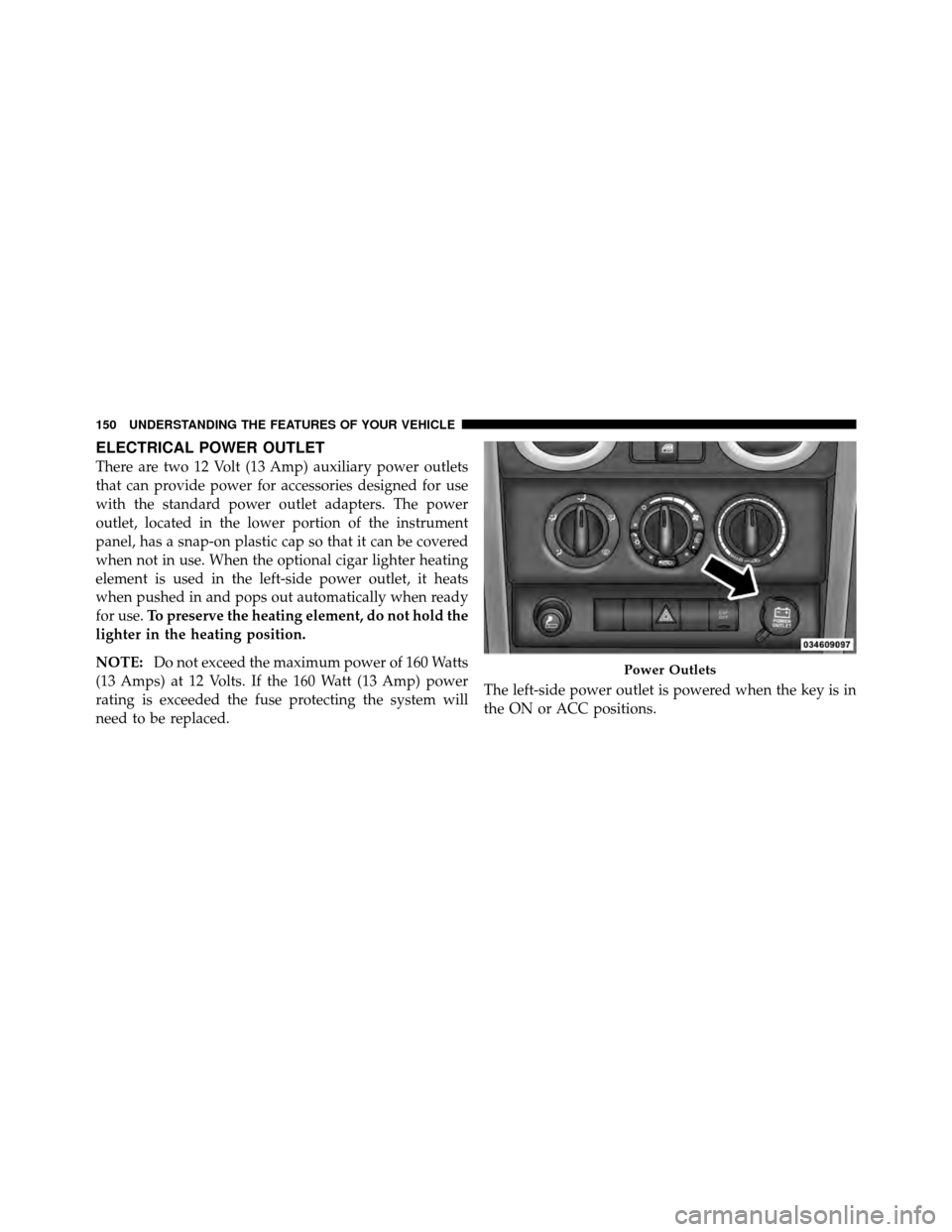
ELECTRICAL POWER OUTLET
There are two 12 Volt (13 Amp) auxiliary power outlets
that can provide power for accessories designed for use
with the standard power outlet adapters. The power
outlet, located in the lower portion of the instrument
panel, has a snap-on plastic cap so that it can be covered
when not in use. When the optional cigar lighter heating
element is used in the left-side power outlet, it heats
when pushed in and pops out automatically when ready
for use.To preserve the heating element, do not hold the
lighter in the heating position.
NOTE: Do not exceed the maximum power of 160 Watts
(13 Amps) at 12 Volts. If the 160 Watt (13 Amp) power
rating is exceeded the fuse protecting the system will
need to be replaced. The left-side power outlet is powered when the key is in
the ON or ACC positions.
Power Outlets
150 UNDERSTANDING THE FEATURES OF YOUR VEHICLE
Page 154 of 554
Rear Cupholders
The rear cupholders are located on the back of the center
console.
STORAGE
Console Storage Compartment
To lock or unlock the storage compartment, insert the
ignition key and turn. To open the storage compartment,
press the latch and lift the cover.
Rear Cupholders
Center Console
3
UNDERSTANDING THE FEATURES OF YOUR VEHICLE 153
Page 258 of 554

1. Turn the ignition switch to the ON position (Do not
start the engine).
2. Fully depress the accelerator pedal slowly three
times within 10 seconds.
3. Turn the ignition switch to the OFF/LOCK position.
NOTE: If the indicator message illuminates when you
start the vehicle, the oil change indicator system did not
reset. If necessary repeat this procedure.
25. Malfunction Indicator Light (MIL) The Malfunction Indicator Light (MIL) is a part of
an Onboard Diagnostic System called OBD II that
monitors engine and automatic transmission con-
trol systems. The light will illuminate when the ignition
is in the ON position, before engine start. If the bulb does
not come on when turning the key from OFF to ON, have
the condition checked promptly. Certain conditions such as a loose or missing gas cap,
poor quality fuel, etc. may illuminate the light after
engine start. The vehicle should be serviced if the light
stays on through several typical driving styles. In most
situations, the vehicle will drive normally and will not
require towing.
When the engine is running, the MIL may flash to alert
serious conditions that could lead to immediate loss of
power or severe catalytic converter damage. The vehicle
should be serviced as soon as possible if this occurs.
CAUTION!
Prolonged driving with the MIL on could cause
damage to the engine control system. It also could
affect fuel economy and drivability. If the MIL is
flashing, severe catalytic converter damage and
power loss will soon occur. Immediate service is
required.
4
UNDERSTANDING YOUR INSTRUMENT PANEL 257
Page 261 of 554

WARNING!
If a warning light remains on the system may not be
working and you will not have the benefit of ESP or
BAS. Under certain driving conditions, where ESP or
BAS would be beneficial, you - if you have not
adjusted your driving speeds and stopping in or to
account for the lack of the feature, may be in acci-
dent.
30. Electronic Throttle Control (ETC) Light This light informs you of a problem with the
Electronic Throttle Control (ETC) system. If a
problem is detected while the engine is run-
ning, the light will either stay on or flash
depending on the nature of the problem. Cycle the
ignition key when the vehicle is safely and completely
stopped and the shift lever is placed in the PARK
position. The light should turn off. If the light remains on with the engine running, your vehicle will usually be
drivable; however, see an authorized dealer for service as
soon as possible.
If the light continues to flash when the engine is running,
immediate service is required and you may experience
reduced performance, an elevated/rough idle, or engine
stall and your vehicle may require towing. The light will
come on when the ignition is first turned ON and remain
on briefly as a bulb check. If the light does not come on
during starting, have the system checked by an autho-
rized dealer.
31. Compass / Mini-Trip Computer Display — If
Equipped
When the appropriate conditions exist, this display
shows the Mini-Trip Computer messages. Refer to “Mini-
Trip Computer”.
260 UNDERSTANDING YOUR INSTRUMENT PANEL