Page 61 of 554

Maintaining Your Airbag System
WARNING!
•Modifications to any part of the airbag system
could cause it to fail when you need it. You could
be injured if the airbag system is not there to
protect you. Do not modify the components or
wiring, including adding any kind of badges or
stickers to the steering wheel hub trim cover or the
upper right side of the instrument panel. Do not
modify the front bumper or vehicle body struc-
ture.
•You need proper knee impact protection in a
collision. Do not mount or locate any aftermarket
equipment on or behind the knee bolsters.
•It is dangerous to try to repair any part of the
airbag system yourself. Be sure to tell anyone who
works on your vehicle that it has an airbag system.
Airbag Warning Light
You will want to have the airbag system ready to inflate
for your protection in an impact. The airbag system is
designed to be maintenance free. If any of the following
occurs, have an authorized dealer service the system
promptly:
•Does not come on during the four to eight seconds
after the ignition switch is first turned on.
•Remains on after the four to eight second interval.
•Comes on for any period of time while driving.
Event Data Recorder (EDR)
This vehicle is equipped with an event data recorder
(EDR). The main purpose of an EDR is to record, in
certain crash or near crash-like situations, such as an air
bag deployment or hitting a road obstacle, data that will
assist in understanding how a vehicle’s systems per-
formed. The EDR is designed to record data related to
60 THINGS TO KNOW BEFORE STARTING YOUR VEHICLE
Page 80 of 554

WARNING! (Continued)
Failure to properly follow floor mat installation or
mounting can cause interference with the brake
pedal and accelerator pedal operation causing loss of
control of the vehicle.
Periodic Safety Checks You Should Make Outside
the Vehicle
Tires
Examine tires for excessive tread wear and uneven wear
patterns. Check for stones, nails, glass, or other objects
lodged in the tread. Inspect the tread and sidewall for
cuts and cracks. Check the wheel nuts for tightness.
Check the tires (including spare) for proper pressure.
Lights
Have someone observe the operation of exterior lights
while you work the controls. Check turn signal and high
beam indicator lights on the instrument panel.
Door Latches
Check for positive closing, latching, and locking.
Fluid Leaks
Check area under vehicle after overnight parking for fuel,
engine coolant, oil, or other fluid leaks. Also, if gasoline
fumes are detected or if fuel, power steering fluid, or
brake fluid leaks are suspected, the cause should be
located and corrected immediately.
2
THINGS TO KNOW BEFORE STARTING YOUR VEHICLE 79
Page 83 of 554

▫Manual Seat Height Adjustment
— If Equipped ...................... 126
▫ Front Seatback Recline ................. 126
▫ Front Easy Entry Seats — Two Door
Models ........................... 127
▫ Head Restraints ..................... 128
▫ Fold And Tumble Rear Seat — Two Door
Models ........................... 130
▫ Removing The Rear Seat — Two Door
Models ........................... 132
▫ Replacing The Rear Seat — Two Door
Models ........................... 133
▫ 60/40 Split Folding Rear Seat — Four Door
Models ........................... 133
� To Open And Close The Hood ............ 135�
Lights ............................. 136
▫ Multifunction Lever .................. 136
▫ Headlights And Parking Lights .......... 136
▫ Turn Signals ........................ 137
▫ Lane Change Assist ................... 138
▫ Lights-On Reminder .................. 138
▫ High/Low Beam Switch ............... 138
▫ Flash-To-Pass ....................... 138
▫ Front Fog Lights — If Equipped .......... 138
▫ Instrument Panel Dimmer .............. 139
▫ Daytime Running Lights — If Equipped .... 139
▫ Interior Lights ...................... 140
82 UNDERSTANDING THE FEATURES OF YOUR VEHICLE
Page 106 of 554

Turning Confirmation Prompts ON/OFF
Turning confirmation prompts off will stop the system
from confirming your choices (e.g., the Uconnect™
Phone will not repeat a phone number before you dial it).
•Press thebutton to begin.
•After the�Ready�prompt and the following beep, say
�Setup Confirmations.� The Uconnect™ Phone will
play the current confirmation prompt status and you
will be given the choice to change it.
Phone and Network Status Indicators
If available on the radio and/or on a premium display
such as the instrument panel cluster, and supported by
your cellular phone, the Uconnect™ Phone will provide
notification to inform you of your phone and network
status when you are attempting to make a phone call
using Uconnect™ Phone. The status is given for roaming,
network signal strength, phone battery strength, etc.
Dialing Using the Cellular Phone Keypad
You can dial a phone number with your cellular phone
keypad and still use the Uconnect™ Phone (while dialing
via the cellular phone keypad, the user must exercise
caution and take precautionary safety measures). By
dialing a number with your paired Bluetooth� cellular
phone, the audio will be played through your vehicle’s
audio system. The Uconnect™ Phone will work the same
as if you dial the number using Voice Command.
NOTE: Certain brands of cellular phones do not send
the dial ring to the Uconnect™ Phone to play it on the
vehicle audio system, so you will not hear it. Under this
situation, after successfully dialing a number the user
may feel that the call did not go through even though the
call is in progress. Once your call is answered, you will
hear the audio.
3
UNDERSTANDING THE FEATURES OF YOUR VEHICLE 105
Page 137 of 554
To close the hood, remove the support rod from the hood
panel and place it in the retaining clip. Lower the hood
slowly. Secure both of the hood latches.
WARNING!
Be sure the hood is fully latched before driving your
vehicle. If the hood is not fully latched, it could open
when the vehicle is in motion and block your vision.
Failure to follow this warning could result in serious
injury or death.
LIGHTS
Multifunction Lever
The multifunction lever controls the operation of the
parking lights, headlights, headlight beam selection,
passing light, fog lights, instrument panel light dimming
and turn signals. The lever is located on the left side of
the steering column.
Headlights and Parking Lights
Turn the end of the multifunction lever to the first detent
for parking lights and instrument panel lights. Turn to
the second detent for headlight operation.
Multifunction Lever
136 UNDERSTANDING THE FEATURES OF YOUR VEHICLE
Page 140 of 554
Instrument Panel Dimmer
Rotate the center portion of the lever to the extreme
bottom position to fully dim the instrument panel lights
and prevent the interior lights from illuminating when a
door is opened.
Rotate the center portion of the lever up to increase the
brightness of the instrument panel lights when the park-
ing lights or headlights are on.
Rotate the center portion of the lever upward to the next
detent position to brighten the odometer and radio when
the parking lights or headlights are on.
Rotate the center portion of the lever upward to the last
detent to turn on the interior lighting.
Daytime Running Lights — If Equipped
The headlights come on at a low intensity level after the
vehicle has been driven approximately 3 ft (1 m). They
will turn off when the vehicle is turned off or when the
headlights are switched on.
Dimmer Control
3
UNDERSTANDING THE FEATURES OF YOUR VEHICLE 139
Page 151 of 554
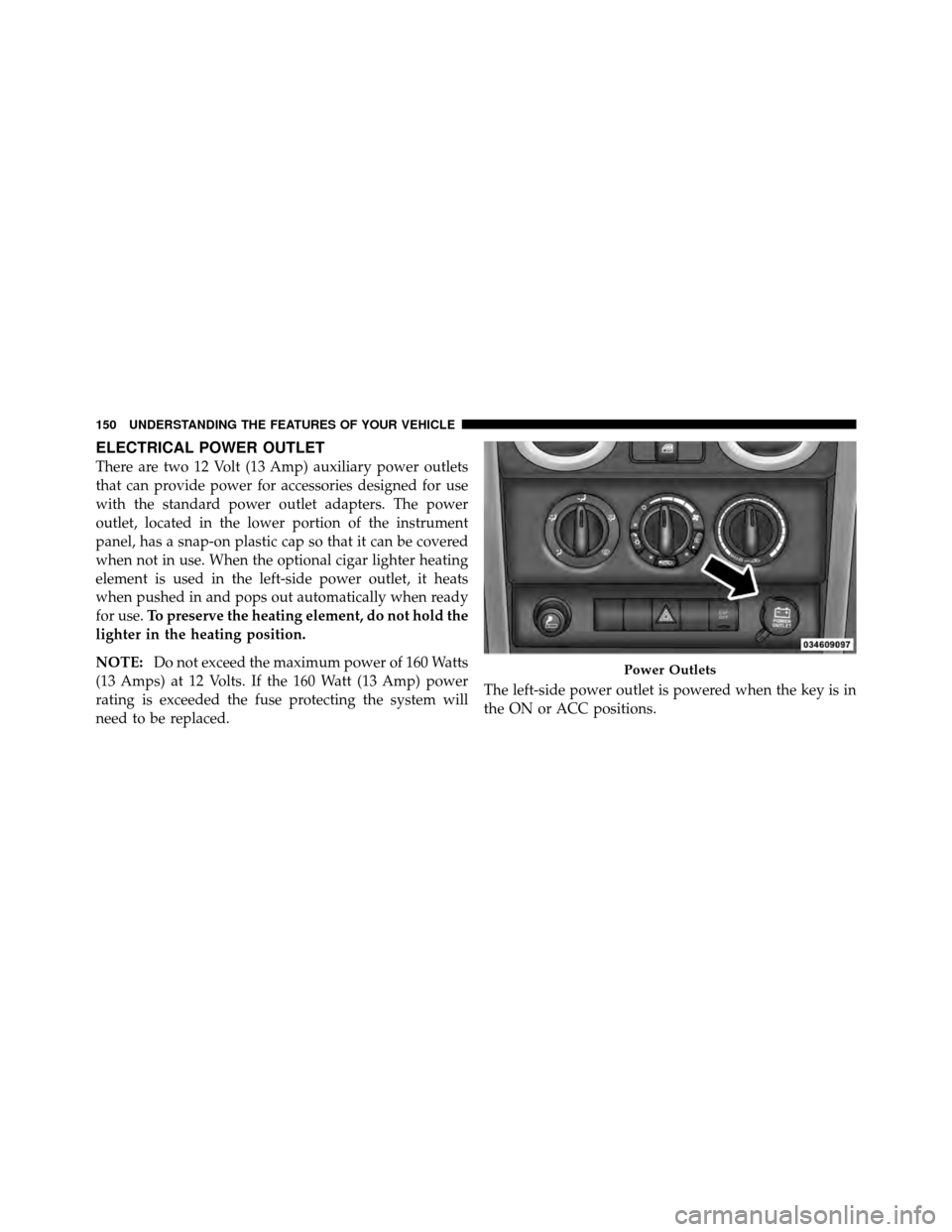
ELECTRICAL POWER OUTLET
There are two 12 Volt (13 Amp) auxiliary power outlets
that can provide power for accessories designed for use
with the standard power outlet adapters. The power
outlet, located in the lower portion of the instrument
panel, has a snap-on plastic cap so that it can be covered
when not in use. When the optional cigar lighter heating
element is used in the left-side power outlet, it heats
when pushed in and pops out automatically when ready
for use.To preserve the heating element, do not hold the
lighter in the heating position.
NOTE: Do not exceed the maximum power of 160 Watts
(13 Amps) at 12 Volts. If the 160 Watt (13 Amp) power
rating is exceeded the fuse protecting the system will
need to be replaced. The left-side power outlet is powered when the key is in
the ON or ACC positions.
Power Outlets
150 UNDERSTANDING THE FEATURES OF YOUR VEHICLE
Page 242 of 554
UNDERSTANDING YOUR INSTRUMENT PANEL
CONTENTS
�Instrument Panel Features ............... 244
� Instrument Cluster .................... 245
� Instrument Cluster Descriptions ........... 246
� Compass And Trip Computer — If Equipped . . 261
▫ Control Buttons ..................... 261
▫ Trip Conditions ..................... 262
▫ Compass/Temperature Display .......... 263
� Media Center 230 (REQ) — AM/FM Stereo
Radio And 6–Disc CD/DVD Changer
(MP3/WMA AUX Jack) .................. 267 ▫
Operating Instructions - Radio Mode ...... 267
▫ Operation Instructions - (Disc Mode For CD
And MP3/WMA Audio Play, DVD-Video) . . . 275
▫ Notes On Playing MP3/WMA Files ....... 277
▫ List Button (Disc Mode For MP3/WMA
Play) ............................. 280
▫ Info Button (Disc Mode For MP3/WMA
Play) ............................. 280
� Media Center 730N/430 (RER/REN/RBZ) —
AM/FM Stereo Radio And CD/DVD/HDD/
NAV — If Equipped .................... 282
4