Page 206 of 496
1. Turn the ignition switch to the ON position.Do not
start the engine.
2. Fully depress the accelerator pedal, slowly, three times
within 10 seconds.
3. Turn the ignition switch to the OFF/LOCK position.
NOTE: If the indicator message illuminates when you
start the vehicle, the oil change indicator system did not
reset. If necessary repeat this procedure.EVIC Functions
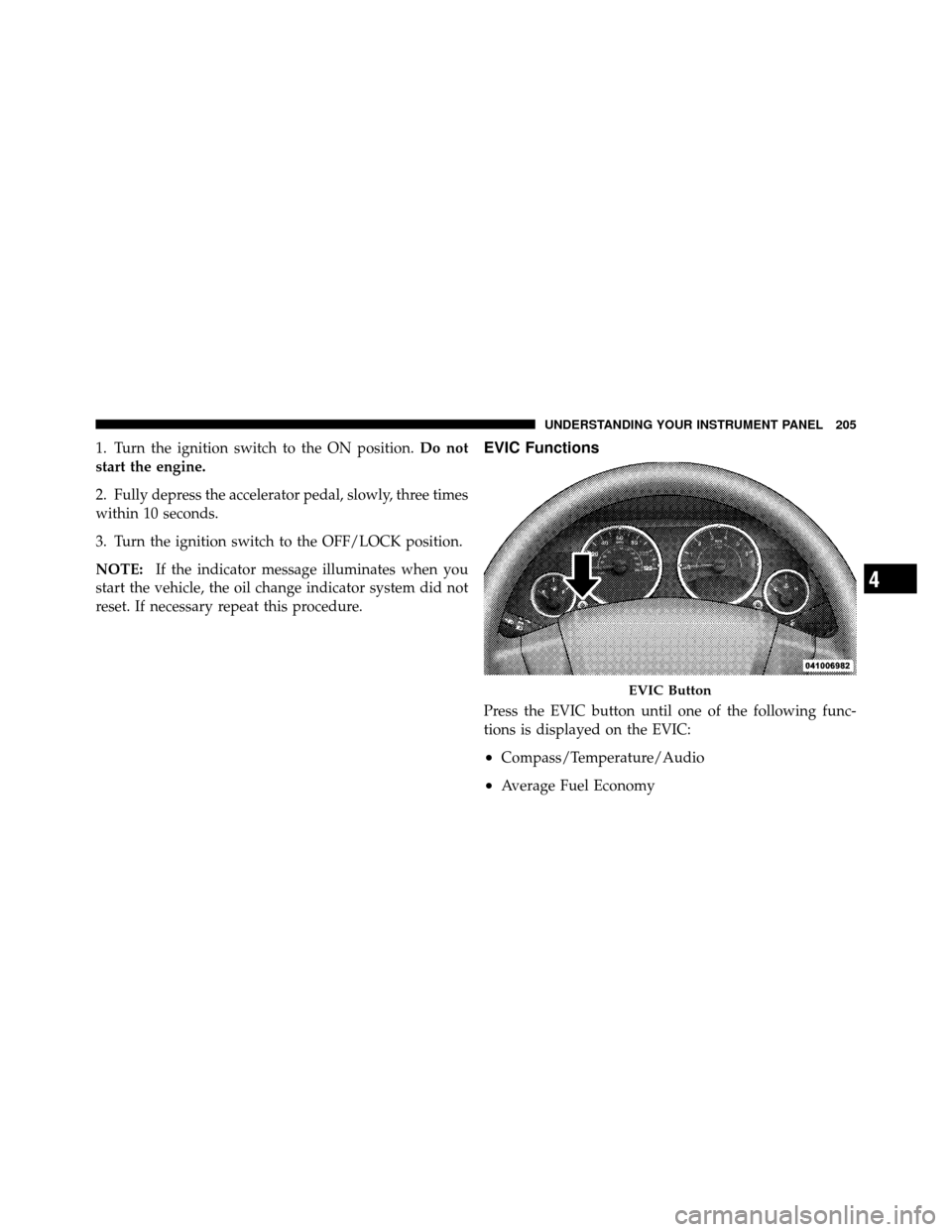
Press the EVIC button until one of the following func-
tions is displayed on the EVIC:
•Compass/Temperature/Audio
•Average Fuel Economy
EVIC Button
4
UNDERSTANDING YOUR INSTRUMENT PANEL 205
Page 207 of 496
•Distance To Empty (DTE)
•Elapsed Time
•Tire Pressure Monitor (TPM)
•Personal Settings
To Reset The Display
Pressing and holding the EVIC button once will clear the
function currently being displayed. Reset will only occur
if a resettable function is currently being displayed. To
reset all resettable functions, press and release the EVIC
button a second time within three seconds of resetting the
currently displayed function. Reset ALL will be dis-
played during this three-second window.
Compass/Temperature/Audio
Press and release the EVIC button to display one of eight
compass headings to indicate the direction the vehicle is
facing, the outside temperature, and the current radio
station.
For additional information regarding the compass, refer
to Personal Settings (Customer-Programmable Features).
Average Fuel Economy
Shows the average fuel economy since the last reset.
When the fuel economy is reset, the display will read
“RESET” or show dashes for two seconds. Then, the
history information will be erased, and the averaging will
continue from the last fuel reading before the reset.
Distance To Empty (DTE)
Shows the estimated distance that can be traveled with
the fuel remaining in the tank. This estimated distance is
206 UNDERSTANDING YOUR INSTRUMENT PANEL
Page 208 of 496

determined by a weighted average of the instantaneous
and average fuel economy, according to the current fuel
tank level. This is not resettable.
NOTE:Significant changes in driving style or vehicle
loading will greatly affect the actual drivable distance of
the vehicle, regardless of the DTE displayed value.
When the DTE value is less than 30 miles (48 km)
estimated driving distance, the DTE display will change
to a text display of �LOW FUEL�. This display will
continue until the vehicle runs out of fuel. Adding a
significant amount of fuel to the vehicle will turn off the
�LOW FUEL� text and a new DTE value will be dis-
played, based on the current values in the DTE calcula-
tion and the current fuel tank level.
Tire Pressure Monitor (TPM)
Refer to “Starting And Operating”, “Tire Pressure Moni-
toring System (TPMS)” for system operation.
Elapsed Time
Shows the total elapsed time of travel since the last reset
when the ignition switch is in the ACC position. Elapsed
time will increment when the ignition switch is in the ON
or START position.
Personal Settings (Customer-Programmable
Features)
This allows the driver to set and recall features when the
transmission is in PARK (automatic transmission) or the
vehicle is stopped (manual transmission).
Press and release the EVIC button until “Personal Set-
tings” is displayed in the EVIC.
Use the EVIC button to display one of the following
choices:
Language
When in this display you may select different languages
for all display nomenclature, including the trip functions.
4
UNDERSTANDING YOUR INSTRUMENT PANEL 207
Page 274 of 496
DefrostAir is directed through the windshield and side
window demist outlets. Use this mode with maxi-
mum blower and temperature settings for best wind-
shield and side window defrosting.
NOTE: The air conditioning compressor operates in
Mix, Defrost, or a blend of these modes, even if the Air
Conditioning (A/C) button is not pressed. This dehu-
midifies the air to help dry the windshield. To improve
fuel economy, use these modes only when necessary.
Recirculation Control Pressing the Recirculation Control button will
put the system in recirculation mode. This can
be used when outside conditions such as
smoke, odors, dust, or high humidity are
present. Activating recirculation will cause the LED in the
control button to illuminate. NOTE:
•Continuous use of the recirculation mode may make
the inside air stuffy and window fogging may occur.
Extended use of this mode is not recommended.
•The use of the recirculation mode in cold or damp
weather will cause windows to fog on the inside,
because of moisture buildup inside the vehicle. Select
the Outside Air position for maximum defogging.
•The A/C will engage automatically to prevent fogging
when the recirculation button is pressed and the mode
control is set to panel or panel / floor.
•The A/C can be deselected manually without disturb-
ing the mode control selection.
•When the ignition switch is turned to the LOCK
position, the recirculation feature will be cancelled.
4
UNDERSTANDING YOUR INSTRUMENT PANEL 273
Page 289 of 496
�Tire Pressure Monitoring System (TPMS) ..... 351
▫ Base System ........................ 354
▫ Premium System – If Equipped .......... 356
▫ General Information .................. 360
� Fuel Requirements ..................... 360
▫ Reformulated Gasoline ................ 361
▫ Gasoline/Oxygenate Blends ............. 361
▫ E85 Usage In Non-Flex Fuel Vehicles ...... 362
▫ MMT In Gasoline .................... 362
▫ Materials Added To Fuel ............... 363
▫ Fuel System Cautions ................. 363
▫ Carbon Monoxide Warnings ............ 364�
Adding Fuel ......................... 365
▫ Fuel Filler Cap (Gas Cap) .............. 365
▫ Loose Fuel Filler Cap Message ........... 367
� Vehicle Loading ...................... 367
▫ Vehicle Certification Label .............. 367
� Trailer Towing ........................ 369
▫ Common Towing Definitions ............ 369
▫ Trailer Hitch Classification .............. 372
▫ Trailer Towing Weights
(Maximum Trailer Weight Ratings) ........ 373
▫ Trailer And Tongue Weight ............. 373
▫ Towing Requirements ................. 374
▫ Towing Tips ........................ 380
288 STARTING AND OPERATING
Page 292 of 496
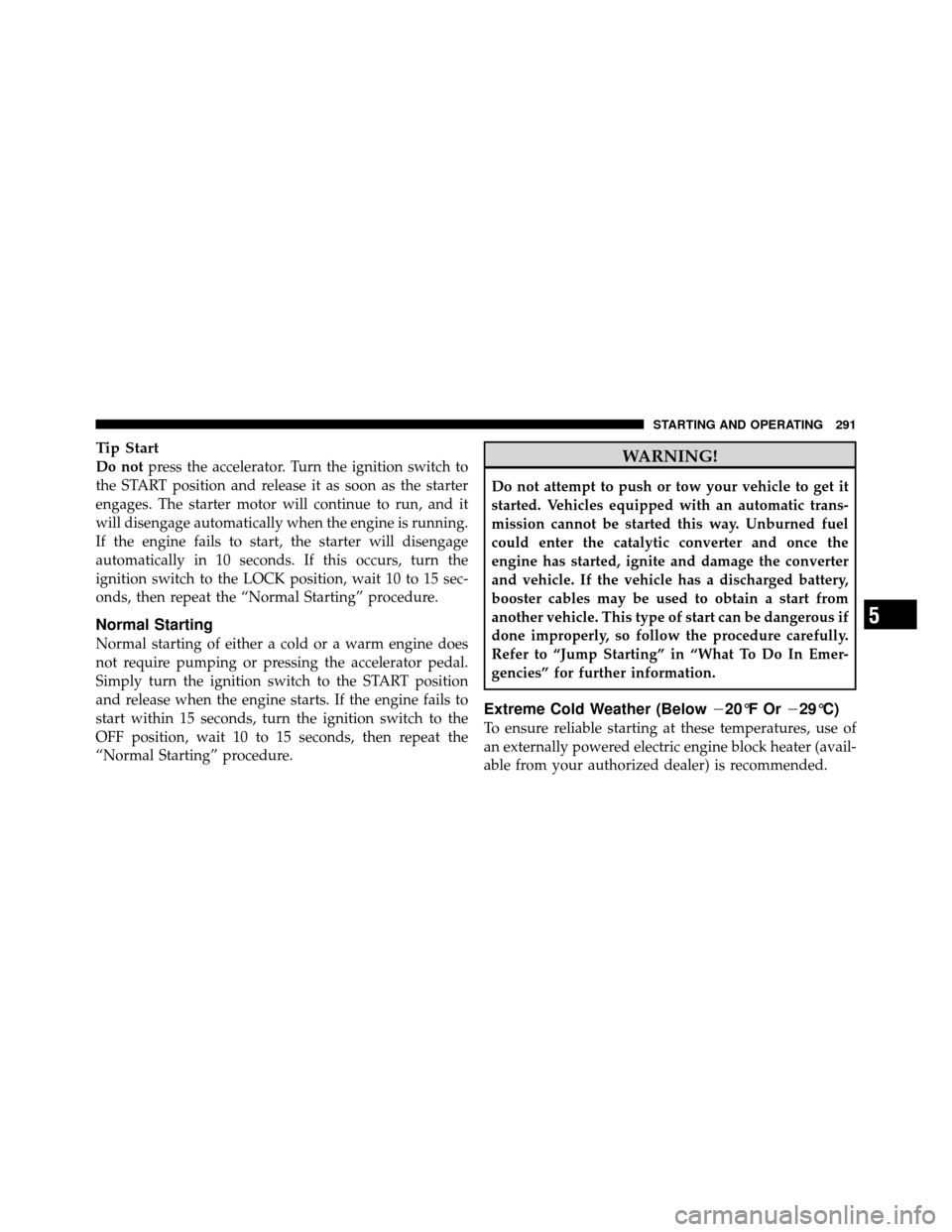
Tip Start
Do notpress the accelerator. Turn the ignition switch to
the START position and release it as soon as the starter
engages. The starter motor will continue to run, and it
will disengage automatically when the engine is running.
If the engine fails to start, the starter will disengage
automatically in 10 seconds. If this occurs, turn the
ignition switch to the LOCK position, wait 10 to 15 sec-
onds, then repeat the “Normal Starting” procedure.
Normal Starting
Normal starting of either a cold or a warm engine does
not require pumping or pressing the accelerator pedal.
Simply turn the ignition switch to the START position
and release when the engine starts. If the engine fails to
start within 15 seconds, turn the ignition switch to the
OFF position, wait 10 to 15 seconds, then repeat the
“Normal Starting” procedure.
WARNING!
Do not attempt to push or tow your vehicle to get it
started. Vehicles equipped with an automatic trans-
mission cannot be started this way. Unburned fuel
could enter the catalytic converter and once the
engine has started, ignite and damage the converter
and vehicle. If the vehicle has a discharged battery,
booster cables may be used to obtain a start from
another vehicle. This type of start can be dangerous if
done improperly, so follow the procedure carefully.
Refer to “Jump Starting” in “What To Do In Emer-
gencies” for further information.
Extreme Cold Weather (Below �20°F Or�29°C)
To ensure reliable starting at these temperatures, use of
an externally powered electric engine block heater (avail-
able from your authorized dealer) is recommended.
5
STARTING AND OPERATING 291
Page 293 of 496
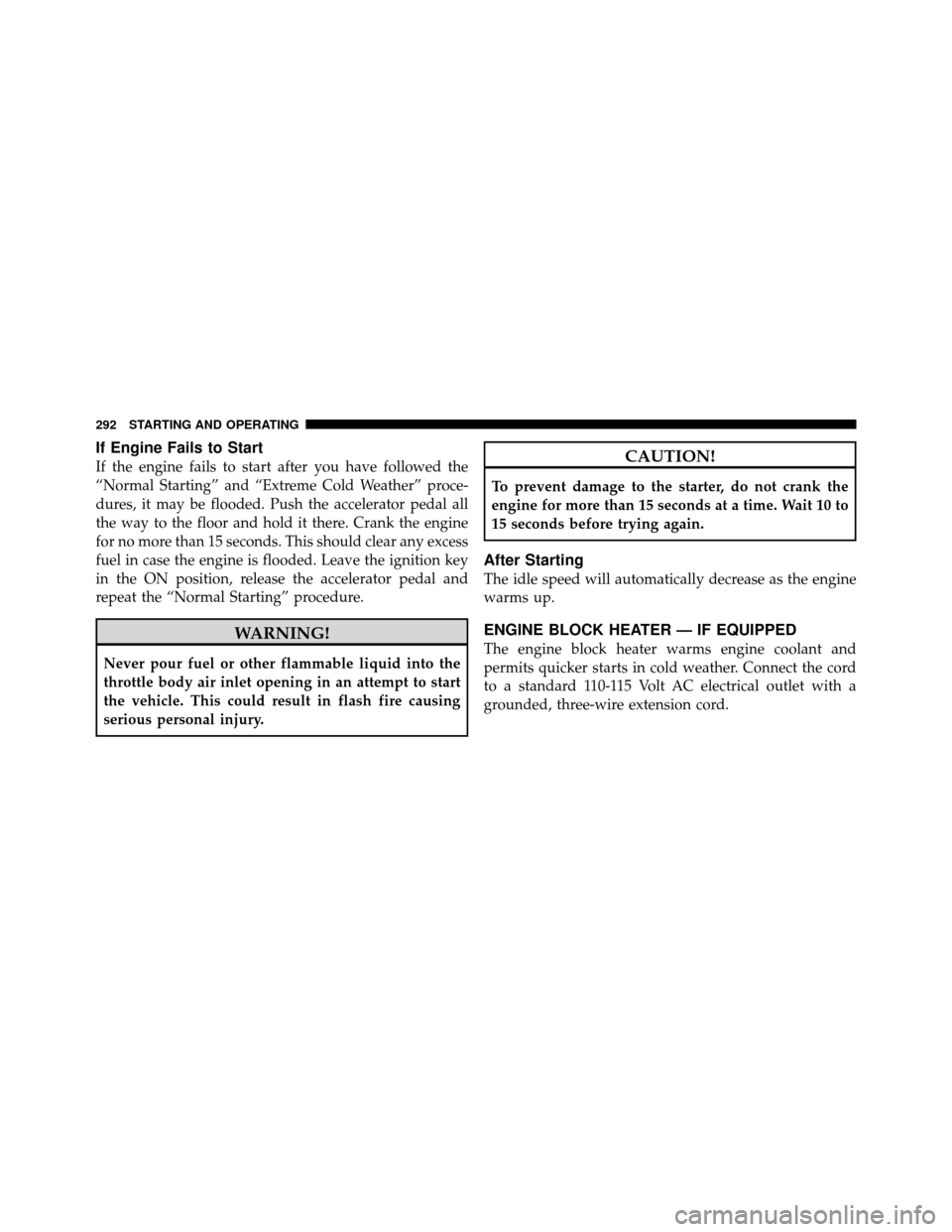
If Engine Fails to Start
If the engine fails to start after you have followed the
“Normal Starting” and “Extreme Cold Weather” proce-
dures, it may be flooded. Push the accelerator pedal all
the way to the floor and hold it there. Crank the engine
for no more than 15 seconds. This should clear any excess
fuel in case the engine is flooded. Leave the ignition key
in the ON position, release the accelerator pedal and
repeat the “Normal Starting” procedure.
WARNING!
Never pour fuel or other flammable liquid into the
throttle body air inlet opening in an attempt to start
the vehicle. This could result in flash fire causing
serious personal injury.
CAUTION!
To prevent damage to the starter, do not crank the
engine for more than 15 seconds at a time. Wait 10 to
15 seconds before trying again.
After Starting
The idle speed will automatically decrease as the engine
warms up.
ENGINE BLOCK HEATER — IF EQUIPPED
The engine block heater warms engine coolant and
permits quicker starts in cold weather. Connect the cord
to a standard 110-115 Volt AC electrical outlet with a
grounded, three-wire extension cord.
292 STARTING AND OPERATING
Page 295 of 496
Use each gear in numerical order, do not skip a gear. Be
sure the transmission is in first gear, (not third), when
starting from a standing position. Damage to the clutch
can result from starting in third gear.
For most city driving, you will find it easier to use only
the lower gears. For steady highway driving with light
accelerations, fifth gear is recommended.
Never drive with your foot resting on the clutch pedal,
and never try to hold the vehicle on a hill with the clutch
pedal partially engaged. This will cause abnormal wear
on the clutch.
Never shift into REVERSE until the vehicle has come to a
complete stop.
NOTE:During cold weather, until the transmission
lubricant is warm, you may experience slightly higher
shift efforts. This is normal and not harmful to the
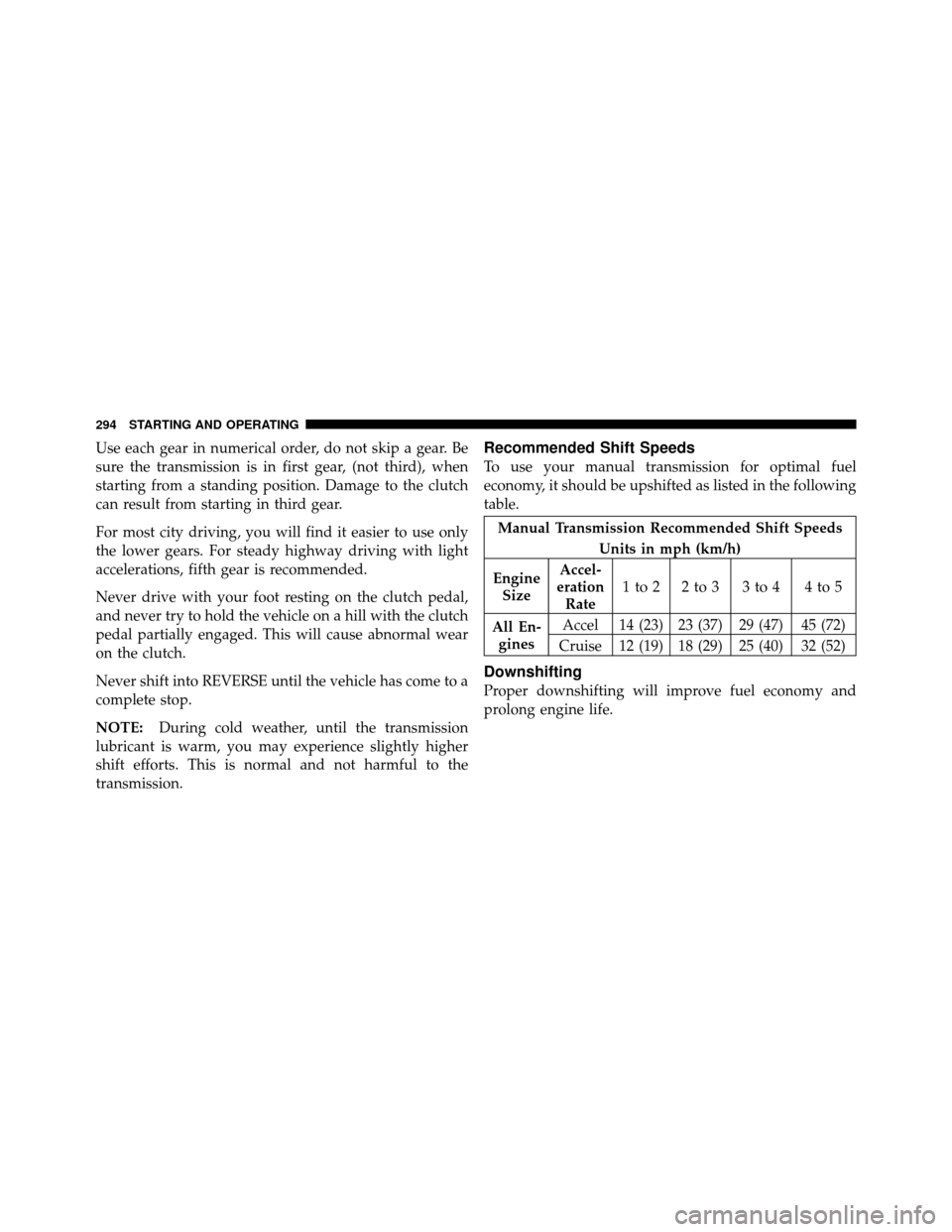
transmission.Recommended Shift Speeds
To use your manual transmission for optimal fuel
economy, it should be upshifted as listed in the following
table.
Manual Transmission Recommended Shift Speeds
Units in mph (km/h)
Engine Size Accel-
eration Rate 1to2 2to3 3to4 4to5
All En- gines Accel 14 (23) 23 (37) 29 (47) 45 (72)
Cruise 12 (19) 18 (29) 25 (40) 32 (52)
Downshifting
Proper downshifting will improve fuel economy and
prolong engine life.
294 STARTING AND OPERATING