Page 152 of 496
CAUTION!
In cold weather, always turn off the wiper switch and
allow the wipers to return to the park position before
turning off the engine. If the wiper switch is left on
and the wipers freeze to the windshield, damage to
the wiper motor may occur when the vehicle is
restarted.
TILT STEERING COLUMN
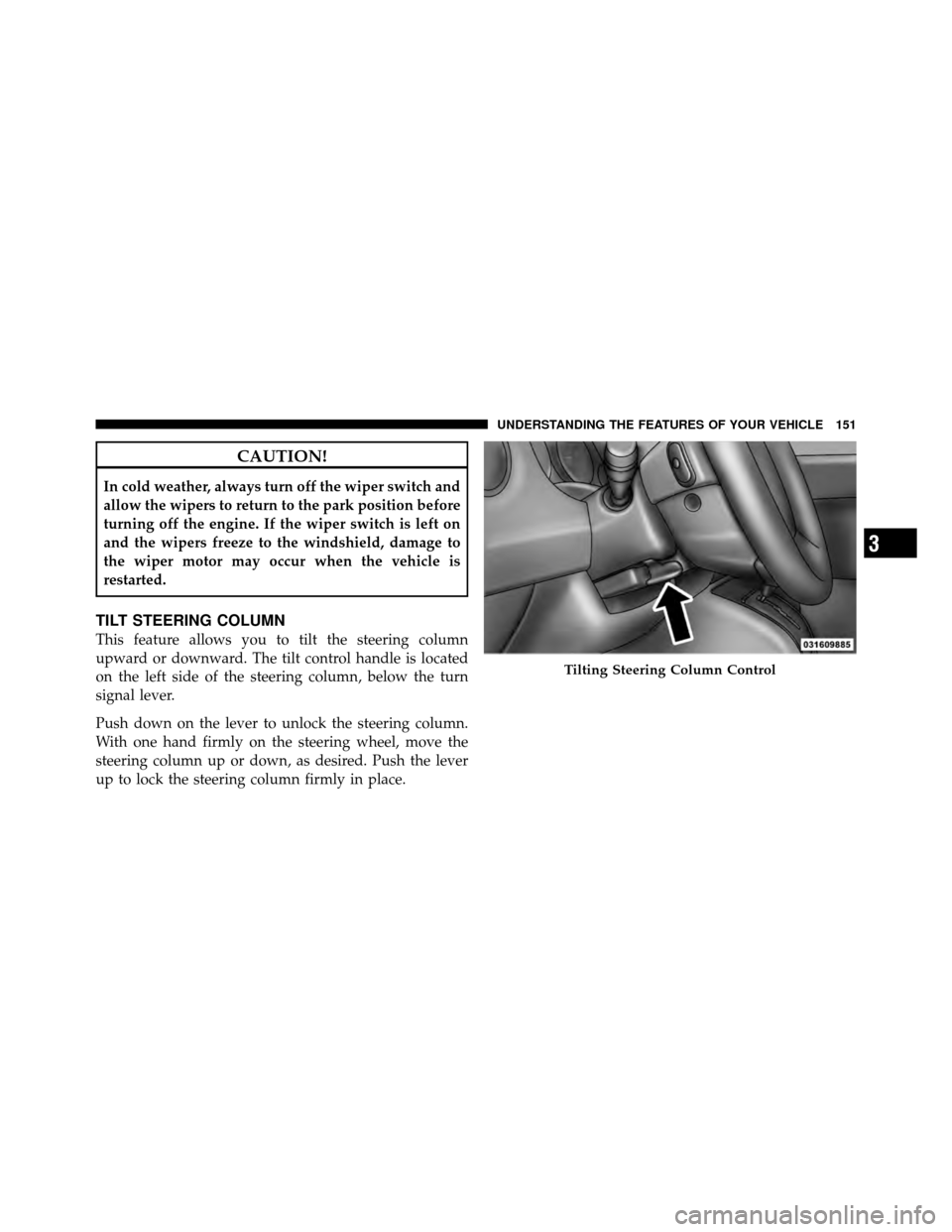
This feature allows you to tilt the steering column
upward or downward. The tilt control handle is located
on the left side of the steering column, below the turn
signal lever.
Push down on the lever to unlock the steering column.
With one hand firmly on the steering wheel, move the
steering column up or down, as desired. Push the lever
up to lock the steering column firmly in place.
Tilting Steering Column Control
3
UNDERSTANDING THE FEATURES OF YOUR VEHICLE 151
Page 153 of 496
WARNING!
Do not adjust the steering column while driving.
Adjusting the steering column while driving or driv-
ing with the steering column unlocked, could cause
the driver to lose control of the vehicle. Be sure the
steering column is locked before driving your ve-
hicle. Failure to follow this warning may result in
serious injury or death.
ELECTRONIC SPEED CONTROL — IF EQUIPPED
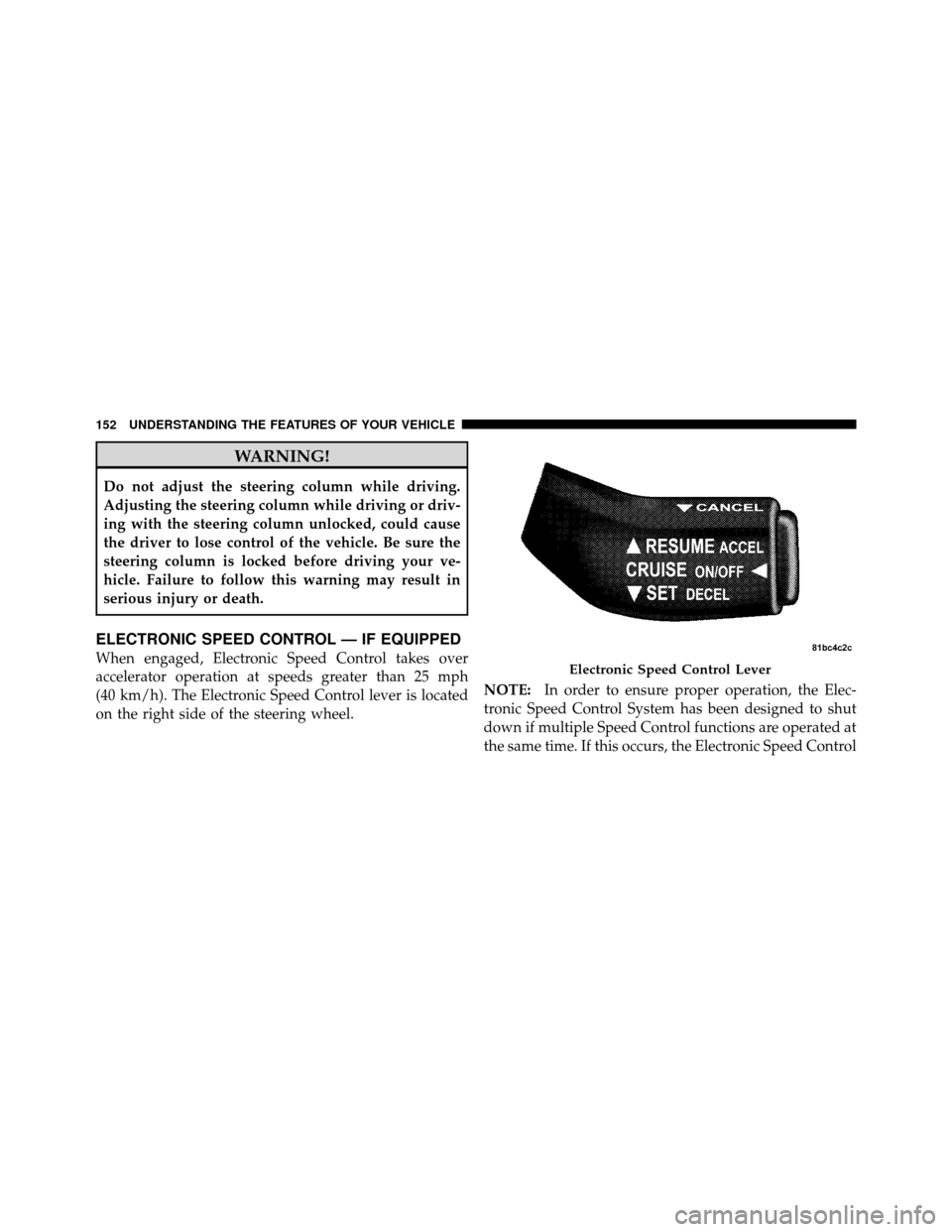
When engaged, Electronic Speed Control takes over
accelerator operation at speeds greater than 25 mph
(40 km/h). The Electronic Speed Control lever is located
on the right side of the steering wheel.NOTE:
In order to ensure proper operation, the Elec-
tronic Speed Control System has been designed to shut
down if multiple Speed Control functions are operated at
the same time. If this occurs, the Electronic Speed ControlElectronic Speed Control Lever
152 UNDERSTANDING THE FEATURES OF YOUR VEHICLE
Page 269 of 496
REMOTE SOUND SYSTEM CONTROLS — IF
EQUIPPED
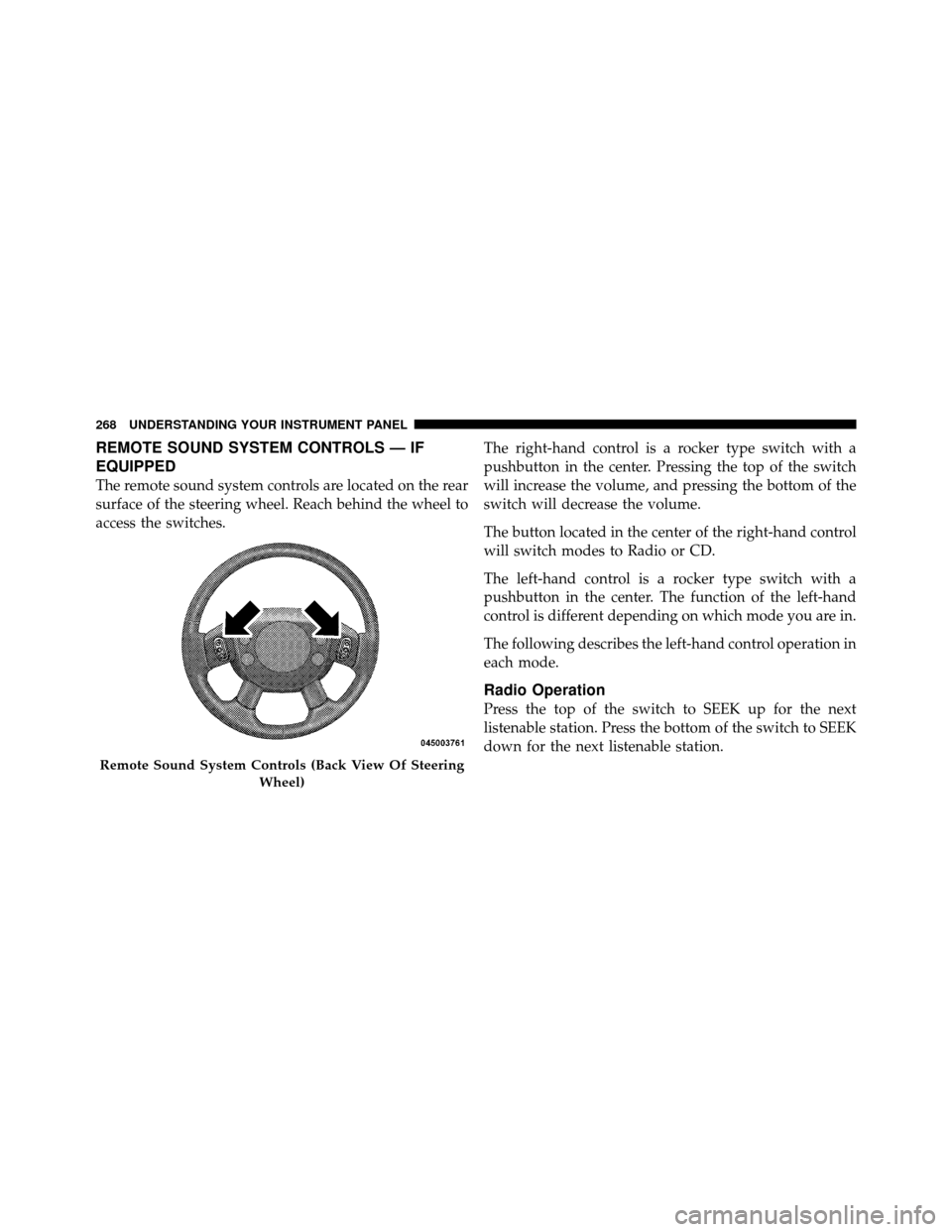
The remote sound system controls are located on the rear
surface of the steering wheel. Reach behind the wheel to
access the switches.The right-hand control is a rocker type switch with a
pushbutton in the center. Pressing the top of the switch
will increase the volume, and pressing the bottom of the
switch will decrease the volume.
The button located in the center of the right-hand control
will switch modes to Radio or CD.
The left-hand control is a rocker type switch with a
pushbutton in the center. The function of the left-hand
control is different depending on which mode you are in.
The following describes the left-hand control operation in
each mode.
Radio Operation
Press the top of the switch to SEEK up for the next
listenable station. Press the bottom of the switch to SEEK
down for the next listenable station.
Remote Sound System Controls (Back View Of Steering
Wheel)
268 UNDERSTANDING YOUR INSTRUMENT PANEL
Page 287 of 496
�AutoStick� — If Equipped ............... 299
▫ Operation ......................... 299
▫ General Information .................. 300
� Four-Wheel Drive Operation — If Equipped . . 300
� Driving On Slippery Surfaces ............. 301
▫ Acceleration ........................ 301
▫ Traction ........................... 302
� Driving Through Water ................. 302
▫ Flowing/Rising Water ................. 303
▫ Shallow Standing Water ............... 303
� On-Road Driving Tips .................. 305
� Off-Road Driving Tips .................. 305 ▫
When To Use Low (L Off-Road) With The
4WD Lock Lever Engaged .............. 306
▫ Driving In Snow, Mud And Sand ......... 306
▫ Hill Climbing ....................... 308
▫ Driving Through Water ................ 311
▫ After Driving Off-Road ................ 313
� Power Steering ....................... 314
▫ Power Steering Fluid Check ............. 315
� Parking Brake ........................ 316
� Brake System ........................ 318
▫ Anti-Lock Brake System (ABS) ........... 319
� Electronic Brake Control System ........... 321
▫ Anti-Lock Brake System (ABS) ........... 322
286 STARTING AND OPERATING
Page 291 of 496
STARTING PROCEDURES
Before starting your vehicle, adjust your seat, adjust both
inside and outside mirrors, and fasten your seat belts.
WARNING!
Never leave children alone in a vehicle. Leaving
unattended children in a vehicle is dangerous for a
number of reasons. A child or others could be seri-
ously or fatally injured. Do not leave the key in the
ignition. A child could operate power windows,
other controls, or move the vehicle.
Manual Transmission – If Equipped
Before starting the engine fully apply the parking brake,
press the clutch pedal to the floor, and place the shift
lever in NEUTRAL.NOTE:
•The engine will not start unless the clutch pedal is
pressed to the floor.
•If the key will not turn and the steering wheel is
locked, rotate the wheel in either direction to relieve
pressure on the locking mechanism and then turn the
key.
Automatic Transmission – If Equipped
The shift lever must be in the PARK or NEUTRAL
position before you can start the engine. Apply the brakes
before shifting to any driving gear.
NOTE:
You must press the brake pedal before shifting
out of PARK.
290 STARTING AND OPERATING
Page 299 of 496
WARNING! (Continued)
•Never leave children alone in a vehicle. Leaving
unattended children in a vehicle is dangerous for a
number of reasons. A child or others could be
seriously or fatally injured. Do not leave the
ignition key in the ignition switch. A child could
operate power windows, other controls, or move
the vehicle.
The following indicators should be used to ensure that
you have engaged the shift lever into the PARK position:
•When shifting into PARK, firmly move the shift lever
all the way forward until it stops.
•Look at the shift indicator window on the shift lever
bezel to ensure it is in the PARK position.
•You must press the brake pedal to move the shift lever
out of the PARK position.
CAUTION!
Before moving the shift lever out of PARK, you must
turn the ignition from LOCK to ON so the steering
wheel and shift lever are released. Otherwise, dam-
age to the steering column or shift lever could result.
You must also press the brake pedal.
REVERSE
This range is for moving the vehicle rearward. Use this
range only after the vehicle has come to a complete stop.
NEUTRAL
This range is used when the vehicle is standing for
prolonged periods with the engine running. The engine
may be started in this range. Set the parking brake if you
must leave the vehicle.
DRIVE
This range is used for most city and highway driving.
298 STARTING AND OPERATING
Page 306 of 496
ON-ROAD DRIVING TIPS
Utility vehicles have higher ground clearance and a
narrower track to make them capable of performing in a
wide variety of off-road applications. Specific design
characteristics give them a higher center of gravity than
ordinary cars.
An advantage of the higher ground clearance is a better
view of the road, allowing you to anticipate problems.
They are not designed for cornering at the same speeds as
conventional two-wheel drive vehicles any more than
low-slung sports cars are designed to perform satisfacto-
rily in off-road conditions. If at all possible, avoid sharp
turns or abrupt maneuvers. As with other vehicles of this
type, failure to operate this vehicle correctly may result in
loss of control or vehicle rollover.
OFF-ROAD DRIVING TIPS
You will encounter many types of terrain driving off-
road. You should be familiar with the terrain and area
before proceeding. There are many types of surface
conditions: hard packed dirt, gravel, rocks, grass, sand,
mud, snow and ice. Every surface has a different effect on
your vehicle’s steering, handling and traction. Control-
ling your vehicle is one of the keys to successful off-road
driving, so always keep a firm grip on the steering wheel
and maintain a good driving posture. Avoid sudden
accelerations, turns or braking. In most cases there are no
road signs, posted speed limits or signal lights. Therefore
you will need to use your own good judgment on what is
safe and what is not. When on a trail, you should always
be looking ahead for surface obstacles and changes in
terrain. The key is to plan your future driving route while
remembering what you are currently driving over.
5
STARTING AND OPERATING 305
Page 308 of 496
Snow
In heavy snow or for additional control and traction at
slower speeds, activate the 4WD LOCK and shift the
transaxle to low (L Off-Road) if necessary. Do not shift to
a lower gear than necessary to maintain headway. Over-
revving the engine can spin the wheels and traction will
be lost. If you start to slow to a stop, try turning your
steering wheel no more than a 1/4 turn quickly back and
forth, while still applying throttle. This will allow the
tires to get a fresh�bite�and help maintain your momen-
tum.
CAUTION!
On icy or slippery roads, do not downshift at high
engine RPM’s or vehicle speeds because engine brak-
ing may cause skidding and loss of control.
Mud
Deep mud creates a great deal of suction around the tires
and is very difficult to get through. You should use low (L
Off-Road) with the 4WD LOCK engaged and maintain
your momentum. If you start to slow to a stop, try
turning your steering wheel no more than a 1/4 turn
quickly back and forth for additional traction. Mud holes
pose an increased threat of vehicle damage and getting
stuck. They are normally full of debris from previous
vehicles getting stuck. As a good practice before entering
any mud hole, get out and determine how deep it is, if
there are any hidden obstacles and if the vehicle can be
safely recovered if stuck.
5
STARTING AND OPERATING 307