2010 JAGUAR XF ventilation
[x] Cancel search: ventilationPage 3 of 225

R
english-en (10, 18, 21 & 25)
Contents
3
Introduction...................................... 2
Entering the vehicle .......................... 4
Exiting the vehicle............................. 9
Front seats...................................... 12
Rear seats ...................................... 17
Head restraints ............................... 20
Steering wheel ................................ 22
Occupant safety .............................. 23
Exterior lights ................................. 36
Interior lights .................................. 39
Wipers and washers ....................... 40
Windows ........................................ 42
Mirrors ........................................... 44
Blind spot monitoring ..................... 46
Garage door opener........................ 48
Warning lamps ............................... 51
Message centre .............................. 56
Touch screen .................................. 58
Heating and ventilation ................... 63
Luggage compartment ................... 67
Towing ........................................... 69
Storage compartments ................... 72
Starting the engine ......................... 74
Intelligent stop/start ....................... 79
Gearbox .......................................... 81
Stability control .............................. 83
Brakes ............................................ 87
Tyre pressure monitoring system... 89
Parking aids.................................... 92
Cruise control ................................. 94
Adaptive cruise control ................... 96
Automatic speed limiter................ 103
Audio/video overview ................... 104
Radio ............................................ 109DAB radio ..................................... 111
Portable media ............................. 113
CD player...................................... 119
Television ..................................... 122
Video media player ....................... 124
Voice control ................................ 126
Telephone..................................... 128
Navigation system ........................ 134
Tyre repair kit ............................... 147
Fuel and refuelling ........................ 152
Maintenance ................................. 158
Fluid level checks ......................... 168
Technical specifications ............... 175
Vehicle battery.............................. 182
Tyres ............................................ 185
Fuses ............................................ 188
Wheel changing............................ 194
Vehicle recovery ........................... 197
After a collision ............................ 198
Vehicle identification .................... 200
Type approval ............................... 202
Controls overview......................... 224
Page 63 of 225
R
(FM8) SEMCON JLR OWNER GUIDE VER 1.00 EURO
LANGUAGE: english-en; MARQUE: jaguar; MODEL: XF
Heating and ventilation
63
Heating and ventilationCLIMATE CONTROL
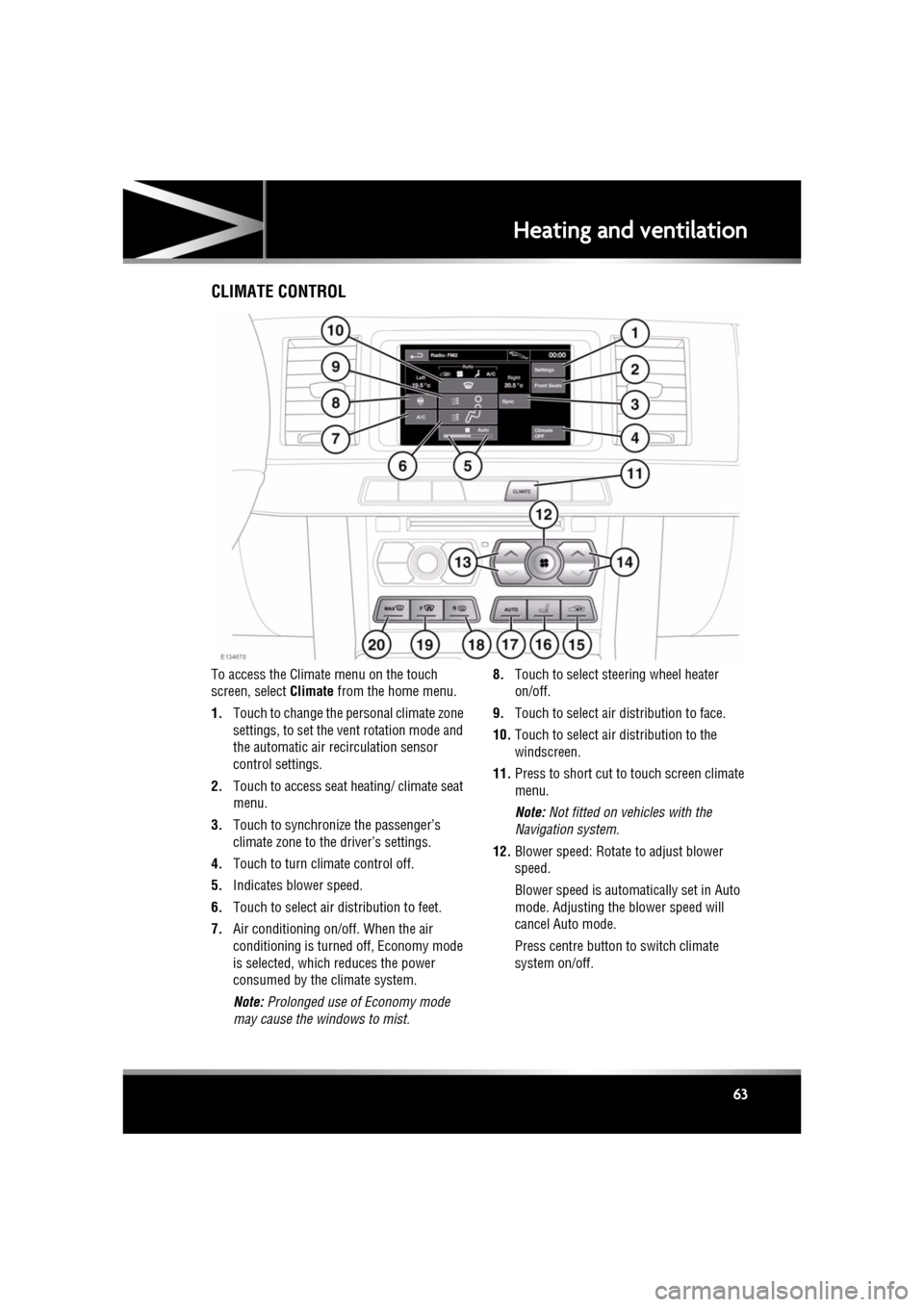
To access the Climate menu on the touch
screen, select Climate from the home menu.
1. Touch to change the personal climate zone
settings, to set the vent rotation mode and
the automatic air recirculation sensor
control settings.
2. Touch to access seat heating/ climate seat
menu.
3. Touch to synchronize the passenger’s
climate zone to the driver’s settings.
4. Touch to turn climate control off.
5. Indicates blower speed.
6. Touch to select air distribution to feet.
7. Air conditioning on/off. When the air
conditioning is turned off, Economy mode
is selected, which reduces the power
consumed by the climate system.
Note: Prolonged use of Economy mode
may cause the windows to mist. 8.
Touch to select steering wheel heater
on/off.
9. Touch to select air distribution to face.
10. Touch to select air distribution to the
windscreen.
11. Press to short cut to touch screen climate
menu.
Note: Not fitted on vehicles with the
Navigation system.
12. Blower speed: Rotate to adjust blower
speed.
Blower speed is automatically set in Auto
mode. Adjusting the blower speed will
cancel Auto mode.
Press centre button to switch climate
system on/off.
Page 64 of 225

L
(FM8) SEMCON JLR OWNER GUIDE VER 1.00 EURO
LANGUAGE: english-en; MARQUE: jaguar; MODEL: XF
Heating and ventilation
64
13. Left-hand temperature control: Press to
adjust temperature for the left side of the
vehicle. The temperat ure is displayed on
the touch screen ( HI or LO is displayed
when the maximum or minimum setting is
selected).
Note: The maximum possible temperature
differential betwee n left and right hand
temperature settings is 3°C (5.4°F).
14. Right-hand temperature control: Press to
adjust temperature for the right side of the
vehicle. The temperat ure is displayed on
the touch screen ( HI or LO is displayed
when the maximum or minimum setting is
selected).
15. Press briefly to select timed recirculation.
Press and hold to select continuous
recirculation. Press again to switch off. See
64, RECIRCULATION .
16. Press to access seat heating/ climate seat
menu.
17. AUTO control: Press to switch automatic
operation on.
18. Press to turn the heated rear screen on/off.
See 64, HEATED SCREENS .
19. Press to turn the heated front screen
on/off. See 64, HEATED SCREENS .
20. Defrost: Press to remove frost or heavy
misting from the winds creen. This setting
activates the blower s, air-conditioning,
front and rear screen heaters and prohibits
recirculation, to ac hieve a rapid defrost.
In addition to the selectable controls, the
climate menu displays symbols that indicate
the status of heating a nd ventilation functions.
Note: If the climate control system is switched
off, pressing an AUTO button or the Defrost
button, will switch the climate system on.HEATED SCREENS
With the engine running, the front (F) and rear
(R ) screen heaters, may be switched on and off
in any mode, including with the climate control
system off.
The front and rear screen heaters switch off
automatically after a timed period depending
on the ambient temperature. In cold ambient
conditions, below 5°C (41°F), the screen
heaters will switch on automatically when the
engine is started, unles s the engine or vehicle
interior is already warm.
RECIRCULATION
• Press briefly to activate timed
recirculation. The button indicator
illuminates when recirculation is on.
• Press and hold the but ton to activate
continuous recirculation. the button
indicator will flash and then illuminate
constantly.
• To cancel recirculation, press the button
briefly.
When selected, the air is recirculated inside the
vehicle. This helps to maintain a high or low
temperature, and is useful for preventing
fumes from entering the vehicle.
Timed recirculation : Recirculation will switch
off automatically after a set time (dependent on
the ambient temperature).
Latched recirculation: Recirculation will
remain on until the button is pressed again.
Note: Prolonged use at low temperatures may
cause the windows to mist.
Recirculation may also be selected in AUTO
mode, if the climate control system detects
high levels of pollution in the atmosphere
outside the vehicle (if an air quality sensor is
fitted). Manual operation of the recirculation
control will override the automatic setting.
Page 65 of 225

R
(FM8) SEMCON JLR OWNER GUIDE VER 1.00 EURO
LANGUAGE: english-en; MARQUE: jaguar; MODEL: XF
Heating and ventilation
65
AIR QUALITY SENSOR
If the air quality sensor detects pollution, air
recirculation is selected automatically to
reduce pollutants entering the vehicle.
The sensitivity of the se nsor can be adjusted
using the touch screen:
1. Select Settings from the Climate menu.
2. Touch the +/- buttons on the screen to
increase/decrease sensitivity.
To switch the function o ff, decrease sensitivity
to the minimum setting.
EXTERNAL TEMPERATURE
The external temperature is displayed in the
Home menu of the touch screen and in the
instrument panel.
When the external temp erature is low enough
that ice may be present on the road, an amber
snowflake warning lamp w ill illuminate in the
instrument panel.
AUTOMATIC CLIMATE CONTROL
AUTO mode should be used as the normal
operating mode. The air conditioning, heating
and ventilation controls automatically provide
an optimum environment at the selected
temperature.
Note: Screen heating and timed air
recirculation may be se lected in AUTO mode.
Any other manual adjustment cancels AUTO
operation.
Note: Water expelled by the air conditioning
may collect underneath the vehicle when
parked. This is not cause for concern.
TEMPERATURE CONTROLS
The driver and front seat passenger zone
temperatures can be i ndependently adjusted.
The temperature for each zone is displayed on
the relevant side of the touch screen.
Note: The maximum possible temperature
differential between the driver and passenger
settings is 3°C (5.4°F).
HEATED SEATS
Note: The seat heaters will only operate when
the engine is running.
The heated seats are controlled from the Home
or Climate menu on the touch screen.
• Touch the appropriate seat icon to switch
on the seat heater at maximum
temperature (3 red bars).
• Touch the icon a second and third time to
reduce the temperature (2 and 1 red bars).
• Touch the icon a fourth time to switch the
seat heater off.
This icon appears at the top of the
touch screen when the air quality
sensor is switched on.
Page 66 of 225

L
(FM8) SEMCON JLR OWNER GUIDE VER 1.00 EURO
LANGUAGE: english-en; MARQUE: jaguar; MODEL: XF
Heating and ventilation
66
CLIMATE SEATS
Note: The climate seats w ill only operate when
the engine is running.
Seat ventilation is cont rolled from the Home or
Climate menu on the touch screen.
Heated ventilation:
• Touch the red arrow above the appropriate
seat icon to switch he ated ventilation on at
maximum (3 red bars).
• Touch the blue arrow below the seat icon
once or twice to reduce the ventilation
setting (2 and 1 red bars).
• Touch the blue arrow a third time to switch
off seat ventilation.
Cooled ventilation:
• Touch the blue arrow below the
appropriate seat icon to switch cooled
ventilation on at maximum (3 blue bars).
• Touch the red arrow above the seat icon
once or twice to reduce the ventilation
setting (2 and 1 blue bars).
• Touch the red arrow a third time to switch
off seat ventilation.
To select backrest ventilation only:
• Select Settings from the Climate menu.
• Select the appropriate icon for full seat or
backrest only ventilation.
Page 129 of 225

R
(FM8) SEMCON JLR OWNER GUIDE VER 1.00 EURO
LANGUAGE: english-en; MARQUE: jaguar; MODEL: XF
Telephone
129
BLUETOOTH® INFORMATION
The Jaguar Bluetoot h® system supports
Bluetooth® Hands-Fre e Profile (HFP),
Advanced Audio Distribution Profile (A2DP)
and Audio Video Remote Control Profile
(AVRCP).
Note: HFP and A2DP/AVRCP profiles can be
connected independently, so a phone can be
connected via one, while a media device can be
connected via the other, at the same time.
Before making use of the vehicle’s Bluetooth
phone system, your Bl uetooth phone must be
paired and connected to the vehicle system.
This is done using one of two methods; via
your phone to the vehicl e or from the touch
screen to your phone. If one of these methods
is not successful, try the other option.
Each time the ignition is switched on the
system will attempt to connect with the last
connected phone.
As mobile phones have a wide range of audio
and echo characteristics, it may take a few
seconds for the vehicle system to adapt and
deliver optimum audio performance. To
achieve this, it may be necessary to reduce the
in-vehicle volume a nd ventilation fan speed
slightly.
TELEPHONE SAFETY
Switch off your telephone in areas
with a high explos ion risk. This
includes filling stat ions, fuel storage
areas or chemical factories, as well
as places where the air contains fuel
vapour, chemicals or metal dust. Always stow your mobile phone
securely.
The functioning of cardiac
pacemakers or hearing aids may be
impaired when the phone is in use.
Check with a doctor or manufacturer
whether any such devices you or your
passengers are using, are sufficiently
protected against high-frequency
energy.
The Health Industry Manufacturers'
Association recommends that a minimum
separation of 15 centimetres (six inches) is
maintained between a wireless phone antenna
and a pacemaker, to avoid potential
interference with the pacemaker. These
recommendations are consistent with the
independent research by, and
recommendations of, Wi reless Technology
Research.
Bluetooth® is the name for
short-range radio frequency (RF)
technology that allows electronic
devices to communicate
wirelessly with each other.
Page 211 of 225

R
english-en (10, 18, 21 & 25)
Index
211
tank capacity . . . . . . . . . . . . . . . . . . . . 156
water in fuel . . . . . . . . . . . . . . . . . . . . . 153
Fuses changing . . . . . . . . . . . . . . . . . . . . . . . 188
engine compartment fuse box . . . . . . . 189
locations . . . . . . . . . . . . . . . . . . . . . . . 188
luggage compartment fuse box . . . . . . 192
Passenger compartment fuse box . . . . 191
G
Garage door opener. . . . . . . . . . . . . . . . . . 48entry gate . . . . . . . . . . . . . . . . . . . . . . . 50
erase all programming. . . . . . . . . . . . . . 49
programming. . . . . . . . . . . . . . . . . . . . . 48a single button . . . . . . . . . . . . . . . . . . 49
rolling code device . . . . . . . . . . . . . . . 49
Gear selector . . . . . . . . . . . . . . . . . . . . . . . 82 malfunction . . . . . . . . . . . . . . . . . . . . . . 82
Gearbox
automatic. . . . . . . . . . . . . . . . . . . . . . . . 81
identification number. . . . . . . . . . . . . . 201
limp home mode . . . . . . . . . . . . . . . . . . 82
operation . . . . . . . . . . . . . . . . . . . . . . . . 86
selector . . . . . . . . . . . . . . . . . . . . . . . . . 82
selector malfunction . . . . . . . . . . . . . . . 82
temporary manual selection . . . . . . . . . 82
winter mode . . . . . . . . . . . . . . . . . . . . . 83
Glass cleaning . . . . . . . . . . . . . . . . . . . . . 165
Global closing . . . . . . . . . . . . . . . . . . . . . . 10
Global opening . . . . . . . . . . . . . . . . . . . . . . 7
H
Handbrake . . . . . . . . . . . . . . . . . . . . . . . . . 88
Handling adaptive dynamics . . . . . . . . . . . . . . . . . 84
DSC warning lampactive . . . . . . . . . . . . . . . . . . . . . . . . . 53
off . . . . . . . . . . . . . . . . . . . . . . . . . . . 53
dynamic mode . . . . . . . . . . . . . . . . . . . . 83
EBD (Electronic brake force distribution) 87
Head restraints . . . . . . . . . . . . . . . . . . . . . 20
active . . . . . . . . . . . . . . . . . . . . . . . . . . . 32 manual . . . . . . . . . . . . . . . . . . . . . . . . . . 21
removing. . . . . . . . . . . . . . . . . . . . . . . . . 21
Headlamps adaptive . . . . . . . . . . . . . . . . . . . . . . . . . 37
AFS (Adaptive front li ghting system) . . . 37
approach lamps . . . . . . . . . . . . . . . . . . . 37
auto high beam . . . . . . . . . . . . . . . . . . . . 38
condensation . . . . . . . . . . . . . . . . . . . . . 38
controls. . . . . . . . . . . . . . . . . . . . . . . . . . 36
daylight running lamps . . . . . . . . . . . . . . 37
high beam warning lamp . . . . . . . . . . . . 54
warning lamp (AFS) . . . . . . . . . . . . . . . . 53
washers . . . . . . . . . . . . . . . . . . . . . . . . . 41
wiper detection . . . . . . . . . . . . . . . . . . . . 37
Heated screens . . . . . . . . . . . . . . . . . . . . . . 64
Heated seats . . . . . . . . . . . . . . . . . . . . . . . . 65
Heated steering wheel. . . . . . . . . . . . . . . . . 22
Heating and ventilation
auto. . . . . . . . . . . . . . . . . . . . . . . . . . . . . 65
recirculation . . . . . . . . . . . . . . . . . . . . . . 64
High beam
automatic . . . . . . . . . . . . . . . . . . . . . . . . 38
warning lamp . . . . . . . . . . . . . . . . . . . . . 54
Homelink . . . . . . . . . . . . . . . . . . . . . . . . . . 48
programming a single button . . . . . . . . . 49
rolling code device programming . . . . . . 49
I
Identifying the vehicletransmission number . . . . . . . . . . . . . . 201
Ignition
rolling re-start . . . . . . . . . . . . . . . . . . . . . 77
switching off while moving . . . . . . . . . . . 77
switching on . . . . . . . . . . . . . . . . . . . . . . 74
Indicators . . . . . . . . . . . . . . . . . . . . . . . . . . 36 warning lamp . . . . . . . . . . . . . . . . . . . . . 54
Information messages . . . . . . . . . . . . . . . . 56
Infotainment CD controls . . . . . . . . . . . . . . . . . . . . . . . 120
DAB radio controls . . . . . . . . . . . . . . . . . . . . . . . 111