2010 JAGUAR XF Gear
[x] Cancel search: GearPage 93 of 225

R
(FM8) SEMCON JLR OWNER GUIDE VER 1.00 EURO
LANGUAGE: english-en; MARQUE: jaguar; MODEL: XF
Parking aids
93
CLEANING THE SENSORS
For reliable operation, th e sensors in the front
and rear bumpers should be kept free from ice,
frost and grime.
Do not clean the sensors with abrasive
or sharp objects or materials.
When using a high pressure spray, only
spray the sensors briefly, from a
distance greater than 200 mm
(8 inches).
PARKING AID SYSTEM FAULT
If the system has a fault when engaging reverse
gear or turning on the ignition, then a single, 3
second tone will be heard and a pop-up
warning will appear on the touch screen. If
both front and rear park ing aids are fitted, the
warning indicator in the parking aid switch will
flash for 3 seconds and then switch off.
If a fault is detected, the system is
automatically disabled.
Note: The parking aid may emit spurious tones
if it detects a frequenc y tone using the same
band as the sensors (e.g. air brakes).
REAR VIEW CAMERA
It remains the driver's responsibility
to detect obstacles and estimate the
vehicle's distance from them when
reversing.
When Reverse ( R) is selected, the system uses
a camera to provide a wide-angle colour rear
view image on the touch screen.
The camera display has priority over the
parking aid display. To view the parking aid
display instead, or to cancel camera display at
any time, touch the display.
The display also incorporates graphic overlays,
indicating vehicle di rection, width and
proximity to surrounding objects. The camera image will not be displayed;
•
If Drive ( D) is selected and the vehicle
speed is greater than 16 km/h (10 mph).
• If Drive ( D) is selected for longer than 2
seconds.
A. Solid line: The projec ted wheel trajectory.
B. Dotted line: The safe working width of the
vehicle (including exterior mirrors).
C. Boot access guideline: Do not reverse
beyond this point if boot access is
required.
D. Bumper inclusion.
E. Parking sensor activati on: A coloured area
appears, to indicate which rear sensor(s)
has been activated.
Page 94 of 225
L
(FM8) SEMCON JLR OWNER GUIDE VER 1.00 EURO
LANGUAGE: english-en; MARQUE: jaguar; MODEL: XF
Cruise control
94
Cruise controlUSING CRUISE CONTROL
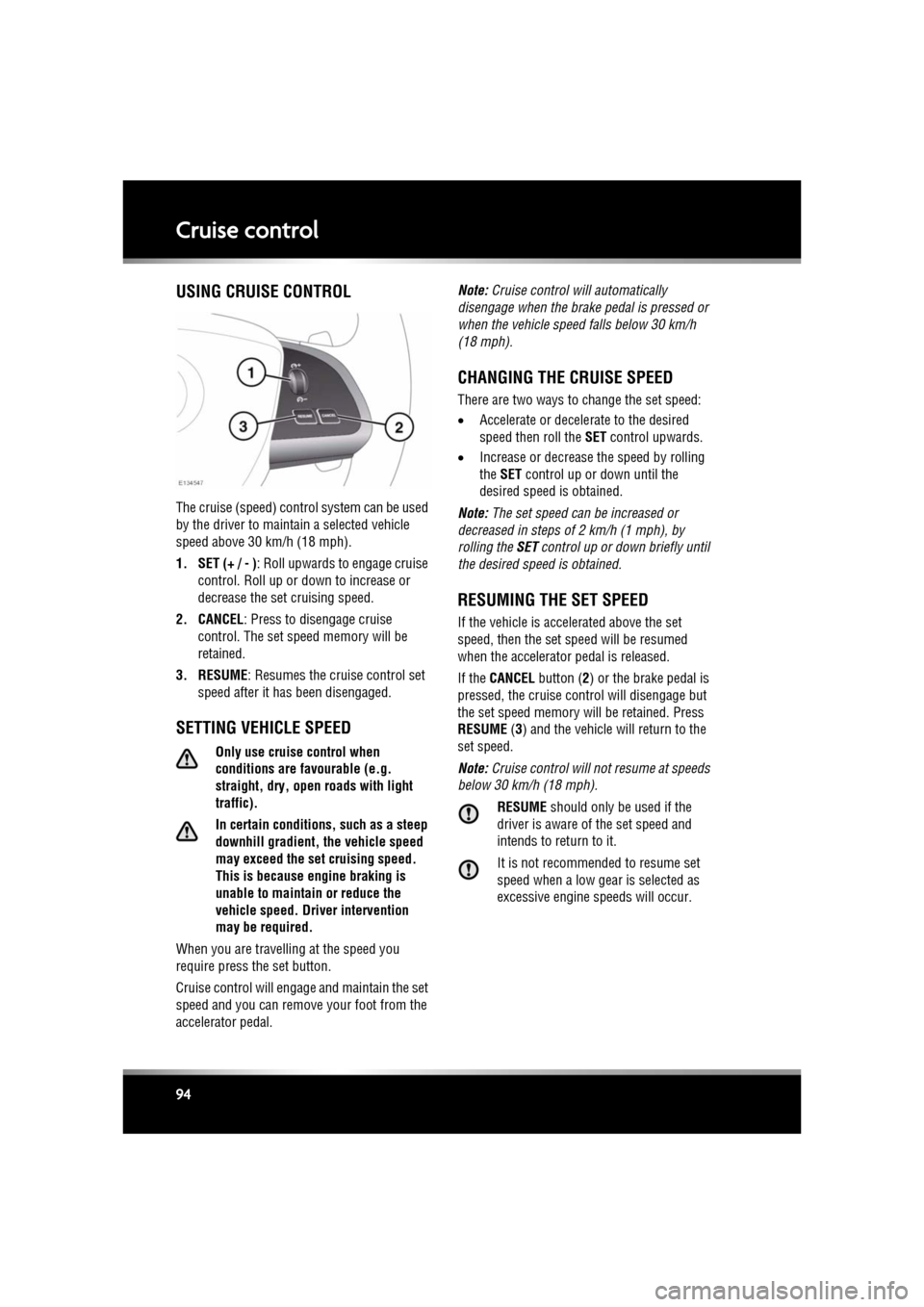
The cruise (speed) contro l system can be used
by the driver to maintain a selected vehicle
speed above 30 km/h (18 mph).
1. SET (+ / - ) : Roll upwards to engage cruise
control. Roll up or down to increase or
decrease the set cruising speed.
2. CANCEL : Press to disengage cruise
control. The set sp eed memory will be
retained.
3. RESUME : Resumes the cruise control set
speed after it has been disengaged.
SETTING VEHICLE SPEED
Only use cruise control when
conditions are favourable (e.g.
straight, dry, open roads with light
traffic).
In certain conditions, such as a steep
downhill gradient, the vehicle speed
may exceed the set cruising speed.
This is because eng ine braking is
unable to maintain or reduce the
vehicle speed. Driver intervention
may be required.
When you are travelling at the speed you
require press the set button.
Cruise control will enga ge and maintain the set
speed and you can remove your foot from the
accelerator pedal. Note:
Cruise control w ill automatically
disengage when the brake pedal is pressed or
when the vehicle speed falls below 30 km/h
(18 mph).
CHANGING THE CRUISE SPEED
There are two ways to change the set speed:
• Accelerate or decele rate to the desired
speed then roll the SET control upwards.
• Increase or decrease the speed by rolling
the SET control up or down until the
desired speed is obtained.
Note: The set speed can be increased or
decreased in steps of 2 km/h (1 mph), by
rolling the SET control up or down briefly until
the desired spee d is obtained.
RESUMING THE SET SPEED
If the vehicle is accelerated above the set
speed, then the set speed will be resumed
when the accelerator pedal is released.
If the CANCEL button ( 2) or the brake pedal is
pressed, the cruise cont rol will disengage but
the set speed memory will be retained. Press
RESUME (3) and the vehicle will return to the
set speed.
Note: Cruise control will not resume at speeds
below 30 km/h (18 mph).
RESUME should only be used if the
driver is aware of the set speed and
intends to return to it.
It is not recomme nded to resume set
speed when a low gear is selected as
excessive engine speeds will occur.
Page 95 of 225

R
(FM8) SEMCON JLR OWNER GUIDE VER 1.00 EURO
LANGUAGE: english-en; MARQUE: jaguar; MODEL: XF
Cruise control
95
AUTOMATIC SWITCH OFF
Cruise control will swit ch off but the set speed
will remain in the memory when:
• The CANCEL button ( 2) is pressed.
• The brake pedal is pressed.
• Speed falls below 30 km/h (18 mph).
• Neutral, Park or Reverse gear is selected.
• Dynamic Stability C ontrol is operating.
• The difference between the actual and set
speed is too great.
• When the vehicle reaches a maximum
speed of 192 km/h (120 mph).
• The accelerator pedal is used to accelerate
beyond the set speed for too long a period.
Cruise control will switch off and clear the
memory when:
• The ignition system is switched off.
• A fault occurs. The cr uise control system
will switch off and cannot be used until the
fault is cleared.
Page 98 of 225

L
(FM8) SEMCON JLR OWNER GUIDE VER 1.00 EURO
LANGUAGE: english-en; MARQUE: jaguar; MODEL: XF
Adaptive cruise control
98
CHANGING THE FOLLOW MODE SET
GAP
Four gap settings are available and the selected
gap setting will be displayed on the message
centre when the gap adjustment control is
operated.
Each gap level is indi cated by an additional
chevron in front of the vehicle icon in the
message centre (one chevron (gap level 1)
being the shortest, four chevrons (gap level 4)
being the longest).
Note: When the ignition is switched off, the
gap setting will revert to the default setting
(gap level 3) when switched on again.
Note: It is the driver’s res ponsibility to select a
gap appropriate to the driving conditions.
OVERRIDING THE SPEED AND
FOLLOW MODE
Whenever the driver is overriding the
ACC by depressing the accelerator
pedal, the ACC will not automatically
apply the brakes to maintain
separation from any vehicle ahead.
The set speed and gap can be overridden by
pressing the accelerator pedal when cruising at
constant speed or in follow mode. If the vehicle
is in follow mode, the warning lamp will go out
when the ACC is overridden by the driver using
the accelerator and CRUISE OVERRIDE will be
displayed on the message centre. When the
accelerator is released the ACC function will
operate again and vehicle speed will decrease
to the set speed, or a lower speed if follow
mode is active.
AUTOMATIC LOW SPEED
SWITCH-OFF
If the speed of the vehicle decreases below 30
km/h (18 mph), the ACC system will be
automatically switched off and the warning
lamp will go out.
If the brakes were bei ng applied by the ACC
system, they will be slowly released.
This will be accompanied by an audible
warning, and DRIVER INTERVENE will be
displayed on the message centre. The driver
must take control.
ACC AUTO OFF
ACC will disengage, but not clear the memory
when:
• The CANCEL button is pressed
• The brake pedal is pressed
• Neutral ( N), Park (P ) or Reverse ( R) gear is
selected
• Dynamic Stability Control activates.
ACC will disengage, and clear the memory
when:
• The ignition system is switched off
• Maximum vehicle speed is reached
• A fault occurs in the ACC system.
Page 99 of 225

R
(FM8) SEMCON JLR OWNER GUIDE VER 1.00 EURO
LANGUAGE: english-en; MARQUE: jaguar; MODEL: XF
Adaptive cruise control
99
RESUMING THE SPEED AND
FOLLOW MODE
RESUME should only be used if the
driver is aware of the set speed and
intends to return to it.
By pressing the RESUME button after ACC has
been cancelled, for example, after braking, the
ACC will become active again provided that the
set speed memory has not been erased. The
original set speed will be resumed (unless a
vehicle ahead causes the follow mode to
become active) and the set speed will be
displayed in the message centre for four
seconds.
HINTS ON DRIVING WITH ACC
The system acts by regulating the speed of the
vehicle using engine c ontrol and the brakes.
Gear changes may occur in response to
deceleration or accele ration whilst in ACC.
ACC is not a collision avoidance system.
However, during some situations the system
may provide the driver with an indication that
intervention is required.
An audible alarm will sound, accompanied by
the message DRIVER INTERVENE if the ACC
detects:
• A failure has occurred whilst the system is
active
• That using maximum ACC braking only is
not sufficient.
Note: ACC operates when the gear selector
lever is in position S or D.
Note: When engaged, the accelerator pedal
rests in the raised position. Fully release the
pedal to allow normal ACC operation.
Note: When braking is applied by the ACC, the
vehicle brake lamps will be switched on
although the brake pedal will not move.
DETECTION BEAM ISSUES
Detection issues can occur:
1. When driving on a different line to the
vehicle in front.
2. When a vehicle edges into your lane. The
vehicle will only be detected once it has
moved fully into your lane.
3. There may be issues with the detection of
vehicles in front when going into and
coming out of a bend.
In these cases ACC may brake late or
unexpectedly. The driver should stay alert and
intervene if necessary.
Page 197 of 225

R
(FM8) SEMCON JLR OWNER GUIDE VER 1.00 EURO
LANGUAGE: english-en; MARQUE: jaguar; MODEL: XF
Vehicle recovery
197
Vehicle recoveryTOWING EYES
The towing eyes at the front and rear
of the vehicle are designed for
on-road recovery only.
Do not tow the vehicle on all four
wheels.
ATTACHING THE FRONT TOWING
EYE
The front towing eye is included in the tool kit,
located in the under-floor area of the luggage
compartment.
1. Pop out the cover in the front bumper.
2. Locate the towing eye through the bumper
and screw the towing eye anticlockwise
into its fixing, until secure.
3. Rear towing eye.
TRANSPORTING THE VEHICLE
Only use the lashing points indicated, or
over-wheel lashings or wheel chocks.
Use of any other lashing position may
cause damage to the vehicle.
During vehicle recovery, to ensure the
steering column remains unlocked,
make sure the Smart Key remains in the
vehicle, the rotary gear selector is in N
(Neutral) and the ignition is on.
The recommended method for recovery/
transportation of the vehicle, is on a
transporter or trailer designed for that purpose.
Ensure that transportation is carried out by
suitably qualified persons, and that the vehicle
is secured correctly.
Page 206 of 225

L
english-en (10, 18, 21 & 25)
Index
206
video media playercontrols . . . . . . . . . . . . . . . . . . . . . . 124
Auto high beam . . . . . . . . . . . . . . . . . . . . . 38
Auto mode (climate) . . . . . . . . . . . . . . . . . 65
Automatic gearbox . . . . . . . . . . . . . . . . . . 81
Automatic locking . . . . . . . . . . . . . . . . . . . . 7
Automatic reconnection (portable audio) 118
Automatic Stop/Start . . . . . . . . . . . . . . . . . 79
Automatic switch off (ACC) . . . . . . . . . . . . 98
Automatic switch off (cruise) . . . . . . . . . . 95
Auxiliary devices connecting multiple devices . . . . . . . . 117
B
Batteryboost starting . . . . . . . . . . . . . . . . . . . 183
care . . . . . . . . . . . . . . . . . . . . . . . . . . . 182
changingtimed climate remote . . . . . . . . . . . . 184
charging . . . . . . . . . . . . . . . . . . . . . . . 184
jump starting connecting cables . . . . . . . . . . . . . . 183
disconnecting cables . . . . . . . . . . . . 183
monitoring system. . . . . . . . . . . . . . . . 183
warning symbols . . . . . . . . . . . . . . . . . 182
Battery backed sounder . . . . . . . . . . . . . . . 11
Beltminder . . . . . . . . . . . . . . . . . . . . . . . . . 26 warning lamp . . . . . . . . . . . . . . . . . . 26, 52
Belts . . . . . . . . . . . . . . . . . . . . . . . . . . . . 167 safety . . . . . . . . . . . . . . . . . . . . . . . . . . . 23
seatbelt warning lamp . . . . . . . . . . . 26, 52
Bluetooth . . . . . . . . . . . . . . . . . . . . . . . . . 129 audioautomatic reconnection . . . . . . . . . . 118
pairing . . . . . . . . . . . . . . . . . . . 117, 118
media pairing . . . . . . . . . . . . . . . . . . . . . . . 117
telephone compatibility . . . . . . . . . . . . . . . . . . 130
icons . . . . . . . . . . . . . . . . . . . . . . . . 131
overview . . . . . . . . . . . . . . . . . . . . . 128
pairing . . . . . . . . . . . . . . . . . . . . . . . 130 phonebook . . . . . . . . . . . . . . . . . . . . 132
safety . . . . . . . . . . . . . . . . . . . . . . . . 129
Bonnet closing . . . . . . . . . . . . . . . . . . . . . . . . . 160
opening . . . . . . . . . . . . . . . . . . . . . . . . . 160
Boost starting . . . . . . . . . . . . . . . . . . . . . . 183
Brakes ABS warning lamp . . . . . . . . . . . . . . . . . 52
advanced emergency assist . . . . . . . . . 101
EBA (Emergency brake assist) . . . . . . . . 87
EBD (Electronic brake force distribution) 87
fluid
check. . . . . . . . . . . . . . . . . . . . . . . . . 171
specification . . . . . . . . . . . . . . . . . . . 172
top up . . . . . . . . . . . . . . . . . . . . . . . . 172
handbrake . . . . . . . . . . . . . . . . . . . . . . . . 88
pedal travel . . . . . . . . . . . . . . . . . . . . . . 180
warning lamp . . . . . . . . . . . . . . . . . . . . . 51
warning lamps . . . . . . . . . . . . . . . . . . . . 87
BSM (Blind spot monitor) . . . . . . . . . . . . . . 46 detection beam issues . . . . . . . . . . . . . . 99
sensor blockage . . . . . . . . . . . . . . . . . . . 47
system fault . . . . . . . . . . . . . . . . . . . . . . 47
Bulbs
license plate . . . . . . . . . . . . . . . . . . . . . 163
number plate . . . . . . . . . . . . . . . . . . . . . 163
C
Call volume . . . . . . . . . . . . . . . . . . . . . . . . 132
Camerasrear view . . . . . . . . . . . . . . . . . . . . . . . . . 93
Capacities . . . . . . . . . . . . . . . . . . . . . . . . . 179
Carpets and mats . . . . . . . . . . . . . . . . . . . 167
Car-wash . . . . . . . . . . . . . . . . . . . . . . . . . 165
CD player controls. . . . . . . . . . . . . . . . . . . . . . . . . 120
loading discs . . . . . . . . . . . . . . . . . . . . . 119
Chairs child seats tether straps . . . . . . . . . . . . . . . . . . . . 31
memory recalling a position . . . . . . . . . . . . . . . 15
Page 211 of 225

R
english-en (10, 18, 21 & 25)
Index
211
tank capacity . . . . . . . . . . . . . . . . . . . . 156
water in fuel . . . . . . . . . . . . . . . . . . . . . 153
Fuses changing . . . . . . . . . . . . . . . . . . . . . . . 188
engine compartment fuse box . . . . . . . 189
locations . . . . . . . . . . . . . . . . . . . . . . . 188
luggage compartment fuse box . . . . . . 192
Passenger compartment fuse box . . . . 191
G
Garage door opener. . . . . . . . . . . . . . . . . . 48entry gate . . . . . . . . . . . . . . . . . . . . . . . 50
erase all programming. . . . . . . . . . . . . . 49
programming. . . . . . . . . . . . . . . . . . . . . 48a single button . . . . . . . . . . . . . . . . . . 49
rolling code device . . . . . . . . . . . . . . . 49
Gear selector . . . . . . . . . . . . . . . . . . . . . . . 82 malfunction . . . . . . . . . . . . . . . . . . . . . . 82
Gearbox
automatic. . . . . . . . . . . . . . . . . . . . . . . . 81
identification number. . . . . . . . . . . . . . 201
limp home mode . . . . . . . . . . . . . . . . . . 82
operation . . . . . . . . . . . . . . . . . . . . . . . . 86
selector . . . . . . . . . . . . . . . . . . . . . . . . . 82
selector malfunction . . . . . . . . . . . . . . . 82
temporary manual selection . . . . . . . . . 82
winter mode . . . . . . . . . . . . . . . . . . . . . 83
Glass cleaning . . . . . . . . . . . . . . . . . . . . . 165
Global closing . . . . . . . . . . . . . . . . . . . . . . 10
Global opening . . . . . . . . . . . . . . . . . . . . . . 7
H
Handbrake . . . . . . . . . . . . . . . . . . . . . . . . . 88
Handling adaptive dynamics . . . . . . . . . . . . . . . . . 84
DSC warning lampactive . . . . . . . . . . . . . . . . . . . . . . . . . 53
off . . . . . . . . . . . . . . . . . . . . . . . . . . . 53
dynamic mode . . . . . . . . . . . . . . . . . . . . 83
EBD (Electronic brake force distribution) 87
Head restraints . . . . . . . . . . . . . . . . . . . . . 20
active . . . . . . . . . . . . . . . . . . . . . . . . . . . 32 manual . . . . . . . . . . . . . . . . . . . . . . . . . . 21
removing. . . . . . . . . . . . . . . . . . . . . . . . . 21
Headlamps adaptive . . . . . . . . . . . . . . . . . . . . . . . . . 37
AFS (Adaptive front li ghting system) . . . 37
approach lamps . . . . . . . . . . . . . . . . . . . 37
auto high beam . . . . . . . . . . . . . . . . . . . . 38
condensation . . . . . . . . . . . . . . . . . . . . . 38
controls. . . . . . . . . . . . . . . . . . . . . . . . . . 36
daylight running lamps . . . . . . . . . . . . . . 37
high beam warning lamp . . . . . . . . . . . . 54
warning lamp (AFS) . . . . . . . . . . . . . . . . 53
washers . . . . . . . . . . . . . . . . . . . . . . . . . 41
wiper detection . . . . . . . . . . . . . . . . . . . . 37
Heated screens . . . . . . . . . . . . . . . . . . . . . . 64
Heated seats . . . . . . . . . . . . . . . . . . . . . . . . 65
Heated steering wheel. . . . . . . . . . . . . . . . . 22
Heating and ventilation
auto. . . . . . . . . . . . . . . . . . . . . . . . . . . . . 65
recirculation . . . . . . . . . . . . . . . . . . . . . . 64
High beam
automatic . . . . . . . . . . . . . . . . . . . . . . . . 38
warning lamp . . . . . . . . . . . . . . . . . . . . . 54
Homelink . . . . . . . . . . . . . . . . . . . . . . . . . . 48
programming a single button . . . . . . . . . 49
rolling code device programming . . . . . . 49
I
Identifying the vehicletransmission number . . . . . . . . . . . . . . 201
Ignition
rolling re-start . . . . . . . . . . . . . . . . . . . . . 77
switching off while moving . . . . . . . . . . . 77
switching on . . . . . . . . . . . . . . . . . . . . . . 74
Indicators . . . . . . . . . . . . . . . . . . . . . . . . . . 36 warning lamp . . . . . . . . . . . . . . . . . . . . . 54
Information messages . . . . . . . . . . . . . . . . 56
Infotainment CD controls . . . . . . . . . . . . . . . . . . . . . . . 120
DAB radio controls . . . . . . . . . . . . . . . . . . . . . . . 111