2010 INFINITI M steering
[x] Cancel search: steeringPage 306 of 445

LDP system operation
The LDP system provides a lane departure warn-
ing and brake control assistance when the
vehicle is driven at speeds of approximately 45
MPH (72 km/h) and above. When the vehicle
approaches either the left or the right side of
the traveling lane, a warning chime will sound
and the lane departure warning light (orange)
on the instrument panel will blink to alert the
driver. Then, the LDP system will automatically
apply the brakes for a short period of time to
help assist the driver to return the vehicle to the
center of the traveling lane.The warning and assist functions will stop when
the vehicle returns to a position inside of the
lane marker.
To turn on the LDP system, push the LDP switch
on the steering wheel after starting the engine.
The LDP ON indicator light (green) on the instru-
ment panel will illuminate. Push the LDP switch
again to turn off the LDP system. The LDP ON
indicator light will turn off.
LDP ON indicator light (green)/ Warning light (orange)
SSD0672
LDP switch
SSD0673
Starting and driving5-21
wÐ
Ð
05/15/09Ðpattie
X
Page 307 of 445

Automatic deactivation
Condition A :
The warning and assist functions of the LDP
system are not designed to work under the
following conditions:
cWhen you operate the lane change signal
and change the traveling lanes in the direc-
tion of the signal. (The LDP system will be
deactivated for approximately 2 seconds af-
ter the lane change signal is turned off.)
c When the vehicle speed lowers to less than
approximately 45 MPH (72 km/h).
After the above conditions have finished and
the necessary operating conditions are satis-
fied, the warning and assist functions will re-
sume.
Condition B :
The assist function of the LDP system is not
designed to work under the following condi-
tions (warning is still functional):
c When the brake pedal is depressed.
c When the steering wheel is turned as far as
necessary for the vehicle to change lanes.
c When the accelerator pedal is depressed
while the brake control assist is provided. c
When the Intelligent Cruise Control (ICC)
approach warning occurs.
c When the hazard warning flashers are oper-
ated.
c When driving on a curve at high speed.
After the above conditions have finished and
the necessary operating conditions are satis-
fied, the LDP brake control assist function will
resume.
Condition C :
Under the following conditions, a beep will
sound and the LDP system will be canceled
automatically. The LDP ON indicator light will
blink in green, and the LDP system cannot be
activated:
c When the VDC system (except TCS function)
or ABS operates.
c When the VDC system is turned off.
c When the SNOW mode switch is turned on.
Action to take:
When the above conditions no longer exist, turn
off the LDP system by pushing the LDP switch.
Push the LDP switch again to turn the LDP
system back on. Temporary disabled status at high temperature :
If the vehicle is parked in direct sunlight under
high temperature conditions (over approxi-
mately 104ÉF (40ÉC)) and then the LDP system is
turned on, the LDP system may be deactivated
automatically. The LDP ON indicator (green) will
blink.
When the interior temperature is reduced, the
system will resume operating automatically and
the LDP ON indicator will stop blinking.
5-22Starting and driving
wÐ
Ð
05/15/09Ðpattie
X
Page 317 of 445

When driving on some roads, such as winding,
hilly, curved, narrow roads, or roads which are
under construction, the ICC sensor may detect
vehicles in a different lane, or may temporarily
not detect a vehicle traveling ahead. This may
cause the ICC system to decelerate or acceler-
ate the vehicle.The detection of vehicles may also be affected
by vehicle operation (steering maneuver or trav-
eling position in the lane, etc.) or vehicle con-
dition.
If this occurs, the ICC system may warn
you by blinking the system indicator and sound-
ing the chime unexpectedly. You will have to
manually control the proper distance away from
the vehicle traveling ahead. When driving on the freeway at a set speed and
approaching a slower traveling vehicle ahead,
the ICC system will adjust the speed to maintain
the distance, selected by the driver, from the
vehicle ahead. If the vehicle ahead changes
lanes or exits the freeway, the ICC system will
accelerate and maintain the speed up to the set
speed. Pay attention to the driving operation to
maintain control of the vehicle as it accelerates
to the set speed.
The vehicle may not maintain the set speed on
winding or hilly roads. If this occurs, you will
have to manually control the vehicle speed.
SSD0253SSD0254
5-32Starting and driving
wÐ
Ð
05/15/09Ðpattie
X
Page 325 of 445
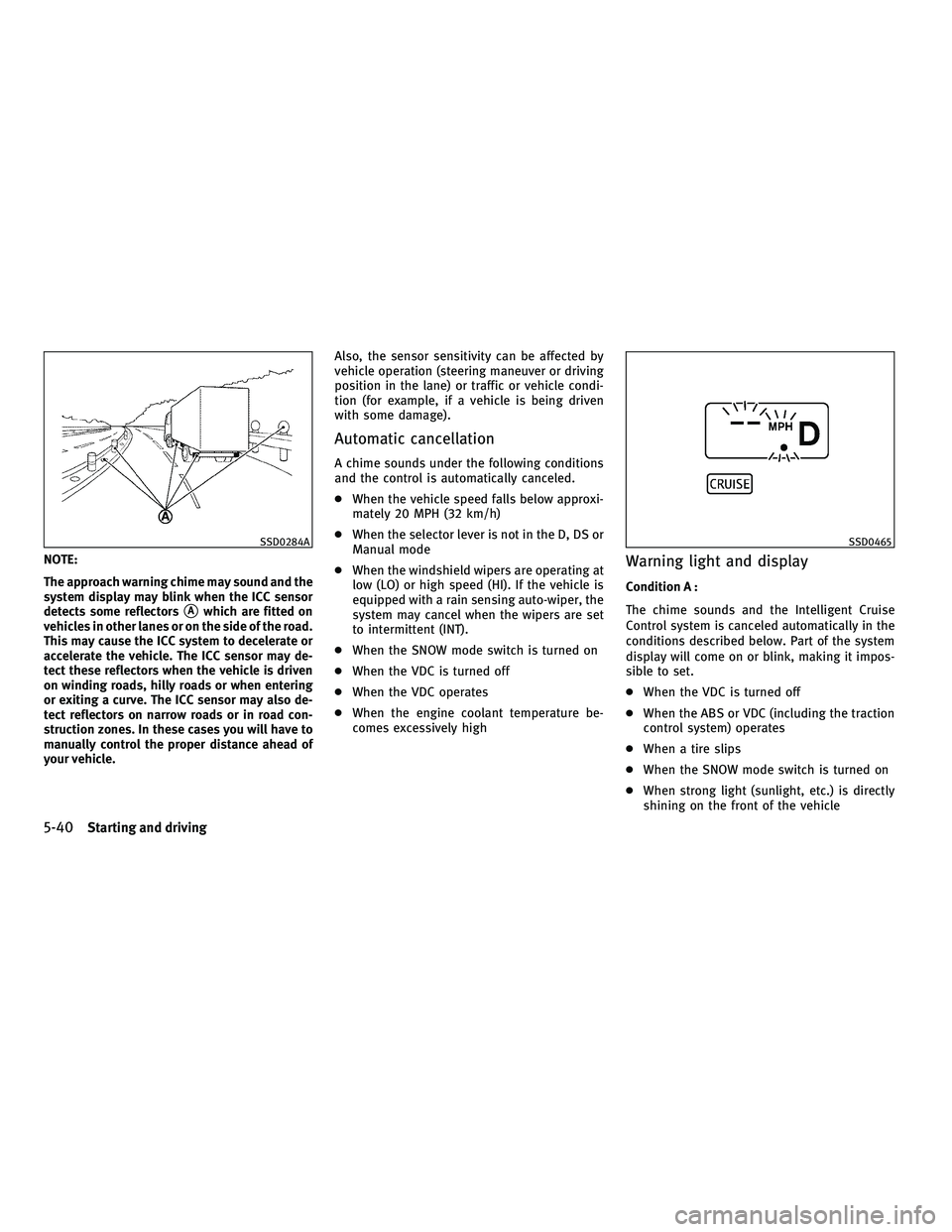
NOTE:
The approach warning chime may sound and the
system display may blink when the ICC sensor
detects some reflectors
sAwhich are fitted on
vehicles in other lanes or on the side of the road.
This may cause the ICC system to decelerate or
accelerate the vehicle. The ICC sensor may de-
tect these reflectors when the vehicle is driven
on winding roads, hilly roads or when entering
or exiting a curve. The ICC sensor may also de-
tect reflectors on narrow roads or in road con-
struction zones. In these cases you will have to
manually control the proper distance ahead of
your vehicle. Also, the sensor sensitivity can be affected by
vehicle operation (steering maneuver or driving
position in the lane) or traffic or vehicle condi-
tion (for example, if a vehicle is being driven
with some damage).
Automatic cancellation
A chime sounds under the following conditions
and the control is automatically canceled.
c
When the vehicle speed falls below approxi-
mately 20 MPH (32 km/h)
c When the selector lever is not in the D, DS or
Manual mode
c When the windshield wipers are operating at
low (LO) or high speed (HI). If the vehicle is
equipped with a rain sensing auto-wiper, the
system may cancel when the wipers are set
to intermittent (INT).
c When the SNOW mode switch is turned on
c When the VDC is turned off
c When the VDC operates
c When the engine coolant temperature be-
comes excessively high
Warning light and display
Condition A :
The chime sounds and the Intelligent Cruise
Control system is canceled automatically in the
conditions described below. Part of the system
display will come on or blink, making it impos-
sible to set.
cWhen the VDC is turned off
c When the ABS or VDC (including the traction
control system) operates
c When a tire slips
c When the SNOW mode switch is turned on
c When strong light (sunlight, etc.) is directly
shining on the front of the vehicle
SSD0284ASSD0465
5-40Starting and driving
wÐ
Ð
05/19/09Ðtbrooks
X
Page 334 of 445

3. To help prevent the vehicle from rollinginto the street when parked on a sloping
drive way, it is a good practice to turn the
wheels as illustrated.
cHEADED DOWNHILL WITH CURB:s1
Turn the wheels into the curb and move
the vehicle forward until the curb side
wheel gently touches the curb.
c HEADED UPHILL WITH CURB:
s2
Turn the wheels away from the curb and
move the vehicle back until the curb side
wheel gently touches the curb.
c HEADED UPHILL OR DOWNHILL, NO CURB:
s3
Turn the wheels toward the side of the
road so the vehicle will move away from
the center of the road if it moves.
4. Push the ignition switch to the LOCK
position.
WARNING
If the engine is not running or is turned off while
driving, the power assist for the steering will
not work. Steering will be harder to operate.
The power assisted steering uses a hydraulic
pump, driven by the engine, to assist steering.
If the engine stops or the drive belt breaks, you
will still have control of the vehicle. However,
much greater steering effort is needed, espe-
cially in sharp turns and at low speeds.
BRAKING PRECAUTIONS
The brake system has two separate hydraulic
circuits. If one circuit malfunctions, you will still
have braking at two wheels.
You may feel a small click and hear a sound
when the brake pedal is fully depressed slowly.
This is not a malfunction and indicates that the
brake assist mechanism is operating properly.
Vacuum assisted brakes
The brake booster aids braking by using engine
vacuum. If the engine stops, you can stop the
vehicle by depressing the brake pedal. How-
ever, greater foot pressure on the brake pedal
will be required to stop the vehicle and the
stopping distance will be longer.
Wet brakes
When the vehicle is washed or driven through
water, the brakes may get wet. As a result, your
braking distance will be longer and the vehicle
may pull to one side during braking.
To dry brakes, drive the vehicle at a safe speed
while lightly tapping the brake pedal to heat-up
the brakes. Do this until the brakes return to
normal. Avoid driving the vehicle at high speeds
until the brakes function correctly.
POWER STEERING BRAKE SYSTEM
Starting and driving5-49
wÐ
Ð
05/19/09Ðtbrooks
X
Page 338 of 445

ANTI-LOCK BRAKING SYSTEM (ABS)
WARNING
cThe Anti-lock Braking System (ABS) is a so-
phisticated device, but it cannot prevent ac-
cidents resulting from careless or dangerous
driving techniques. It can help maintain ve-
hicle control during braking on slippery sur-
faces. Remember that stopping distances on
slippery surfaces will be longer than on nor-
mal surfaces even with ABS. Stopping dis-
tances may also be longer on rough, gravel
or snow covered roads, or if you are using
tire chains. Always maintain a safe distance
from the vehicle in front of you. Ultimately,
the driver is responsible for safety.
c Tire type and condition may also affect brak-
ing effectiveness.
± When replacing tires, install the specified size of tires on all four wheels.
± When installing a spare tire, make sure that it is the proper size and type as speci-
fied on the Tire and Loading Information
label. See ªTIRE AND LOADING INFORMA-
TION LABELº in the ª9. Technical and con-
sumer informationº section of this
manual. ± For detailed information, see ªWHEELS
AND TIRESº in the ª8. Maintenance and
do-it-yourselfº section of this manual.
The Anti-lock Braking System (ABS) controls the
brakes so the wheels do not lock during hard
braking or when braking on slippery surfaces.
The system detects the rotation speed at each
wheel and varies the brake fluid pressure to
prevent each wheel from locking and sliding. By
preventing each wheel from locking, the system
helps the driver maintain steering control and
helps to minimize swerving and spinning on
slippery surfaces.
Using the system
Depress the brake pedal and hold it down.
Depress the brake pedal with firm steady pres-
sure, but do not pump the brakes. The ABS will
operate to prevent the wheels from locking up.
Steer the vehicle to avoid obstacles.
WARNING
Do not pump the brake pedal. Doing so may
result in increased stopping distances.
Self-test feature
The ABS includes electronic sensors, electric
pumps, hydraulic solenoids and a computer.
The computer has a built-in diagnostic feature
that tests the system each time you start the
engine and move the vehicle at a low speed in
forward or reverse. When the self-test occurs,
you may hear a ªclunkº noise and/or feel a
pulsation in the brake pedal. This is normal and
does not indicate a malfunction. If the computer
senses a malfunction, it switches the ABS off
and illuminates the ABS warning light on the
instrument panel. The brake system then oper-
ates normally, but without anti-lock assistance.
If the ABS warning light illuminates during the
self-test or while driving, have the vehicle
checked by an INFINITI retailer.
Starting and driving5-53
wÐ
Ð
05/15/09Ðpattie
X
Page 340 of 445

WARNING
cThe VDC system is designed to help improve
driving stability but does not prevent acci-
dents due to abrupt steering operation at
high speeds or due to careless or dangerous
driving techniques. Reduce vehicle speed
and be especially careful when driving and
cornering on slippery surfaces and always
drive carefully.
c Do not modify the vehicle's suspension. If
suspension parts such as shock absorbers,
struts, springs, stabilizer bars and bushings
and wheels are not INFINITI approved or are
extremely deteriorated the VDC system may
not operate properly. This could adversely
affect vehicle handling performance, and the
ªVDC OFFº indicator or ªSLIPº indicator or
both indicator lights may illuminate.
c If brake related parts such as brake pads,
rotors and calipers are not standard equip-
ment or are extremely deteriorated, the
ªVDC OFFº indicator or ªSLIPº indicator or
both indicator lights may illuminate.
c If engine related parts such as muffler are
not standard equipment or are extremely de-
teriorated, the ªVDC OFFº indicator or ªSLIPº
indicator or both indicator lights may
illuminate. c
When driving on extremely inclined surfaces
such as higher banked corners, the VDC sys-
tem may not operate properly and the ªVDC
OFFº indicator or ªSLIPº indicator or both
indicator lights may illuminate. Do not drive
on these types of roads.
c When driving on unstable surfaces such as a
turntable, ferry, elevator or ramp, the ªVDC
OFFº indicator or ªSLIPº indicator or both
indicator lights may illuminate. This is not a
malfunction. Restart the engine after driving
onto a stable surface.
c If wheels or tires other than those recom-
mended are used, the VDC system may not
operate properly and ªVDC OFFº indicator or
ªSLIPº indicator or both indicator lights may
illuminate.
c The VDC system is not a substitute for winter
tires or tire chains on a snow covered road. The Rear Active Steer system is an electronically
controlled four-wheel steering system.
The angle of the rear wheels are adjusted by the
Rear Active Steer system, depending on the
vehicle speed and steering angle. The rear
wheels are designed to turn momentarily in the
opposite direction and then change to the same
direction as the front wheels.
At low speeds, the rear wheels will not turn and
the system functions as a two-wheel steering
system.
If a malfunction occurs in the system, the Rear
Active Steer function will stop but the ordinary
two-wheel steering system will operate nor-
mally. The ªRASº warning light will illuminate. If
the light illuminates while driving, contact an
INFINITI retailer for repair.
WARNING
The Rear Active Steer system, although a so-
phisticated device, cannot prevent accidents
resulting from careless or dangerous driving
techniques. Ultimately the responsibility for
safety of self and others rests in the hands of
the driver. Therefore only through attentive
and careful driving methods can the Rear Active
Steer system be fully appreciated and safety
assured.
REAR ACTIVE STEER SYSTEM (if so
equipped)
Starting and driving5-55
wÐ
Ð
05/15/09Ðpattie
X
Page 345 of 445

Every new INFINITI comes with a 4 year, unlim-
ited mileage Roadside Assistance plan. In the
event of a roadside emergency, Roadside Assis-
tance Service is available to you. Please refer to
your Warranty Information Booklet (U.S.) or
Warranty & Roadside Assistance Information
Booklet (Canada) for details. Both the Warranty
Information Booklet and Roadside Assistance
Calling Card in your Owner's Literature Portfolio
provide the Toll-Free Number to call for assis-
tance. Roadside Assistance is provided 24
hours a day, 365 days a year, for 4 years from
the date sold to give emergency roadside help,
in the event of mechanical or nonmechanical
trouble(s) such as flat tires, out-of-gas, dead
battery, lost keys, mechanical breakdown, acci-
dent, etc.TIRE PRESSURE MONITORING SYSTEM
(TPMS)
This vehicle is equipped with the Tire Pressure
Monitoring System (TPMS). It monitors tire
pressure of all tires except the spare. When the
low tire pressure warning light is lit, one or
more of your tires is significantly under-
inflated. If the vehicle is being driven with low
tire pressure, the TPMS will activate and warn
you of it by the low tire pressure warning light
(in the instrument panel) or the LOW PRESSURE
information screen (on the display). This system
will activate only when the vehicle is driven at
speeds above 16 MPH (25 km/h). For more
details, see ªWARNING/INDICATOR LIGHTS AND
AUDIBLE REMINDERSº in the ª2. Instruments
and controlsº section and ªTIRE PRESSURE
MONITORING SYSTEM (TPMS)º in the ª5. Start-
ing and drivingº section.
For information about the tire pressure informa-
tion display, see ªHOW TO USE INFO BUTTONº
in the ª4. Monitor, climate, audio, phone and
voice recognition systemsº section.
WARNING
cIf the low tire pressure warning light illumi-
nates or LOW PRESSURE information is dis-
played on the monitor screen while driving,
avoid sudden steering maneuvers or abrupt
braking, reduce vehicle speed, pull off the
road to a safe location and stop the vehicle
as soon as possible. Driving with under-
inflated tires may permanently damage the
tires and increase the likelihood of tire fail-
ure. Serious vehicle damage could occur and
may lead to an accident and could result in
serious personal injury. Check the tire pres-
sure for all four tires. Adjust the tire pressure
to the recommended COLD tire pressure
shown on the Tire and Loading Information
label to turn the low tire pressure warning
light OFF. If the light still illuminates while
driving after adjusting the tire pressure, a
tire may be flat. If you have a flat tire, replace
it with a spare tire as soon as possible.
c When a spare tire is mounted or a wheel is
replaced, tire pressure will not be indicated,
the TPMS will not function and the low tire
pressure warning light will flash for approxi-
mately 1 minute. The light will remain on
after 1 minute. Contact your INFINITI retailer
as soon as possible for tire replacement
and/or system resetting.
ROADSIDE ASSISTANCE PROGRAM FLAT TIRE
6-2In case of emergency
wÐ
Ð
05/15/09Ðpattie
X