Page 112 of 509

Be sure not to put anything on top of the photo
sensor
�Alocated on the top of the instrument
panel. The photo sensor controls the autolight;
if it is covered, the photo sensor reacts as if it is
dark and the headlights will illuminate.Headlight beam select
�1To select the low beam, put the lever in
the neutral position as shown.
�2To select the high beam, push the lever
forward while the switch is in the
position. Pull it back to select the low
beam.
�3Pulling the lever toward you will flash the headlight high beam even when the
headlight switch is in the OFF position.
Battery saver system
A chime will sound when the driver side door is
opened with the light switch in the
or
position and the ignition switch in the
ACC, OFF or LOCK position.
When the headlight switch is in the
or
position while the ignition switch is in
the ON position, the lights will automatically
turn off 5 minutes after the ignition switch has
been pushed to the OFF position.
When the headlight switch remains in the
orposition after the lights auto-
matically turn off, the lights will turn on when
the ignition switch is pushed to the ON posi-
tion.
CAUTION
● When you turn on the headlight switch again
after the lights automatically turn off, the
lights will not turn off automatically. Be sure
to turn the light switch to the OFF position
when you leave the vehicle for extended pe-
riods of time, otherwise the battery will be
discharged.
● Never leave the light switch on when the
engine is not running for extended periods of
time even if the headlights turn off
automatically.
SIC2941SIC3269
Instruments and controls2-37
�—
—
07/30/09—pattie
�
Page 120 of 509

The vehicle should be driven with the Vehicle
Dynamic Control (VDC) system on for most
driving conditions.
If the vehicle is stuck in mud or snow, the VDC
system reduces the engine output to reduce
wheel spin. The engine speed will be reduced
even if the accelerator is depressed to the floor.
If maximum engine power is needed to free a
stuck vehicle, turn the VDC system off.
To turn off the VDC system, push the VDC OFF
switch. The
indicator will illuminate.
Push the VDC OFF switch again or restart the
engine to turn on the system. (See “VEHICLE
DYNAMIC CONTROL (VDC) SYSTEM” in the “5.
Starting and driving” section.) If the power supply is disconnected, the clock
will not indicate the correct time. Readjust the
time.
ADJUSTING THE TIME
1. To set the clock forward, push the button
�1.
2. To set the clock backward, push the but- ton
�2.
3. To move forward or backward faster, push and hold the button more than 5 seconds.
For details about display clock adjustment (if so
equipped), see “HOW TO USE SETTING BUTTON”
in the “4. Monitor, climate, audio, phone and
voice recognition systems” section.
SIC1881SIC3325
Front
SIC3631
Center console
SIC4274
VEHICLE DYNAMIC CONTROL (VDC) OFF
SWITCH CLOCK
POWER OUTLET
Instruments and controls2-45
�—
—
07/30/09—pattie
�
Page 123 of 509
GLOVE BOX
WARNING
Keep glove box lid closed while driving to help
prevent injury in an accident or a sudden stop.
To open the glove box, pull the handle
�1.
To close, push the lid in until the lock latches.
To lock
�2/unlock�3the glove box, use the
mechanical key. For the mechanical key usage,
see “KEYS” in the “3. Pre-driving checks and
adjustments” section.
CONSOLE BOX
Front
When the lever�A(front passenger’s seat side)
is pulled, the upper case is available for storing
some small items. When the lever
�B(driver’s
seat side) is pulled, the bottom case is available
for storing some larger ones.
SIC3838
Front
SIC3839
2-48Instruments and controls
�—
—
08/03/09—tbrooks
�
Page 124 of 509
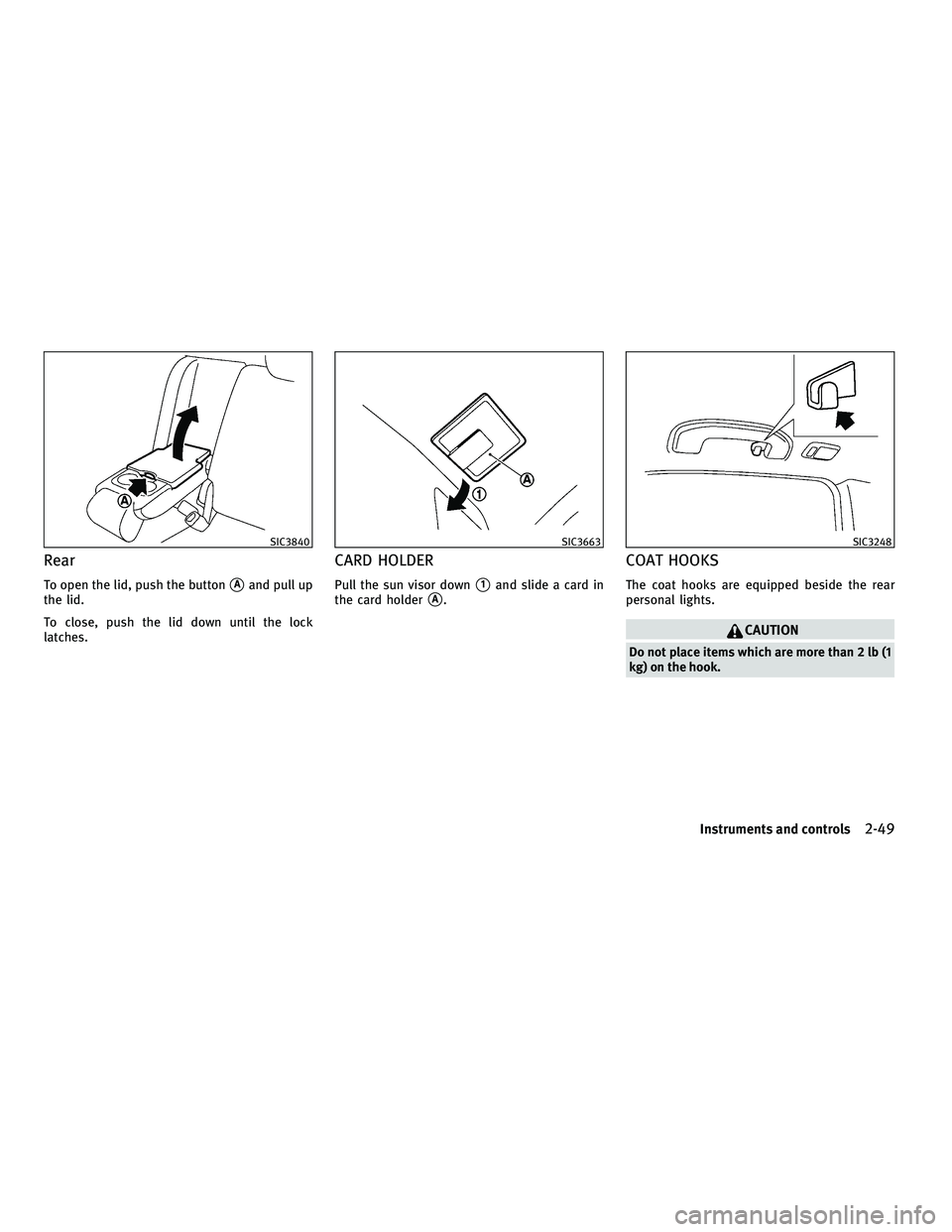
Rear
To open the lid, push the button�Aand pull up
the lid.
To close, push the lid down until the lock
latches.
CARD HOLDER
Pull the sun visor down�1and slide a card in
the card holder
�A.
COAT HOOKS
The coat hooks are equipped beside the rear
personal lights.
CAUTION
Do not place items which are more than 2 lb (1
kg) on the hook.
SIC3840SIC3663SIC3248
Instruments and controls2-49
�—
—
07/30/09—pattie
�
Page 128 of 509

ROOF RACK (if so equipped)
Always distribute the luggage evenly on the roof
rack. Do not load more than 99 lb (45 kg) on the
roof rails. Observe the maximum load limit
shown on the crossbars or roof carriers when
you attach them on the roof rails. Contact an
INFINITI retailer for crossbar or other equipment
information.
Be careful that your vehicle does not exceed the
Gross Vehicle Weight Rating (GVWR) or its Gross
Axle Weight Rating (GAWR front and rear). The
GVWR and GAWR are located on the F.M.V.S.S.
or C.V.M.S.S. certification label (located on the
driver’s door pillar). For more information re-
garding GVWR and GAWR, see “VEHICLE LOAD-ING INFORMATION” in the “9. Technical and
consumer information” section.
WARNING
●
Drive extra carefully when the vehicle is
loaded at or near the cargo carrying capac-
ity, especially if the significant portion of
that load is carried on the roof rack.
● Heavy loading of the roof rack has the poten-
tial to affect the vehicle stability and han-
dling during sudden or unusual handling
maneuvers.
● Roof rack load should be evenly distributed.
● Do not exceed maximum roof rack load
weight capacity.
● Properly secure all cargo with ropes or
straps to help prevent it from sliding or shift-
ing. In a sudden stop or collision, unsecured
cargo could cause personal injury.
CAUTION
Use care when placing or removing items from
the roof rack. If you cannot comfortably lift the
items onto the roof rack from the ground, use a
ladder or stool.
POWER WINDOWS
WARNING
● Make sure that all passengers have their
hands, etc. inside the vehicle while it is in
motion and before closing the windows. Use
the window lock switch to prevent unex-
pected use of the power windows.
● Do not leave children unattended inside the
vehicle. They could unknowingly activate
switches or controls and become trapped in
the window. Unattended children could be-
come involved in serious accidents.
The power windows operate when the ignition
switch is in the ON position or for about 45
seconds after the ignition switch is pushed to
the OFF position. If the driver’s or front passen-
ger’s door is opened during this period of about
45 seconds, power to the windows is canceled.
SIC3845
WINDOWS
Instruments and controls2-53
�—
—
07/30/09—pattie
�
Page 129 of 509
Main power window switch (driver’s
side)
1. Driver side window
2. Front passenger side window
3. Rear left passenger side window
4. Rear right passenger side window
5. Window lock button
To open or close the window, push down�Aor
pull up
�Bthe switch and hold it. The main
switch (driver side switches) will open or close
all the windows.
Locking passengers’ windows
When the lock button�Cis pushed in, only the
driver side window can be opened or closed.
Push it in again to cancel.
Passenger side power window switch
The passenger side switch will open or close
only the corresponding window. To open or
close the window, push down or pull up the
switch and hold it.
SIC3640SIC3241
2-54Instruments and controls
�—
—
07/30/09—pattie
�
Page 132 of 509

If the moonroof does not operate
If the moonroof does not operate properly,
perform the following procedure to initialize the
moonroof operation system.
1. If the moonroof is open, close it fully byrepeatedly pushing the CLOSE
�1side of
the moonroof switch.
2. Push and hold the CLOSE
�1side of the
moonroof switch to tilt the moonroof up.
3. Release the moonroof switch after the moonroof moves slightly up and down.
4. Push and hold the OPEN
�2side of the
moonroof switch to fully tilt the moonroof
down.
5. Check if the moonroof switch operates normally.
If the moonroof does not operate properly after
performing the procedure above, have your
vehicle checked by an INFINITI retailer. To activate or deactivate the welcome light
function, perform the following procedure. Note
that the function is set to disabled as the
factory default setting.1. Push the ignition switch to the ON posi-
tion.
2. Open the driver’s side door.
3. Push the door handle request switch on the driver’s side door handle for more
than 5 seconds with the driver’s door
open.
4. A chime sounds when the setting is com- pleted.
Once the welcome light function is active, the
puddle light
�Aand the passenger cabin illu- mination will illuminate when you approach the
vehicle with the Intelligent Key (within approxi-
mately 3.3 feet (1 m) of the antenna built inside
the door handles) and the following conditions
are met.
●
All doors are closed and locked.
● The ignition switch is in the LOCK or OFF
position.
● The Intelligent Key is outside the vehicle.
● The puddle light operates within a set dura-
tion.
The welcome light function will be deactivated
automatically if it does not operate within a set
duration to prevent battery discharge. Note that
the duration is set to 14 days as the factory
default setting. An INFINITI retailer can custom-
ize the set duration from 1 to 14 days. Contact
an INFINITI retailer for details.
SIC3642
WELCOME LIGHT
Instruments and controls2-57
�—
—
07/30/09—pattie
�
Page 134 of 509

DOOR position
When the switch is in the DOOR position�2, the
map lights and rear personal lights will illumi-
nate under the following conditions:
● ignition switch is switched to the LOCK
position
– remain on for about 15 seconds.
● doors are unlocked by pushing the UNLOCK
button on the Intelligent Key or door handle
request switch with the ignition switch in the
LOCK position
– remain on for about 15 seconds.
● any door is opened and then closed with the
ignition switch in the LOCK position
– remain on for about 15 seconds.
● any door is opened with the ignition switch
in the ACC or ON position
– remain on while the door is opened. When the door is closed, the lights go off.
The lights will also turn off after 30 minutes
when the lights remain illuminated after the ig-
nition switch has been pushed to the OFF or
LOCK position to prevent the battery from be-
coming discharged. When the auto interior illumination is set to the
OFF position (see “VEHICLE INFORMATION AND
SETTINGS” in the “4. Monitor, climate, audio,
phone and voice recognition systems” section),
the lights will illuminate under the following
condition:
●
any door is opened with the ignition switch
in any position
– remain on while the door is opened. When the door is closed, the lights go off.
OFF position
When the switch is in the OFF position�3, the
lights will not illuminate, regardless of the
condition.
CAUTION
Do not use for extended periods of time with
the engine stopped. This could result in a dis-
charged battery. The light on the vanity mirror will turn on when
the cover on the vanity mirror is opened.
When the cover is closed, the light will turn off.
The lights will also turn off after 30 minutes
when the lights remain illuminated to prevent
the battery from becoming discharged.
SIC3869
VANITY MIRROR LIGHTS
Instruments and controls2-59
�—
—
07/30/09—pattie
�