2010 Hyundai Sonata stop start
[x] Cancel search: stop startPage 149 of 285
1FEATURES OF YOUR HYUNDAI
136
o BALANCE Control
Rotate the knob clockwise to emphasize
right speaker sound (left speaker sound
will be attenuated). When the control knob
is turned counter clockwise, left speaker
sound will be emphasized (right speaker
sound will be attenuated).6. RANDOM Playback ButtonPress the button for less than 0.8 seconds
to start or stop the random playback of the
songs in the current folder.
Press the button for more than 0.8 seconds
to randomly play the entire songs in the
USB device.
Press the button again to cancel the mode.7. REPEAT ButtonPress the button for less than 0.8 seconds
to repeat the song currently played.
Press the button for more than 0.8 seconds
to repeat the entire songs in the USB
device.8. SCAN ButtonPlays 10 seconds of each song in the USB
device.
Press the button once again to cancel
scanning.
o When the formatted byte/sector set-
ting of External USB devices is not
either 512BYTE or 2048BYTE, then
the device will not be recognized.
o Only the USB device formatted to FAT
12/16/32 can be used.
o USB device without USB IF
(Implementers-Forum) authentica-
tion may not be recognizable.
o Make sure the USB connection termi-
nal does not come in contact with a
human body or any other object.
o If you repeat connecting or discon-
necting USB device in a short period
of time, it may damage the device.
o You might hear unusual noise when
connecting or disconnecting a USB
device.
o If you disconnect the external USB
device during playback in USB mode,
the external USB device can be dam-
aged. Therefore, connect the exter-
nal USB device when the engine is
turned off or in another mode.
o Depending on the type and capacity
of the external USB device or the type
of the files stored in the device, there
is a difference in the time taken for
recognition of the device, but this does
not indicate a problem.
!
CAUTION IN USING
USB DEVICE:
o To use the external USB device, make
sure the device is not connected when
starting up the vehicle and connect
the device after starting up.
o If you start the vehicle when the USB
device is connected, it may damage
the USB device. (USB is not ESA)
o If the vehicle is started up or turned off
while the external USB device is con-
nected, the external USB device may
not work.
o It may not play all MP3 or WMA files.
1) It can only play MP3 files with the
compression rate between
8Kbps~320Kbps.
2) It can only play WMA music files
with the compression rate between
8Kbps~320Kbps.
o Take cautions for static electricity
when connecting or disconnecting the
external USB device.
o Encoded MP3 PLAYER'S are not rec-
ognizable.
o Depending on the condition of the ex-
ternal USB device, the connected
external USB device can be unrecog-
nizable.
Page 156 of 285
2
DRIVING YOUR HYUNDAI
3
!
BEFORE STARTING
THE ENGINEC020A01NF-AATBefore you start the engine, you should
always:
1. Look around the vehicle to be sure
there are no flat tires, puddles of oil,
water or other indications of possible
trouble.
2. After entering the car, check to be sure
the parking brake is engaged.
3. Check that all windows and lights are
clean.
4. Check that the interior and exterior
mirrors are clean and in position.
5. Check your seat, seatback and head-
rest to be sure they are in their proper
positions.
6. Lock all the doors.
7. Fasten your seat belt and be sure that all
other occupants have fastened theirs.
8. Turn off all lights and accessories that
are not needed.
9. When you turn the ignition switch to
"ON", check that all appropriate warning
lights are operating and that you have
sufficient fuel.
10. Check the operation of warning lights
and all bulbs when key is in the "ON"
position.
TO START THE ENGINEC030A01E-AATCOMBINATION IGNITION SWITCHo If your Hyundai is equipped with a
manual transaxle, place the shift lever
in neutral and depress the clutch pedal
fully.
o If your Hyundai has an automatic
transaxle, place the shift lever in "P"
(Park).
o To start the engine, insert the ignition
key and turn it to the "START" position.
Release it as soon as the engine starts.
Do not hold the key in the "START"
position for more than 15 seconds.NOTE:o For safety, the engine will not start if
the clutch pedal is not depressed fully
(Manual Transaxle) or the shift lever
is not in "P" or "N" Position (Automatic
Transaxle).
o The ignition key cannot be turned from
"ACC" position to "LOCK" position
unless the shift lever is in the "P"
(Park) position or the negative battery
terminal is disconnected from the bat-
tery. To remove the key, always
confirm that the shift lever is securely
positioned in "P" (Park) (For Automatic
Transaxle).
o For additional information about start-
ing, see page 2-5.
WARNING:
o All passengers must be properly
belted whenever the vehicle is moving.
Refer to pages: 1-22 through 1-34 for
more information on their proper use.
o Always check the surrounding areas
near your vehicle for people,
especially children, before putting a
car into 'drive'.
!
WARNING:
Always wear appropriate shoes when
operating your vehicle.
Unsuitable shoes (high heels, ski boots,
etc.) may interfere with your ability to
use the brake and accelerator pedal,
and the clutch (if installed).
!
WARNING:
When you intend to park or stop the
vehicle with the engine on, be careful not
to depress the accelerator pedal for a
long period of time. It may overheat the
engine or exhaust system and cause
fire.
Page 161 of 285
2
DRIVING YOUR HYUNDAI
8
NOTE:
Depress the brake pedal when shift-
ing.
The selector lever can be shifted
freely.
The first few shifts on a new vehicle, or
if the battery has been disconnected,
may be somewhat abrupt. This is a
normal condition, and the shifting
sequence will adjust after shifts are
cycled a few times by the T.C.M
(Transaxle Control Module).
!
C090A02NF
CAUTION:
Never shift into "R" or "P" position while
the vehicle is moving.
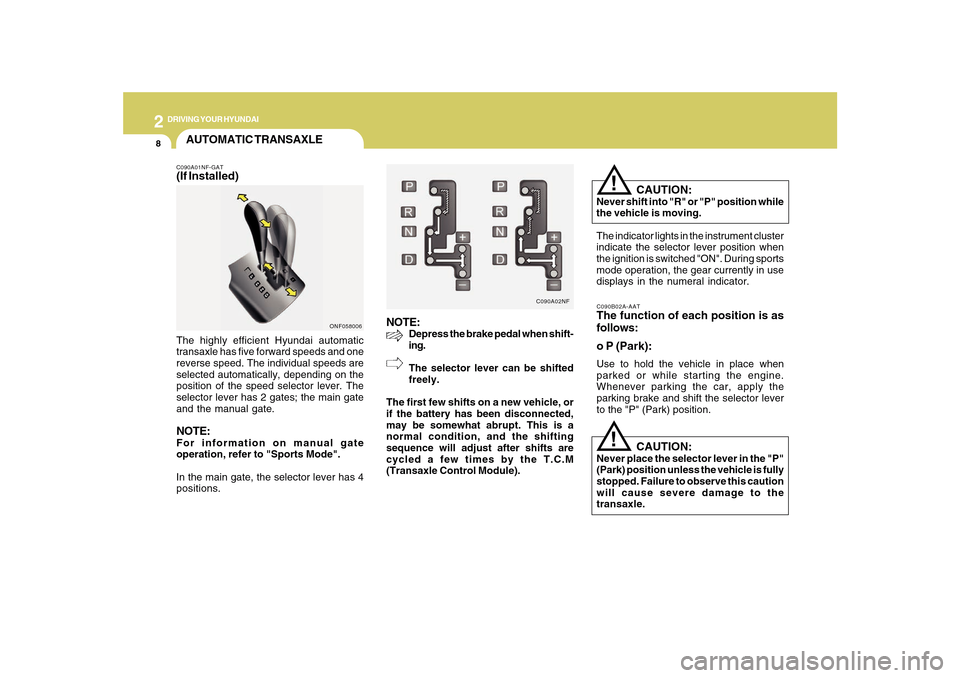
The indicator lights in the instrument cluster
indicate the selector lever position when
the ignition is switched "ON". During sports
mode operation, the gear currently in use
displays in the numeral indicator.C090B02A-AATThe function of each position is as
follows:
o P (Park):Use to hold the vehicle in place when
parked or while starting the engine.
Whenever parking the car, apply the
parking brake and shift the selector lever
to the "P" (Park) position.
CAUTION:
Never place the selector lever in the "P"
(Park) position unless the vehicle is fully
stopped. Failure to observe this caution
will cause severe damage to the
transaxle.
!
AUTOMATIC TRANSAXLEC090A01NF-GAT(If Installed)The highly efficient Hyundai automatic
transaxle has five forward speeds and one
reverse speed. The individual speeds are
selected automatically, depending on the
position of the speed selector lever. The
selector lever has 2 gates; the main gate
and the manual gate.NOTE:For information on manual gate
operation, refer to "Sports Mode".
In the main gate, the selector lever has 4
positions.
ONF058006
Page 162 of 285
2
DRIVING YOUR HYUNDAI
9
C090E02NF-GATo D (Drive):Use for normal driving. Bring the vehicle to
a complete stop before shifting the selector
to "D" position. The transaxle will automati-
cally shift through a five gear sequence.C090D02A-AATo N (Neutral):In the "N" position, the transaxle is in neutral,
which means that no gears are engaged.
The engine can be started with the shift
lever in "N" position, although this is not
recommended except if the engine stalls
while the car is moving.C090C01A-AATo R (Reverse):Use for backing up the vehicle. Bring the
car to a complete stop before shifting the
selector lever to "R" position.
CAUTION:
o In sports mode, the driver must
execute upward shifts in accordance
with prevailing road conditions, taking
care to keep the engine speed below
the red zone.
o For engine protection, upward shifts
are made automatically when the
engine rpm reaches the red zone.
o By rapidly moving the selector lever
backwards (-) twice it is possible to
skip one gear, i.e., 3rd to 1st, 4th to 2nd
or 5th to 3rd. Since sudden engine
braking and/or rapid acceleration can
cause a loss of traction, however,
downshifts must be made carefully in
accordance with the vehicle's speed.
!
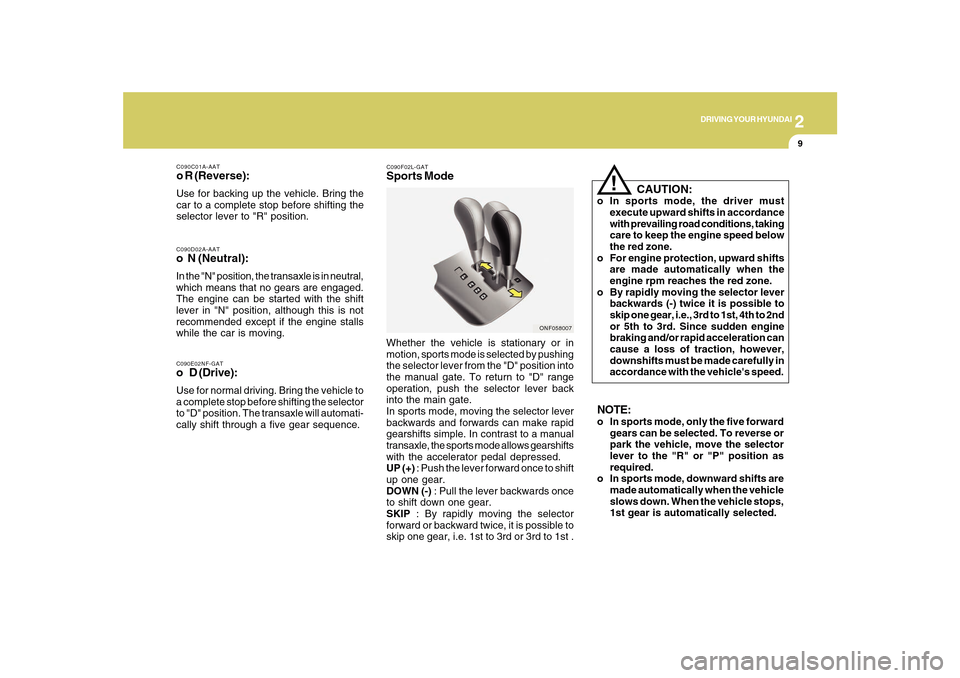
C090F02L-GATSports ModeWhether the vehicle is stationary or in
motion, sports mode is selected by pushing
the selector lever from the "D" position into
the manual gate. To return to "D" range
operation, push the selector lever back
into the main gate.
In sports mode, moving the selector lever
backwards and forwards can make rapid
gearshifts simple. In contrast to a manual
transaxle, the sports mode allows gearshifts
with the accelerator pedal depressed.
UP (+) : Push the lever forward once to shift
up one gear.
DOWN (-) : Pull the lever backwards once
to shift down one gear.
SKIP : By rapidly moving the selector
forward or backward twice, it is possible to
skip one gear, i.e. 1st to 3rd or 3rd to 1st .
ONF058007
NOTE:o In sports mode, only the five forward
gears can be selected. To reverse or
park the vehicle, move the selector
lever to the "R" or "P" position as
required.
o In sports mode, downward shifts are
made automatically when the vehicle
slows down. When the vehicle stops,
1st gear is automatically selected.
Page 165 of 285
2
DRIVING YOUR HYUNDAI
12
!
ANTI-LOCK BRAKE SYSTEM
(ABS)C120A01FC-AATThe Anti-Lock Brake System (ABS) is
designed to prevent wheel lock-up during
sudden braking or on hazardous road
surfaces. The ABS control module monitors
the wheel speed and controls the pressure
applied to each brake. Thus, in emergency
situations or on slick roads, ABS will
increase vehicle control during braking.NOTE:o A click sound may be heard in the
engine compartment when the ve-
hicle begins to move after the engine
is started. These conditions are nor-
mal and indicate that the anti-lock
brake system or Electronic Stability
Control is functioning properly.
o During ABS or ESC operation, a pul-
sation may be felt in the brake pedal
when the brakes are applied. Also, a
noise may be heard in the engine
compartment while braking. These
conditions are normal and indicate
that the anti-lock brake system or
Electronic Stability Control System is
functioning properly.
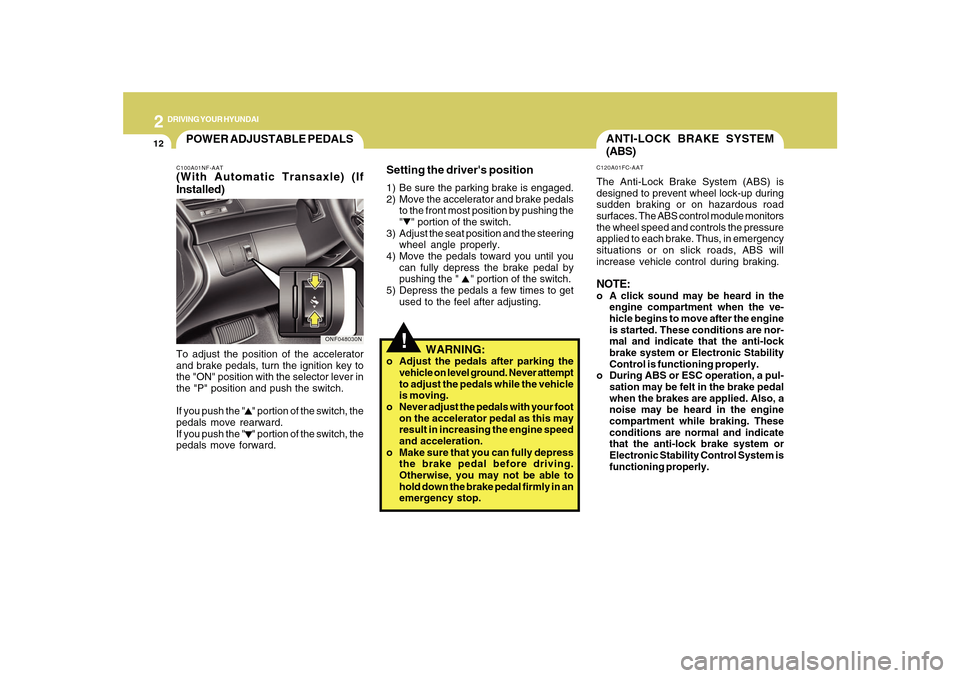
Setting the driver's position1) Be sure the parking brake is engaged.
2) Move the accelerator and brake pedals
to the front most position by pushing the
" " portion of the switch.
3) Adjust the seat position and the steering
wheel angle properly.
4) Move the pedals toward you until you
can fully depress the brake pedal by
pushing the " " portion of the switch.
5) Depress the pedals a few times to get
used to the feel after adjusting.
WARNING:
o Adjust the pedals after parking the
vehicle on level ground. Never attempt
to adjust the pedals while the vehicle
is moving.
o Never adjust the pedals with your foot
on the accelerator pedal as this may
result in increasing the engine speed
and acceleration.
o Make sure that you can fully depress
the brake pedal before driving.
Otherwise, you may not be able to
hold down the brake pedal firmly in an
emergency stop.
POWER ADJUSTABLE PEDALSC100A01NF-AAT(With Automatic Transaxle) (If
Installed)To adjust the position of the accelerator
and brake pedals, turn the ignition key to
the "ON" position with the selector lever in
the "P" position and push the switch.
If you push the " " portion of the switch, the
pedals move rearward.
If you push the " " portion of the switch, the
pedals move forward.
ONF048030N
Page 167 of 285

2
DRIVING YOUR HYUNDAI
14
C310D01NF-AATIndicators and WarningThe indicators should illuminate when the
ignition key is turned to ON or START but
should go out after three seconds.
If the indicators do not illuminate, or the
ESC or ESC-OFF indicator does not go out
after 3 seconds, have the vehicle checked
by an authorized dealer.
Should there be any unusual operation of
the device while driving, the ESC-OFF
indicator illuminates as a warning.
If the ESC-OFF indicator illuminates, drive
your car to a safe place and stop the
engine.
Then, start the engine again to check if the
ESC-OFF indicator goes out.
If the indicator remains lit even after the
engine has been started, have your car
checked by an authorized Hyundai dealer.
C310B01NF-AATESC ON/OFF ModeWhen the ESC is operating, the ESC indi-
cator in the instrument cluster will blink.
If you turn the system off by pressing the
ESC switch, the ESC-OFF indicator will
come on and stay on. In the ESC-OFF
mode, the stability control will be
deactivated. Adjust your driving accord-
ingly. To turn the system back on, press the
switch again. The ESC-OFF indicator
should go off.NOTE:The ESC mode will automatically be
turned ON after the engine is turned off
and restarted.
CAUTION:
Driving with varying tire or wheel sizes
may cause the ESC system to
malfunction. When replacing tires, make
sure they are the same size as your
original tires.
!
Page 169 of 285
2
DRIVING YOUR HYUNDAI
16
o Travel lightly. Don't carry unnecessary
weight in your car. Weight reduces fuel
economy.
o Don't let the engine idle longer than
necessary. If you are waiting (and not in
traffic), turn off your engine and restart
only when you're ready to go.
o Remember, your Hyundai does not re-
quire extended warm-up. After the en-
gine has started, allow the engine to run
for 10 to 20 seconds prior to placing the
vehicle in gear. In very cold weather,
however, give your engine a slightly
longer warm-up period.
o Don't "lug" or "over-rev" the engine.
Lugging is driving too slowly in too high
a gear resulting in the engine bucking.
If this happens, shift to a lower gear.
Over-revving is racing the engine
beyond its safe limit. This can be avoided
by shifting at the recommended speeds.
o Use your air conditioning sparingly. The
air conditioning system is operated by
engine power so your fuel economy is
reduced when you use it. o Take care of your tires. Keep them
inflated to the recommended pressure.
Incorrect inflation, either too much or
too little, results in unnecessary tire
wear. Check the tire pressures at least
once a month.
o Be sure that the wheels are aligned
correctly. Improper alignment can result
from hitting curbs or driving too fast over
irregular surfaces. Poor alignment
causes faster tire wear and may also
result in other problems as well as
greater fuel consumption.
o Keep your car in good condition. For
better fuel economy and reduced
maintenance costs, maintain your car
in accordance with the maintenance
schedule in Section 5. If you drive your
car in severe conditions, more frequent
maintenance is required (see Section 5
for details).
o Keep your car clean. For maximum
service, your Hyundai should be kept
clean and free of corrosive materials. It
is especially important that mud, dirt,
ice, etc. not be allowed to accumulate
on the underside of the car. This extra
weight can result in increased fuel
consumption and also contribute to cor-
rosion.
DRIVING FOR ECONOMYC140A02A-AATYou can save fuel and get more miles from
your car if you follow these suggestions:
o Drive smoothly. Accelerate at a
moderate rate. Don't make "jack-rabbit"
starts or full-throttle shifts and maintain
a steady cruising speed. Don't race
between stoplights. Try to adjust your
speed to that of the other traffic so you
don't have to change speeds unneces-
sarily. Avoid heavy traffic whenever pos-
sible. Always maintain a safe distance
from other vehicles so you can avoid
unnecessary braking. This also reduces
brake wear.
o Drive at a moderate speed. The faster
you drive, the more fuel your car uses.
Driving at a moderate speed, especially
on the highway, is one of the most
effective ways to reduce fuel
consumption.
o Don't "ride" the brake or clutch pedal.
This can increase fuel consumption and
also increase wear on these
components. In addition, driving with
your foot resting on the brake pedal may
cause the brakes to overheat, which
reduces their effectiveness and may
lead to more serious consequences.
Page 176 of 285

2
DRIVING YOUR HYUNDAI
23
8. When parking your car and trailer, es-
pecially on a hill, be sure to follow all
the normal precautions. Turn your front
wheel into the curb, set the parking
brake firmly, and put the transaxle in 1st
or Reverse (manual) or Park (automatic).
In addition, place wheel chocks at each
of the trailer's tires.
9. If the trailer has electric brakes, start
your vehicle and trailer moving, and
then apply the trailer brake controller by
hand to be sure the brakes are working.
This lets you check your electrical
connection at the same time.
10. During your trip, check occasionally to
be sure that the load is secure, and that
the lights and any trailer brakes are still
working.
11. Avoid jerky starts, sudden acceleration
or sudden stops.
12. Avoid sharp turns and rapid lane
changes.
13. Avoid holding the brake pedal down
too long or too frequently. This could
cause the brakes to overheat, resulting
in reduced braking efficiency.
14. When going down a hill, shift into a
lower gear and use the engine braking
effect.
When ascending a long grade, down-
shift the transaxle to a lower gear and
reduce speed to reduce chances of
engine overloading and/or overheat-
ing.
CAUTION:
If overheating should occur when tow-
ing, (the temperature gauge reads near
red zone), taking the following action
may reduce or eliminate the problem.
1. Turn off the air conditioner.
2. Reduce highway speed.
3. Select a lower gear when going uphill.
4. While in stop and go traffic, place the
gear selector in park or neutral and
idle the engine at a higher speed.
!
15. If you have to stop while going uphill,
do not hold the vehicle in place by
pressing on the accelerator. This can
cause the automatic transaxle to over-
heat. Use the parking brake or
footbrake.NOTE:When towing check transaxle fluid more
frequently.