2010 Hyundai Accent light
[x] Cancel search: lightPage 130 of 284
1FEATURES OF YOUR HYUNDAI118B670D04MC
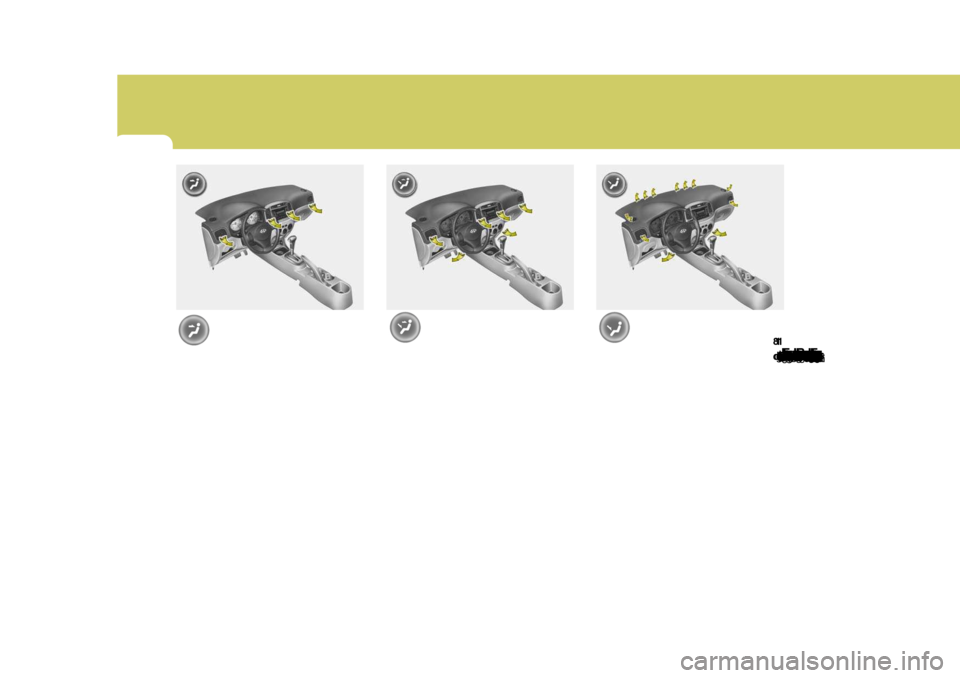
Floor-Level
When selecting the "Floor-Level", the
indicator light will come on and the air will be discharged through the floor
vents, windsheld defroster nozzle, side
defroster nozzle and side ventilator.Face-Level
When selecting the "Face-Level", the
indicator light will come on, causing air
to be discharged through the face level vents. B670D02MC
Bi-Level
When selecting the "Bi-Level", the indi-
cator light will come on and the air will
be discharged through the face vents
and the floor vents. B670D03MC
Page 131 of 284
1
FEATURES OF YOUR HYUNDAI119119119
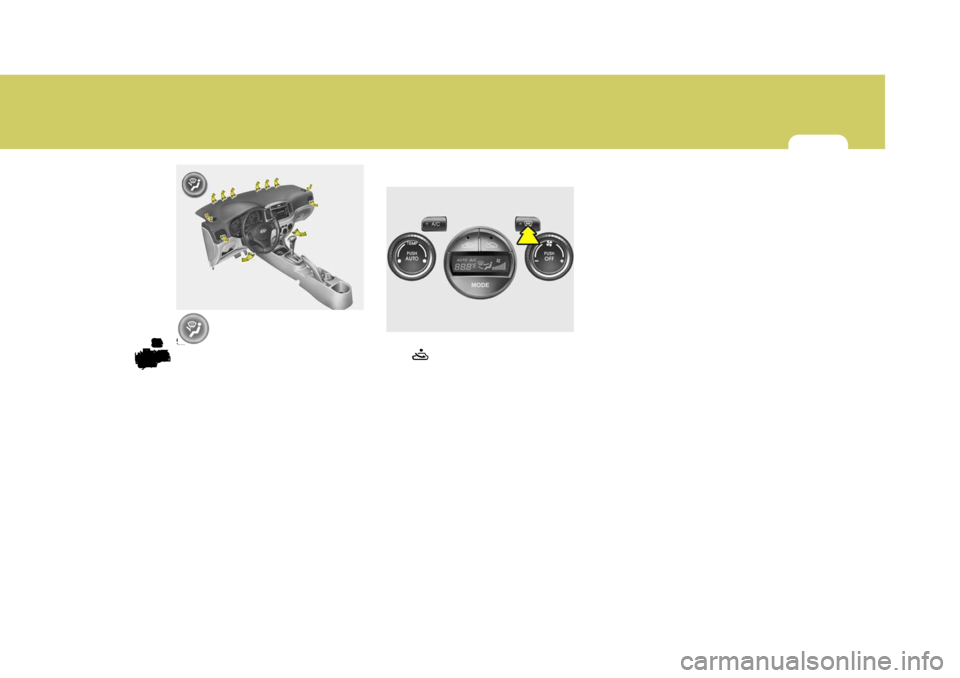
Floor-Defrost Level
When selecting the "Floor-Defrost Level"
mode, the indicator light will come on
and the air will be discharged through
the windshield defroster nozzle, the floor vents, side defroster nozzle and
side ventilator.
If any of the temperature control switch,
the blower fan control switch, or the
defrost switch is selected in "Floor- Defrost" mode, the A/C will turn on
automatically and "Fresh" mode will be
activated. B670D05MCB980F01MC-GAT
Defrost Switch
When the "Defrost" button is pressed,
the " " mode will be automatically
selected and the air will be discharged through the windshield defroster nozzle,
side defroster nozzle and side ventila- tor. B980F01MC
Page 135 of 284
1
FEATURES OF YOUR HYUNDAI123123123CARE OF DISCSStorage
When not in use, place your discs in
their individual cases and store them in
a cool place away from the sun, heat,
and dust.Do not grip or pull out the disc with your
hand while the disc is being pulled into
the unit by the self loading mechanism.
Keep Your Discs Clean
B850A02F-AAT
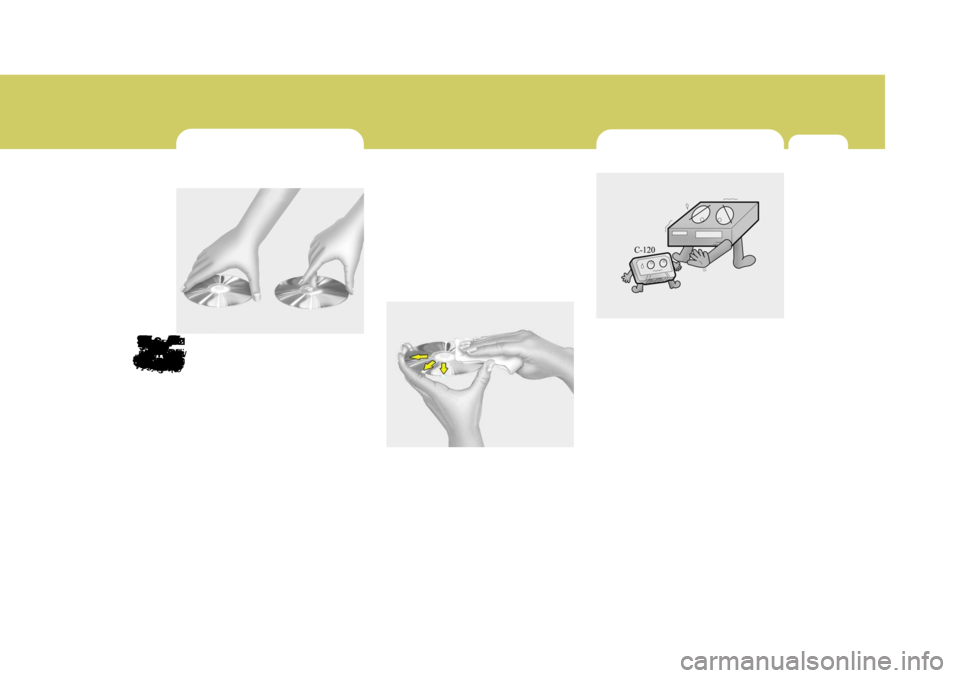
Proper Handling
Handle your disc as shown. Do not drop
the disc. Hold the disc so you will not leave fingerprints on the surface. If the
surface is scratched, it may cause the
pickup to skip signal tracks. Do not
affix tape, paper, or gummed labels on the disc. Do not write on the disc.
Damaged Disc
Do not attempt to play damaged, warped or cracked discs. These could severely
damage the playback mechanism. Fingerprints, dust, or soil on the surface
of a disc could cause the pickup to skip
signal tracks. Wipe the surface clean
with a clean soft cloth.If the surface is heavily soiled, dampena clean soft cloth in a solution of mild
neutral detergent to wipe it clean.
B850A01L
B850A02LCARE OF CASSETTE TAPES
B860A01A-AAT
Proper care of your cassette tapes will extend the tape life and increase yourlistening enjoyment. Always protect
your tapes and cassette cases from
direct sunlight, severely cold and dusty
conditions.
When not in use, cassettes shouldalways be stored in the original protec-
tive cassette case. When the vehicle is
very hot or cold, allow the interior tem-
perature to become more comfortable before listening to your cassettes.
oNever leave a cassette inserted in the player when not being played.
This could damage the tape player
unit and the cassette tape.B860A01L
Page 155 of 284

1
FEATURES OF YOUR HYUNDAI
143143143143
1. CD Loading Slot Please face printed side upward and gently push in. When the ignition switch is on ACC or ON and power is off, poweris automatically turned on if the CD is loaded. This CDP supports only 12cm CD. if VCD, Data CD, are loaded, "Er-6"message will appear and CD will be ejected. 2. CD Indicator When car ignition switch is ACC or ON and if the CD is loaded, this indicator islighted. If the CD is ejected the light is turned off. 3. CD Eject Button Push
button to eject the CD. This
button is enabled when ignition switch is off. 4. CD Selection Button If there is a CD in the CDP DECK it plays the CD. Press CD Button to automatically in-sert CD when the disc is ejected from the deck by pressing CD EJECT. 5. Automatic Track Selection
Button
o Push [SEEK
] button for less than
0.8 second to play from the begin- ning of current song.
o Push [SEEK
] button for less than
0.8 second and press again within 1 seconds to play the previous song.
o Push [SEEK
] button for 0.8 or
longer to initiate reverse direction high speed sound search of current song.
o Push [SEEK
] button for less than
0.8 second to play the next song.
o Push [SEEK
] button for 0.8 or
longer to initiate high speed sound search of current song.
6. Information Display Button Displays the information of the current CD TRACK in the order of DISC TITLE ➟ DISC ARTIST ➟ TRACK TITLE ➟
TRACK ARTIST ➟ TOTAL TRACK ➟
Play Screen ➟ DISC TITLE ➟ ···.(not
displayed if the information is not avail-able on the DISC.) (If MP3 is displayed FILE NAME ➟
TITLE ➟ ARTIST ➟ ALBUM ➟
FOLDER ➟ TOTAL FILE ➟ FILE NAME
➟ ···.) 7. TUNE/ENTER Button Turn this button clockwise to display songs after current song. Also, turn this button counterclockwiseto display songs before current song. To listen to the displayed song, press the button to skip to the song and play. 8. RANDOM Play Button Turns on/off the randomization of the play list of files in the currently playedDISC. To cancel the mode, press the key once again. 9. REPEAT Button Repeats current song when the button is pressed for less than 0.8 second. Repeats current folder when the buttonis pressed for 0.8 second or longer. (If there is no folder, entire disc will be repeated.) 10. SCAN Play Button Plays first 10 seconds of each song in the DISC. To cancel the mode, pressthe key once again.
Page 161 of 284

1
FEATURES OF YOUR HYUNDAI
149149149149
1. CD Loading Slot Please face printed side upward and gently push in. When the ignition switch is on ACC or ON and power is off, poweris automatically turned on if the CD is loaded. This CDP supports only 12cm CD. If VCD, Data CD, are loaded, "Er-6" message will appear and CD will be ejected. 2. CD Indicator When car ignition switch is ACC or ON and if the CD is loaded, this indicator is lighted. If the CD is ejected the light isturned off. 3. CD Eject Button Push button to eject the CD. This but- ton is enabled when ignition switch isoff. 4. CD Selection Button If there is a CD in the CDP DECK it plays the CD. Press CD button to automatically insert CD when the disc is ejected from thedeck by pressing CD EJECT. 5. AUX Selection Button If AUX function is not supported, when you push the button, no function wil be done. (‘NO MEDIA’ will be displayed)
6. Automatic Track Selection
Button
o Push [SEEK
] button for less than
0.8 second to play from the begin- ning of current song.
o Push [SEEK
] button for less than
0.8 second and press again within 1 secondto play the previous song.
o Push [SEEK
] button for 0.8 or
longer to initiate reverse direction high speed sound search of currentsong.
o Push [SEEK
] button for less than
0.8 second to play the next song.
o Push [SEEK
] button for 0.8 or
longer to initiate high speed sound search of current song. 7. Information Display Button Displays the information of the current CD TRACK in the order of DISC TITLE ➟
DISC ARTIST ➟ TRACK TITLE ➟
TRACK ARTIST ➟ TOTAL TRACK ➟
Play Screen ➟ DISC TITLE ➟ ···. (not
displayed if the information is not avail-able on the DISC.) (If MP3 is displayed FILE NAME ➟
TITLE ➟ ARTIST ➟ ALBUM ➟
FOLDER ➟ TOTAL FILE ➟ FILE NAME
➟ ···.)
8. TUNE/ENTER Button Turn this button clockwise to display songs after current song. Also, turn this button counterclockwiseto display songs before current song. To listen to the displayed song, press the button to skip to the song and play. 9. RANDOM Play Button Turns on/off the randomization of the play list of files in the currently played DISC.To cancel the mode, press the key once again.
Page 165 of 284

2
DRIVING YOUR HYUNDAI
3
2
DRIVING YOUR HYUNDAI
3
!
BEFORE STARTING THE EN- GINE
C020A03O-GAT Before you start the engine, you should always:
1. Look around the vehicle to be sure
there are no flat tires, puddles of oil, water or other indications of pos- sible trouble.
2. After entering the car, check to be sure the parking brake is engaged.
3. Check that all windows, and lights are clean.
4. Check that the interior and exterior
mirrors are clean and in position.
5. Check your seat, seatback and headrest to be sure they are in theirproper positions.
6. Lock all the doors.
7. Fasten your seat belt and be sure
that all other occupants have fas- tened theirs.
8. Turn off all lights and accessories
that are not needed.
9. When you turn the ignition switch to "ON", check that all appropriatewarning lights are operating andthat you have sufficient fuel.
10.Check the operation of warning
lights and all bulbs when key is inthe "ON" position. WARNING:
(Diesel Engine)
To ensure that sufficient vacuum exists within the brake system dur-ing cold weather start-up condi- tions, it is necessary to run the engine at idle for several secondsafter starting the engine.TO START THE ENGINE
C030A01A-GAT COMBINATION IGNITION SWITCH
o If your Hyundai is equipped with a manual transaxle, place the shift lever in neutral and depress the clutch pedal fully.
o If your Hyundai has an automatic
transaxle, place the shift lever in "P"(park).
o To start the engine, insert the igni- tion key and turn it to the "START"position. Release it as soon as the engine starts. Do not hold the key inthe "START" position for more than 15 seconds.
NOTE: For safety, the engine will not start if the shift lever is not in "P" or "N" position (Automatic transaxle).
!WARNING:
o Always wear appropriate shoes when operating your vehicle. Unsuitable shoes (high heels, skiboots, etc.) may interfere with your ability to use the brake and accel- erator pedal, and the clutch (ifinstalled).
o When you intend to park or stop
the vehicle with the engine on, becareful not to depress the accel- erator pedal for a long period of time. It may overheat the engine orexhaust system and cause fire.
Page 167 of 284

2
DRIVING YOUR HYUNDAI
5
2
DRIVING YOUR HYUNDAI
5
!WARNING:
Never run the engine in a closed or poorly ventilated area any longer than is needed to move your car in or out of the area. The carbon mon-oxide gas emitted is odorless and can cause serious injury or death.
C050A01E C051A01O-GAT STARTING FOR THE DIESEL ENGINE ENGINE COLD
o Turn the ignition key to position
"ON" and wait for the pre-heat indi- cator light to go out.
o Operate the starter until the engine
runs.
ENGINE WARM Operate the starter. If the engine does not respond on the first attempt, wait several seconds and try again usingthe pre-heat.
STARTING
C050A01A-AAT STARTING FOR THE GASOLINE ENGINE C050B02S-GAT Normal Conditions The Starting Procedure:
1. Insert key, and fasten the seat belt.
2. Depress the clutch pedal fully and
place the gearshift lever (manualtransaxle) in neutral or the selectorlever (automatic transaxle) in "P" (park) position.
3. After turning the ignition key to the "ON" position, make certain all warn-ing lights and gauges are function- ing properly before starting the en-gine.
4. On vehicles equipped with the die-
sel preheat indicator light, turn theignition key to the "ON" position. The diesel pre-heat indicator light will first illuminate in amber, andthen after a short time, the amber illumination will go off, indicating that preheating is completed.
LOCK
ON
START
Page 175 of 284

2
DRIVING YOUR HYUNDAI
13
2
DRIVING YOUR HYUNDAI
13
!WARNING:
ABS (ESP) will not prevent accidents due to improper or dangerous driv- ing maneuvers. Even though vehiclecontrol is improved during emer- gency braking, always maintain a safe distance between you and ob-jects ahead. Vehicle speeds should always be reduced during extreme road conditions. The braking distance for cars equipped with an anti-lock braking system (Electronic Stability Program)may be longer than for those without it in the following road conditions. During these conditions, the ve-hicle should be driven at reduced speeds.
o Rough, gravel or snow-covered roads.
o With tire chains installed.
o On roads where the road surface
is pitted or has different surface height. The safety features of an ABS (ESP) equipped vehicle should not be testedby high speed driving or cornering. This could endanger the safety of yourself or others.
ANTI-LOCK BRAKE SYSTEM
C120A01FC-GAT (If Installed) The Anti-Lock Brake System (ABS) is designed to prevent wheel lock-upduring sudden braking or on hazard- ous road surfaces. The ABS control module monitors the wheel speed andcontrols the pressure applied to each brake. Thus, in emergency situations or on slick roads, ABS will increasevehicle control during braking. NOTE:
o A click sound may be heard in the engine compartment when the ve- hicle begins to move after the en- gine is started. These conditionsare normal and indicate that the anti-lock brake system (Electronic Stability Program) is functioningproperly.
o During ABS (ESP) operation, a
slight pulsation may be felt in thebrake pedal when the brakes are applied. Also, a noise may be heard in the engine compartment whilebraking. These conditions are normal and indicate that the anti- lock brake system (Electronic Sta-bility Program) is functioning prop- erly.