2010 Hyundai Accent reset
[x] Cancel search: resetPage 143 of 284
1
FEATURES OF YOUR HYUNDAI
131131131131
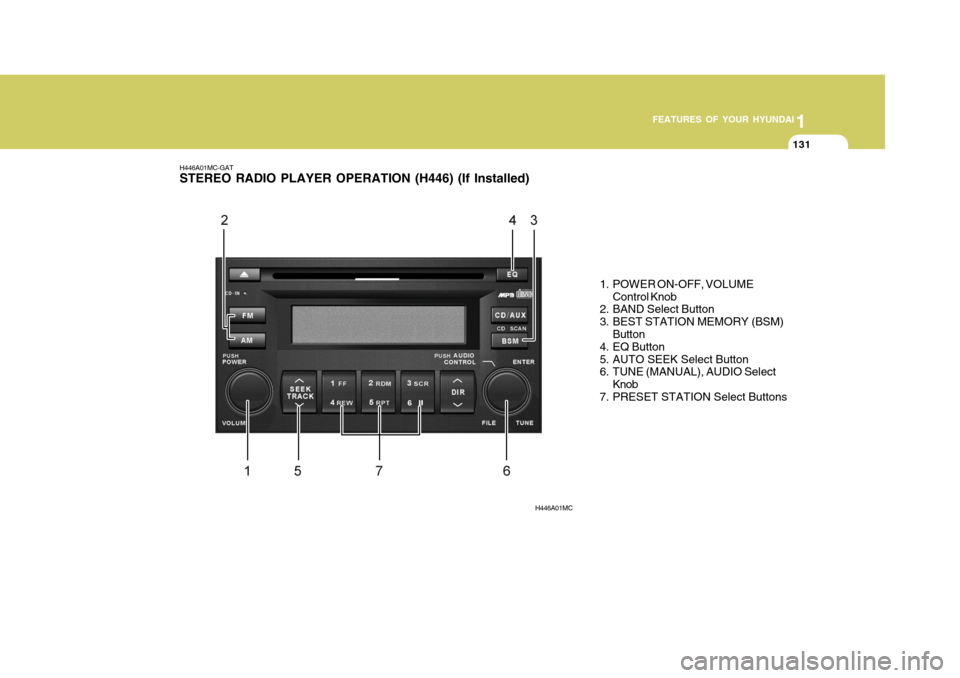
H446A01MC-GAT STEREO RADIO PLAYER OPERATION (H446) (If Installed)
1. POWER ON-OFF, VOLUMEControl Knob
2. BAND Select Button
3. BEST STATION MEMORY (BSM)
Button
4. EQ Button
5. AUTO SEEK Select Button
6. TUNE (MANUAL), AUDIO Select
Knob
7. PRESET STATION Select Buttons
H446A01MC
Page 144 of 284

1FEATURES OF YOUR HYUNDAI
132
H446B01MC-GAT 1. POWER ON-OFF Control Knob
o The radio unit may be operated when
the ignition key is in the "ACC" or "ON" position. Press the button to switch the power on. The LCD shows the radio frequency in the radio mode,CD/MP3 track in the CD/MP3 mode. To switch the power off, press the button again.
o Push the FM, AM or CD/MP3 to turn on that function without pushingpower ON-OFF control knob.
VOLUME Control Rotate the knob clockwise to increase the volume and turn the knob counter- clockwise to reduce the volume. 2. BAND Select Button Pressing the FM, AM button changes the AM, FM1 and FM2 bands. The mode selected is shown on the display. 3. Best Station Memory (BSM)
Button
When the BSM button is pressed, thesix channels from the highest field in-tensity are selected next and stored in memory. The stations selected are stored in the sequence frequency fromthe first preset key. 4. EQ Button Press the EQ button to select the CLAS- SIC, POPS, ROCK, JAZZ and OFFMODE for the desired tone quality. Each press of the button changes the display as follows;
5. AUTO SEEK Select Button (Automatic Channel Selection)
Press the AUTO SEEK select button. When the side is pressed, the unitwill automatically tune to the next higher frequency and when the side is pressed, it will automatically tune to thenext lower frequency. 6. TUNE (Manual) Select Knob Rotate the knob clockwise to increase the frequency and turn the knob coun-terclockwise to reduce the frequency. AUDIO Select Button Pressing the AUDIO button changes the BASS, TREBLE, FADER and BAL- ANCE mode.The mode selected is shown on the display. After selecting the each mode, rotatethe Volume control knob clockwise or counterclockwise. o BASS Control To increase the BASS, rotate the knob clockwise, while to decrease the bass, rotate the knob counterclockwise. o TREBLE Control Turn to the left or right for the desired treble tone.
CLASSIC
POPS ROCK JAZZ OFF
Page 145 of 284

1
FEATURES OF YOUR HYUNDAI
133133133133
o FADER Control Turn the control knob clockwise to emphasize rear speaker sound (frontspeaker sound will be attenuated). When the control knob is turned counterclock- wise, front speaker sound will be em-phasized (rear speaker sound will be attenuated). o BALANCE Control Rotate the knob clockwise to empha- size right speaker sound (Left speaker sound will be attenuated). When the control knob is turned counterclock-wise, left speaker sound will be empha- sized (Right speaker sound will be at- tenuated).
! CAUTION:
o Do not place beverages close to the audio system. The playback mechanism may be damaged if you spill them.
o Do not strike or allow anything to impact the audio system, damageto the system mechanisms could occur.
7. PRESET STATION Select But-
tons
Six stations for AM, FM1 and FM2respectively can be preset in the elec-tronic memory circuit. HOW TO PRESET STATIONS Six AM and twelve FM stations may be programmed into the memory of the radio. Then, by simply pressing the band select button and/or one of the sixstation select buttons, you may recall any of these stations instantly. To pro- gram the stations, follow these steps:
o Press AM, FM selector to set the band for AM, FM1 and FM2.
o Select the desired station to be stored by seek or manual tuning.
o Determine the preset station select button you wish to use to access that station.
o Press the station select button for more than two seconds. Beep soundwill be heard while depressing the button. You should then release thebutton, and proceed to program the next desired station. A total of 18 stations can be pro- grammed by selecting one AM andtwo FM station per button.
o When completed, any preset station
may be recalled by selecting AM,FM1 or FM2 band and the appropri- ate station button.
Page 149 of 284

1
FEATURES OF YOUR HYUNDAI
137137137137
!
CAUTION:
o Do not insert warped or poor qual- ity discs into the CD player as damage to the unit may occur.
o Do not insert anything like coins
into the player slot as damage tothe unit may occur.
o Do not place beverages close to
the audio system. The playbackmechanism may be damaged if you spill them.
10. CD SCAN Button
o To playback the first 10 seconds of
each track, press the CD SCAN button more than 1 second.
o To playback the first 10 seconds of
each track in the selected folder,press the CD SCAN button within 1 second (MP3 CD only).
o Press the CD SCAN button again within 10 sec. when you have reachedthe desired track.
11. FILE SEARCH Knob (TUNE Select Knob)
o You can skip the track by turning the FILE SEARCH knob clockwise or counterclockwise.After selecting the desired track, press the FILE SEARCH knob to playback the track.If you do not press the FILE SEARCH knob within five seconds, the search will stop. 12. DIRECTORY SEARCH
Button
o You can move through the folder by pushing the DIR button to up ( ) anddown ( ). After moving the desired folder, press the FILE SEARCH knob to playbackthe selected folder. If you do not press the FILE SEARCH knob within five seconds, the searchwill stop.
NOTE :
o To assure proper operation of the unit, keep the vehicle interior tem- perature within a normal range by using the vehicle's air condition- ing or heating system.
o When replacing the fuse, replace it with a fuse having the correctcapacity.
o All stored bookmarks are all erased when the car battery is discon-nected or power to the vehicle islost. If this occurs, the bookmarks will have to be reset.
o This equipment is designed to be used only in a 12 volt DC batterysystem with negative ground.
o This unit is made of precisionparts. Do not attempt to disas- semble or adjust any parts.
o When driving your vehicle, be sure
to keep the volume of the unit setlow enough to allow you to hear sounds coming from the outside.
o Do not expose this equipment (in- cluding the speakers and tape) towater or excessive moisture.
Page 151 of 284

1
FEATURES OF YOUR HYUNDAI
139139139139
RADIO, SET UP, VOLUME CONTROL (PA710R) (If Installed)
1. AM Selection Button
2. FM Selection Button
3. TA Selection Button
4. Automatic Channel Selection Button
5. Power ON/OFF & Volume ControlButton
6. SCAN Button
7. AUTO STORE Button
8. SETUP Button
9. Information Display Button 10. PTY(FOLDER) Button 11. TUNE/ENTER Button12. PRESET Button
A-200MCEA
4 5 11
8
6
1
12
2
3
7
9
10
Page 152 of 284

1FEATURES OF YOUR HYUNDAI
140
1. AM Selection Button Turns to AM mode, and toggles AM and AMA when the button is pressed eachtime. 2. FM Selection Button Turns to FM mode and toggles in the order of FM1 ➟ FM2 ➟ FMA ➟ FM1···
when the button is pressed each time. 3. TA Selection Button In FM, CD, AUX mode, turns on/off the reception of TA channels of RDS.. 4. Automatic Channel Selection
Button
o When the [SEEK
] button is
pressed, it reduces the band fre- quency by 50khz to automaticallyselect channel. Stops at the previ- ous frequency if no channel is found.
o When the [SEEK
] button is
pressed, it increases the band fre- quency by 50khz to automatically select channel. Stops at the previous frequency if nochannel is found. 5. Power ON/OFF & Volume
Control Button
Turns on/off the set when the IGNI- TION SWITCH is on ACC or ON. If the button is turned to the right, it increasesthe volume and left, decreases the volume. 6. SCAN Button If this button is pressed, the frequen- cies will become increased and receive the corresponding broadcasts. This function will play the frequenciesfor 10 seconds each and find other broadcasts as the frequency increases. Press the button again when desiring tocontinue listening to the currently play- ing broadcast. 7. AUTO STORE Button
o When you press the [AST] button,
the mode changes to ‘Auto store Band’ and it saves the result. (FA1 or FM2 change to FMA, AM changes to AMA.)
o When the button is pressed, it auto- matically selects and saves chan-nels with high reception rate to PRE-SET buttons [1]~[6] and plays the channel saved in PRESET1. If no channel is saved after AST, itwill play the previous channel.
8. SETUP Button Press this button to turn to the SCROLL, TA VOL, P.BASS, NEWS and RE-GION adjustment mode. If no action is taken for 5 seconds after pressing the button, it will return to theplay mode.(After entering SETUP mode, move between items using the left, right and PUSH functions of the TUNEbutton.) The setup Items changes from SCROLL ↔ AF ↔ TA VOL ↔ P.BASS ↔ NEWS
↔ REGION.
Page 153 of 284

1
FEATURES OF YOUR HYUNDAI
141141141141
!
CAUTION:
o Do not place beverages close to the audio system. The playback mechanism may be damaged if you spill them.
o Do not strike or allow anything to impact the audio system, damageto the system mechanisms couldoccur.
9. Information Display Button Displays the information of the channel currently played by RDS. 10. PTY(FOLDER) Button
o Moves [PTY
] button when search-
ing PTY in RDS Broadcasting Pro- gram Type selection.
o Moves [PTY
] button when search-
ing PTY in RDS Broadcasting Pro- gram Type selection.
11. TUNE/ENTER Button Turn this button clockwise by one notch to increase frequency from current fre-quency. Turn this button counterclockwise by one notch to decrease frequency fromcurrent frequency. The frequency cahnges by 0.05Mhz in FM MODE and 9Khz in AM MODE.Press this button while holding SETUP button to activate / inactivate the item to.Select SETUP item using left and right function of the Tune button. 12. PRESET Button Push [1]~[6] buttons less than 0.8 sec- ond to play the channel saved in each button.Push PRESET button for 0.8 second or longer to save current channel to the respective button with a beep.
Page 156 of 284

1FEATURES OF YOUR HYUNDAI
144
11. FOLDER Button Folder up/down operation.
o Folder is moved up or down fromcurrently playing and folder name becomes displayed.
o Press TUNE/ENTER button to play
the selected folder.
o If the TUNE/ENTER button is not pressed within 5 seconds, then theprevious folder name will be dis-played again.
! CAUTION:
o Do not insert warped or poor qual- ity discs into the CD player as damage to the unit may occur.
o Do not insert anything like coins
into the player slot as damage tothe unit may occur.
o Do not place beverages close to
the audio system. The playbackmechanism may be damaged if you spill them.
o Do not strike or allow anything to impact the audio system, damageto the system mechanisms could occur.
o Off-road or rough surface driving may cause the compact disc toskip. Do not use the compact discwhen driving in such conditions as damage to the compact disc face could occur.
o Do not attempt to grab or pull the compact disc out while the disc isbeing pulled into the audio unit bythe self-loading mechanism. Dam- age to the audio unit and compact disc could occur.
NOTE:
o To assure proper operation of the
unit, keep the vehicle interior tem- perature within a normal range byusing the vehicle's air condition- ing or heating system.
o When replacing the fuse, replace it with a fuse having the correctcapacity.
o All stored bookmarks are all erased when the car battery is discon-nected or power to the vehicle is lost. If this occurs, the bookmarkswill have to be reset.
o This equipment is designed to be
used only in a 12 volt DC batterysystem with negative ground.
o This unit is made of precision
parts. Do not attempt to disas-semble or adjust any parts.
o When driving your vehicle, be sure
to keep the volume of the unit setlow enough to allow you to hear sounds coming from the outside.
o Do not expose this equipment (in- cluding the speakers and CD) towater or excessive moisture.