Page 144 of 284

1FEATURES OF YOUR HYUNDAI
132
H446B01MC-GAT 1. POWER ON-OFF Control Knob
o The radio unit may be operated when
the ignition key is in the "ACC" or "ON" position. Press the button to switch the power on. The LCD shows the radio frequency in the radio mode,CD/MP3 track in the CD/MP3 mode. To switch the power off, press the button again.
o Push the FM, AM or CD/MP3 to turn on that function without pushingpower ON-OFF control knob.
VOLUME Control Rotate the knob clockwise to increase the volume and turn the knob counter- clockwise to reduce the volume. 2. BAND Select Button Pressing the FM, AM button changes the AM, FM1 and FM2 bands. The mode selected is shown on the display. 3. Best Station Memory (BSM)
Button
When the BSM button is pressed, thesix channels from the highest field in-tensity are selected next and stored in memory. The stations selected are stored in the sequence frequency fromthe first preset key. 4. EQ Button Press the EQ button to select the CLAS- SIC, POPS, ROCK, JAZZ and OFFMODE for the desired tone quality. Each press of the button changes the display as follows;
5. AUTO SEEK Select Button (Automatic Channel Selection)
Press the AUTO SEEK select button. When the side is pressed, the unitwill automatically tune to the next higher frequency and when the side is pressed, it will automatically tune to thenext lower frequency. 6. TUNE (Manual) Select Knob Rotate the knob clockwise to increase the frequency and turn the knob coun-terclockwise to reduce the frequency. AUDIO Select Button Pressing the AUDIO button changes the BASS, TREBLE, FADER and BAL- ANCE mode.The mode selected is shown on the display. After selecting the each mode, rotatethe Volume control knob clockwise or counterclockwise. o BASS Control To increase the BASS, rotate the knob clockwise, while to decrease the bass, rotate the knob counterclockwise. o TREBLE Control Turn to the left or right for the desired treble tone.
CLASSIC
POPS ROCK JAZZ OFF
Page 145 of 284

1
FEATURES OF YOUR HYUNDAI
133133133133
o FADER Control Turn the control knob clockwise to emphasize rear speaker sound (frontspeaker sound will be attenuated). When the control knob is turned counterclock- wise, front speaker sound will be em-phasized (rear speaker sound will be attenuated). o BALANCE Control Rotate the knob clockwise to empha- size right speaker sound (Left speaker sound will be attenuated). When the control knob is turned counterclock-wise, left speaker sound will be empha- sized (Right speaker sound will be at- tenuated).
! CAUTION:
o Do not place beverages close to the audio system. The playback mechanism may be damaged if you spill them.
o Do not strike or allow anything to impact the audio system, damageto the system mechanisms could occur.
7. PRESET STATION Select But-
tons
Six stations for AM, FM1 and FM2respectively can be preset in the elec-tronic memory circuit. HOW TO PRESET STATIONS Six AM and twelve FM stations may be programmed into the memory of the radio. Then, by simply pressing the band select button and/or one of the sixstation select buttons, you may recall any of these stations instantly. To pro- gram the stations, follow these steps:
o Press AM, FM selector to set the band for AM, FM1 and FM2.
o Select the desired station to be stored by seek or manual tuning.
o Determine the preset station select button you wish to use to access that station.
o Press the station select button for more than two seconds. Beep soundwill be heard while depressing the button. You should then release thebutton, and proceed to program the next desired station. A total of 18 stations can be pro- grammed by selecting one AM andtwo FM station per button.
o When completed, any preset station
may be recalled by selecting AM,FM1 or FM2 band and the appropri- ate station button.
Page 147 of 284

1
FEATURES OF YOUR HYUNDAI
135135135135
H446D01MC-GAT 1. CD Select Button
o Insert the CD with the label facing upward.
o Insert the CD to start CD playback, during radio operation.
o If you press the CD button while a disc is in the CD deck, the CD player will begin playing even if the radio player is being used.
o The CD player can be used when the ignition switch is in either the “ON” or“ACC” position.
o Push the CD button to start CD playback without pushing power ON-OFF control knob. (Only when a CDis in the deck.)
NOTE :
o Do not stick paper or tape etc., on the label side or the recording side of any discs, as it may cause a malfunction.
o The unit can play a multi-session CD-R (recordable CD) and CD-RW(rewritable CD) that consists ofmore than two sessions. Please refer to the manual of CD-R/CD-RW recorder or CD-R/CD-RWsoftware for more information on finalization process.
o Depending on the recording sta-
tus, some CD-Rs/CD-RWs may notbe played on this unit.
o Playback of MP3 and WMA file
formats are supported. Load toplay time for these formats may be longer due to the compressednature of these discs.
AUX Select Button Listening to the external player con- nected to AUX-IN
o Connect the external player to AUX- IN.
o Press CD/AUX button to turn to AUX-
IN.
o You can enjoy the music played in the external player through the auto mobile speaker. NOTE :
o If the AUX device is not connected,
you cannot switch to AUX-IN mode.
o When the AUX device is discon- nected while in AUX-IN mode, the unit automatically switches its mode to last selected mode (CDmode or RADIO mode).
o The quality of sound may be de-
fected or distorted when the unit'sEQ control and AUX device's EQ control are both enabled (not flat). When you want to use the unit'sEQ control feature, disable the AUX device's EQ control feature, and vice versa.
o When using a portable audio de- vice connected to the power out-let, noise may occur during play-back. If this happens, use the power source of the portable audio de- vice.
Page 151 of 284
1
FEATURES OF YOUR HYUNDAI
139139139139
RADIO, SET UP, VOLUME CONTROL (PA710R) (If Installed)
1. AM Selection Button
2. FM Selection Button
3. TA Selection Button
4. Automatic Channel Selection Button
5. Power ON/OFF & Volume ControlButton
6. SCAN Button
7. AUTO STORE Button
8. SETUP Button
9. Information Display Button 10. PTY(FOLDER) Button 11. TUNE/ENTER Button12. PRESET Button
A-200MCEA
4 5 11
8
6
1
12
2
3
7
9
10
Page 157 of 284
1
FEATURES OF YOUR HYUNDAI
145145145145
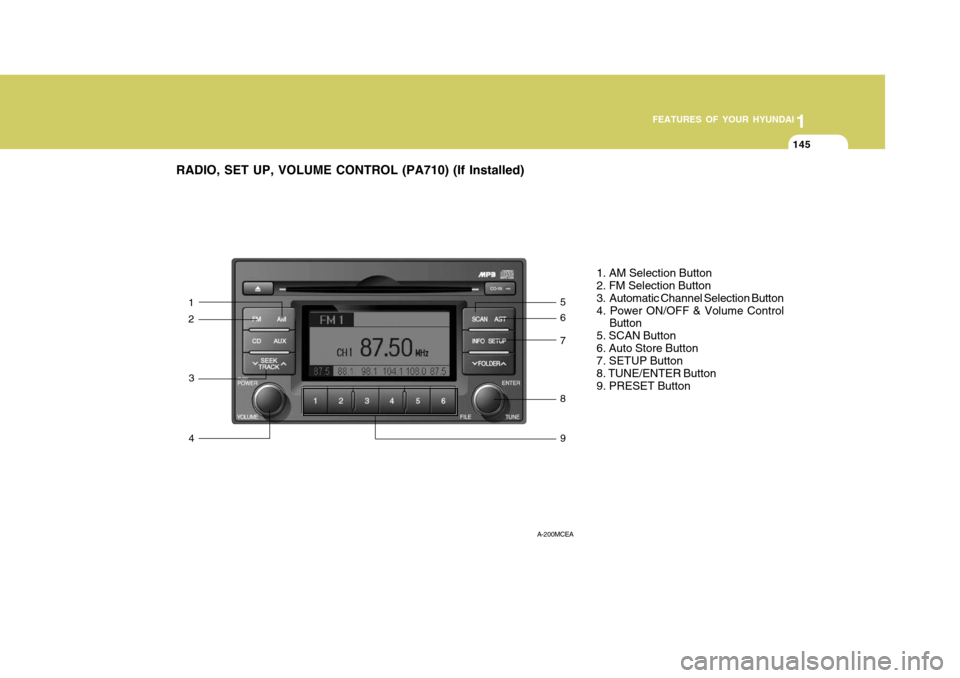
RADIO, SET UP, VOLUME CONTROL (PA710) (If Installed)
1. AM Selection Button 2. FM Selection Button
3. Automatic Channel Selection Button4. Power ON/OFF & Volume ControlButton
5. SCAN Button6. Auto Store Button 7. SETUP Button 8. TUNE/ENTER Button9. PRESET Button
A-200MCEA
3 4 8
7
5
1
9
26
Page 166 of 284
2 DRIVING YOUR HYUNDAI
4
C070C01A-AAT
To Remove The Ignition Key
1. Turn the ignition key to the "ACC"position.
2. Simultaneously push and turn the ignition key counterclockwise from the "ACC" position to the "LOCK"position.
3. The key can be removed in the
"LOCK" position.
C070C01E
LOCK
ACC
ON
START
!
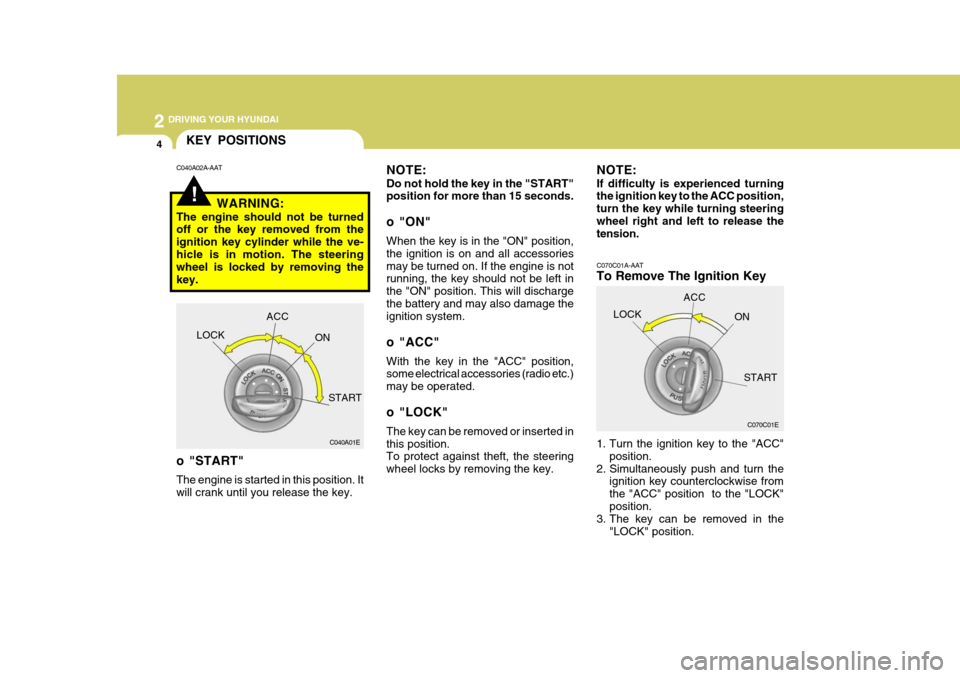
KEY POSITIONS
C040A01E
LOCK
ACC
ON
START
o "START" The engine is started in this position. It will crank until you release the key.
C040A02A-AAT
NOTE: Do not hold the key in the "START" position for more than 15 seconds.
o "ON" When the key is in the "ON" position, the ignition is on and all accessoriesmay be turned on. If the engine is not running, the key should not be left in the "ON" position. This will dischargethe battery and may also damage the ignition system.
o "ACC" With the key in the "ACC" position, some electrical accessories (radio etc.) may be operated.
o "LOCK" The key can be removed or inserted in this position. To protect against theft, the steering wheel locks by removing the key.
WARNING:
The engine should not be turned off or the key removed from the ignition key cylinder while the ve-hicle is in motion. The steering wheel is locked by removing the key. NOTE: If difficulty is experienced turning the ignition key to the ACC position, turn the key while turning steeringwheel right and left to release the tension.
Page 247 of 284

6
DO-IT-YOURSELF MAINTENANCE
21
4. Replace the blown fuse by pressing
a new fuse of the same rating into place. The fuse should be a snug fit. If it is not, have the fuse clip repaired or replaced by a Hyundai dealer.
1. Turn off the ignition and all other
switches.
2. Open the fuse box and examine each fuse. Remove each fuse bypulling it toward you (a small "fusepuller" tool is contained in the relay and fuse box of the engine room to simplify this operation).
3. Be sure to check all other fuses even if you find one that appears tohave burned out.
G200B02MC
If you do not have a spare fuse, you may be able to borrow a fuse of the same or lower rating from an acces- sory you can temporarily get alongwithout (the radio or cigarette lighter, for example). Always remember to replace the borrowed fuse.
G200B02L
Good B
urned out CAUTION:
A burned-out fuse indicates that there is a problem in the electrical circuit. If you replace a fuse and itblows as soon as the accessory is turned on, the problem is serious and should be referred to a Hyun-dai dealer for diagnosis and repair. Never replace a fuse with anything except a fuse with the same or alower amperage rating. A higher capacity fuse could cause damage and create a fire hazard. NOTE: See page 6-35 for the fuse panel descriptions.
!