Page 146 of 421
�Û�Ý
Multi-Inf ormation Display
Inst rument s and Cont rols
83
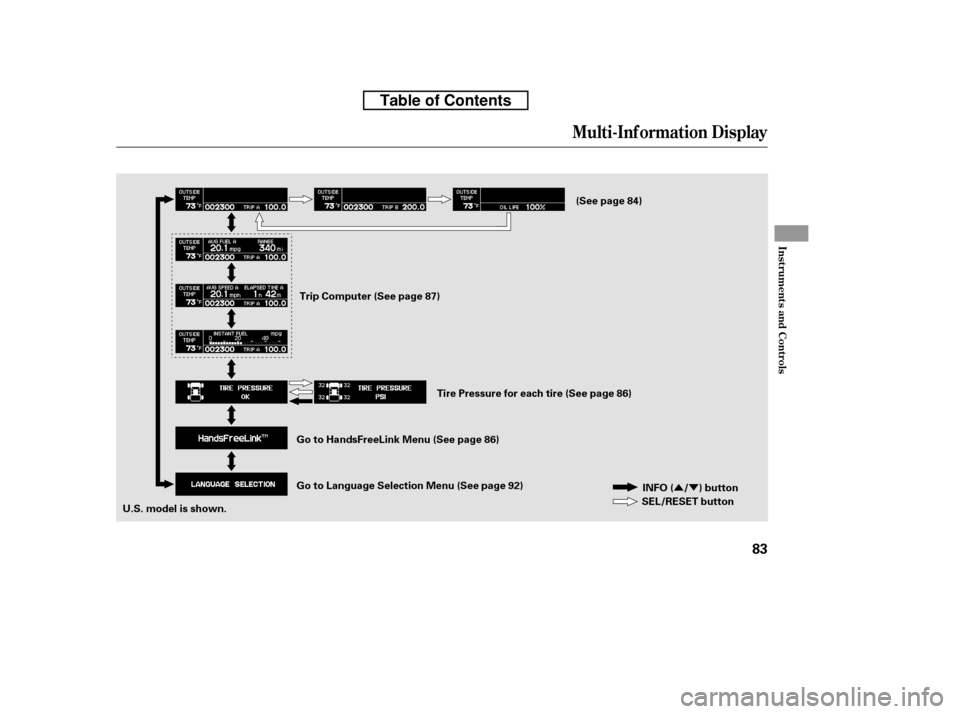
INFO ( / ) button
SEL/RESET button
U.S. model is shown. Trip Computer (See page 87)
(See page 84)
Tire Pressure for each tire (See page 86)
Go to Language Selection Menu (See page 92)
Go to HandsFreeLink Menu (See page 86)
Table of Contents
Page 147 of 421

The odometer shows the total
distance your vehicle has been
driven. It measures miles in U.S.
models and kilometers in Canadian
models. It is illegal under U.S.
federal law and Canadian provincial/
territorial regulations to disconnect,
reset, or alter the odometer with the
intent to change the number of miles
or kilometers indicated.This meter shows the number of
miles (U.S.) or kilometers (Canada)
driven since you last reset it. There
are two trip meters: Trip A and Trip
B. Each trip meter works
independently, so you can keep track
of two dif f erent distances.
To reset a trip meter, display it, and
then press and hold the SEL/RESET
button until the number resets to‘‘0.0.’’When you reset Trip A, AVERAGE
FUEL A, AVERAGE SPEED A, and
ELAPSED TIME A are reset at the
same time. When you reset Trip B,
AVERAGE FUEL B, AVERAGE
SPEED B, and ELAPSED TIME B
are reset.
Multi-Inf ormation Display
Odometer T rip Meter
84
TRIP METER
ODOMETER
U.S. model is shown.
U.S. model is shown.
Table of Contents
Page 148 of 421

�¶�¶�µ�µ
�µ�µ�µ �µ�µ�µ
If the outside temperature is
incorrectly displayed, you can adjust
it up to 5°F in U.S. models ( 3°C
in Canadian models) warmer or
cooler.
The temperature must be
stabilized bef ore doing this
procedure.
To adjust the outside temperature
indicator, press and hold the SEL/
RESET button f or 10 seconds. The
f ollowing sequence will appear f or 1
secondeach:0,1,2,3,4,5, 5, 4, 3, 2, 1, 0 (U.S.) or 0, 1, 2, 3,
3, 2, 1, 0 (Canada).
When the temperature reaches the
desired value, release the SEL/
RESET button. You should see the
new outside temperature displayed.
The temperature sensor is in the
f ront bumper. The temperature
reading can be affected by heat
ref lection f rom the road surf ace,
engine heat, and the exhaust f rom
surrounding traf f ic. This can cause
an incorrect temperature reading
when your vehicle speed is under
19 mph (30 km/h). When you start
your trip, the sensor is not f ully
acclimatized, theref ore it may take
several minutes until the proper
temperature is displayed.
In certain weather conditions,
temperature readings near f reezing
(32°F, 0°C) could mean that ice is
f orming on the road surf ace.
This shows the outside temperature
in Fahrenheit (U.S. models), or in
Celsius (Canadian models).
Outside Temperature
Multi-Inf ormation Display
Inst rument s and Cont rols
85
NOTE:
OUTSIDE TEMPERATURE
U.S. model is shown.
Table of Contents
Page 149 of 421
This shows the remaining lif e of the
engine oil. It shows 100% af ter the
engine oil is replaced and the display
is reset. The engine oil lif e is
calculated based on engine operating
conditions and accumulated engine
revolutions. For more inf ormation,
see page .Whenthetirepressuremonitoris
shown on the multi-inf ormation
display, press the SEL/RESET
button. The display changes as
shown.
You can see the pressure of each tire
in this monitor. If one or more tires
are low, inflate them to the correct
pressure. For more inf ormation, see
page .You can receive or make phone calls
f rom your cell phone through your
vehicle’s
HandsFreeLink
(HFL) system without touching your
cell phone.
313 282
Bluetooth
Engine Oil L if e T ire Pressure MonitorHandsFreeL inkBluet oot h
Multi-Inf ormation Display
86
ENGINE OIL LIFEU.S.
Canada
Table of Contents
Page 150 of 421
�Û�Ý
To use the system, your cell phone
and the HFL system must be linked.
Not all cell phones are compatible
with this system. Ref er to pagefor instructions on how to link
your cell phone to HFL and how to
receive or make phone calls, or visit
the handsf reelink.com website. In
Canada, visit , or call 1-
(888) 9-HONDA-9. 221
www.honda.ca
CONT INUED
Multi-Inf ormation Display
Trip Computer
Inst rument s and Cont rols
87
Average Fuel Economy/Range
Average Vehicle Speed/Elapsed Time SEL/RESET button
INFO ( / ) button
U.S. model is shown. Instantaneous Fuel Economy
Table of Contents
Page 151 of 421

This shows the accumulated
traveling time since you last reset it.
When you turn the ignition switch to
the ON (II) position, ELAPSED
TIME is reset.
This shows your vehicle’s average
f uel economy in mpg (U.S. models)
or liter/100 km (Canadian models)
since you last reset Trip A or Trip B.
This shows the estimated distance
you can travel on the fuel remaining
in the f uel tank. This distance is
estimated f rom the f uel economy
you received over the last several
miles (U.S.) or kilometers (Canada),
so it will vary with changes in speed,
traf f ic, etc.
This shows the average speed you
are traveling in miles per hour (mph)
forU.S.modelsorkilometersper
hour (km/h) f or Canadian models.
Along with the trip meter, the trip
computer calculates these values:
Average Fuel Economy
Range
Average Vehicle Speed
Elapsed Time
Instantaneous f uel economy
This shows your instant f uel
economy.
EL A PSED T IME A /B
AVERAGE FUEL A/B
RANGE
AVERAGE SPEED A/B INST A NT FUEL MPG (U.S.
models)/INST A NT FUEL L /100 km
(Canadian models)
Multi-Inf ormation Display
88
Table of Contents
Page 155 of 421
�Û�ÝPress the SEL/RESET button to see
the selections.
There are three language selections
you can make: English, Spanish, and
French. To choose the language you
want, f ollow these instructions: Select the desired language by
pressing the SEL/RESET button,
then enter your selection by pressing
and holding the SEL/RESET button.When your selection is successf ully
completed, the display returns to the
‘‘LANGUAGE SELECTION’’ display.
Press and release the INFO ( / )
button repeatedly to select the
‘‘LANGUAGE SELECTION’’ display.
Multi-Inf ormation Display
Language Selection
92
Table of Contents
Page 156 of 421

�Î�Î
�Î�Î�Î
�Î
�Î
�Î
�Î
�Î �Î
�Î
�Î �Î�Î�Î�Î
�Û �Ý
Only on vehicles equipped with navigation system. Ref er to the navigati on system manual.
To use the horn, press the center pad of the steering wheel.
If equipped
On models with navigation system.
On models without navigation system.
1:2:3:4:5:
Controls Near the Steering Wheel
Inst rument s and Cont rols
93
MOONROOF SWITCH
REMOTE AUDIO CONTROLS
HEADLIGHT CONTROL DIAL
VEHICLE STABILITY ASSIST (VSA)
SYSTEM OFF SWITCH HORN
STEERING WHEEL
ADJUSTMENT SEAT HEATERS
PASSENGER AIRBAG OFF
INDICATOR
SEL/RESET BUTTON
INFO ( ) BUTTON
SELECT BUTTON
TRIP/RESET BUTTON
Vehicle with navigation system is shown. CRUISE CONTROLS
HAZARD WARNING BUTTON
VOICE CONTROL
BUTTONS INTERIOR LIGHT CONTROL
SWITCH
MULTI-CONTROL LEVER
(WINDSHIELD WIPERS/
WASHERS/TURN SIGNALS/
HEADLIGHT HIGH BEAMS)
(P.131)
(P.94)
(P.95)
FOG LIGHTS (P.97)
(P.292)
(P.99)
(P.126)
(P.142)
(P.99)
(P.31)
(P.76)
(P.76)
(P.76)
(P.76)
(P.76)
INFO ( )BUTTON
(P.203)
(P.221)(P.210)
INSTRUMENT PANEL
BRIGHTNESS
(P.98)
SHIFT LEVER
(P.271)
VTM-4 LOCK
(P.276)
BED LIGHT SWITCH
(P.144) BLUETOOTH
HANDSFREELINK
SYSTEM VOICE CONTROL
BUTTONS
2
2
124
4
5
5
3
2 4
3
Table of Contents