Page 86 of 575
This shows the temperature of the
engine’s coolant. During normal
operation, the pointer should rise to
about the middle of the gauge. In
severe driving conditions, the pointer
may rise to the upper zone. If it
reaches the red (hot) mark, pull
safely to the side of the road. For
instructions and precautions on
checking the engine’s cooling
system, see page .
This shows how much f uel you
have. It may show slightly more
or less than the actual amount.
519
Gauges
Temperature Gauge
Fuel Gauge
82
U.S. model is shown.
SPEEDOMETERFUEL GAUGE
TEMPERATURE GAUGETACHOMETER
INFORMATION DISPLAYSELECT/RESET KNOB
SPEEDOMETERFUEL GAUGE
TEMPERATURE GAUGE
SELECT/RESET KNOB
Touring models
Except Touring models
TACHOMETER
MULTI-INFORMATION DISPLAY
Avoid driving with an extremely low
f uel level. Running out of f uel could
cause the engine to misf ire, damaging
the catalytic converter.
�����—�����—�
���y�
�����������
�y���
�(�/�����
���y���������y
2010 Pilot
Page 103 of 575

�Î
�Î
�Î
�Î
�Î
�Î
�Î
�Î
�Î
�Î
�Î
Menu ItemDescriptionGroup SetupSetting Option Page
INTERIOR LIGHT
DIMMING T IME
HEADLIGHT
AUTO OFF TIMER
AUTO LIGHT
SENSITIVITY
AUTO DOOR LOCK
AUTO DOOR UNLOCK
KEY AND REMOTE
UNLOCK MODE
KEYLESS LOCK
ACKNOWLEDGMENT
SECURITY RELOCK
TIMER
15 sec
0sec
LOW
MIN
Changes how long (in seconds) the interior lights
stay on after you close the doors and the tailgate.
Changes how long (in seconds) the exterior lights
stay on after you close the driver’s door.
Changes the timing of when the headlights come
on. The headlight switch needs to be in the AUTO
position.
Changes the setting of when to automatically lock
the doors.
Changes the setting of when to automatically
unlock the driver’s/all the doors.
Changes which doors unlock with the remote
transmitter on a first push.
The exterior lights flash each time you press the
LOCK or UNLOCK button. A beeper will also
sound when you press the LOCK button twice.
Changes how long it takes (in seconds) for the
doors to relock and the security system to set after
you unlock but do not open the door.
Set/Cancel all the customized settings as default.
LIGHTING SETUP
(P.110)
DOOR/WINDOW
SETUP
(P.115)
DEFAULT ALL
(P.100)
60 sec
30 sec
60 sec
30 sec
15 sec
MAX
HIGH
MID
SHIFT FROM P
WITH VEH SPEED
OFF
IGN OFF
OFF
DRIVER DOOR
ALL DOORS
ON
OFF
90 sec
60 sec
30 sec
SET
CANCEL
111
112
113
116
117
119
120
121
100
: Default setting
DRIVER DOOR /
AL L DOORS
SHIFT TO P
Multi-Inf ormation Display
Inst rument s and Cont rols
99
�����—�����—�
���y�
�������������y���
�(�/�����
���y���
�����y
2010 Pilot
Page 105 of 575
�Û
�Ý
�Û�Ý
�Û�Ý
You can customize some of the
vehicle control settings to your
pref erence. Here are the settings
you can customize:
METER SETUP
LIGHTING SETUP
POSITION SETUP
DOOR/WINDOW SETUP
Each time you press the INFO ( /
) button, the screen changes as
shownonthenextpage.Pressthe
INFO( / )buttonuntilyousee
the setup you want to customize,
then press the SEL/RESET button
to enter your selection.
When you want to change the
vehicle control settings, press the
INFO ( / ) button to select CHG
SETTING, then press the SEL/
RESET button.
CONT INUED
Multi-Inf ormation Display
Customize Settings
Inst rument s and Cont rols
101
�����—�����—�
���y�
�������������y���
�(�/�����
���y���
�����y
2010 Pilot
Page 106 of 575
Multi-Inf ormation Display
102
Select ‘‘DEFAULT ALL’’
Select ‘‘EXIT’’
Select ‘‘CANCEL’’
INFO button
SEL/RESET button
METER SETUP (Seepage103)
POSITION SETUP(Seepage108)
LIGHTING SETUP(Seepage110)
DOOR/WINDOW SETUP(Seepage115)
�����—�����—�
���y�
�������������y���
�(�/�����
���y���
�����y
2010 Pilot
Page 114 of 575
�Û
�Ý
�Û�Ý
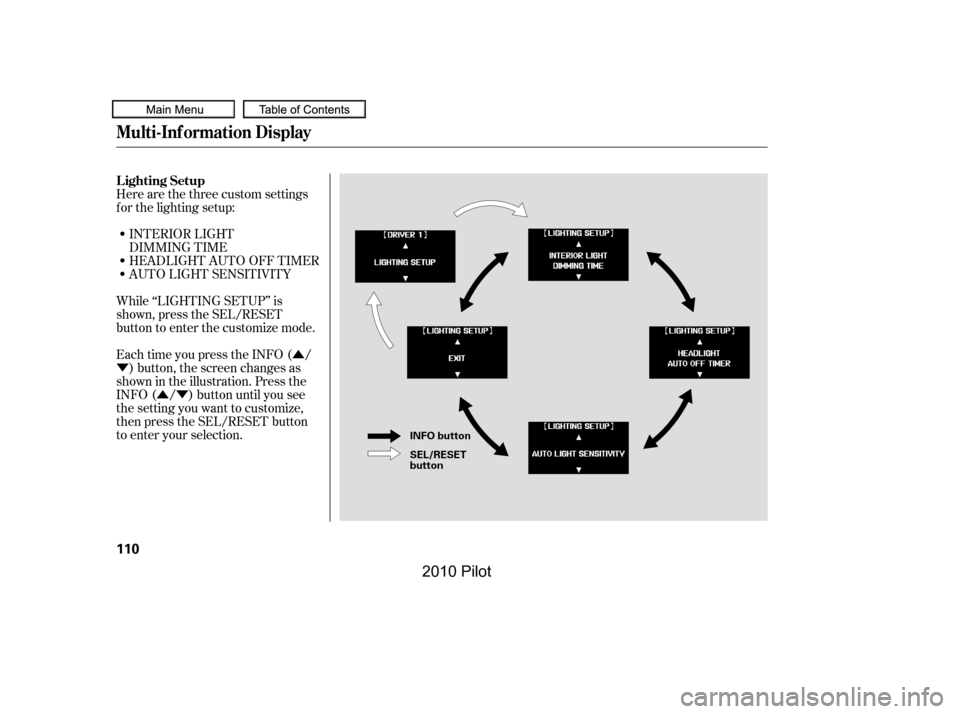
INTERIOR LIGHT
DIMMING TIME
HEADLIGHT AUTO OFF TIMER
AUTO LIGHT SENSITIVITY
While ‘‘LIGHTING SETUP’’ is
shown, press the SEL/RESET
button to enter the customize mode.
Each time you press the INFO ( /
) button, the screen changes as
shown in the illustration. Press the
INFO ( / ) button until you see
the setting you want to customize,
then press the SEL/RESET button
to enter your selection.
Here are the three custom settings
f or the lighting setup:
Lighting Setup
Multi-Inf ormation Display
110
INFO button
SEL/RESET button
�����—�����—�
���y�
������
������y���
�(�/�����
���y���
�
���y
2010 Pilot
Page 115 of 575
�Û
�Ý
�Û�Ý
CONT INUED
Interior Light Dimming Time
The interior lights f ade out when you
close all doors and tailgate. To
change how long the lights stay on
before they fade out, follow these
instructions:
You can choose this item to
customize f rom ‘‘LIGHTING
SETUP’’ by pressing the INFO ( /
) button repeatedly.
Press the SEL/RESET button to see
the selections.
When your selection is successf ully
completed, the display changes as
shown above, and then goes back to
the customize item screen.
If the ‘‘SETTING INCOMPLETE’’
message appears, go back to
‘‘INTERIOR LIGHT DIMMING
TIME’’ and repeat the procedure
again.
Select the desired setting by
pressing the INFO ( / ) button,
then enter your selection by pressing
the SEL/RESET button.
Multi-Inf ormation Display
Inst rument s and Cont rols
111
�����—�����—�
���y�
������
������y���
�(�/�����
���y���
�
���y
2010 Pilot
Page 116 of 575
�Û
�Ý
�Û�Ý
Headlight Auto Of f Timer
You can choose this item to
customize f rom ‘‘LIGHTING
SETUP’’ by pressing the INFO ( /
) button repeatedly.
Press the SEL/RESET button to see
the selections.
Select the desired setting by
pressing the INFO ( / ) button,
then enter your selection by pressing
the SEL/RESET button.
The headlights, parking lights, side
marker lights, taillights, and license
plate lights go of f af ter the selected
time when you remove the key f rom
the ignition switch and close the
driver’s door. To change how long
thelightsstayonbeforetheygooff,
f ollow these instructions:
Multi-Inf ormation Display
112
�����—�����—�
���y�
������
������y���
�(�/�����
���y���
�
���y
2010 Pilot
Page 117 of 575

�µ
�µ
�µ
�µ
�µ
�Û
�Ý
CONT INUED
Auto Light Sensitivity
The headlights automatically come
on when the headlight switch is in
the AUTO position and the ambient
light reaches a changeable level. You
can select the auto light sensitivity
f rom the f ollowing f ive levels:
When your selection is successf ully
completed, the display changes as
shown above, and then goes back to
the customize item screen.
If the ‘‘SETTING INCOMPLETE’’
message appears, go back to
‘‘HEADLIGHT AUTO OFF TIMER’’
and repeat the procedure again.
MAX
Theheadlightscomeonwhenitis
bright.
HIGH
Theheadlightscomeonwhenitis
somewhat bright.
MID
Theheadlightscomeonwhenitisas
bright as sunset or sunrise.
LOW
Theheadlightscomeonwhenitis
somewhat dark.
MIN
Theheadlightscomeonwhenitis
dark.
You can choose this item to
customize f rom ‘‘LIGHTING
SETUP’’ by pressing the INFO ( /
) button repeatedly.
Multi-Inf ormation Display
Inst rument s and Cont rols
113
�����—�����—�
���y�
������
������y���
�(�/�����
���y���
�
���y
2010 Pilot