Page 205 of 575

When you press a f an control button,
the fan is taken out of AUTO mode.
When you set the temperature to its
lower limit ( ) or its upper limit
( ), the system runs at f ull
cooling or heating only. It does not
regulate the interior temperature.
In the Auto mode, the vehicle’s
interior temperature is
independently regulated f or the
driver, f ront passenger, and rear
passengers according to each
adjusted temperature. The system
also regulates each temperature
basedontheinformationof the
sunlight sensor and the sun’s
position which is updated
automatically by the navigation’s
global positioning system (GPS). For
example, if the driver’s side of the
vehicle is getting too much sun, the
system will adjust to a lower
temperature.
When you turn the ignition switch to
the ON (II) position, the temperature
of the rear passenger compartment
is synchronized to the driver’s side
set temperature. You will see SYNC
on the system display of the rear
control panel. Changing the
temperature of the rear passenger
compartment takes the system out
of synchronized mode. This causes
thewordSYNCinthedisplaytogo
out and displays the rear
temperature in the f ront display.
When you turn the ignition switch to
the ON (II) position and see LOCK
on the system display of the f ront
and rear control panels, the
temperature of the rear passenger
compartment is not synchronized to
the driver’s side set temperature.
On vehicles with navigation systemRR (Rear) L ock But t on
Climate Control System
Features
201
�����—�����—�
���y�
�������������y���
�(�/�����
���y���������y
2010 Pilot
Page 206 of 575

�Û
�Ý
You can manually select various
f unctions of the climate control
system when it is in f ully automatic
mode. All other f eatures remain
automatically controlled. Making any
manual selection causes the word
AUTO in the display to go out.
Press the button to increase
the fan speed and airflow. Press the
button to decrease it.
This button turns the air
conditioningonandoff.Youwillsee
A/C ON or A/C OFF in the display.
When you turn the A/C of f , the
system cannot regulate the inside
temperature if you set the
temperature control below the
outside temperature.
When the indicator in the button is
on, air f rom the vehicle’s interior is
sent through the system again.
When the indicator is off, air is
brought in f rom the outside of the
vehicle (fresh air mode).
Switch to recirculation mode when
driving through dusty or smoky
conditions, then return to fresh air
mode.
Thesystemshouldbeleftinfresh
air mode under almost all conditions.
Keeping the system in recirculation
mode, particularly with the A/C of f ,
can cause the windows to fog up.
The outside air intakes f or the
climate control system are at the
base of the windshield. Keep this
area clear of leaves and other debris.
To turn the system completely off,
press the ON/OFF button.
Keep the system completely of f
f or short periods only.
To keep stale air and mustiness
f rom collecting, you should have
the f an running at all times.
Semi-automatic OperationTo Turn Everything Off
Fan Control
A ir Condit ioning (A /C) But t on
Recirculat ion But t on
Climate Control System
202
�����—�����—�
���y�
���������
���y���
�(�/�����
���y���������y
2010 Pilot
Page 207 of 575

For your saf ety, make sure you have
a clear view through all the windows
bef ore driving.
Airf low is divided between
the f loor and corner vents and the
defroster vents at the base of the
windshield.
This button directs the main airflow
to the windshield for faster
def rosting. It also overrides any
mode selection you may have made.
When you select , the system
automatically switches to f resh air
mode and turns on the A/C. For
f aster def rosting, manually set the
fanspeedtohigh.Youcanalso
increase airf low to the windshield by
closing the corner vents on the
dashboard. To close the vents, rotate
the wheel under each corner vent.
When you turn of f by
pressing the button again, the
system returns to its former settings.
This button turns the rear window
def ogger of f and on (see page ).
Pushing this button also turns the
power mirror heaters on and of f .
Use the mode control button to
select the vents the air flows from.
Some air will flow from the
dashboard vents in all modes.
Air flows from the center
and corner vents in the dashboard.
Airf low is divided between
the vents in the dashboard and the
f loor vents.
Air f lows f rom the f loor
vents.
When the indicator in the button is
on, the f ront passenger’s
temperature cannot be set separately
f rom the driver’s.
130
Windshield Def rost er But t on
Rear Window Def ogger But t on
Mode Cont rol
Climate Control System
Features
203
�����—�����—�
���y�
�������������y���
�(�/�����
���y���������y
2010 Pilot
Page 208 of 575
�Û
�Ý
When this button is on, you will see
LOCK on the system display. The
rear climate controls can only be
controlled by the f ront control panel.
Press the temperature control
button to increase the temperature
of airflow, and the button to
decrease it. The temperature you
adjust is shown in the system display.
Rear Climate Controls
RR (Rear) Lock ButtonTemperature Control
Climate Control System
204
MODE BUTTONRR LOCK BUTTON
REAR CONTROL PANEL
AUTO BUTTON
OFF BUTTON
REAR PASSENGER COMPARTMENTTEMPERATURE
REAR PASSENGER COMPARTMENTTEMPERATURECONTROL BUTTONS
FAN CONTROLBUTTON
�����—�����—�
���y�
�������������y���
�(�/�����
���y���������y
2010 Pilot
Page 209 of 575

�Û
�Ý
�Û�Ý
Press the fan control button
to increase the f an speed and airf low.
Press the button to
decrease it. The level of the f an
speed is shown in the display.
Each time you press the mode
button, the mode display changes
from to .
When is selected, air f lows
f rom the upper vents on the back of
the center console.
When is selected, air f lows
f rom the lower vents.
Pressing the AUTO button puts the
system in automatic operation mode.
The rear system automatically
adjusts the fan speed and airflow
levels to maintain the selected
temperature of the rear passenger
compartment. You will see AUTO in
the display.
To shut of f the rear climate control
system, press the OFF button until
the system shuts off.
The temperatures of the driver’s side
and the front passenger’s side are
controlled independently.
When the RR (REAR) LOCK button
is of f , the temperature of the rear
passenger compartment can be
controlled independently.
To adjust each temperature, press
either of the temperature control
buttons ( or ) on the climate
control panel.
CONT INUED
Climate Control System
Fan Cont rol
Mode Cont rol
Automatic OperationTriple Zone Temperature Control
Features
205
�����—�����—�
���y�
�������������y���
�(�/�����
���y�����
���y
2010 Pilot
Page 210 of 575
When you set each temperature to
its lower limit or its upper limit, it will
be displayed as ‘‘ ’’ or ‘‘ ’’.
Climate Control System
206
Rear Passenger Compartment
Passenger’s SideDriver’s Side
�����—�����—�
���y�
�������������y���
�(�/�����
���y�����
�
�y
2010 Pilot
Page 211 of 575
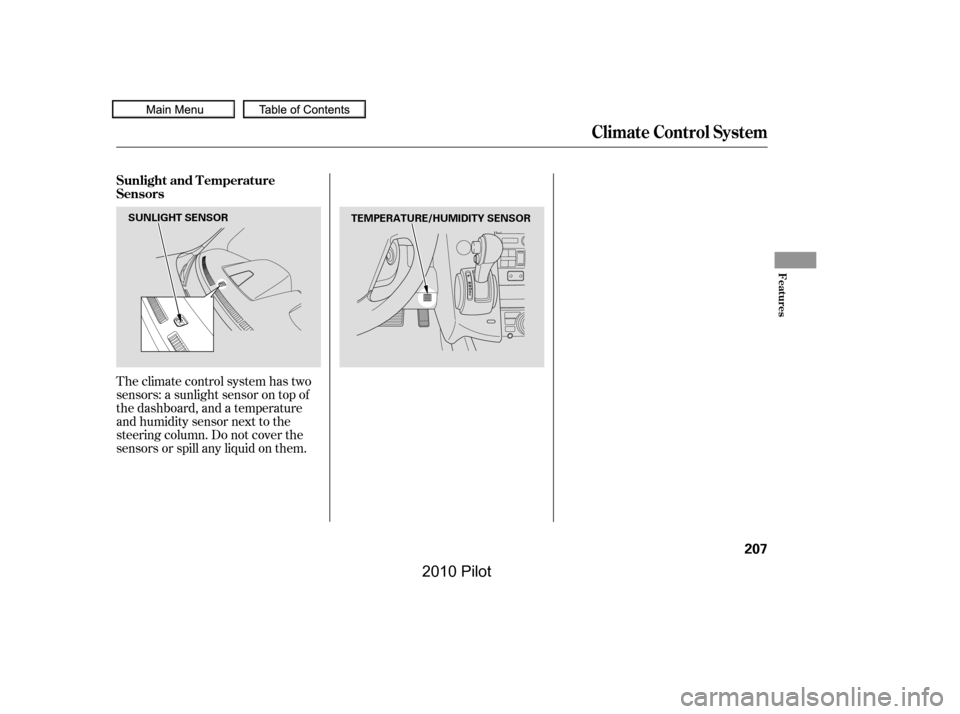
Theclimatecontrolsystemhastwo
sensors: a sunlight sensor on top of
the dashboard, and a temperature
and humidity sensor next to the
steering column. Do not cover the
sensors or spill any liquid on them.
Sunlight and T emperature
Sensors
Climate Control System
Features
207
TEMPERATURE/HUMIDITY SENSORSUNLIGHT SENSOR
�����—�����—�
���y�
�����������
�y���
�(�/�����
���y�����
���y
2010 Pilot
Page 494 of 575

If your seat belts get dirty, use a sof t
brush with a mixture of mild soap
and warm water to clean them. Do
not use bleach, dye, or cleaning
solvents. Let the belts air-dry bef ore
you use the vehicle.
This f ilter removes the dust and
pollenthatisbroughtinfromthe
outside through the heating and
cooling system/climate control
system.
Have your dealer replace the filter
when this service is indicated by a
maintenance message on the
inf ormation display or multi-
inf ormation display (depending on
the models). It should be replaced
every 15,000 miles (24,000 km) if you
drive primarily in urban areas that
have high concentrations of soot in
the air, or if the flow from the
heating and cooling system/climate
control system becomes less than
usual.
Dirt build-up in the loops of the seat
belt anchors can cause the belts to
retract slowly. Wipe the insides of
the loops with a clean cloth
dampened in mild soap and warm
water or isopropyl alcohol.
Cleaning the Seat BeltsDust and Pollen Filter
Dust and Pollen Filter, Cleaning the Seat Belts
490
LOOP
�����—�����—�
���y�
������
������y���
�(�/�����
���y���������y
2010 Pilot