2010 HONDA ELEMENT change
[x] Cancel search: changePage 27 of 153

26Navigation System
Entering the Street Number
After you have completed the street
name, the display changes to the Enter
street number screen. Use the voice
control system and say the address
number as a continuous string of
numbers. For example, the address 1527
should be spoken as “One, five, two,
seven.” You can also use the on-screen
keyboard to enter th e street number.
Some address numbers may not be
available on the selected street. For
example, let’s say the individual address
ranges for a selected street name are 1 -
20 and 9,000 - 10,000, with an overall
range shown on the display of 1 to
10,000. If you try to enter a number
outside the individual address ranges
such as 500, the system will show this
number as unavailable (grayed out).
• When using the on-screen keyboard, the system only allows you to choose
available address numbers.
• When using voice control, the system beeps if you try to select an
unavailable (grayed out) address
number. If you did not select a city in the
beginning, the street name you selected
might appear in more
than one city. The
system will give you a list of cities that
the street appears in . Select the desired
city from the list. The system then
displays the Calculate route to screen
(see Driving to Your Destination on
page 45).
Tip:
If the particular address you want
cannot be found, select Map Input and
use the joystick to se lect the appropriate
location on the map (see By Map Input
on page 36).
Select View Dest. Map and use the
joystick to select an icon, approximate
area, or street you wish to choose as
your destination. Otherwise, a central
location of the street will be selected. If
you select a point of interest (POI) or
road in an unverified area, you may or
may not have routing in these areas. See
Map Overview on page 6.
By Intersection
After you select Intersection from the
Enter destination by screen, the
display changes to:
Tip:
When entering an address, it is usually
easier to enter the st reet first. A city or
cities that the street appears in will be
displayed. For your convenience, you
do not have to enter both city and street.
Entering a Destination
Page 28 of 153

Navigation System27
NOTE:
If you find that your city is not listed,
it may be part of a larger
metropolitan area. Try entering the
street first.
Prior to departure, you can set areas to avoid. The system then includes
them in its calculations for the
destination you have entered. See
Edit Avoid Area on page 87.
Selecting the State or Province
The state you are in is displayed at the
top of the screen. If your desired
destination is in an other state, select
Change State .
The display then changes to the Enter
state name screen. Use the voice
control system and say the name of the
state or use the on-screen keyboard to
enter the name of the state.
Selecting the City
This is helpful if the street runs through
several cities, and you know what city
includes the street. Th e city you are in is
displayed on the screen. If the city you
want is displayed on the screen, say
“Select current city .” If your desired
destination is in another city, say or
enter another city.
By Voice Control:
Say “City” on the Find intersection by
screen, and the display changes to the
Say city name screen. Say the city
name and the searching will begin. To enter the city na
me by voice spelling,
say or select CHANGE TO Spell
Mode on the Say city name screen,
and the display will change to the Enter
city name screen.
Say the city name by saying individual
letters, or words that represent the
letters, one at a time.
Entering a Destination
Page 29 of 153

28Navigation System
The system has a talk back function. If
your spoken letter is not recognized, the
system will talk back to you. For
example, if you say “E” but the system
does not recognize the command, it will
ask you, “Please select the number of
the input letter from the list,” and the
following pop-up box will appear:
You should select a letter by saying the
number.
Alternatively, to improve voice
recognition, you can say “Echo” or
“Edward” instead of “E.”
See page 15 for a list of available words
for each letter.By Touch Control:
Select City, and the display then
changes to the Enter city name screen.
Use the on-screen keyboard to enter the
name of the city.
The system will display a list of city
names, with the closest match to the
name you entered at the top of the list.
Select the number (1-6) of the desired
city from the list. If the system does not find an exact
match, select
List when you finish
entering the name of the city. Most of
the cities and towns for that state are
listed.
Listings of cities and towns in the non-
detailed coverage area may have an
asterisk “*” next to their names. If you
select one, a pop-up box is displayed
saying, “No detailed street data...”, and
a street address cannot be entered (see
Map Coverage on page 108).
Select View Dest. Map and use the
joystick to select an icon, approximate
area, or street you wish to choose as
your destination. Otherwise, a central
location of the city will be selected. If
you select a point of interest (POI) or
road in an unverified area, you may or
may not have routing in these areas. See
Map Overview on page 6.
Entering a Destination
Page 30 of 153
Navigation System29
Selecting the Street
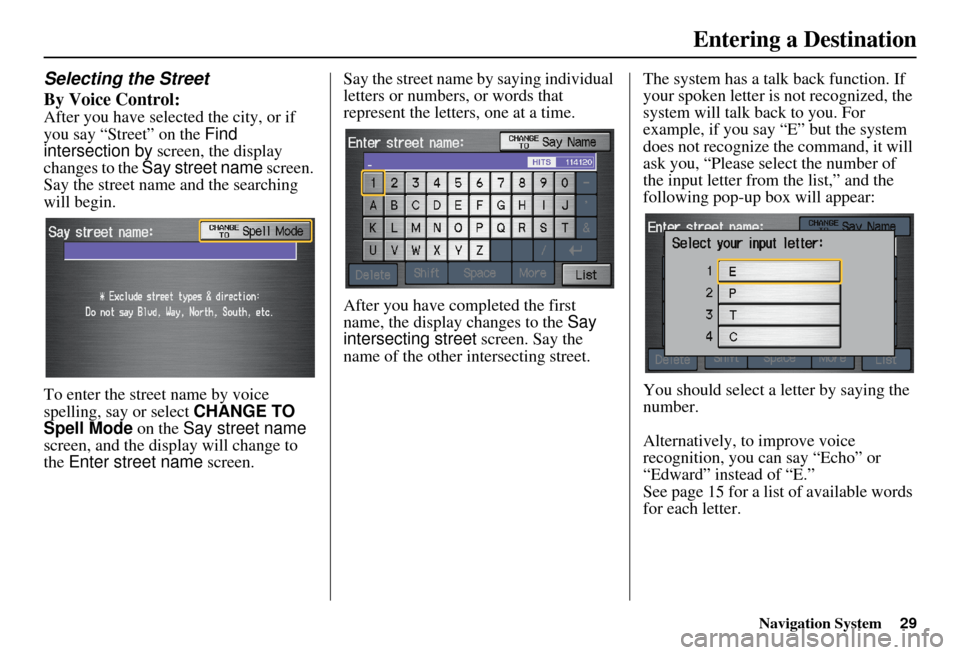
By Voice Control:
After you have selected the city, or if
you say “Street” on the Find
intersection by screen, the display
changes to the Say street name screen.
Say the street name and the searching
will begin.
To enter the street name by voice
spelling, say or select CHANGE TO
Spell Mode on the Say street name
screen, and the disp lay will change to
the Enter street name screen. Say the street name by saying individual
letters or numbers, or words that
represent the letters, one at a time.
After you have completed the first
name, the display
changes to the Say
intersecting street screen. Say the
name of the other intersecting street. The system has a talk back function. If
your spoken letter is not recognized, the
system will talk back to you. For
example, if you say “E” but the system
does not recognize the command, it will
ask you, “Please select the number of
the input letter from the list,” and the
following pop-up box will appear:
You should select a letter by saying the
number.
Alternatively, to improve voice
recognition, you can say “Echo” or
“Edward” instead of “E.”
See page 15 for a list of available words
for each letter.
Entering a Destination
Page 31 of 153

30Navigation System
By Touch Control:
After you have selected the city, or if
you select Street in the beginning, the
display changes to the Enter street
name screen. Use the on-screen
keyboard to enter one of the names (like
ELM or 42ND) of the intersecting
streets.
To enter the name of a major highway,
you must use the full name, including a
hyphen. For intersta tes, use an “I” (I-
10). For U.S. highways, use “US” (US-
18). For state highways, use the two
character state desi gnation (CA-101).
For county roads, use the appropriate
designation (G-2, for example).
Tip:
When entering a street, you do not need
to enter the direction (N, S, E, W) or the
type (St, Ave, etc.). The system will
automatically determine that for you. The system will display a list of street
names, with the closest match to the
name you entered at the top of the list.
Select the number (1-6) of the desired
street from the list.
After you have completed the first street
name, the display
changes to the Enter
intersecting street screen.
Enter the name of the other intersecting
street using the on-screen keyboard. If you did not select a city in the
beginning, and the
intersection appears
in more than one city, you will see the
Select a city screen. The system will
give you a list of cities that the
intersection appears in. Select the
desired city from the list. If more than
one intersection appears in a city, select
the desired intersection from the Select
an intersection screen. The system
then displays the Calculate route to
screen (see Driving to Your Destination
on page 45).
Tip:
If the particular intersection you want
cannot be found, select Map Input and
use the joystick to select the appropriate
location on the map (see By Map Input
on page 36).
Select View Dest. Map and use the
joystick to select an icon, approximate
area, or street you wish to choose as
your destination. Otherwise, a central
location of the street will be selected. If
you select a point of interest (POI) or
road in an unverified area, you may or
may not have routing in these areas. See
Map Overview on page 6.
Entering a Destination
Page 32 of 153

Navigation System31
By Places
After you select Places from the Enter
destination by screen, the display
changes to:
There are three ways to find a place or
point of interest (POI), by Category ,
Name , or Phone Number .Let’s assume you want to find a coffee
shop (restaurant) called “Bucks.”
• If you know the phone number of the
coffee shop, select Phone Number,
then enter the 10-digit number with
area code. This is the quickest way to
find it.
• The second best me thod is to select
Category , Restaurant, and
CAFÉ/COFFEE SHOP . After you
select Place Name by Keyword
and search method, enter the keyword
“Bucks.” The list will include all
restaurants that have the letters
“bucks” anywhere in the name.
• You can try to enter “Bucks” using Name, but you may have to search
through a list that might include
Bucks Welding, Bucks Surplus, etc. NOTE:
Prior to departure, you can set areas
to avoid. The system then includes
them in its calculations for the
destination you have entered. See
Edit Avoid Area on page 87.
You can enter the desired destination using the voice control system. For
information on the available voice
commands, see Voice Command
Index on page 139.
Entering a Destination
Page 34 of 153

Navigation System33
Auto Service LodgingShoppingHonda DealersAuto Repair & Maintenance Bed & Breakfast Resort All Shopping*2 Office Supplies/Electronics
Acura Dealers Car Wash & Detailing Hotel/M otel Accessories/Jewelry Pharmacy/Drug Store
Gas Station Motorcycle Dealers
LeisureAuto Parts & Electronics Pet Food/Supplies
Hydrogen Station Other Car Dealers Amusement Park Museum Books/Music/Video Sewing/Linen
Auto Parts & Electronics Roadside Assistance Golf Course Park/Recreation Area Clothing Shoes/Bags
BankingHistorical Monument Performing Arts Groceries Sporting Goods
ATM Check Cashing/Money Transfer Marina Sports Complex Home Improvement Toys/Arts/Crafts
Bank Currency Exchange Movie TheaterTourist Attraction Mall/Department Store
Community RestaurantTravelBusinessHigher Education All Types*1ItalianAirport Parking Lot
City Hall Library AmericanJapaneseAutomobile Club Rental Car Agency
Civic/Community Center Post Office Café/Coffee Shop KoreanBed & Breakfast Resort
Convention/Exhibition Center School CalifornianMexicanBus Station Rest Area
Court House ChinesePizzaCamping Ski Area
EmergencyContinental SeafoodCommuter Rail Station Tourist Attraction
Hospital Roadside Assistance Fast FoodThaiFerry Terminal Tourist Information
Police Station Veterinarian FrenchVegetarianHotel/Motel Train Station
German VietnameseNamed Place Travel Agency
Greek OtherPark & Ride Truck Stop/Plaza
Indian Parking Garage/House
Advanced
*1 When trying to find a specific restaurant, select the category ALL TYPES. Some restaurants may be
miscategorized.
*2 When trying to find a speci fic store, select the category ALL SHOPPING. Some stores may be
miscategorized.If the category you want is not listed, you can try to
find it with a keyword. When you select this option,
the display changes to the Enter keyword for
category screen. If the system finds any categories
with the keyword you entered, the display changes to
the Select a category screen. Select the desired
category.
Entering a Destination
Page 35 of 153

34Navigation System
Place Name by Keyword
If you do not know the exact name of
the destination, you can find the place
with a keyword. When you select this
option, the display changes to:
You can find your destination with a
keyword using the Sort by Distance
to Travel option or City Vicinity
option. If you select the
Sort by Distance to
Travel option, the Enter keyword for
place screen appear s. Enter the
keyword using the on-screen keyboard.
If the system does not find an exact
match, select List when you finish
entering the keyword. The system starts
searching for places that match the
entered keyword. If you see your
desired place, select it from the list.
If not, scroll through the list to find the
desired place. If you select the
City Vicinity option,
the Enter city name screen appears.
Enter the name of the city using the on-
screen keyboard. The system will
display a list of city names, with the
closest match to the name you entered at
the top of the list. Select your desired
city name from the list. Once you have
selected your desired city name, the
Enter keyword for place screen
appears. Enter the keyword using the
on-screen keyboard to specify the
desired place.
Once you select a place, the system then
displays the Calculate route to screen
(see Driving to Your Destination on
page 45).
Entering a Destination