Page 74 of 441

This section gives inf ormation about
the controls and displays that
contribute to the daily operation of
your vehicle. All the essential
controls are within easy reach............................
Control Locations . 60............................
Instrument Panel . 61 ..........
Instrument Panel Indicators . 62
.............................................
Gauges . 68
....................
Inf ormation Display . 69
...................................
Trip Meter . 69
................
Instant Fuel Economy . 70
..............
Average Fuel Economy . 70
...........................................
Range . 70
.....................................
Odometer . 71
..................................
Fuel Gauge . 71
...................
Temperature Gauge . 71
Outside Temperature
..................................
Indicator . 71
..........
Check Fuel Cap Message . 73
..................
Maintenance Minder . 73
Controls Near the Steering
...........................................
Wheel . 74
.
Windshield Wipers and Washers . 75
.........
Turn Signals and Headlights . 76
........
Instrument Panel Brightness . 79
.................
Hazard Warning Button . 79
.................
Rear Window Def ogger . 80
.................................
Parking Brake . 81
..........
Steering Wheel Adjustment . 81
...............................
Keys and Locks . 82
........................
Immobilizer System . 83
................................
Ignition Switch . 84 ......................................
Door Locks . 85
......................
Power Door Locks . 85
.
Auto Door Locking/Unlocking . 86
..............
Childproof Door Locks . 91
.......................
Remote Transmitter . 92
............................................
Tailgate . 95
.................................................
Seats . 97
..................................
Seat Heaters . 111
............................
Power Windows . 112
.......................................
Moonroof . 113
...........................................
Mirrors . 114
.........
Interior Convenience Items . 116
............
Dual Deck Cargo Shelf . 117
.....................
Beverage Holders . 119
.............................
Center Table . 120
......................
Lower Glove Box . 120
......................
Upper Glove Box . 121
............................
Vanity Mirror . 121
...................................
Sun Visor . 122
....................
Sunglasses Holder . 122
................
Conversation Mirror . 123
........
Accessory Power Sockets . 123
.............
Console Compartment . 124
..................................
Coat Hook . 125
.......................
Seat Under Tray . 125
...............................
Interior Lights . 126
Instruments and Controls
Inst rument s and Cont rols
59
Page 75 of 441
�Î�Î
�Î
�Î �Î
�Î
If equipped
:
Control L ocations
60
MIRROR CONTROLS
GAUGES
INSTRUMENT PANEL
INDICATORS
MOONROOF SWITCH
ACCESSORY POWER SOCKETS
POWER DOOR LOCK
MASTER SWITCH
POWER WINDOW
SWITCHES
FUEL FILL DOOR
RELEASE HANDLE
HOOD RELEASE
HANDLE
PARKING BRAKE PEDAL
(P.61)
(P.68) (P.113)
(P.123)
(P.81) (P.297)
(P.295)
(P.112)
(P.85)
(P.111)
SEAT HEATER
SWITCHES
(P.135)
CLIMATE CONTROL
SYSTEM
(P.130)
HEATING/COOLING
CONTROLS
(P.315)
AUTOMATIC
TRANSMISSION
(P.237, 245)
USB ADAPTER CABLE
(P.259)
CLOCK
(P.145, 157, 194)
AUDIO SYSTEM
HAZARD WARNING
BUTTON
(P.33)
PASSENGER AIRBAG
OFF INDICATOR
(P.79)
EX-L without navigation system is shown. (P.115)
Table of Contents
Page 89 of 441
�Î �Î�Î
�Î
�Î
�Î
�Î �Î �Î
�Î
�Î
To use the horn, press the center pad of the steering wheel.
If equipped.
Ref er to the navigation system manual.
1:2:3:
Controls Near the Steering Wheel
74
CRUISE CONTROL BUTTON
PARKING BRAKE PEDAL HORN HAZARD WARNING
BUTTON
SHIFT LEVER
REMOTE AUDIO CONTROLS
STEERING WHEEL
ADJUSTMENTS PASSENGER AIRBAG
OFF INDICATOR
REAR WINDOW DEFOGGER
BUTTON
HEATED MIRROR BUTTON
NAVIGATION SYSTEM
VOICE CONTROL BUTTONS
BLUETOOTH HANDSFREELINK SYSTEM
VOICE CONTROL BUTTONS
(P.325)
(P.255)
(P.81)
(P.269) (P.81)
(P.123)
(P.266) (P.115)
(P.80)
(P.315)
(P.194)
AUDIO SYSTEM
(P.79)
(P.33)
(P.145, 157)
AUDIO SYSTEM
VEHICLE STABILITY
ASSIST (VSA) SYSTEM
OFF SWITCH HEADLIGHTS/TURN
SIGNALS
(P.76)
INSTRUMENT PANEL
BRIGHTNESS
(P.79)WINDSHIELD WIPERS/
WASHERS
(P.75)
ACCESSORY POWER SOCKET SEAT HEATER
SWITCHES
(P.111)
MIRROR CONTROLS (P.115)
1
2
2
3 2 2
2
2
Table of Contents
Page 91 of 441
�Î
�Î
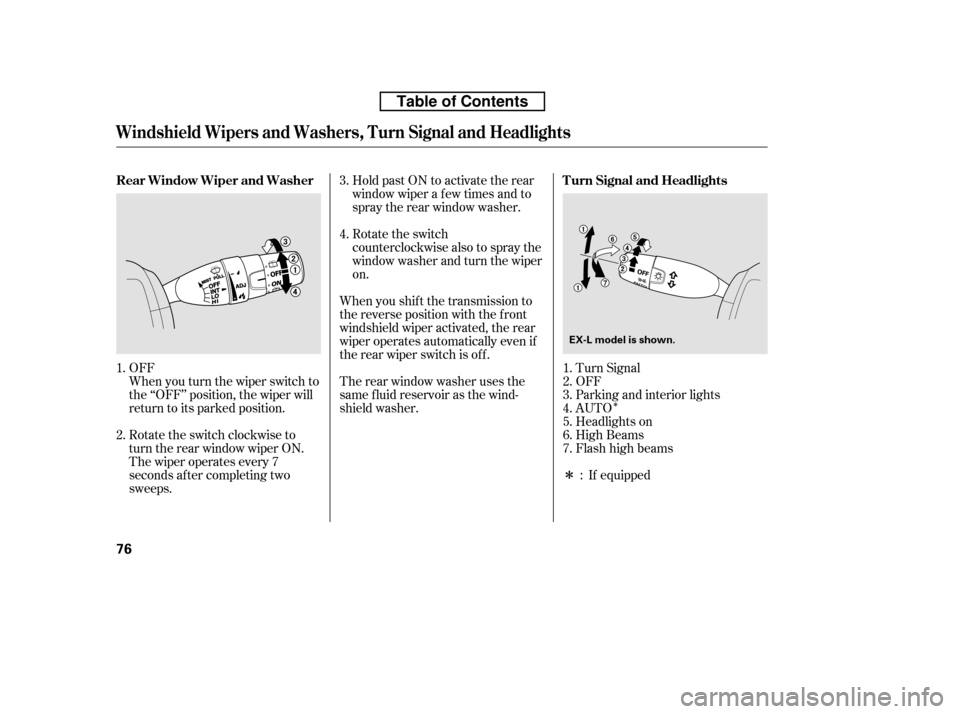
When you turn the wiper switch to
the ‘‘OFF’’ position, the wiper will
return to its parked position.
OFF
Turn Signal
OFF
Parking and interior lights
AUTO
Headlights on
High Beams
Flashhighbeams
Rotate the switch
counterclockwise also to spray the
window washer and turn the wiperon.
When you shif t the transmission to
the reverse position with the f ront
windshield wiper activated, the rear
wiper operates automatically even if
the rear wiper switch is of f .
Therearwindowwasherusesthe
same f luid reservoir as the wind-
shield washer. Hold past ON to activate the rear
window wiper a f ew times and to
spray the rear window washer.
The wiper operates every 7
seconds af ter completing two
sweeps.
Rotate the switch clockwise to
turn the rear window wiper ON.
If equipped
4.
3.
1. 2. 1. 2.3.4.5.6.7.
:
Turn Signal and Headlights
Rear Window Wiper and Washer
Windshield Wipers and Washers, Turn Signal and Headlights
76
EX-L model is shown.
Table of Contents
Page 95 of 441
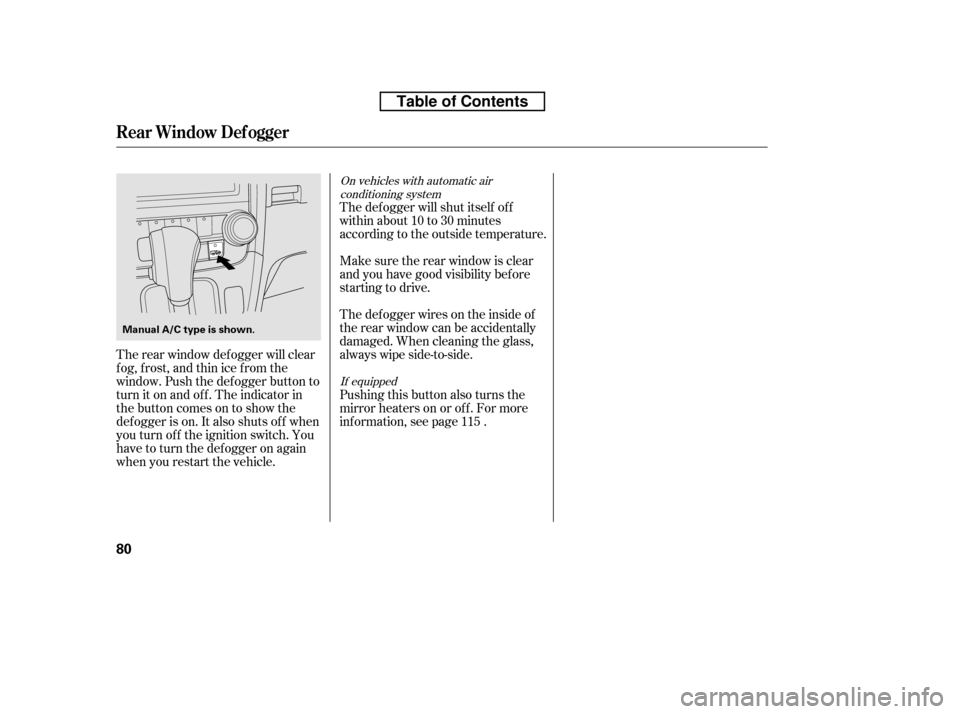
Pushing this button also turns the
mirror heaters on or of f . For more
inf ormation, see page .
Thedefoggerwiresontheinsideof
the rear window can be accidentally
damaged. When cleaning the glass,
always wipe side-to-side.
Make sure the rear window is clear
and you have good visibility bef ore
starting to drive.
The def ogger will shut itself of f
withinabout10to30minutes
according to the outside temperature.
The rear window def ogger will clear
fog, frost, and thin ice from the
window. Push the def ogger button to
turn it on and off. The indicator in
the button comes on to show the
def ogger is on. It also shuts of f when
you turn of f the ignition switch. You
have to turn the defogger on again
when you restart the vehicle. 115
If equipped
On vehicles with automatic air
conditioning system
Rear Window Def ogger
80
Manual A/C type is shown.
Table of Contents
Page 127 of 441
�µ�µ
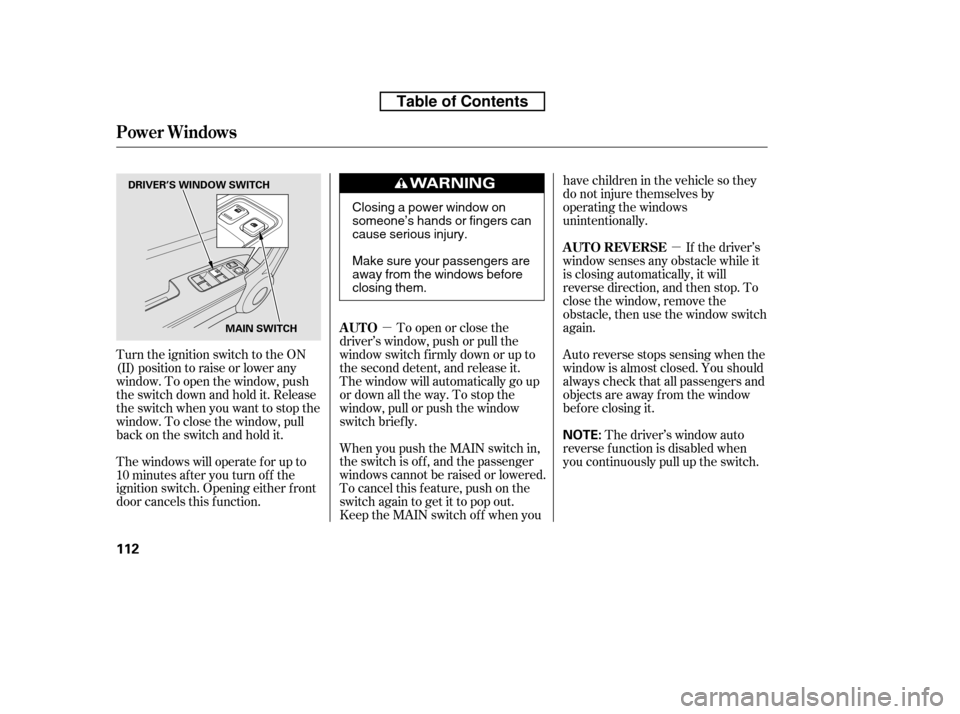
When you push the MAIN switch in,
the switch is off, and the passenger
windows cannot be raised or lowered.
To cancel this f eature, push on the
switch again to get it to pop out.
Keep the MAIN switch of f when you have children in the vehicle so they
do not injure themselves by
operating the windows
unintentionally.
To open or close the
driver’s window, push or pull the
window switch firmly down or up to
the second detent, and release it.
The window will automatically go up
or down all the way. To stop the
window, pull or push the window
switch brief ly. If the driver’s
window senses any obstacle while it
is closing automatically, it will
reverse direction, and then stop. To
close the window, remove the
obstacle, then use the window switch
again.
Auto reverse stops sensing when the
window is almost closed. You should
always check that all passengers and
objects are away from the window
bef ore closing it.
Turn the ignition switch to the ON
(II) position to raise or lower any
window. To open the window, push
the switch down and hold it. Release
the switch when you want to stop the
window. To close the window, pull
back on the switch and hold it.
The windows will operate f or up to
10 minutes af ter you turn of f the
ignition switch. Opening either f ront
door cancels this f unction. The driver’s window auto
reverse f unction is disabled when
you continuously pull up the switch.
AUTO
AUTO REVERSE
Power Windows
112
NOTE:
DRIVER’S WINDOW SWITCH
MAIN SWITCH
Closing a power window on
someone’s hands or fingers can
cause serious injury.
Make sure your passengers are
away from the windows before
closing them.
Table of Contents
Page 130 of 441
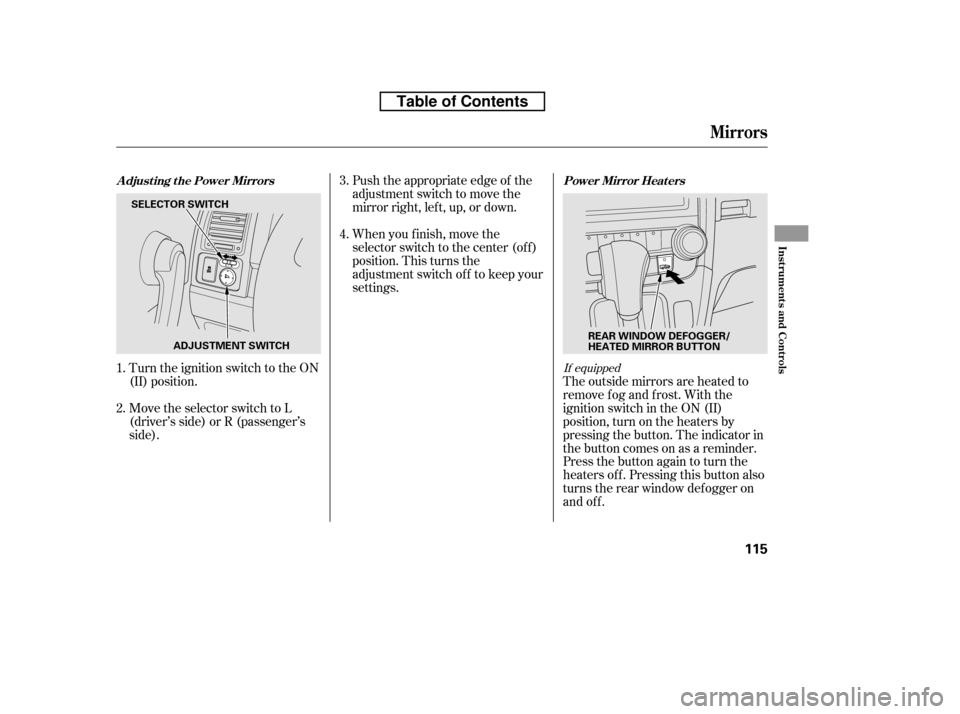
Push the appropriate edge of the
adjustment switch to move the
mirrorright,left,up,ordown.
When you f inish, move the
selector switch to the center (off)
position. This turns the
adjustment switch of f to keep your
settings.
Turn the ignition switch to the ON
(II) position.
Move the selector switch to L
(driver’s side) or R (passenger’s
side). The outside mirrors are heated to
remove fog and frost. With the
ignition switch in the ON (II)
position, turn on the heaters by
pressing the button. The indicator in
the button comes on as a reminder.
Press the button again to turn the
heaters off. Pressing this button also
turns the rear window def ogger on
and off.
2.
1. 3. 4.
If equipped
Adjusting the Power Mirrors
Power Mirror Heaters
Mirrors
Inst rument s and Cont rols
115
SELECTOR SWITCH
ADJUSTMENT SWITCH REAR WINDOW DEFOGGER/
HEATED MIRROR BUTTON
Table of Contents
Page 137 of 441
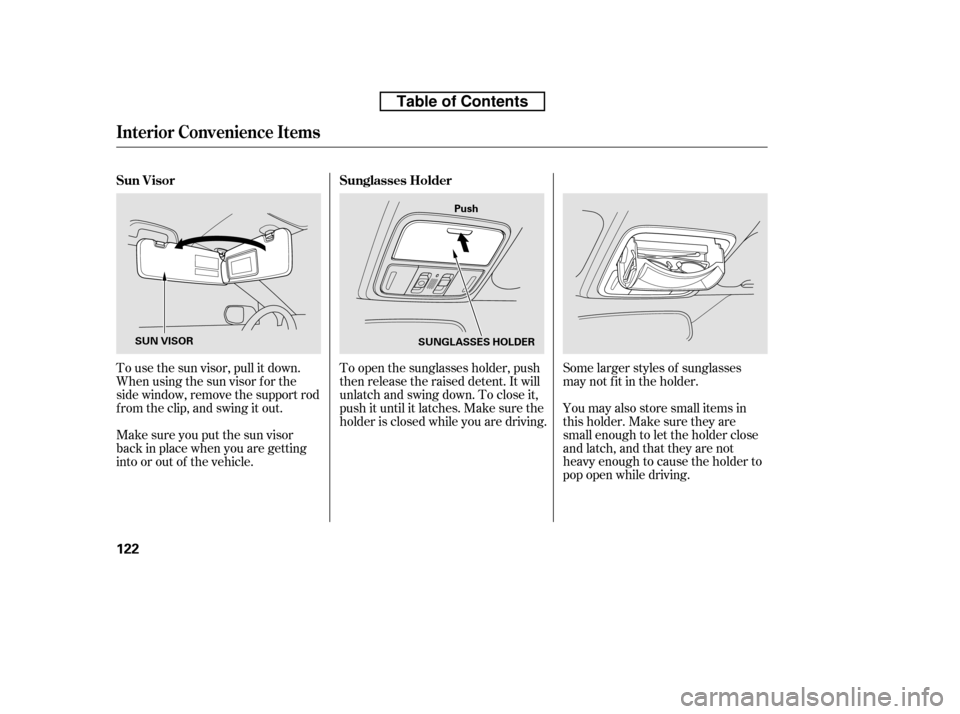
Some larger styles of sunglasses
may not f it in the holder.
You may also store small items in
thisholder.Makesuretheyare
small enough to let the holder close
and latch, and that they are not
heavy enough to cause the holder to
pop open while driving.
To open the sunglasses holder, push
then release the raised detent. It will
unlatch and swing down. To close it,
push it until it latches. Make sure the
holder is closed while you are driving.
To use the sun visor, pull it down.
Whenusingthesunvisorforthe
side window, remove the support rod
f rom the clip, and swing it out.
Make sure you put the sun visor
back in place when you are getting
into or out of the vehicle. Sunglasses Holder
Sun Visor
Interior Convenience Items
122
Push
SUNGLASSES HOLDER
SUN VISOR
Table of Contents