Page 19 of 441
�Î �Î�Î
�Î�Î�Î
�Î �Î
�Î
�Î �Î
To use the horn, press the center pad of the steering wheel.
If equipped.
Ref er to the navigation system manual.
1:2:3:
Your Vehicle at a Glance
4
INSTRUMENT PANEL
BRIGHTNESS
PASSENGER AIRBAG
OFF INDICATOR
HAZARD WARNING
BUTTON
WINDSHIELD
WIPERS/WASHERS
SHIFT LEVER
CLOCK
HORN CRUISE CONTROL
BUTTONS SEAT HEATER SWITCHESREAR WINDOW
DEFOGGER BUTTON/
HEATED MIRRORS
BUTTON
BLUETOOTH HANDSFREELINK SYSTEM
VOICE CONTROL BUTTONS VEHICLE STABILITY
ASSIST (VSA) SYSTEM
OFF SWITCH
(P.79)
(P.79)
(P.33)AUDIO SYSTEM
(P.145, 157)
(P.259)
AUDIO SYSTEM
(P.194)
(P.75)
(P.80/115)
(P.315)
(P.111)
(P.266)
(P.269)
(P.325)
(P.81)
HEADLIGHTS/
TURN SIGNALS
(P.76)
MIRROR CONTROLS
REMOTE AUDIO CONTROLS
(P.255)
STEERING WHEEL
ADJUSTMENTS
PARKING BRAKE PEDAL
(P.81)
NAVIGATION SYSTEM
VOICE CONTROL SWITCHES
(P.115)
1
22
2 2
2
2 3
Page 23 of 441
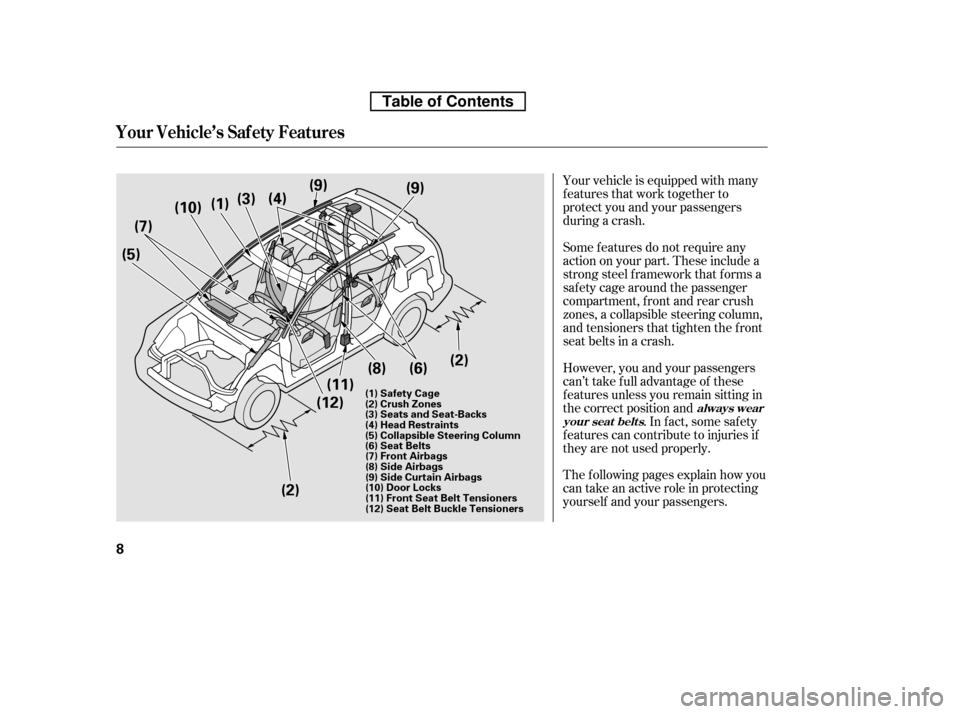
Your vehicle is equipped with many
features that work together to
protect you and your passengers
during a crash.
However, you and your passengers
can’t take f ull advantage of these
f eatures unless you remain sitting in
the correct position and. In fact, some safety
f eatures can contribute to injuries if
they are not used properly.
The f ollowing pages explain how you
cantakeanactiveroleinprotecting
yourself and your passengers.
Some f eatures do not require any
action on your part. These include a
strong steel f ramework that f orms a
saf ety cage around the passenger
compartment, front and rear crush
zones, a collapsible steering column,
and tensioners that tighten the f ront
seat belts in a crash.
always wear
your seat belt s
Your Vehicle’s Saf ety Features
8
(5) (7)
(10)
(2)
(2) (9)
(11)
(4)
(3)
(12)
(1)
(9)
(8)(6)
(1) Safety Cage
(2) Crush Zones
(3) Seats and Seat-Backs
(4) Head Restraints
(5) Collapsible Steering Column
(6) Seat Belts (7) Front Airbags
(8) Side Airbags
(9) Side Curtain Airbags
(10) Door Locks
(11) Front Seat Belt Tensioners
(12) Seat Belt Buckle Tensioners
Table of Contents
Page 26 of 441

The most important things you need
to know about your airbags are:They are designed to supplement
the seat belts. Always wear
your seat belt properly, and sit
upright and as f ar back f rom the
steering wheel as possible while
allowing f ull control of the vehicle. A
f ront passenger should move their
seat as far back from the dashboard
as possible. The rest of this section gives more
detailed inf ormation about how you
can maximize your saf ety.
Remember, however, that no saf ety
system can prevent all injuries or
deaths that can occur in a severe
crash, even when seat belts are
properly worn and the airbags deploy.
To do their job, airbags must
inf late with tremendous f orce. So
while airbags help save lives, they
can cause minor injuries or more
serious or even fatal injuries if
occupants are not properly
restrained or sitting properly.
Airbags do not replace seat belts.
A irbags of f er no prot ect ion in rearcollisions, or minor f ront al or side
collisions. What you should do:
Airbags can pose serious hazards.
Your Vehicle’s Saf ety Features
Driver and Passenger Saf ety
11
Table of Contents
Page 28 of 441

If you sit too close to the steering
wheel or dashboard, you can be
seriously injured by an inf lating f ront
airbag, or by striking the steering
wheel or dashboard.Adjust the driver’s seat-back to a
comf ortable, upright position,
leaving ample space between your
chest and the airbag cover in the
center of the steering wheel.
Passengers with adjustable seat-
backs should also adjust their seat-
back to a comf ortable, upright
position.
If you cannot get f ar enough away
f rom the steering wheel and still
reach the controls, we recommend
that you investigate whether some
type of adaptive equipment may help.
The National Highway Traffic Safety
Administration and Transport
Canada recommend that drivers
allow at least 10 inches (25 cm)
between the center of the steering
wheel and the chest. In addition to
adjusting the seat, you can adjust the
steering wheel up and down, and in
and out (see page ).
Once your seat is adjusted correctly,
rock it back and f orth to make sure
the seat is locked in position.
See page f or how to adjust a
f ront seat (power adjustment) and
page f or a manual adjustment.
81
97
98
On vehicles with manual adjustable seats
CONT INUED
Adjust the Seat-Backs
3.
Protecting A dults and Teens
Driver and Passenger Saf ety
13
Sitting too close to a front
airbag can result in serious
injury or death if the front
airbags inflate.
Always sit as far back from the
front airbags as possible.
Table of Contents
Page 39 of 441
Your airbag system includes:Two SRS (supplemental restraint
system) f ront airbags. The driver’s
airbag is stored in the center of
the steering wheel; the f ront
passenger’sairbagisstoredinthe
dashboard. Both are marked ‘‘SRS
AIRBAG’’ (see page ).
Two side airbags, one f or the
driver and one f or a f ront
passenger. The airbags are stored
in the outer edges of the seat-
backs. Both are marked ‘‘SIDE
AIRBAG’’ (see page ).
Two side curtain airbags, one f or
each side of the vehicle. The
airbags are stored in the ceiling,
above the side windows. The f ront
and rear pillars are marked ‘‘SIDE
CURTAIN AIRBAG’’ (see page ). 26
29
31
Additional Inf ormation About Your Airbags
24
(14) (16)
(15)
(14) Front Crash Sensors
(15) Side Impact Sensor (Second)
(16) Side Curtain Airbags
Table of Contents
Page 74 of 441

This section gives inf ormation about
the controls and displays that
contribute to the daily operation of
your vehicle. All the essential
controls are within easy reach............................
Control Locations . 60............................
Instrument Panel . 61 ..........
Instrument Panel Indicators . 62
.............................................
Gauges . 68
....................
Inf ormation Display . 69
...................................
Trip Meter . 69
................
Instant Fuel Economy . 70
..............
Average Fuel Economy . 70
...........................................
Range . 70
.....................................
Odometer . 71
..................................
Fuel Gauge . 71
...................
Temperature Gauge . 71
Outside Temperature
..................................
Indicator . 71
..........
Check Fuel Cap Message . 73
..................
Maintenance Minder . 73
Controls Near the Steering
...........................................
Wheel . 74
.
Windshield Wipers and Washers . 75
.........
Turn Signals and Headlights . 76
........
Instrument Panel Brightness . 79
.................
Hazard Warning Button . 79
.................
Rear Window Def ogger . 80
.................................
Parking Brake . 81
..........
Steering Wheel Adjustment . 81
...............................
Keys and Locks . 82
........................
Immobilizer System . 83
................................
Ignition Switch . 84 ......................................
Door Locks . 85
......................
Power Door Locks . 85
.
Auto Door Locking/Unlocking . 86
..............
Childproof Door Locks . 91
.......................
Remote Transmitter . 92
............................................
Tailgate . 95
.................................................
Seats . 97
..................................
Seat Heaters . 111
............................
Power Windows . 112
.......................................
Moonroof . 113
...........................................
Mirrors . 114
.........
Interior Convenience Items . 116
............
Dual Deck Cargo Shelf . 117
.....................
Beverage Holders . 119
.............................
Center Table . 120
......................
Lower Glove Box . 120
......................
Upper Glove Box . 121
............................
Vanity Mirror . 121
...................................
Sun Visor . 122
....................
Sunglasses Holder . 122
................
Conversation Mirror . 123
........
Accessory Power Sockets . 123
.............
Console Compartment . 124
..................................
Coat Hook . 125
.......................
Seat Under Tray . 125
...............................
Interior Lights . 126
Instruments and Controls
Inst rument s and Cont rols
59
Page 89 of 441
�Î �Î�Î
�Î
�Î
�Î
�Î �Î �Î
�Î
�Î
To use the horn, press the center pad of the steering wheel.
If equipped.
Ref er to the navigation system manual.
1:2:3:
Controls Near the Steering Wheel
74
CRUISE CONTROL BUTTON
PARKING BRAKE PEDAL HORN HAZARD WARNING
BUTTON
SHIFT LEVER
REMOTE AUDIO CONTROLS
STEERING WHEEL
ADJUSTMENTS PASSENGER AIRBAG
OFF INDICATOR
REAR WINDOW DEFOGGER
BUTTON
HEATED MIRROR BUTTON
NAVIGATION SYSTEM
VOICE CONTROL BUTTONS
BLUETOOTH HANDSFREELINK SYSTEM
VOICE CONTROL BUTTONS
(P.325)
(P.255)
(P.81)
(P.269) (P.81)
(P.123)
(P.266) (P.115)
(P.80)
(P.315)
(P.194)
AUDIO SYSTEM
(P.79)
(P.33)
(P.145, 157)
AUDIO SYSTEM
VEHICLE STABILITY
ASSIST (VSA) SYSTEM
OFF SWITCH HEADLIGHTS/TURN
SIGNALS
(P.76)
INSTRUMENT PANEL
BRIGHTNESS
(P.79)WINDSHIELD WIPERS/
WASHERS
(P.75)
ACCESSORY POWER SOCKET SEAT HEATER
SWITCHES
(P.111)
MIRROR CONTROLS (P.115)
1
2
2
3 2 2
2
2
Table of Contents
Page 96 of 441

Push the lever under the steering
column all the way down.
Make any steering wheel adjustment
bef ore you start driving.
To apply the parking brake, push the
pedal down with your f oot. To
release it, push on the pedal again.
The parking brake indicator on the
instrument panel should go out when
the parking brake is fully released
(see page ). Move the steering wheel up or
down, and in or out, so it points
toward your chest, not toward
your f ace. Make sure you can see
the instrument panel gauges and
indicators.
1. 2.
62
CONT INUED
Parking Brake Steering Wheel A djustment
Parking Brake, Steering Wheel A djustment
Inst rument s and Cont rols
81
PARKING BRAKE PEDAL
Adjusting the steering wheel
position while driving may
cause you to lose control of the
vehicle and be seriously injured
inacrash.
Adjust the steering wheel only
when the vehicle is stopped.
Driving the vehicle with the parking
brake applied can damage the rear
brakes and hubs. A beeper will sound if
the vehicle is driven with the parking
brake on.
Table of Contents


