Page 106 of 441
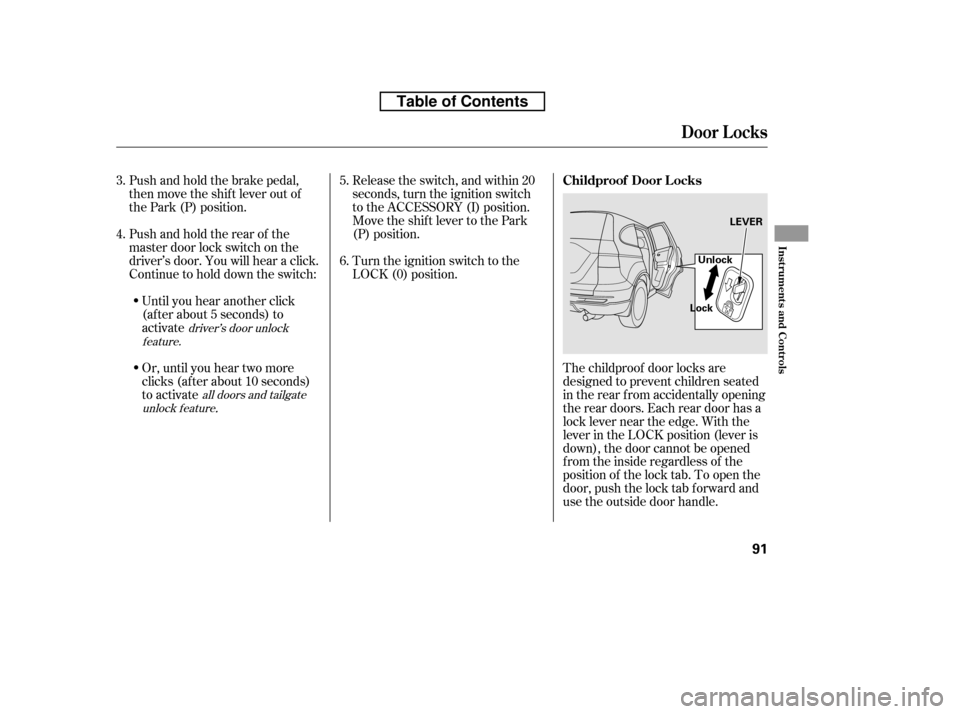
The childproof door locks are
designed to prevent children seated
in the rear f rom accidentally opening
the rear doors. Each rear door has a
lock lever near the edge. With the
lever in the LOCK position (lever is
down), the door cannot be opened
fromtheinsideregardlessof the
position of the lock tab. To open the
door, push the lock tab f orward and
use the outside door handle.
Turn the ignition switch to the
LOCK (0) position.
Push and hold the brake pedal,
then move the shift lever out of
the Park (P) position.
Pushandholdtherearof the
master door lock switch on the
driver’s door. You will hear a click.
Continue to hold down the switch:
Until you hear another click
(af ter about 5 seconds) to
activate
Or, until you hear two more
clicks (af ter about 10 seconds)
to activate
.
Release the switch, and within 20
seconds, turn the ignition switch
to the ACCESSORY (I) position.
Move the shift lever to the Park
(P) position.
3. 4. 5. 6.
driver’s door unlock
feature.
all doors and tailgate
unlock f eature
Childproof Door L ocks
Door L ocks
Inst rument s and Cont rols
91
LEVER
Lock Unlock
Table of Contents
Page 128 of 441
�µTo open the moonroof
f ully, pull back the moonroof switch
f irmly, then release it. The moonroof
automatically opens all the way. To
stop the moonroof f rom opening,
push the switch briefly.
To close the moonroof f ully, f irmly
push the moonroof switch f orward,
then release it. The moonroof
automatically closes all the way. To
stop the moonroof f rom closing,
push the switch briefly.
To open or close the moonroof
partially, lightly pull the switch back
or push it f orward and hold it. The
moonroof will stop when you release
the switch.
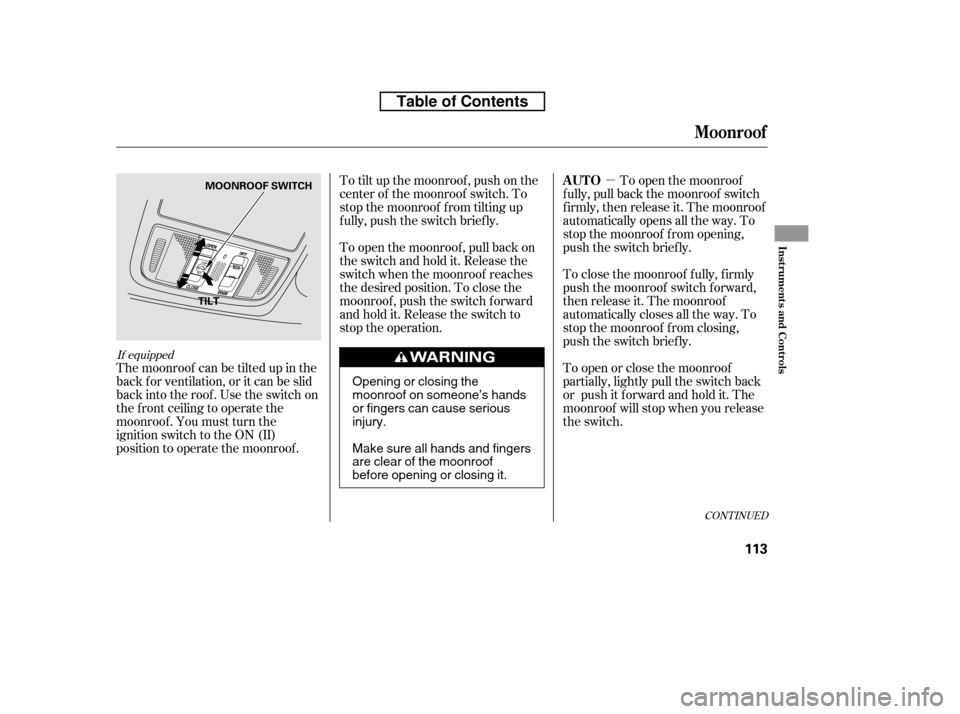
To tilt up the moonroof , push on the
center of the moonroof switch. To
stop the moonroof f rom tilting up
f ully, push the switch brief ly.
To open the moonroof , pull back on
the switch and hold it. Release the
switch when the moonroof reaches
the desired position. To close the
moonroof , push the switch f orward
andholdit.Releasetheswitchto
stop the operation.
The moonroof can be tilted up in the
back f or ventilation, or it can be slid
back into the roof. Use the switch on
the f ront ceiling to operate the
moonroof . You must turn the
ignition switch to the ON (II)
position to operate the moonroof .
If equipped
CONT INUED
AUTO
Moonroof
Inst rument s and Cont rols
113
TILT MOONROOF SWITCH
Opening or closing the
moonroof on someone’s hands
or fingers can cause seriousinjury.
Make sure all hands and fingers
are clear of the moonroof
before opening or closing it.
Table of Contents
Page 129 of 441

�µIf the
moonroof runs into any obstacle
while it is closing automatically, it
will reverse direction and then stop.
To close the moonroof , remove the
obstacle, then use the moonroof
switch again.
Auto reverse stops sensing when the
moonroof is almost closed. You
should always check that all
passengers and objects are away
f rom the moonroof bef ore closing it. The moonroof has a key-of f delay.
You can open and close the
moonroof f or up to 10 minutes af ter
you turn of f the ignition switch. The
key-of f delay cancels as soon as you
open either f ront door. You must
then turn the ignition switch to the
ON (II) position f or the moonroof to
operate.
Keeptheinsideandoutsidemirrors
clean and adjusted f or best visibility.
Be sure to adjust the mirrors bef ore
you start driving.
The inside mirror has day and night
positions. The night position reduces
glare f rom headlights behind you.
Flip the tab on the bottom edge of
the mirror to select the day or night
position.
AUTO REVERSE
Mirrors
Moonroof , Mirrors
114
TAB
If you try to open the moonroof in
below-f reezing temperatures, or when
it is covered with snow or ice, you can
damage the moonroof panel or its
motor.
Table of Contents
Page 179 of 441
�µ�µ
The XM satellites are in orbit over
the equator; therefore, objects south
of the vehicle may cause satellite
reception interruptions. To help
compensate f or this, ground-based
repeaters are placed in major
metropolitan areas. Satellite signals are more likely to be
blocked by tall buildings and
mountains the f arther north you
travel f rom the equator. Carrying
large items on a roof rack can also
block the signal.
The selected channel
number does not exist, or is not part
of your subscription, or this channel
has no artist or title inf ormation at
this time.
There is a problem
with the XM antenna. Please consult
your dealer.
‘‘----’’
‘‘A NT ENNA ’’
Playing t he XMRadio (EX-L model without navigation system)
164
Signal may be blocked by
mountains or large obstacles to
the south.
Signal weaker in
these areas.
SATELLITE GROUND REPEATER
Table of Contents
Page 180 of 441

Depending on where you drive, you
may experience reception problems.
Interf erence can be caused by any of
these conditions:Driving on the north side of a
large commercial truck on an
east/west road.
Driving in tunnels.
Driving on a road beside a vertical
wall, steep clif f , or hill to the south
of you.
Driving on the lower level of a
multi-tiered road.
Driving on a single lane road
alongside dense trees taller than
50 ft. (15 m) to the south of you.
Driving on the north side of an
east/west mountain road.
Large items carried on a roof rack.
There may be other geographic
situations that could af f ect XM Radio
reception. If your XM Radio service has expired
or you purchased your vehicle f rom
a previous owner, you can listen to a
sampling of the broadcasts available
on XM Radio. With the ignition
switch in the ACCESSORY (I) or ON
(II) position, push the button to
turn on the audio system and press
the XM button. A variety of music
types and styles will play.
After you’ve registered with XM
Radio, keep your audio system in the
XM radio mode while you wait f or
activation. This should take about 30
minutes.
If you decide to purchase XM Radio
service, contact XM Radio at ,orat
1-800-852-9696. In Canada, contact
XM CANADA
at , or
at 1-877-209-0079. You will need to
give them your radio I.D. number
and your credit card number. To get your radio I.D. number, press SEEK
until ‘‘CH000’’ appears in the display.
Your I.D. will appear in the display.
While waiting f or activation, make
sure your vehicle remains in an open
area with good reception. Once your
audio system is activated, you’ll be
able to listen to XM Radio broadcasts.
XM Radio will continue to send an
activation signal to your vehicle f or
at least 12 hours from the activation
request. If the service has not been
activated after 36 hours, contactXM
Radio. In Canada, contact XM
CANADA
.
As required by the FCC:
Changes or modif ications not expresslyapproved by the party responsible f or
compliance could void the user’sauthority to operate the equipment.
www.xmradio.com www.xmradio.ca
Receiving XM Radio Service
Playing t he XMRadio (EX-L model without navigation system)
Features
165
Table of Contents
Page 219 of 441
The XM satellites are in orbit over
the equator; therefore, objects south
of the vehicle may cause satellite
reception interruptions. To help
compensate f or this, ground-based
repeaters are placed in major
metropolitan areas.
Satellite signals are more likely to be
blocked by tall buildings and
mountains the f arther north you
travel f rom the equator. Carrying
large items on a roof rack can also
block the signal.
Playing t he XMRadio (EX-L model with navigation system)
204
Signal may be blocked by
mountains or large obstacles to
the south.Signal weaker in
these areas.
SATELLITE GROUND
REPEATER
Table of Contents
Page 220 of 441

Depending on where you drive, you
may experience reception problems.
Interf erence can be caused by any of
these conditions:Driving on the north side of a
large commercial truck on an
east/west road.
Driving in tunnels.
Driving on a road beside a vertical
wall, steep clif f , or hill to the south
of you.
Driving on the lower level of a
multi-tiered road.
Driving on a single lane road
alongside dense trees taller than
50 ft. (15 m) to the south of you.
Driving on the north side of an
east/west mountain road.
Large items carried on a roof rack.
There may be other geographic
situations that could af f ect XM Radio
reception. If your XM Radio service has expired
or you purchased your vehicle f rom
a previous owner, you can listen to a
sampling of the broadcasts available
on XM Radio. With the ignition
switch in the ACCESSORY (I) or ON
(II) position, push the power/volume
knob to turn on the audio system and
press the CD/XM button. A variety
of music types and styles will play.
If you decide to purchase XM Radio
service, contact XM Radio at
,orat
1-800-852-9696. In Canada, contact
XM CANADA
at , or
at 1-877-209-0079. You will need to
give them your radio I.D. number
and your credit card number. To get your radio I.D. number, press the
TUNE bar until ‘‘0’’ appears in the
display. Your I.D. will appear in the
display.
After you’ve registered with XM
Radio, keep your audio system in the
XM radio mode while you wait f or
activation. This should take about 30
minutes.
While waiting f or activation, make
sure your vehicle remains in an open
area with good reception. Once your
audio system is activated, you’ll be
able to listen to XM Radio broadcasts.
XM Radio will continue to send an
activation signal to your vehicle f or
at least 12 hours from the activation
request. If the service has not been
activated after 36 hours, contactXM
Radio. In Canada, contact XM
CANADA
.
As required by the FCC:
Changes or modif ications not expresslyapproved by the party responsible f or
compliance could void the user’sauthority to operate the equipment.
www.xmradio.com www.xmradio.ca
Receiving XM Radio Service
Playing t he XMRadio (EX-L model with navigation system)
Features
205
Table of Contents
Page 275 of 441
Next to the outside temperature
indicator of the inf ormation display,
a compass indicates which direction
your vehicle is pointed. It indicates
eight directions.N: North
S: South
E: East
W: West
NE: Northeast
NW: Northwest
SE: Southeast
SW: Southwest
For example, when your vehicle is
traveling in the north-east direction,
the compass shows ‘‘NE’’ in the
display.
Compass operation can be af f ected
by driving near power lines or
stations, across bridges, through
tunnels, over railroad crossings, past
large vehicles, or driving near large
objects that can cause a magnetic
disturbance. It can also be af f ected
by accessories such as antennas and
roof racks that are mounted by
magnets.
EX model and EX-L model without
navigation system
Compass
Compass Operation
260
DIRECTION DISPLAY
Table of Contents


