Page 151 of 441

On vehicles with navigation systemThe automatic climate control
system in your vehicle maintains the
interior temperature you select. The
system also adjusts the f an speed
and airf low levels.The driver’s side temperature and
the passenger’s side temperature can
be set separately. Turn the dial of
the appropriate temperature control
clockwisetoincreasethe
temperature of airf low. Turn the dial
counterclockwise to decrease it.
Each set temperature is shown in the
display.
When you set the temperature to its
lower limit ( ) or its upper limit
( ), the system runs at f ull
cooling or heating only. It does not
regulate the interior temperature.
When the indicator in the dual
button is on, the driver’s side and
passenger’s side temperature can be
controlled independently (see page
).
The climate control system f or your
vehicle can also be operated using
the voice control system. See the
navigation system manual f or
complete details.
Press the AUTO button.
Set the desired temperature by
turning the driver’s side
temperature control dial. You will
see AUTO and the selected
temperature in the display. You
can also set the passenger’s side
temperature by turning the
passenger’s side dial.
The system automatically selects the
proper mix of conditioned and/or
heated air that will, as quickly as
possible, raise or lower the interior
temperature to your pref erence.
1. 2.
140
Climat e Cont rol Syst em
Voice Control System Using A utomatic Climate ControlT emperat ure Cont rol
136
Table of Contents
Page 274 of 441

On models with navigation system
On models without navigation system
The navigation system receives
signals f rom the global positioning
system (GPS), and the displayed
time is updated automatically by the
GPS. Ref er to the navigation system
manual f or how to adjust the time.
Change the hours by pressing the H
(hour) button until the numbers
advance to the desired time. Change
the minutes by pressing the M
(minute) button until the numbers
advance to the desired time.
Press the CLOCK button again to
enter the set time.
For example: 1:06 will reset to 1:001:52 will reset to 2:00
You can quickly set the time to the
nearest hour. If the displayed time is
bef ore the half hour, press and hold
the CLOCK button, then press the R
(reset) button to set the time back to
the previous hour. If the displayed
time is af ter the half hour, the same
procedure sets the time f orward to
the beginning of the next hour.
To set the time, press the CLOCK
button until you hear a beep. The
displayed time begins to blink.
Setting the Clock
Features
259
EX and EX-L models without
navigation system
CLOCK BUTTON
(A.SEL side of the A.SEL/SCAN bar)
HOUR BUTTON
(PRESET 4) RESET BUTTON
(PRESET 6)
LX model
MINUTE BUTTON
(PRESET 5) RESET BUTTON
(PRESET 3)
HOUR BUTTON
(PRESET 1) MINUTE BUTTON
(PRESET 2)
CLOCK BUTTON (FM)
Table of Contents
Page 368 of 441
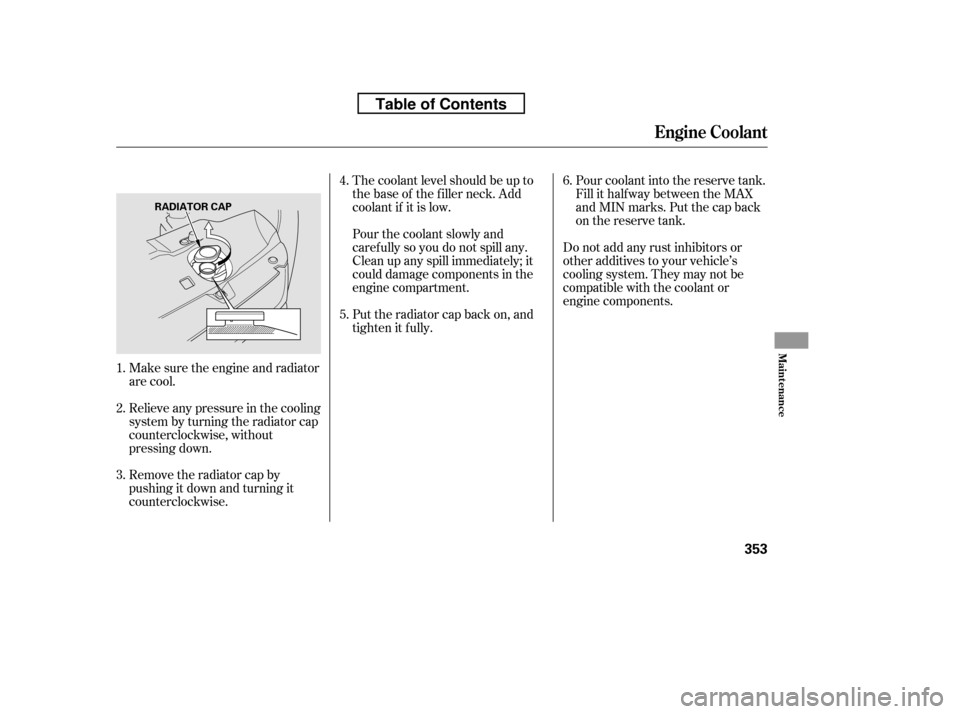
Do not add any rust inhibitors or
other additives to your vehicle’s
cooling system. They may not be
compatible with the coolant or
engine components.Pour coolant into the reserve tank.
Fill it half way between the MAX
and MIN marks. Put the cap back
on the reserve tank.
Make sure the engine and radiator
are cool. The coolant level should be up to
the base of the f iller neck. Add
coolant if it is low.
Pourthecoolantslowlyand
caref ully so you do not spill any.
Clean up any spill immediately; it
could damage components in the
engine compartment.
Put the radiator cap back on, and
tighten it fully.
Relieve any pressure in the cooling
system by turning the radiator cap
counterclockwise, without
pressing down.
Remove the radiator cap by
pushingitdownandturningit
counterclockwise.
3. 4.
2.
1. 5.6.
Engine Coolant
Maint enance
353
RADIATOR CAP
Table of Contents
Page 376 of 441
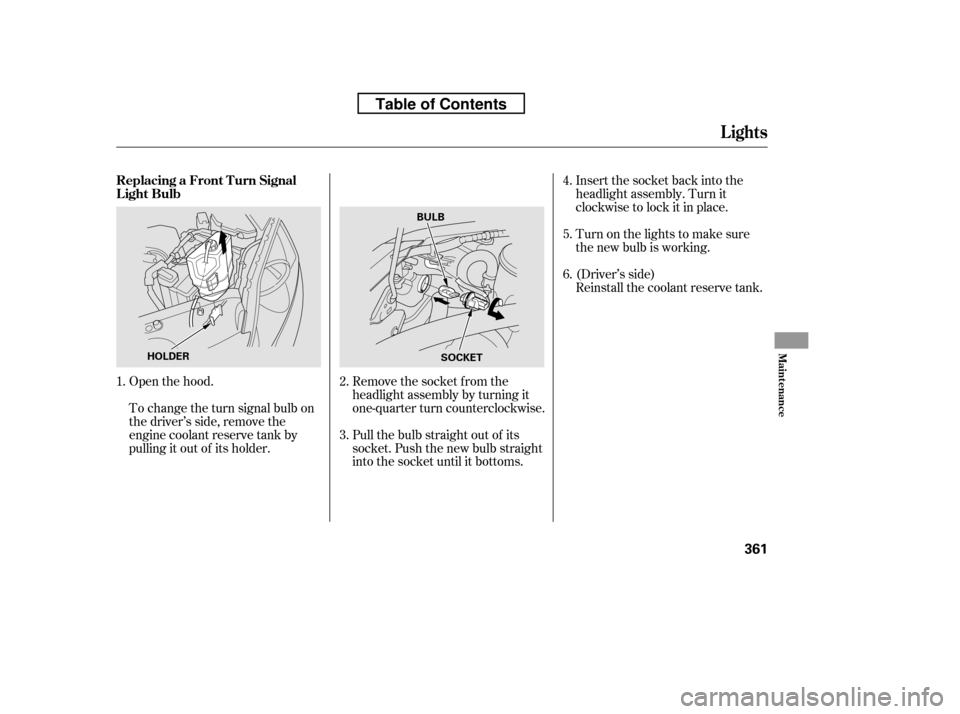
Insert the socket back into the
headlight assembly. Turn it
clockwise to lock it in place.
Turn on the lights to make sure
the new bulb is working.
(Driver’s side)
Reinstall the coolant reserve tank.
Open the hood.
To change the turn signal bulb on
the driver’s side, remove the
engine coolant reserve tank by
pulling it out of its holder. Remove the socket from the
headlight assembly by turning it
one-quarter turn counterclockwise.
Pull the bulb straight out of its
socket. Push the new bulb straight
into the socket until it bottoms.
1.
2. 3.4.5. 6.
Lights
Replacing a Front T urn Signal
Light Bulb
Maint enance
361
HOLDER
BULB
SOCKET
Table of Contents
Page 377 of 441
Insert the socket back into the
headlight assembly. Turn it
clockwise to lock it in place.
Turn on the lights to make sure
the new bulb is working.
Reinstall the f use box in place
securely.
(Driver’s side)
Open the hood.
To change the parking light/f ront
side marker on the driver’s side,
removethefuseboxfromitsstay
by pulling out. Remove the socket from the
headlight assembly by turning it
one-quarter turn counterclockwise.
Pull the bulb straight out of its
socket. Push the new bulb straight
into the socket until it bottoms.
1.
2. 3.4.5. 6.
Lights
Replacing a Parking L ight/Front
Side Marker L ight Bulb
362
FUSE BOX
On the passenger’s sideBULB
SOCKET
Table of Contents
Page 378 of 441
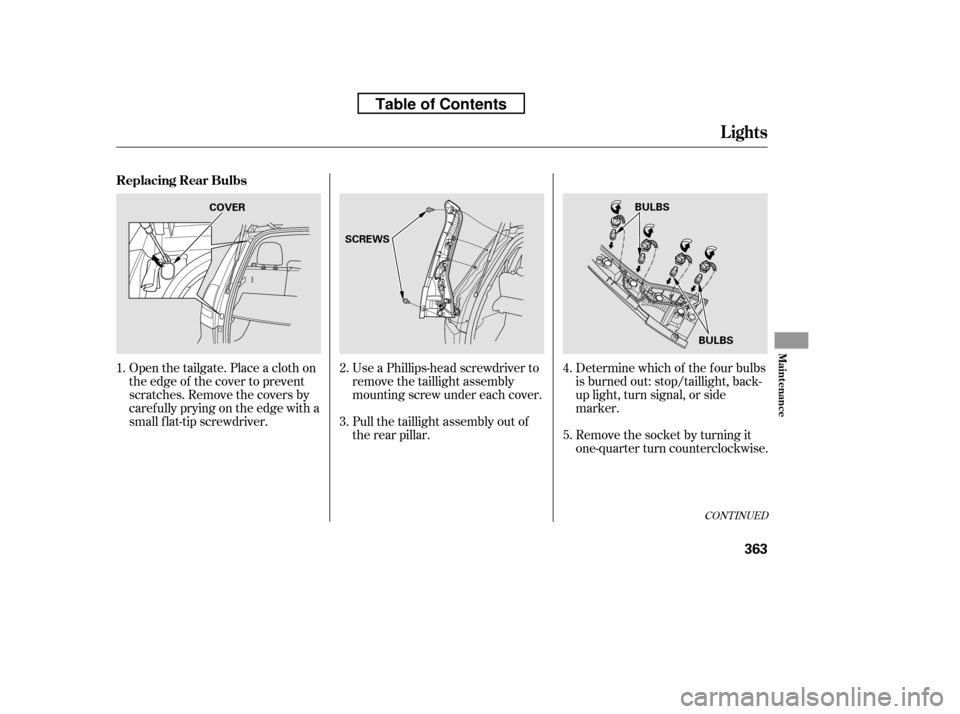
Determine which of the f our bulbs
is burned out: stop/taillight, back-
up light, turn signal, or side
marker.
Remove the socket by turning it
one-quarter turn counterclockwise.
Use a Phillips-head screwdriver to
remove the taillight assembly
mounting screw under each cover.
Pull the taillight assembly out of
the rear pillar.
Open the tailgate. Place a cloth on
the edge of the cover to prevent
scratches. Remove the covers by
caref ully prying on the edge with a
small f lat-tip screwdriver.
2. 3. 4. 5.
1.
CONT INUED
Replacing Rear Bulbs
Lights
Maint enance
363
BULBS
COVER
SCREWS
BULBS
Table of Contents
Page 379 of 441
Reinstall the socket into the light
assembly by turning it clockwise
until it locks.
Align the clips on the taillight
assembly with the holes in the
body, then push the taillight
assembly into place. Tighten the
two mounting screws securely and
reinstall the covers.
Pull the bulb straight out of its
socket. Push the new bulb straight
into the socket until it bottoms.
Turn on the lights to make sure
the new bulb is working.
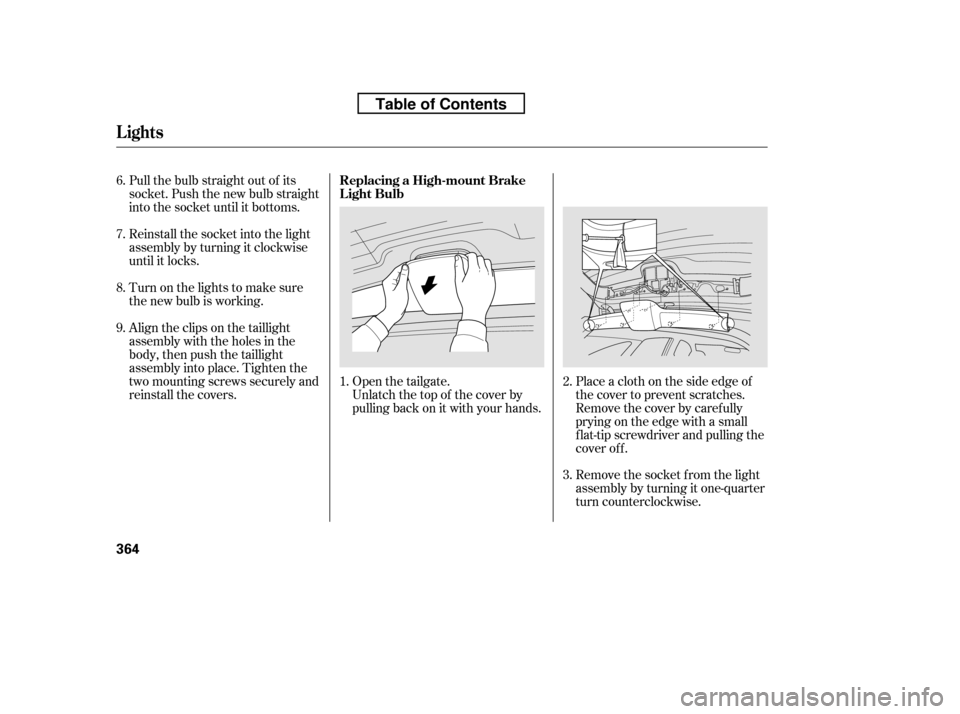
Open the tailgate. Place a cloth on the side edge ofthe cover to prevent scratches.
Remove the cover by caref ully
prying on the edge with a small
f lat-tip screwdriver and pulling the
cover off.
Unlatch the top of the cover by
pulling back on it with your hands.
Remove the socket f rom the light
assembly by turning it one-quarter
turn counterclockwise.
1.
2.
6. 7.8. 9.
3.
Replacing a High-mount Brake
Light Bulb
Lights
364
Table of Contents
Page 380 of 441
CONT INUED
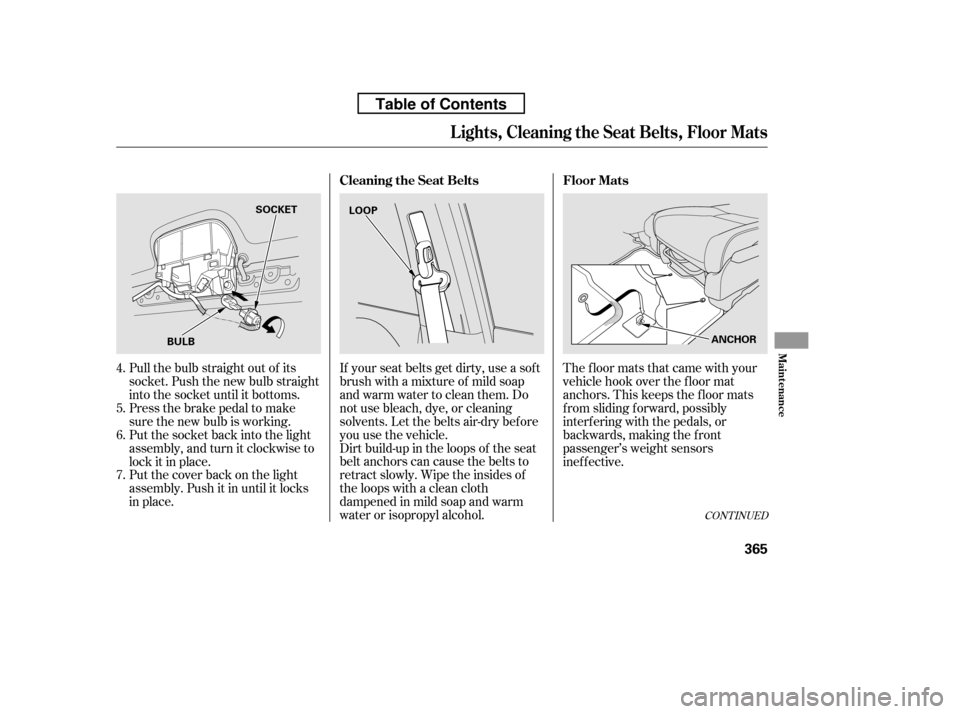
Dirt build-up in the loops of the seat
belt anchors can cause the belts to
retract slowly. Wipe the insides of
the loops with a clean cloth
dampened in mild soap and warm
water or isopropyl alcohol.
If your seat belts get dirty, use a sof t
brush with a mixture of mild soap
and warm water to clean them. Do
not use bleach, dye, or cleaning
solvents. Let the belts air-dry bef ore
you use the vehicle.
Pull the bulb straight out of its
socket. Push the new bulb straight
into the socket until it bottoms.
Press the brake pedal to make
sure the new bulb is working.
Put the socket back into the light
assembly, and turn it clockwise to
lock it in place.
Put the cover back on the light
assembly. Push it in until it locks
in place. The floor mats that came with your
vehicle hook over the f loor mat
anchors. This keeps the f loor mats
f rom sliding f orward, possibly
interf ering with the pedals, or
backwards, making the f ront
passenger’s weight sensors
inef f ective.
4. 5. 6. 7. Floor Mats
Cleaning the Seat Belts
Lights, Cleaning the Seat Belts, Floor Mats
Maint enance
365
BULB SOCKET
LOOP
ANCHOR
Table of Contents