Page 109 of 441

�´
As required by the FCC:This device complies with Part 15 of theFCC rules. Operation is subject to the
f ollowing two conditions: (1) This devicemay not cause harmf ul interf erence, and(2) this device must accept any
interf erence received, includinginterf erence that may cause undesiredoperation.
Changes or modif ications not expresslyapproved by the party responsible f or
compliance could void the user’sauthority to operate the equipment.
This device complies with IndustryCanada Standard RSS-210.Operation is subject to the f ollowing two
conditions: (1) this device may not causeinterf erence, and (2) this device mustaccept any interf erence that may cause
undesired operation of the device.
An improperly disposed of battery
can hurt the environment.
Always conf irm local regulations
for battery disposal.
Install the parts in reverse order.
Inside the transmitter, separate
the inner cover f rom the keypad
by caref ully prying on the edge
with a coin.
Remove the old battery and note
the polarity. Make sure the
polarity of the new battery is the
same ( side f acing down), then
insert it in the keypad.
5.
3.
4.
Remote Transmitter
94
BATTERY
COIN
Table of Contents
Page 126 of 441
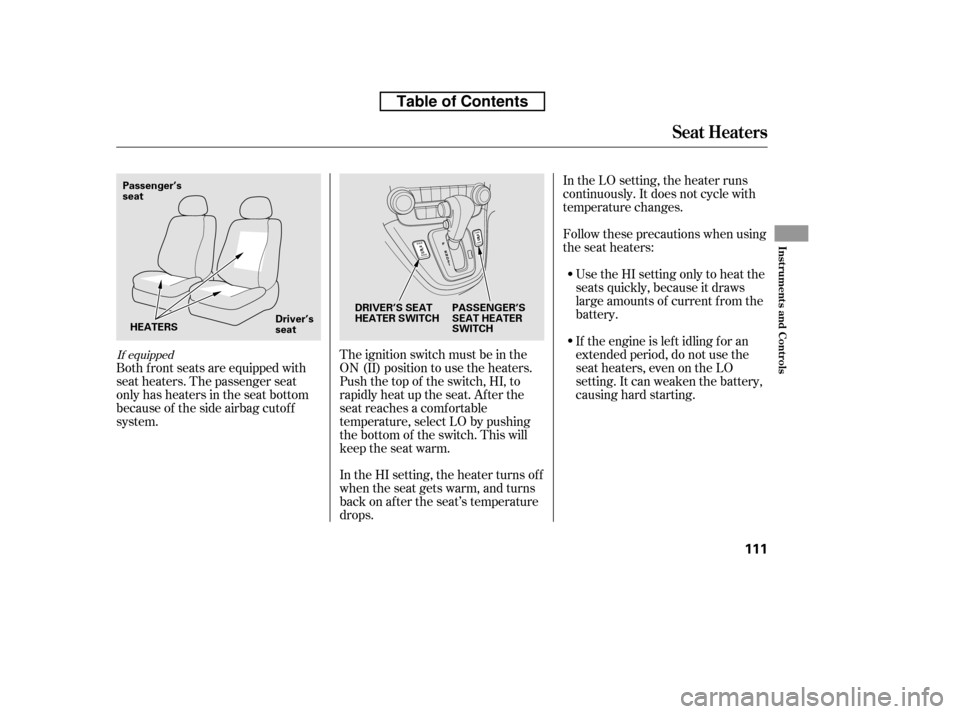
If equipped
Both f ront seats are equipped with
seat heaters. The passenger seat
only has heaters in the seat bottom
because of the side airbag cutof f
system.The ignition switch must be in the
ON (II) position to use the heaters.
Push the top of the switch, HI, to
rapidly heat up the seat. Af ter the
seat reaches a comfortable
temperature, select LO by pushing
the bottom of the switch. This will
keep the seat warm.
In the HI setting, the heater turns off
when the seat gets warm, and turns
back on after the seat’s temperature
drops.In the LO setting, the heater runs
continuously. It does not cycle with
temperature changes.
Follow these precautions when using
the seat heaters:
Use the HI setting only to heat the
seats quickly, because it draws
large amounts of current f rom the
battery.
If the engine is lef t idling f or an
extended period, do not use the
seat heaters, even on the LO
setting. It can weaken the battery,
causing hard starting.
Seat Heaters
Inst rument s and Cont rols
111
DRIVER’S SEAT
HEATER SWITCH PASSENGER’S
SEAT HEATER
SWITCH
Passenger’sseat
HEATERS Driver’sseat
Table of Contents
Page 273 of 441

If your vehicle’s battery is
disconnected or goes dead, or the
radio f use is removed, the audio
system will disable itself . If this
happens, you will see ‘‘ENTER
CODE’’ in the f requency display the
nexttimeyouturnonthesystem.
Use the preset buttons to enter the
code. On vehicles with navigation
system, touch the icon to enter the
code number, then touch the Done
icon to set the code. The code is on
the radio code card included in your
owner’s manual kit. When it is
entered correctly, the radio will start
playing.
If you make a mistake entering the
code, do not start over; complete the
sequence, then enter the correct
code. You have 10 tries to enter the
correct code. If you are unsuccessf ul
in 10 attempts, you must then leave
the system on f or 1 hour bef ore
trying again.
Youshouldhavereceivedacardthat
lists your audio system’s code and
serial numbers. It is best to store this
card in a saf e place at home. In
addition, you should write the audio
system’s serial number in this owner’s
manual.
If you lose the card, you must obtain
the code number f rom a dealer. To
do this, you will need the system’s
serial number.
Your vehicle’s audio system will
disable itself if it is disconnected
f rom electrical power f or any reason.
To make it work again, you must
enter a specif ic code using the preset
buttons (icon on vehicle’s with
navigation system). Because there
are hundreds of number
combinations possible f rom specif ic
digits, making the system work
without knowing the exact code is
nearly impossible.
Radio T hef t Prot ect ion
258
Table of Contents
Page 290 of 441

To use HFL, you need to pair your
Bluetooth-compatible cell phone to
the system.This command group is available f or
paired cell phones.
You cannot pair your phone while
the vehicle is moving.
Your phone must be in discovery
or search mode to pair. Ref er to
your phone’s manual.
Up to six phones can be paired.
Your phone’s battery may drain
f aster when it is paired to HFL.
If af ter three minutes your phone
is not ready to pair or a phone is
not f ound, the system will time out
andreturntoidle. Press and release the HFL Talk
button. If you are pairing a phone
f or the f irst time, HFL will give
you inf ormation about the pairing
process. If it is not the f irst phone
you are pairing, say ‘‘
’’ and say ‘‘ .’’
Follow the HFL prompts and put
your phone in discovery or search
mode. HFL will give you a 4-digit
pairing code and begin searching
foryourphone.
When your phone f inds a
Bluetooth device, select HFL f rom
the options and enter the 4-digit
code f rom the previous step.
Follow the HFL prompts and
name the newly paired phone.
1.
2. 3. 4.
CONT INUED
Phone Setup Phone
setup Pair
Phone pairing tips T o pair a cell phone:
BluetoothHandsFreeL ink
Features
275
Table of Contents
Page 293 of 441

You can make calls using any phone
number or a name in the HFL
phonebook. You can also redial the
last number called.Press and release the HFL Talk
button bef ore a command.
Say ‘‘ ’’ or ‘‘ .’’
Follow the HFL prompts and say
the phone number you want to dial.
Follow the HFL prompts to
conf irm the number and say
‘‘ ’’ or ‘‘ .’’
Once connected, you will hear the
person you called through the audio
speakers.
Bluetooth is the wireless technology
that links your phone to HFL. HFL
uses a Class 2 Bluetooth, which
means the maximum range between
yourphoneandvehicleis30feet(10
meters).
During a call, HFL allows you to talk
up to 30 minutes af ter you remove
the key from the ignition switch.
However, this may weaken the
vehicle’s battery.
Select ‘‘ .’’
Press the INFO button, then select
‘‘ .’’
1. 2. 3.
1.2.
Making a Call
Call Dial
Call Dial Dial
Cellular Phonebook
BluetoothHandsFreeL ink
T o make a call using a phone number
(t alk but t on): T o make a call using a phone number
(navigat ion display):
278
Table of Contents
Page 329 of 441
Apply the parking brake.
In cold weather, turn of f all
electrical accessories to reduce
the drain on the battery.Without touching the accelerator
pedal, turn the ignition key to the
START (III) position. Do not hold
the key in the START (III)
position f or more than 15 seconds
at a time. If the engine does not
start right away, pause for at least
10 seconds bef ore trying again.
Make sure the shif t lever is in
Park. Press on the brake pedal.
1. 2. 3.
4.
Starting the Engine
314
T he immobilizer system protects your
vehicle f rom thef t. If an improperly-
coded key (or other device) is used, the
engine’s f uel system is disabled. For
more inf ormation, see page .The engine is harder to start in cold
weather. Also, the thinner air f ound at
altitudes above 8,000 f eet (2,400
meters) adds to this problem.
83
Table of Contents
Page 349 of 441

Your vehicle can be towed behind a
motorhome at legal highway speeds
up to 65 mph (100 km/h). Do not
exceed 65 mph (100 km/h).
Otherwise, severe transmission
damage will occur. To avoid damage
to the 4WD system, your vehicle
must be towed with all f our wheels
on the ground (f lat towing).
When purchasing a tow bar, make
sure you select a reputable
manuf acturer and installer. Follow
the manufacturer’s attachment
instructions caref ully.
Perf orm the f ollowing procedure
every day immediately bef ore you
begin towing. Otherwise severe
automatic transmission damage will
occur.
Always drive slowly and have
someone guide you when backing up.
Grip the of the steering wheel,
then turn the wheel to the left to get
the trailer to move to the lef t, and
turn the wheel right to move the
trailer to the right.
Follow all normal precautions when
parking, including f irmly setting the
parking brake and putting the
transmission in Park. Also, place
wheel chocks at each of the trailer’s
tires.
Leave the ignition switch in the
ACCESSORY (I) position so the
steering wheel does not lock.
Make sure the radio and any items
plugged into the accessory power
sockets are turned of f so you do
not run down the battery.
Release the parking brake.
Shif t to D position and hold f or 5
seconds, then to N. Let the engine
runfor3minutes,thenturnitoff.
Press on the brake pedal. Move
the shif t lever through all its
positions.
Check the transmission f luid level
(see page ).
Start the engine.
355
bottom Do not overf ill.
T owing a T railer, T owing Your Vehicle Behind a Mot orhome
Towing Your Vehicle Behind a
MotorhomeBacking Up
Parking
334
Table of Contents
Page 350 of 441

If you tow more than 8 hours in one
day, you should repeat the above
procedure at least every 8 hours
(when you stop f or f uel, etc.)Only remove the fuse after you have
perf ormed the transmission shif ting
procedure, and the key is in the
ACCESSORY (I) position. Store the
f use in an obvious location (center
tray, coin pockets, etc) as a reminder
to re-install the fuse before drivingthe vehicle.
When towing your vehicle f or long
periods, remove the 7.5 A Accessory
Radio f use to reduce drain on battery.
This f use is located in the interior
f use box and is shown as number 34
below.
If you tow a CR-V behind a
motorhome, the transmission fluid
must be changed every 2 years or
30,000 miles (48,000 km), whichever
comes f irst.
Ext ended T owing
Towing Your Vehicle Behind a Motorhome
Driving
335
INTERIOR FUSE BOXACCESSORY RADIO FUSE
The steering system can be damaged if
the steering wheel is locked. Leave the
ignition switch in the ACCESSORY (I)
position, and make sure the steering
wheel turns f reely bef ore you begin
towing.
Failure to f ollow the recommended
instructions exactly will result in severe
automatic transmission damage. If you
cannot shif t the transmission or start
the engine, your vehicle must be
transported on a f lat-bed truck or
trailer. Severe transmission damage will occur
if the vehicle is shif ted f rom reverse to
neutral and then towed with the drive
wheels on the ground.
Table of Contents
