Page 280 of 441
�Ý
�Û
When in reverse, the touch screen
and navigation system ‘‘hard’’
buttons are locked out, except the
‘‘ZOOM’’ button. Touching the ‘‘ ’’
or ‘‘ ’’ button allows you to adjust
the brightness of the rearview
camera image.
Whenever you shif t to reverse (R)
with the ignition switch in the ON
(II) position, the rearview is shown
on the navigation system screen.
For the best picture, always keep the
rearview camera clean, and do not
cover the camera lens. To avoid
scratching the lens when you clean it,
use a moist, sof t cloth. Since the rearview camera display
area is limited, you should always
back up slowly and caref ully, and
look behind you f or obstacles.
On EX-L model with navigation system
Rearview Camera and Monitor
Features
265
The camera brightness cannot be
adjusted by voice control.
Table of Contents
Page 286 of 441
When there is an incoming call, or
HFL is in use, ‘‘HFL’’ will appear at
the bottom of the map screen.
A notif ication that there is an
incoming call, or HFL is in use, will
appear on the navigation screen
when the audio system is on.
As an incoming call notif ication, you
will see the f ollowing display:
The Bluetooth icon will also
appear on the display when a phone
is linked.
However, when the current street is
shown, and AUDIO INFO icon is
visible, ‘‘HFL’’ will not appear when
there is an incoming call.
BluetoothHandsFreeL ink
Inf ormat ion Display
Features
271
HFL MESSAGE BLUETOOTH INDICATOR
Table of Contents
Page 293 of 441

You can make calls using any phone
number or a name in the HFL
phonebook. You can also redial the
last number called.Press and release the HFL Talk
button bef ore a command.
Say ‘‘ ’’ or ‘‘ .’’
Follow the HFL prompts and say
the phone number you want to dial.
Follow the HFL prompts to
conf irm the number and say
‘‘ ’’ or ‘‘ .’’
Once connected, you will hear the
person you called through the audio
speakers.
Bluetooth is the wireless technology
that links your phone to HFL. HFL
uses a Class 2 Bluetooth, which
means the maximum range between
yourphoneandvehicleis30feet(10
meters).
During a call, HFL allows you to talk
up to 30 minutes af ter you remove
the key from the ignition switch.
However, this may weaken the
vehicle’s battery.
Select ‘‘ .’’
Press the INFO button, then select
‘‘ .’’
1. 2. 3.
1.2.
Making a Call
Call Dial
Call Dial Dial
Cellular Phonebook
BluetoothHandsFreeL ink
T o make a call using a phone number
(t alk but t on): T o make a call using a phone number
(navigat ion display):
278
Table of Contents
Page 294 of 441
Press and release the HFL Talk
button bef ore a command.Follow the HFL prompts and say
thenamestoredintheHFL
phonebook that you want to call.
Follow the HFL prompts to
conf irm the name and make the
call.
Say ‘‘ ’’ or ‘‘ .’’
Press and release the HFL Talk
button and say ‘‘ .’’ Press the INFO button, then select
‘‘ .’’
Select ‘‘
.’’
The navigation display will change
as shown above. Enter a call
number.
To make the call, select ‘‘ .’’
To end the call, select ‘‘ .’’ 1.2. 3.
3.4. 5. 1. 2.
CONT INUED
BluetoothHandsFreeL ink
Tomakeacallusinganameinthe
HFL phonebook:
To redial the last number called byHFL : T o make a call f rom an import ed
phonebook:
Call Dial
Redial Cellular Phonebook
Search Imported
Phonebook
CA L L
Hang-up
Features
279
Table of Contents
Page 295 of 441
If the phonebook you select is PIN-
protected, you will need to enter the
PIN to access it. See page f or
more inf ormation.Select a phonebook you want to
choose a phone number f rom.
To search f or a specif ic name in the
phonebook, enter the keyword f or
either the f irst or last name.
To display all names in the
phonebook, select the ‘‘ ’’ option. Select the name. All the phone
numbers stored f or that name will
be listed.
Select the phone number, and
HFL begins dialing.
3.
4. 5.
287
BluetoothHandsFreeL ink
List
280
List ICON
Table of Contents
Page 300 of 441
(available on some phones)handsf reelink.honda.
com
www.honda.ca,
If you select
f rom the Inf ormation screen menu,
you will see f our HFL options.
In the U.S., visitor call (888) 528-7876.
In Canada, visit or call
(888) 9-HONDA-9. The entire phonebook data of the
cell phone that is linked to HFL can
be imported to the navigation system.
Select ‘‘
,’’ and HFL will begin
importing the phonebook. Select
‘‘ ’’ af ter the import is completed. Once a phonebook has been
imported, you can search the phone
numbers by the person’s name.
Select ‘‘
,’’ and a list of imported
phonebooks will be displayed.
Select a phonebook f rom the list.
For a list of cell phones that are
compatible with this f eature:
CONT INUED
Cellular Phonebook
Cellular Phonebook
Import Cellular
Phonebook
OK Search Imported
PhonebookImport Cellular Phonebook: Search Import ed Phonebook:
BluetoothHandsFreeL ink
Features
285
IMPORTED PHONEBOOK
IMPORTED DATEPIN ICON
Table of Contents
Page 301 of 441
Select a person f rom the list. Up to
three category icons are displayed in
the lef t side of the list:
Select the person’s number you want
to call, and press the HFL Talk
button.
These indicate how many numbers
are stored for the name. If a name
has more than three category icons,
‘‘…’’ is displayed.
If the phonebook is PIN-protected,
you will need to enter the 4-digit PIN.
To search f or a specif ic name in the
phonebook, enter the keyword f or
either the f irst or last name.
To display all names in the
phonebook, select the ‘‘ ’’ option.
List
BluetoothHandsFreeL ink
286
Preference
Home Mobile
Work Pager Fax
Car
Voice
Other
List ICON
Table of Contents
Page 302 of 441
Select ‘‘,’’ and a list of imported
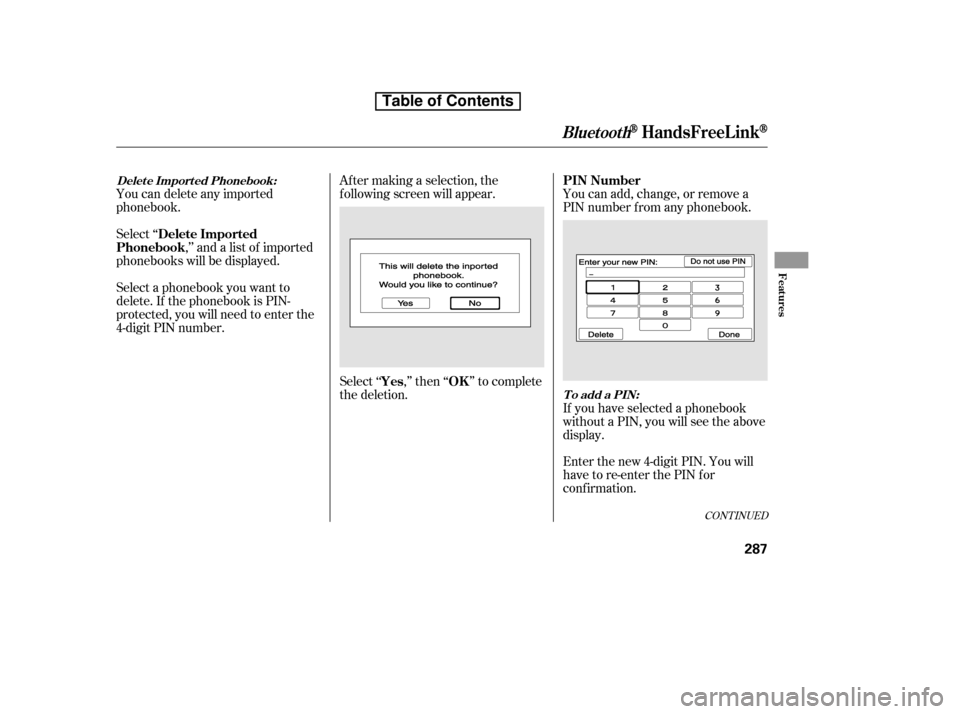
phonebooks will be displayed. Af ter making a selection, the
f ollowing screen will appear.
Select‘‘ ,’’then‘‘ ’’tocomplete
the deletion.You can add, change, or remove a
PIN number f rom any phonebook.
You can delete any imported
phonebook.
Select a phonebook you want to
delete. If the phonebook is PIN-
protected, you will need to enter the
4-digit PIN number.
If you have selected a phonebook
without a PIN, you will see the above
display.
Enter the new 4-digit PIN. You will
have to re-enter the PIN for
conf irmation.
CONT INUED
Delete Imported
Phonebook
Yes OKPIN Number
Delet e Import ed Phonebook:
To add a PIN:
BluetoothHandsFreeL ink
Features
287
Table of Contents