Page 274 of 387
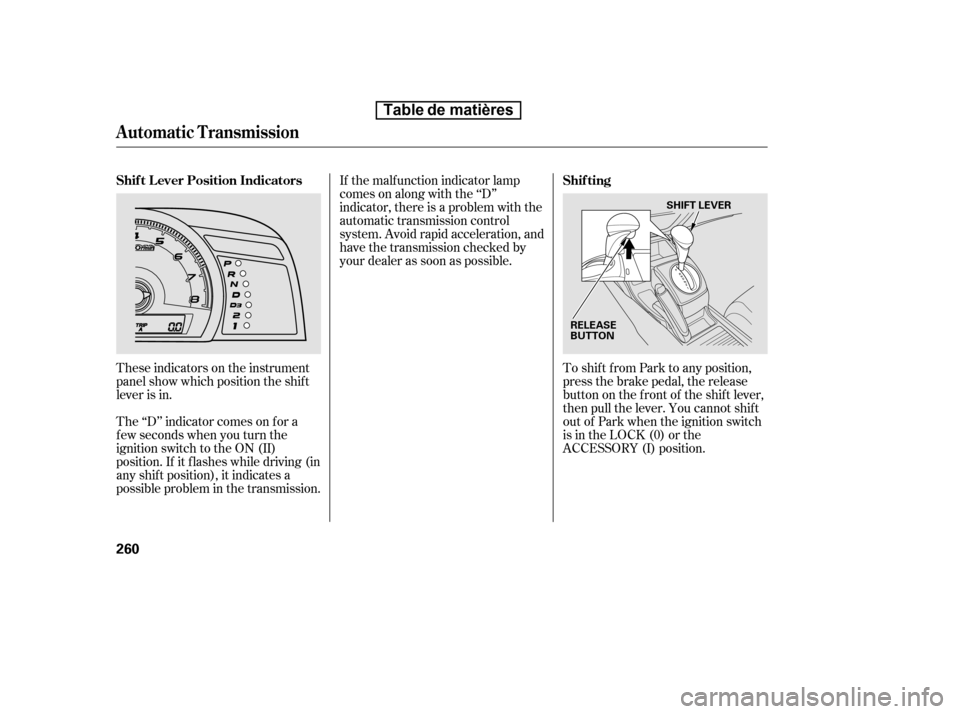
These indicators on the instrument
panel show which position the shif t
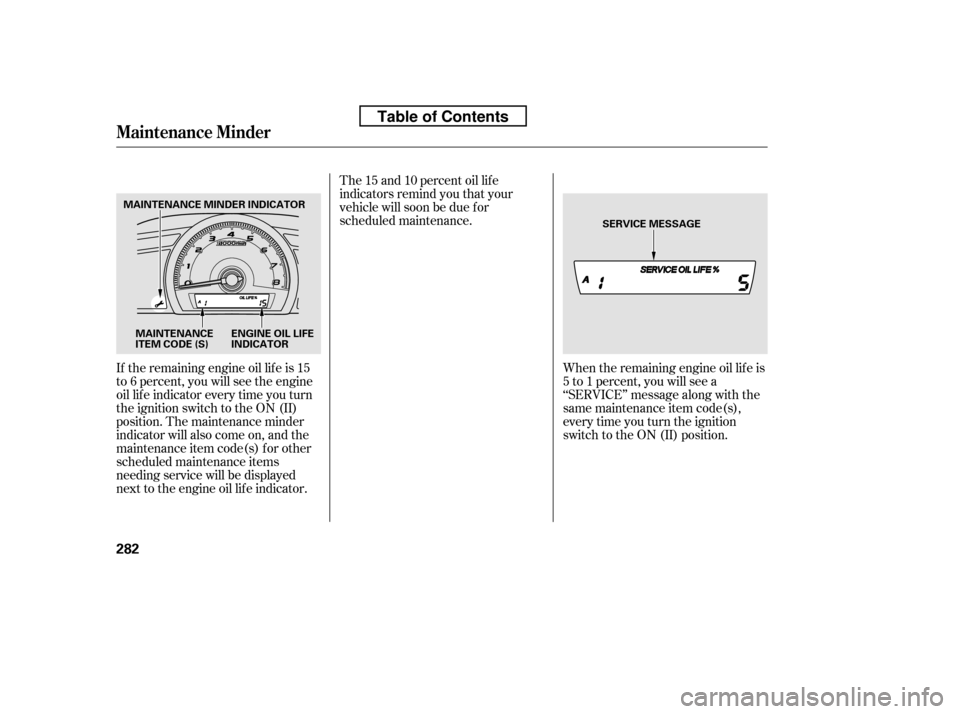
lever is in.To shif t f rom Park to any position,
press the brake pedal, the release
button on the f ront of the shif t lever,
then pull the lever. You cannot shif t
out of Park when the ignition switch
is in the LOCK (0) or the
ACCESSORY (I) position.
The ‘‘D’’ indicator comes on f or a
f ew seconds when you turn the
ignition switch to the ON (II)
position. If it f lashes while driving (in
any shif t position), it indicates a
possible problem in the transmission. If the malf unction indicator lamp
comes on along with the ‘‘D’’
indicator, there is a problem with the
automatic transmission control
system. Avoid rapid acceleration, and
have the transmission checked by
your dealer as soon as possible.
Automatic Transmission
Shif t L ever Position Indicators
Shif ting
260
RELEASE
BUTTONSHIFT LEVER
Table de matières
Page 275 of 387

�µ�µ �µ�µTo shift from:
PtoR
RtoP
NtoR
Dto2
2to1
1to2
2toD
DtoD
DtoN
DtoD NtoD
RtoN Do this:
Press the brake pedal, and
press the shift lever release
button.
Press the shift lever release
button.
Move the shift lever.
3
3
3
3
This position mechani-
cally locks the transmission. Use
Park whenever you are turning of f or
starting the engine. To shif t out of
Park, you must press on the brake
pedal and have your f oot of f the
accelerator pedal. Press the release
buttononthefrontof theshiftlever
to move it.
If you have done all of the above and
still cannot move the lever out of
Park, see on
page .
To avoid transmission damage, come
to a complete stop bef ore shif ting
into Park. You must also press the
release button to shift into Park. The
shif t lever must be in Park bef ore
you can remove the key f rom the
ignition switch.
Press the brake
pedal and press the release button to
shif t f rom Park to reverse. To shif t f rom reverse to neutral, come to a
completestopandthenshift.Press
the release button bef ore shif ting
into reverse f rom neutral.
Use this position f or
your normal driving. The
transmission automatically selects a
suitable gear (1 through 5) f or your
speed and acceleration. You may
notice the transmission shifting up at
higher engine speeds when the
engine is cold. This helps the engine
warm up f aster. Use neutral if you
need to restart a stalled engine, or if
it is necessary to stop brief ly with
the engine idling. Shif t to the Park
position if you need to leave your
vehicle for any reason. Press on the
brake pedal when you are moving
the shift lever from neutral to
another gear.
263
CONT INUED
Automatic Transmission
Park (P)
Shif t L ock Release
Reverse (R) Drive (D)
Neutral (N)
Driving
261
Table de matières
Page 277 of 387
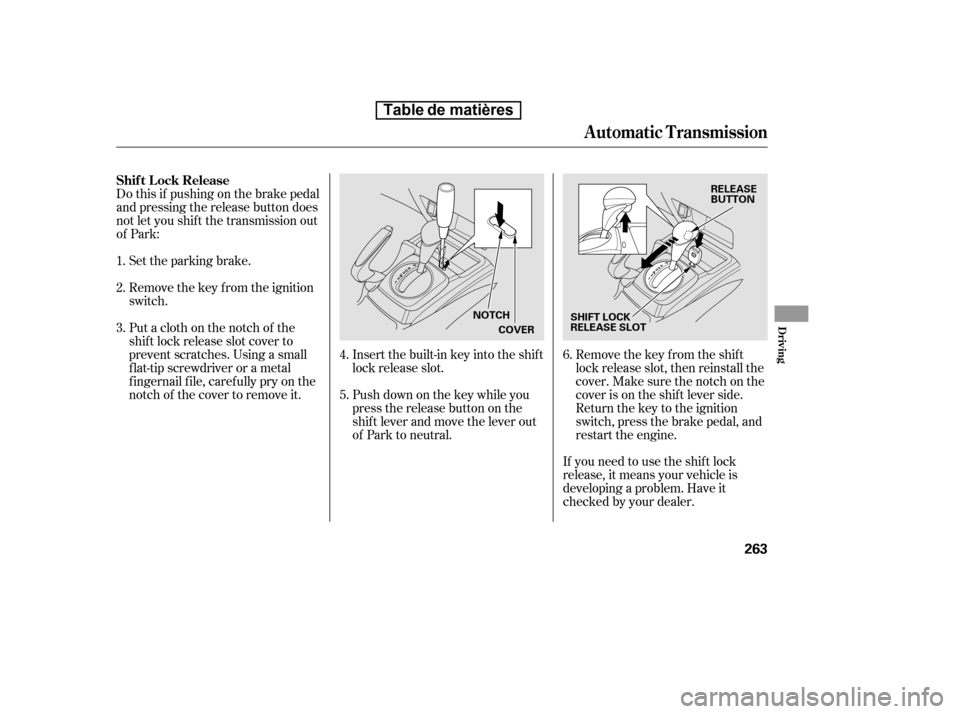
Do this if pushing on the brake pedal
and pressing the release button does
not let you shif t the transmission out
of Park:Set the parking brake.
Remove the key from the ignition
switch.
Insert the built-in key into the shift
lock release slot.
Push down on the key while you
pressthereleasebuttononthe
shif t lever and move the lever out
of Park to neutral.Remove the key from the shift
lock release slot, then reinstall the
cover. Make sure the notch on the
cover is on the shif t lever side.
Return the key to the ignition
switch, press the brake pedal, and
restart the engine.
If you need to use the shif t lock
release, it means your vehicle is
developing a problem. Have it
checked by your dealer.
Putaclothonthenotchof the
shif t lock release slot cover to
prevent scratches. Using a small
f lat-tip screwdriver or a metal
f ingernail f ile, caref ully pry on the
notch of the cover to remove it.
1. 2. 3.
4.5.6.
Shif t L ock Release
Automatic Transmission
Driving
263
COVER
RELEASE
BUTTON
SHIFT LOCK
RELEASE SLOT
NOTCH
Table de matières
Page 282 of 387

The vehicle stability assist (VSA)
system helps to stabilize the vehicle
during cornering if the vehicle turns
more or less than desired. It also
assists you in maintaining traction
while accelerating on loose or
slippery road surf aces. It does this
by regulating the engine’s output and
by selectively applying the brakes.
When VSA activates, you may notice
that the engine does not respond to
the accelerator in the same way it
does at other times. There may also
be some noise f rom the VSA
hydraulic system. You will also see
the VSA activation indicator blink.
The VSA system cannot enhance the
vehicle’s driving stability in all
situations and does not control your
vehicle’s entire braking system. It is
still your responsibility to drive and
corner at reasonable speeds and to
leave a sufficient margin of safety.When VSA activates, you will see the
VSA Activation indicator blinks.
If this indicator comes on while
driving, pull to the side of the road
when it is saf e, and turn of f the
engine. Reset the system by
restarting the engine. If the VSA
system indicator stays on or comes
back on while driving, have the VSA
system inspected by your dealer.
Without VSA, your vehicle will have
normal braking and cornering ability,
but it will not have VSA traction and
stability enhancement.
If the low tire pressure indicator or
TPMS indicator comes on, the VSA
system automatically turns on even if
the VSA system is turned of f by
pressing the VSA OFF switch (see
page ). If this happens, you
cannot turn the VSA system of f by
pressing the VSA OFF switch again.
If the indicator does not come on
when the ignition switch is turned to
the ON (II) position, there may be a
problem with the VSA system. Have
your dealer inspect your vehicle as
soon as possible.
The main f unction of the
VSA system is generally known as
Electronic Stability Control (ESC).
The system also includes a traction
control f unction. 269
On U.S. models
If equipped
VSA A ctivation Indicator
Vehicle Stability Assist
(VSA ) System Indicator
Vehicle St abilit y A ssist (VSA), aka Electronic Stability Control (ESC), System
268
NOTE:
Table de matières
Page 295 of 387
�µ
�µ �µ�µ�µ�µ�µ�µ�µ�µ �µ
�µ
CONT INUED
Calculated Engine Oil Lif e (%)
100 % 91 % 90 % 81 %
80 % 71 %
70 % 61 %
60 % 51 %
50 % 41 %
40 % 31 %
30 % 21 %
20 % 16 %
15 % 11 %10 % 6 % 5% 1% 0% Displayed
Engine Oil Lif e (%) 100 %90 %
80 %
70 %
60 %
50 %
40 %
30 %
20 %
15 %
10 %5%0%
Your vehicle displays engine oil lif e
and maintenance service items on
the inf ormation display to show you
when you should have your dealer
perf orm engine oil replacement and
indicated maintenance service.
Based on the engine operating
conditions and accumulated engine
revolutions, the onboard computer in
your vehicle calculates the remaining
engine oil lif e and displays it as a
percentage.
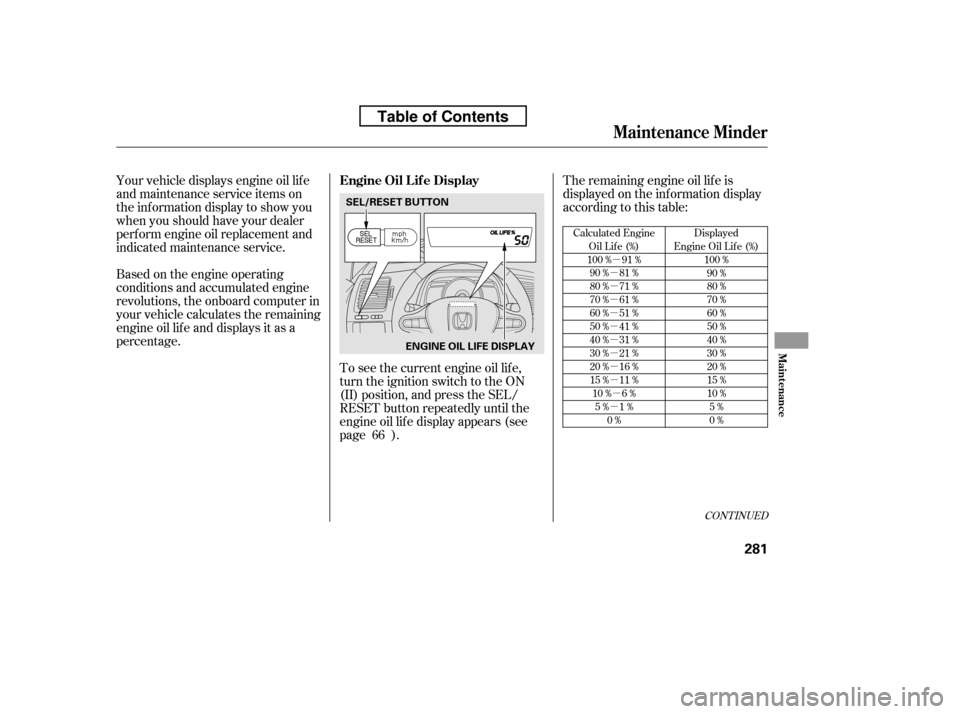
To see the current engine oil lif e,
turn the ignition switch to the ON
(II) position, and press the SEL/
RESET button repeatedly until the
engine oil lif e display appears (see
page ).The remaining engine oil lif e is
displayed on the inf ormation display
according to this table:
66
Maintenance Minder
Engine Oil L if e Display
Maint enance
281
SEL/RESET BUTTON ENGINE OIL LIFE DISPLAY
Table of Contents
Page 296 of 387
If the remaining engine oil lif e is 15
to 6 percent, you will see the engine
oil lif e indicator every time you turn
the ignition switch to the ON (II)
position. The maintenance minder
indicator will also come on, and the
maintenance item code(s) for other
scheduled maintenance items
needing service will be displayed
next to the engine oil lif e indicator.When the remaining engine oil lif e is
5 to 1 percent, you will see a
‘‘SERVICE’’ message along with the
same maintenance item code(s),
every time you turn the ignition
switch to the ON (II) position.
The 15 and 10 percent oil lif e
indicators remind you that your
vehicle will soon be due f or
scheduled maintenance.
Maintenance Minder
282
ENGINE OIL LIFE
INDICATOR
SERVICE MESSAGE
MAINTENANCE
ITEM CODE (S)
MAINTENANCE MINDER INDICATOR
Table of Contents
Page 297 of 387
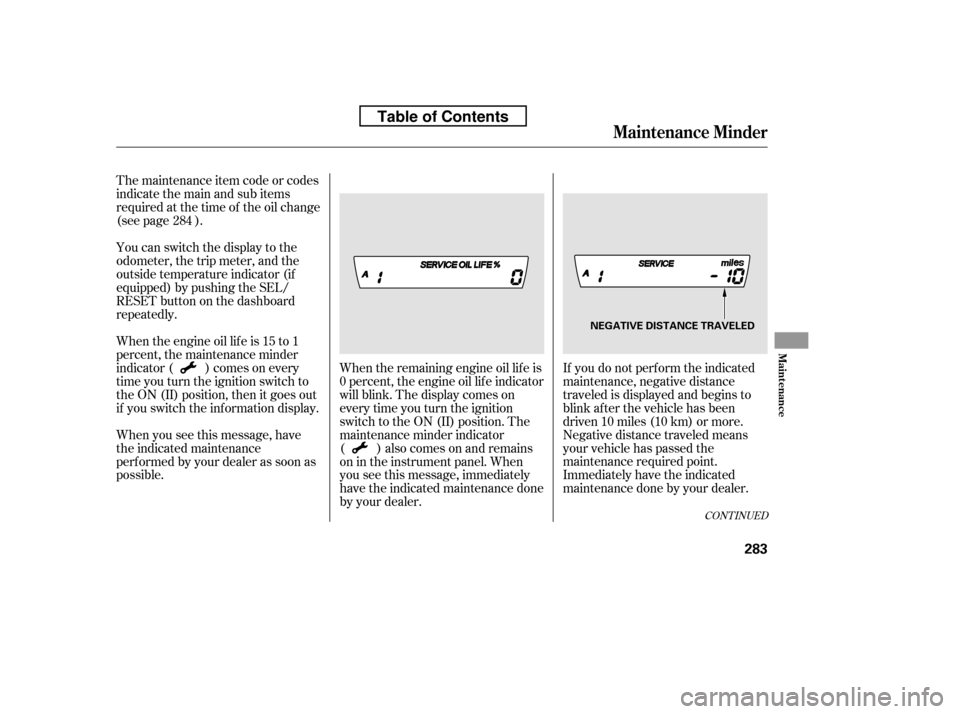
If you do not perf orm the indicated
maintenance, negative distance
traveled is displayed and begins to
blink af ter the vehicle has been
driven 10 miles (10 km) or more.
Negative distance traveled means
your vehicle has passed the
maintenance required point.
Immediately have the indicated
maintenance done by your dealer.
When the remaining engine oil lif e is
0 percent, the engine oil lif e indicator
will blink. The display comes on
everytimeyouturntheignition
switch to the ON (II) position. The
maintenance minder indicator
( ) also comes on and remains
on in the instrument panel. When
you see this message, immediately
have the indicated maintenance done
by your dealer.
The maintenance item code or codes
indicate the main and sub items
required at the time of the oil change
(see page ).
You can switch the display to the
odometer, the trip meter, and the
outside temperature indicator (if
equipped) by pushing the SEL/
RESET button on the dashboard
repeatedly.
Whentheengineoillifeis15to1
percent, the maintenance minder
indicator ( ) comes on every
time you turn the ignition switch to
the ON (II) position, then it goes out
if you switch the inf ormation display.
When you see this message, have
the indicated maintenance
perf ormed by your dealer as soon as
possible.
284
CONT INUED
Maintenance Minder
Maint enance
283
NEGATIVE DISTANCE TRAVELED
Table of Contents
Page 298 of 387
Your dealer will reset the display
af ter completing the required
maintenance service. You will see
‘‘OIL LIFE 100%’’ on the inf ormation
display the next time you turn the
ignition switch to the ON (II)
position.
If maintenance service is done by
someone other than your dealer,
reset the maintenance minder as
f ollows:Turn the ignition switch to the ON
(II) position.
Press the SEL/RESET button
repeatedly until the engine oil lif e
indicator is displayed.
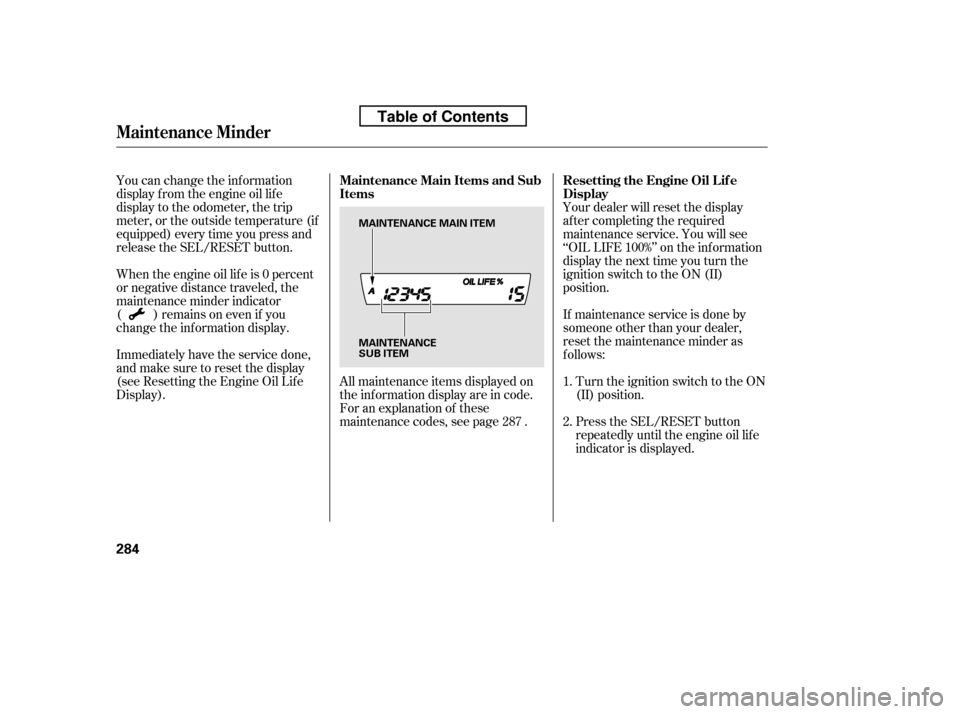
All maintenance items displayed on
the inf ormation display are in code.
For an explanation of these
maintenance codes, see page .
You can change the inf ormation
display f rom the engine oil lif e
display to the odometer, the trip
meter, or the outside temperature (if
equipped) every time you press and
release the SEL/RESET button.
When the engine oil lif e is 0 percent
or negative distance traveled, the
maintenance minder indicator
( )remainsonevenif you
change the inf ormation display.
Immediately have the service done,
andmakesuretoresetthedisplay
(see Resetting the Engine Oil Lif e
Display).
1. 2.
287
Maintenance Minder
Resetting the Engine Oil Lif e
Display
Maintenance Main Items and Sub
Items
284
MAINTENANCE
SUB ITEM
MAINTENANCE MAIN ITEM
Table of Contents