Page 102 of 387
Even if your vehicle’s battery is
removed or goes dead, the system
keeps the auto door lock/unlock
setting which you selected.
push and hold the
brake pedal, then move the shift
lever out of the Park (P) position.
Pushandholdtherearof the
master door lock switch on the
driver’s door. You will hear a click.
Continue to hold the switch:
Release the switch, and within 5
seconds, turn the ignition switch
to the ACCESSORY (I) position. move the shif t
lever to the Park (P) position. Until you hear another click
(af ter about 5 seconds) to
activate
Or, until you hear two more
clicks (af ter about 10 seconds)
to activate
Turn the ignition switch to the
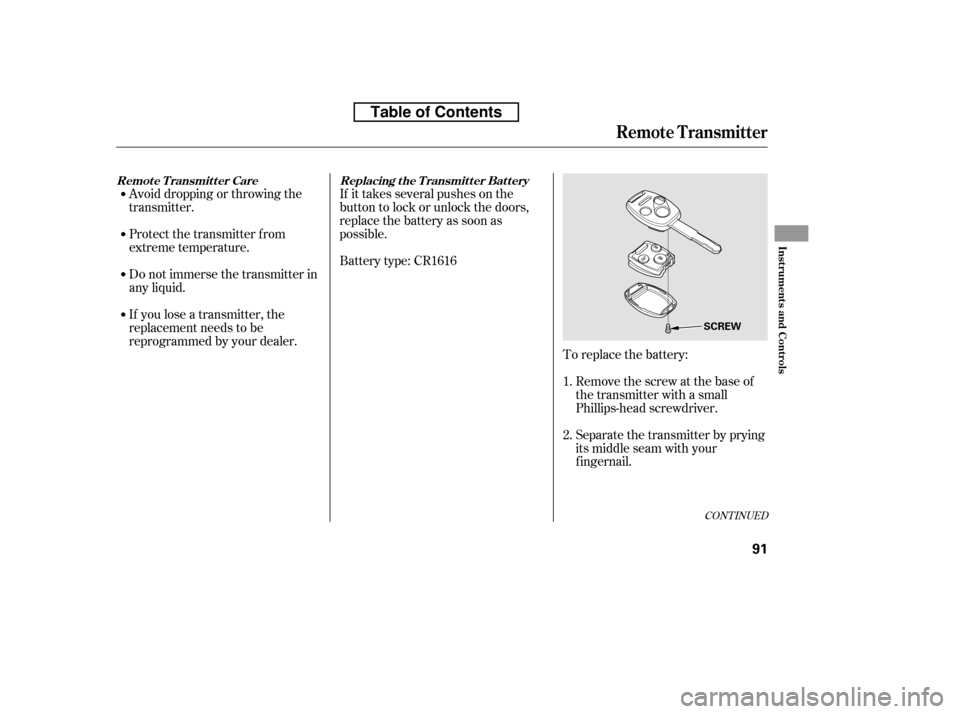
LOCK (0) position. To open the trunk, pull the trunk
release handle on the lef t side of the
driver’s seat. To protect items in the
trunk when you need to give the key
to someone else, lock the trunk
release handle with the master key,
and give the other person the valetkey.
3. 4. 5. 6.On A/T vehicles,
On A/T vehicles,driver’s door unlock
feature.
all doors unlock f eature.
Door L ocks, T runk
Trunk
88
MASTER KEYTRUNK RELEASE
HANDLEPULL
Table of Contents
Page 104 of 387
�µ�µ
�µ
�µ
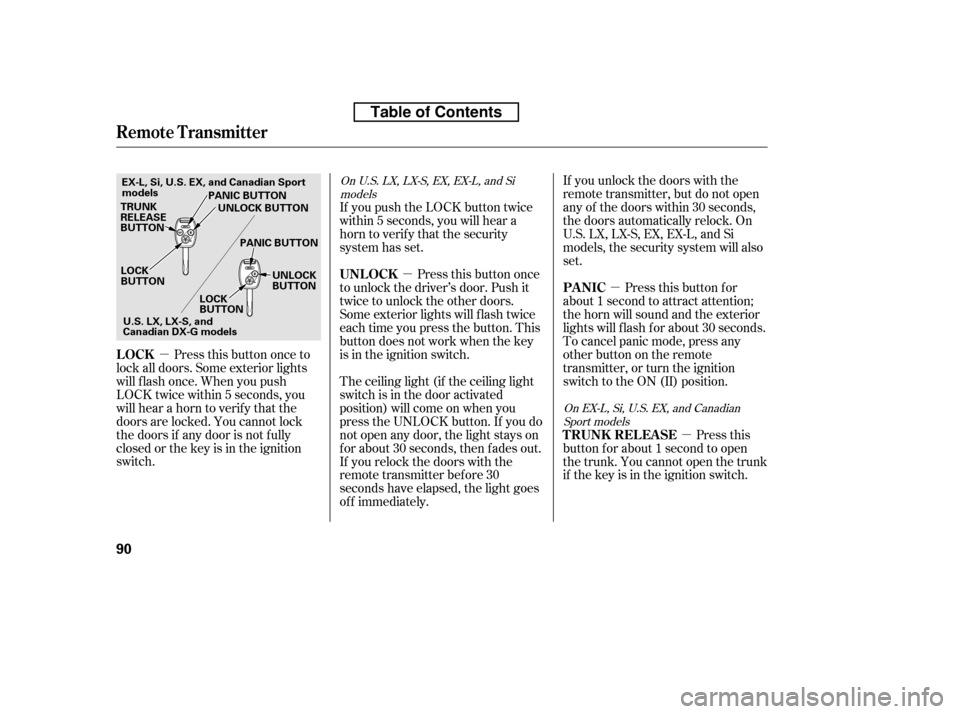
Press this button once to
lock all doors. Some exterior lights
will f lash once. When you push
LOCK twice within 5 seconds, you
will hear a horn to verif y that the
doors are locked. You cannot lock
the doors if any door is not f ully
closed or the key is in the ignition
switch. If you unlock the doors with the
remote transmitter, but do not open
any of the doors within 30 seconds,
the doors automatically relock. On
U.S. LX, LX-S, EX, EX-L, and Si
models, the security system will also
set.
If you push the LOCK button twice
within 5 seconds, you will hear a
horn to verify that the security
system has set.
Press this button once
to unlock the driver’s door. Push it
twice to unlock the other doors.
Some exterior lights will f lash twice
each time you press the button. This
button does not work when the key
is in the ignition switch.
The ceiling light (if the ceiling light
switch is in the door activated
position) will come on when you
press the UNLOCK button. If you do
not open any door, the light stays on
f or about 30 seconds, then f ades out.
If you relock the doors with the
remote transmitter before 30
seconds have elapsed, the light goes
of f immediately. Press this
button f or about 1 second to open
the trunk. You cannot open the trunk
if the key is in the ignition switch. Pressthisbuttonfor
about 1 second to attract attention;
thehornwillsoundandtheexterior
lights will f lash f or about 30 seconds.
To cancel panic mode, press any
other button on the remote
transmitter, or turn the ignition
switch to the ON (II) position.
On U.S. LX, LX-S, EX, EX-L, and Si
models
On EX-L, Si, U.S. EX, and CanadianSport models
LOCK UNL OCK
T RUNK REL EA SE
PA NIC
Remote Transmitter
90
LOCK
BUTTON
TRUNK
RELEASE
BUTTON
PANIC BUTTON
PANIC BUTTON UNLOCK
BUTTON
LOCK
BUTTON UNLOCK BUTTON
U.S.LX,LX-S,and
Canadian DX-G models
EX-L, Si, U.S. EX, and Canadian Sport
models
Table of Contents
Page 105 of 387
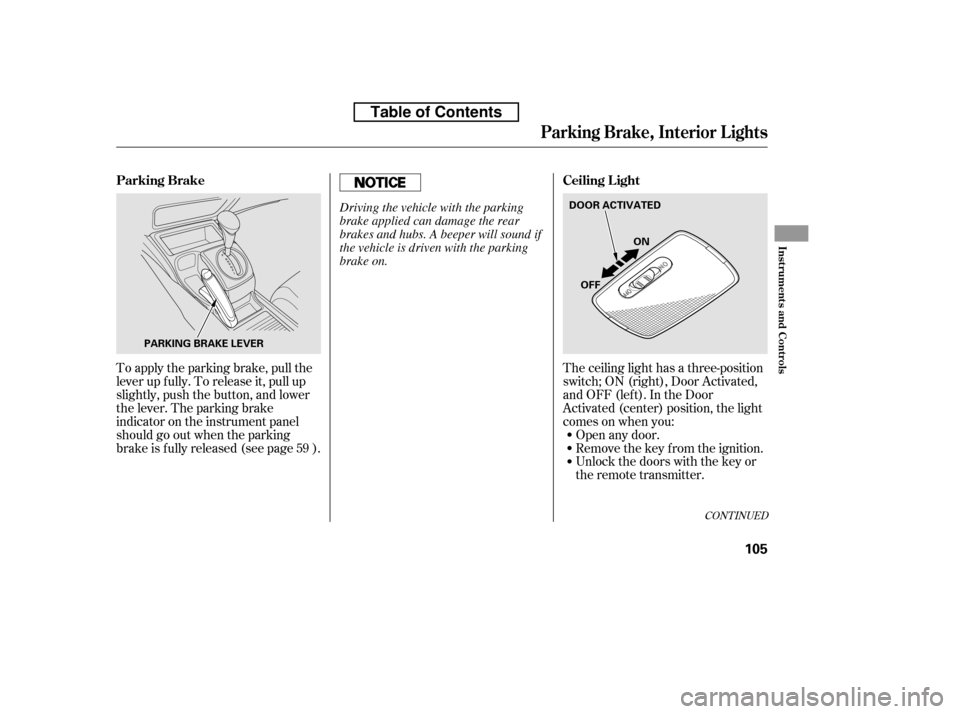
Avoid dropping or throwing the
transmitter.If it takes several pushes on the
button to lock or unlock the doors,
replace the battery as soon as
possible.
Battery type: CR1616
To replace the battery:Remove the screw at the base of
the transmitter with a small
Phillips-head screwdriver.
Separate the transmitter by prying
its middle seam with your
f ingernail.
If you lose a transmitter, the
replacement needs to be
reprogrammed by your dealer.
Do not immerse the transmitter in
any liquid.
Protect the transmitter from
extreme temperature.
1. 2.
CONT INUED
Replacing the Transmitter Battery
Remote Transmitter Care
Remote Transmitter
Inst rument s and Cont rols
91
SCREW
Table of Contents
Page 119 of 387
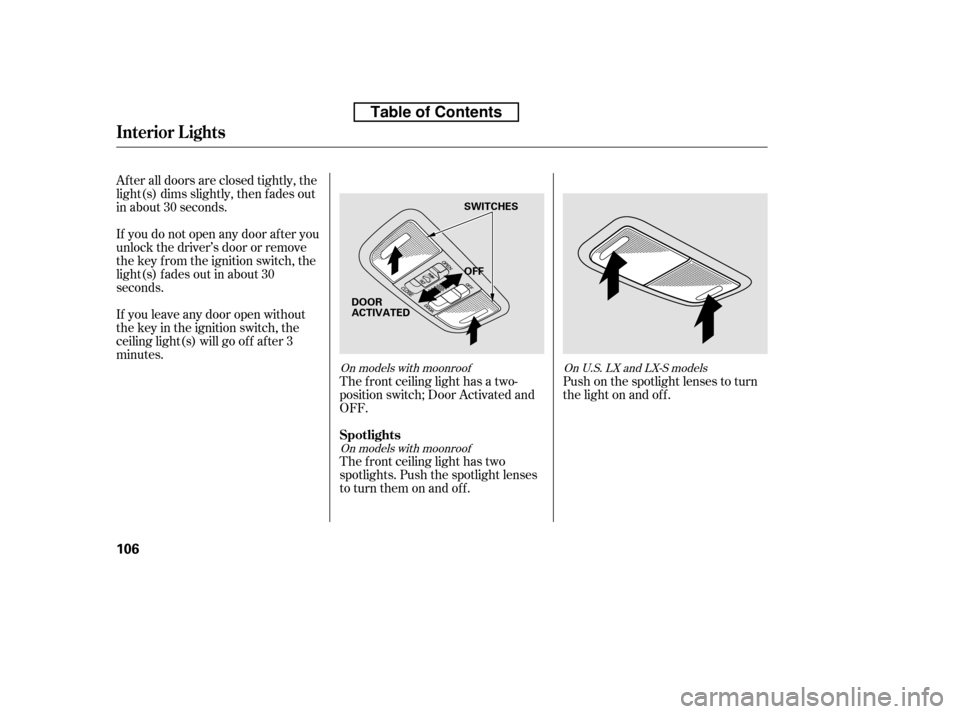
The ceiling light has a three-position
switch;ON(right),DoorActivated,
andOFF(left).IntheDoor
Activated (center) position, the light
comesonwhenyou:Open any door.
Unlock the doors with the key or
the remote transmitter.
Remove the key from the ignition.
To apply the parking brake, pull the
lever up f ully. To release it, pull up
slightly, push the button, and lower
the lever. The parking brake
indicator on the instrument panel
should go out when the parking
brake is f ully released (see page ).
59
CONT INUED
Parking Brake, Interior L ights
Ceiling L ight
Parking Brake
Inst rument s and Cont rols
105
PARKING BRAKE LEVER DOOR ACTIVATED
ON
OFF
Driving the vehicle with the parking
brake applied can damage the rear
brakes and hubs. A beeper will sound if
the vehicle is driven with the parking
brake on.
Table of Contents
Page 120 of 387
After all doors are closed tightly, the
light(s) dims slightly, then f ades out
in about 30 seconds.
If you do not open any door af ter you
unlock the driver’s door or remove
the key from the ignition switch, the
light(s) f ades out in about 30
seconds.
If you leave any door open without
the key in the ignition switch, the
ceiling light(s) will go of f af ter 3
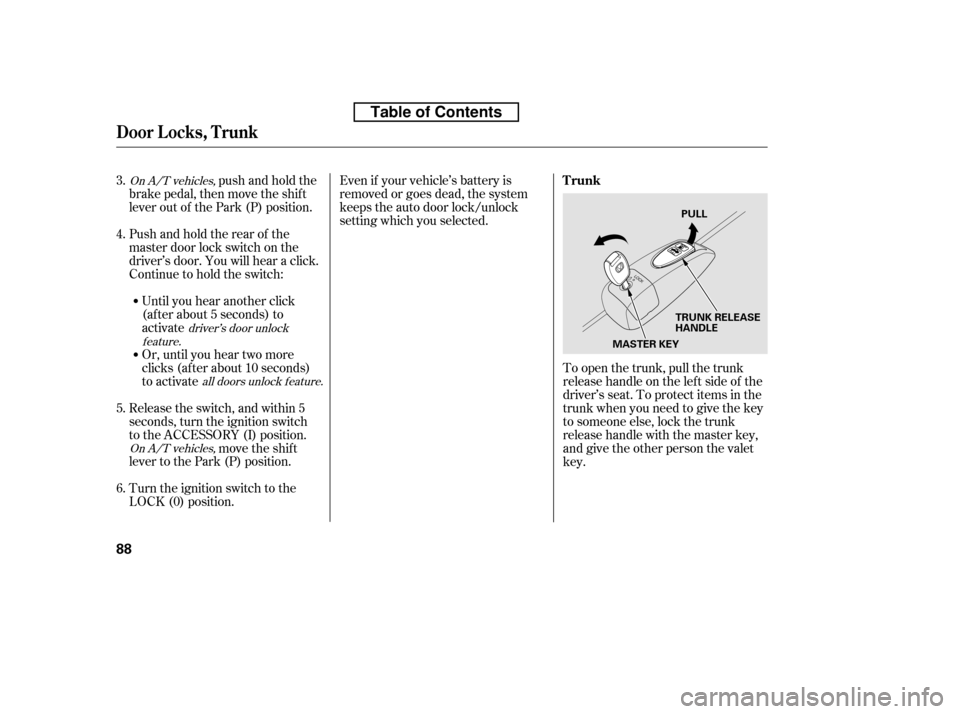
minutes.The f ront ceiling light has a two-
position switch; Door Activated and
OFF.
The f ront ceiling light has two
spotlights. Push the spotlight lenses
to turn them on and off.Push on the spotlight lenses to turn
the light on and of f .
On models with moonroof
On models with moonroof OnU.S.LXandLX-Smodels
Interior Lights
Spotlights
106
OFF
SWITCHES
DOOR
ACTIVATED
Table of Contents
Page 222 of 387
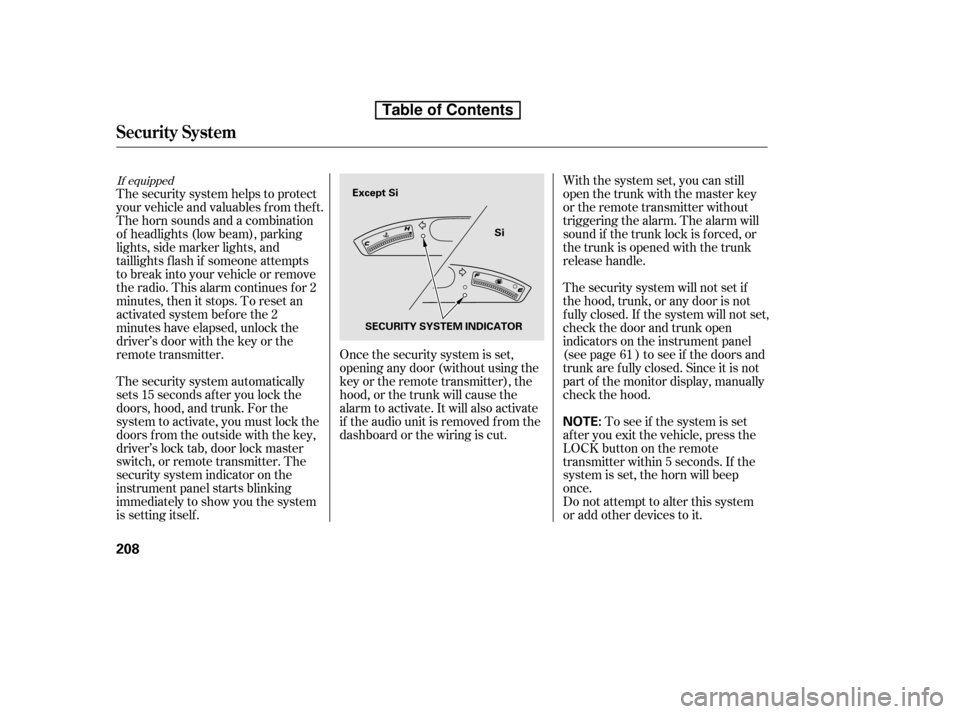
The security system automatically
sets 15 seconds after you lock the
doors, hood, and trunk. For the
system to activate, you must lock the
doors f rom the outside with the key,
driver’s lock tab, door lock master
switch, or remote transmitter. The
security system indicator on the
instrument panel starts blinking
immediately to show you the system
is setting itself .With the system set, you can still
open the trunk with the master key
or the remote transmitter without
triggering the alarm. The alarm will
sound if the trunk lock is f orced, or
the trunk is opened with the trunk
release handle.
The security system will not set if
the hood, trunk, or any door is not
f ully closed. If the system will not set,
check the door and trunk open
indicators on the instrument panel
(see page ) to see if the doors and
trunk are f ully closed. Since it is not
part of the monitor display, manually
check the hood.
Do not attempt to alter this system
or add other devices to it.
To see if the system is set
af ter you exit the vehicle, press the
LOCK button on the remote
transmitter within 5 seconds. If the
system is set, the horn will beep
once.
The security system helps to protect
your vehicle and valuables f rom thef t.
The horn sounds and a combination
of headlights (low beam), parking
lights, side marker lights, and
taillights f lash if someone attempts
to break into your vehicle or remove
the radio. This alarm continues f or 2
minutes, then it stops. To reset an
activated system before the 2
minutes have elapsed, unlock the
driver’s door with the key or the
remote transmitter. Once the security system is set,
opening any door (without using the
key or the remote transmitter), the
hood, or the trunk will cause the
alarm to activate. It will also activate
if the audio unit is removed f rom the
dashboard or the wiring is cut. 61
If equipped
Security System
208
NOTE:
Except Si
Si
SECURITY SYSTEM INDICATOR
Table of Contents
Page 269 of 387
Make sure all windows, mirrors,
and outside lights are clean and
unobstructed. Remove f rost, snow,
or ice.
Check that the hood and trunk are
f ully closed.Check that any items you may be
carrying are stored properly or
f astened down securely.
Check the seat adjustment (see
page ).
Check the adjustment of the
inside and outside mirrors (see
page ).
Check the steering wheel
adjustment (see page ).
Make sure the doors are securely
closed and locked.Fasten your seat belt. Check that
your passengers have f astened
their seat belts (see page ).
Youshoulddothefollowingchecks
and adjustments every day bef ore
you drive your vehicle.
When you start the engine, check
the gauges and indicators in the
instrument panel (see page ).
Visually check the tires. If a tire
looks low, use a gauge to check its
pressure (see page ).
1. 2. 3. 4.
9.
8.
7.
6.
5.
10.14
57
93
77
314 103
Preparing to Drive
Driving
255
Table de matières
Page 278 of 387

If your vehicle has an automatic
transmission, set the parking brake
bef ore you put the transmission in
Park. This keeps the vehicle f rom
moving and putting pressure on the
parking mechanism in the
transmission.Make sure the moonroof (if
equipped) and the windows are
closed.
Place any packages, valuables, etc.,
in the trunk or take them with you.
Turn of f the lights. If the vehicle is f acing uphill, turn
the f ront wheels away f rom the
curb. If you have a manual
transmission, put it in f irst gear.
If the vehicle is f acing downhill,
turn the front wheels toward the
curb. If you have a manual
transmission, put it in reverse gear.
Make sure the parking brake is
f ully released bef ore driving away.
Driving with the parking brake
partially set can overheat or
damage the rear brakes.
Lock the doors.
Always use the parking brake when
you park your vehicle. Make sure
the parking brake is set f irmly, or
your vehicle may roll if it is parked
on an incline.
Check the indicator on the
instrument panel to verif y that the
security system is set.
Never park over dry leaves, tall
grass, or other f lammable
materials. The hot three way
catalytic converter could cause
these materials to catch on fire.
On vehicles with security system
Parking T ips
Parking
264
Never install a sunshade between the
upper and lower meters on the
instrument panel. If you do, you could
cause heat damage to the upper meter
on a very hot day.
Table de matières