Page 199 of 387
This audio system can select and
play the audio f iles on the iPod
with
the same controls used f or the in-
dash disc player. To play an iPod,
connect it to the USB adapter cable
in the console compartment by using
your dock connector. Press the
AUDIO button beside the screen to
show the audio display and touch the
AUX icon. The ignition switch must
be in the ACCESSORY (I) or ON (II)
position. The iPod will also be
recharged with the ignition switch in
these positions.
The audio system reads and plays
playable sound f iles on the iPod. The
system cannot operate an iPod as a
mass storage device. The system will
only play songs stored on the iPod
with iTunes.
iPod and iTunes are registered
trademarks owned by Apple Inc. You can select the AUX mode by
using the navigation system voice
control buttons, but cannot operate
theplaymodefunctions.
iPods compatible with your audio
system using the USB adapter cable
are:
Some devices cannot be powered
or charged via the USB adapter. If
this is the case, use the accessory
adapter to supply power to your
device.
We recommend backing up your
data bef ore playing it.
Do not use an extension cable
between the USB adapter cable
equipped with your vehicle and
your dock connector.
DonotkeeptheiPodinthe
vehicle. Direct sunlight and high
heat will damage it.
Do not connect your iPod using ahub.
UseonlycompatibleiPodswiththe
latest sof tware. iPods that are not
compatible will not work in this audio
unit.
CONT INUED
Sof tware
Ver. 1.0 or more
Ver. 1.2 or more
Ver. 1.2 or more
Ver. 1.1.2 or more
Ver. 1.0 or more
Ver. 1.0.2 or more
Ver. 1.1.1 or more
Ver. 2.1.1 or more
Model
iPod classic
iPod with video
(iPod 5th
generation)
iPod nano
iPod nano 2nd
generation
iPod nano 3rd
generation
iPod nano 4th
generation
iPod touch
iPod touch 2nd
generation
To Play an iPodVoice Cont rol Syst em
Audio System (Models with navigation system)
Features
185
NOTE:
Table of Contents
Page 207 of 387
�µ
�µ
�µ
�µ �µ �µ �µ
�µ �µ �µ �µ �µ �µ�µ�µ �µ �µ
CONT INUED
The specif ications f or compatible
AAC files are:
Bitrate:
48 320 kbps
Supported standards:
MPEG4/AAC LC
MPEG2/AAC LC
Partition: Top partition only
Maximum layers: 8
The specif ications f or compatible
WMA f iles are:
Bitrate:
48 320/VBR kbps (Max 384)
Partition: Top partition only
Maximum layers: 8
Bitrate:
32/40/48/56/64/80/96/112/128/
160/192/224/256/320/VBR kbps
(MPEG1)
Supported standards:
MPEG1 Audio Layer3
MPEG2 Audio Layer3
Partition: Top partition only
Maximum layers: 8
Depending on the type of
encoding and writing sof tware
used, there may be cases where
character inf ormation does not
display properly.
The specif ications f or compatible
MP3 f iles are:
The order of f iles in USB playback
maybedifferentfromtheorderof
f iles displayed in PC or other
devices etc. Files are played in the
orderstoredinUSBflashmemory
device. You can select the AUX mode by
using the navigation system voice
control buttons, but cannot operate
theplaymodefunctions.
Sampling f requency:
32/44.1/48 kHz (MPEG1)
16/22.05/24 kHz (MPEG2) Sampling f requency:
32/44.1/48 kHz
Supported standards:
WMA version 7/8/9
Sampling f requency:
8/11.025/12/16/22.05/24/32/
44.1/48 kHz
Audio System (Models with navigation system)
Voice Cont rol Syst em
Features
193
Table of Contents
Page 220 of 387

If your vehicle’s battery is
disconnected or goes dead, or the
radio f use is removed, the audio
system will disable itself . If this
happens, you will see ‘‘ENTER
CODE’’ in the f requency display the
nexttimeyouturnonthesystem.
Use the preset buttons (icons on
vehicles with navigation system) to
enter the code. The code is on the
radio code card included in your
owner’s manual kit. When it is
entered correctly, the radio will start
playing.
If you make a mistake entering the
code, do not start over; complete the
sequence, then enter the correct
code. You have 10 tries to enter the
correct code. If you are unsuccessf ul
in 10 attempts, you must then leave
the system on f or 1 hour bef ore
trying again.
If you lose the card, you must obtain
the code number f rom a dealer. To
do this, you will need the system’s
serial number.
Youshouldhavereceivedacardthat
lists your audio system’s code and
serial numbers. It is best to store this
card in a saf e place at home. In
addition, you should write the audio
system’s serial number in this owner’s
manual.
Your vehicle’s audio system will
disable itself if it is disconnected
f rom electrical power f or any reason.
To make it work again, you must
enter a specif ic 5 digit code using the
preset buttons (icon on vehicle’s with
navigation system). Because there
are hundreds of number
combinations possible f rom specif ic
digits, making the system work
without knowing the exact code is
nearly impossible.On models with audio system
Radio T hef t Prot ect ion
206
Table of Contents
Page 226 of 387
�µ�µ
Bluetooth
handsf reelink.honda.
com
www.honda.ca,
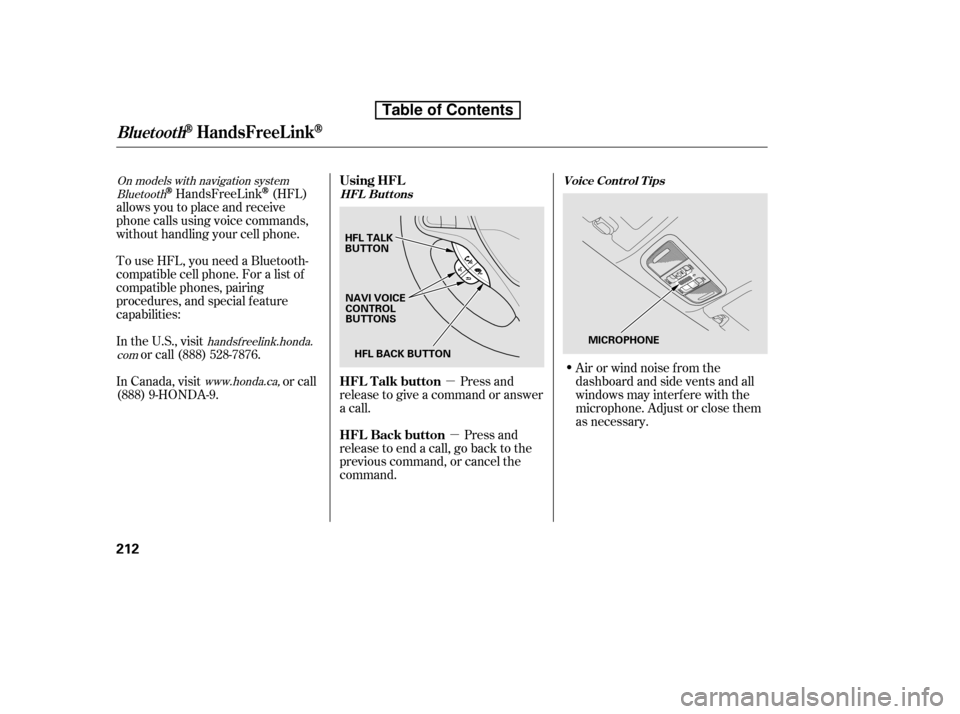
On models with navigation systemHandsFreeLink(HFL)
allows you to place and receive
phone calls using voice commands,
without handling your cell phone.
To use HFL, you need a Bluetooth-
compatible cell phone. For a list of
compatible phones, pairing
procedures, and special f eature
capabilities:
In the U.S., visit or call (888) 528-7876.
In Canada, visit or call
(888) 9-HONDA-9. Press and
release to give a command or answer
a call.
Press and
release to end a call, go back to the
previous command, or cancel the
command. Airorwindnoisefromthe
dashboard and side vents and all
windows may interfere with the
microphone. Adjust or close them
as necessary.
Using HFL
HFL Talk button
HFL Back buttonHFL Buttons
Voice Cont rol T ips
BluetoothHandsFreeL ink
212
HFL BACK BUTTON
NAVI VOICE
CONTROL
BUTTONS
HFL TALK
BUTTON
MICROPHONE
Table of Contents
Page 274 of 387
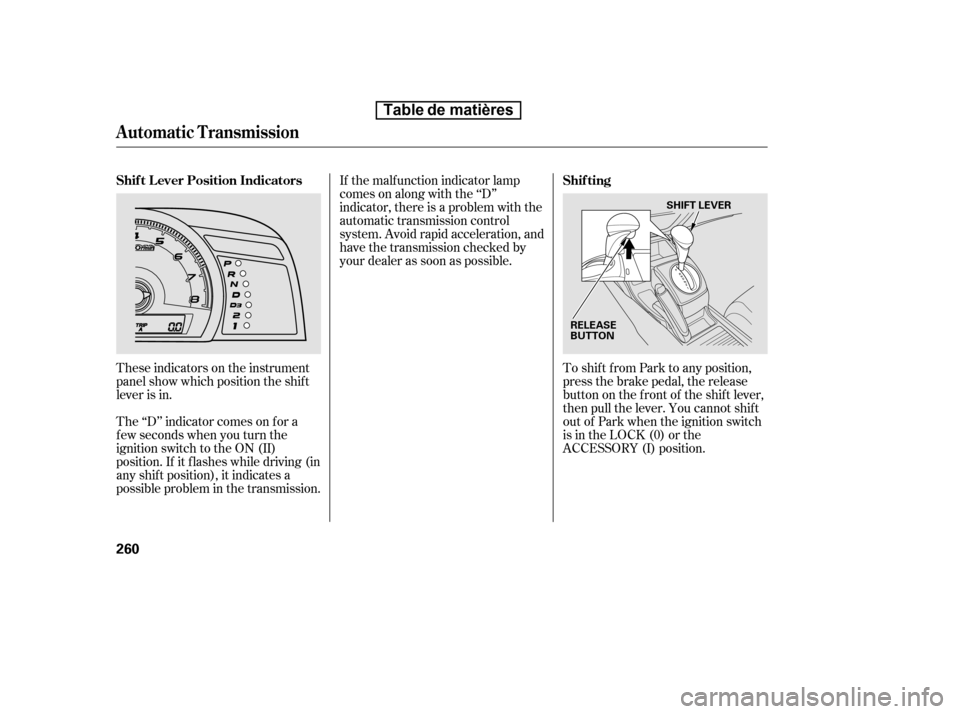
These indicators on the instrument
panel show which position the shif t
lever is in.To shif t f rom Park to any position,
press the brake pedal, the release
button on the f ront of the shif t lever,
then pull the lever. You cannot shif t
out of Park when the ignition switch
is in the LOCK (0) or the
ACCESSORY (I) position.
The ‘‘D’’ indicator comes on f or a
f ew seconds when you turn the
ignition switch to the ON (II)
position. If it f lashes while driving (in
any shif t position), it indicates a
possible problem in the transmission. If the malf unction indicator lamp
comes on along with the ‘‘D’’
indicator, there is a problem with the
automatic transmission control
system. Avoid rapid acceleration, and
have the transmission checked by
your dealer as soon as possible.
Automatic Transmission
Shif t L ever Position Indicators
Shif ting
260
RELEASE
BUTTONSHIFT LEVER
Table de matières
Page 337 of 387
�µ
If you need to connect the battery to
a charger, disconnect both cables to
prevent damaging your vehicle’s
electrical system. Always disconnect
the negative ( ) cable first, and
reconnect it last.
If additional battery maintenance is
needed, see your dealer or a
qualif ied technician.
Battery posts,
terminals, and related accessories
contain lead and lead compounds. If your vehicle’s battery is
disconnected, or goes dead, the
audio system will disable itself . The
nexttimeyouturnontheradio,you
may see ‘‘ENTER CODE’’ in the
f requency display. Use the preset
buttons to enter the code (see page
).
The navigation system will also
disableitself.Thenexttimeyouturn
on the ignition switch, the system
will require you to enter a PIN
bef ore it can be used. Ref er to the
navigation system manual.
If your vehicle’s battery is
disconnected, or goes dead, the time
setting will be reset to 1:00. To set
the time again, f ollow the setting
procedure (see page ).
206
207
On vehicles with navigation system
On vehicles without navigation system
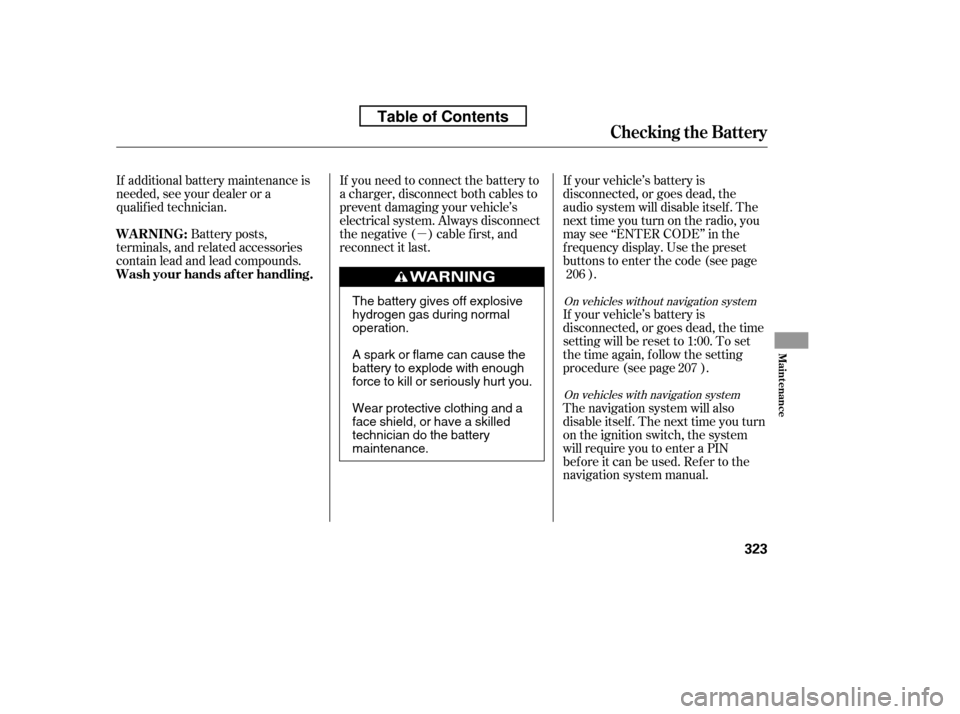
WARNING:
Wash your hands af ter handling.
Checking the Battery
Maint enance
323
The battery gives off explosive
hydrogen gas during normaloperation.
A spark or flame can cause the
battery to explode with enough
force to kill or seriously hurt you.
Wear protective clothing and a
face shield, or have a skilled
technician do the batterymaintenance.
Table of Contents
Page 359 of 387
When the audio system is disabled,
the clock setting in the audio system
will be canceled. You will need to
reset the clock (see page ).
If the radio f use is removed, the
audio system may disable itself . The
nexttimeyouturnontheradio,you
will see ‘‘ENTER CODE’’ in the
f requency display. Use the preset
buttons to enter the five-digit code
(see page ).
If the replacement fuse of the
same rating blows in a short time,
there is probably a serious
electrical problem with your
vehicle. Leave the blown fuse in
that circuit, and have your vehicle
checked by a qualif ied technician.
6.
206
207
Fuses
T aking Care of t he Unexpect ed
345
Replacing a f use with one that has a
higher rating greatly increases the
chances of damaging the electrical
system. If you do not have a
replacement f use with the proper rating
f or the circuit, install one with a lower
rating.
Table of Contents