Page 96 of 416
CONT INUED
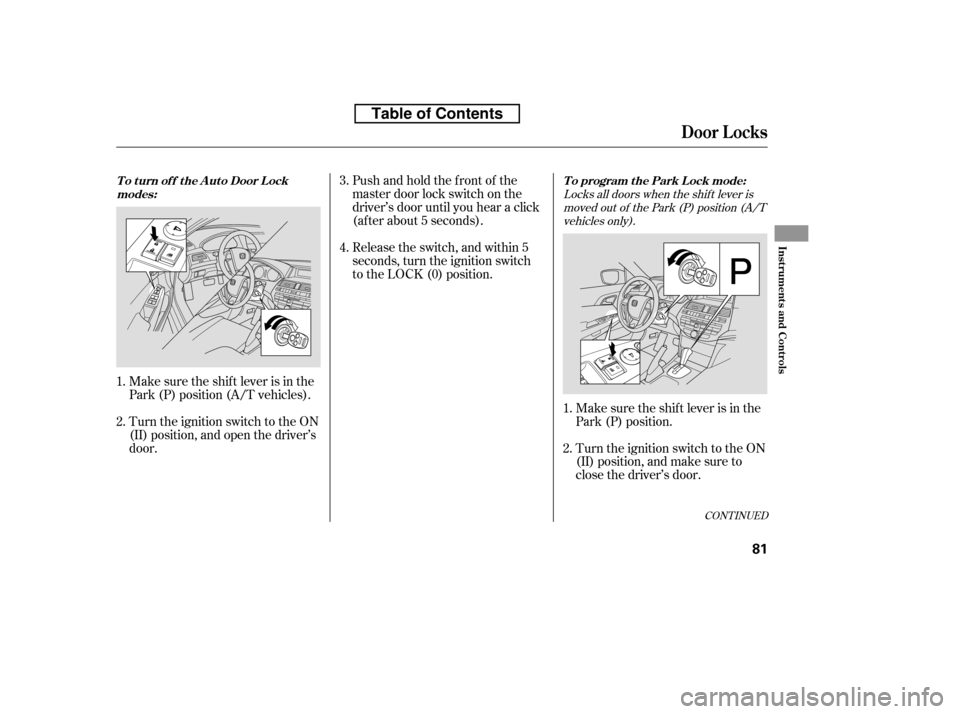
Locks all doors when the shif t lever ismoved out of the Park (P) position (A/Tvehicles only).
Make sure the shif t lever is in the
Park (P) position (A/T vehicles).
Turn the ignition switch to the ON
(II) position, and open the driver’s
door. Pushandholdthefrontof the
master door lock switch on the
driver’s door until you hear a click
(af ter about 5 seconds).
Release the switch, and within 5
seconds, turn the ignition switch
to the LOCK (0) position.
Make sure the shif t lever is in the
Park (P) position.
Turn the ignition switch to the ON
(II) position, and make sure to
close the driver’s door.
1. 2.
1.2. 3. 4.
Door L ocks
To program the Park Lock mode:
T o t urn of f t he A ut o Door L ock
modes:
Inst rument s and Cont rols
81
�����—�����—�
���y�
���������
���y���
�)�����������y���������y
Table of Contents
Page 97 of 416

Pushandholdthefrontof the
master door lock switch on the
driver’s door. You will hear a click.
Keep holding the switch until you
hear another click (after about 5
seconds).
Release the switch, and within 5
seconds, turn the ignition switch
to the LOCK (0) position.Release the switch, and within 5
seconds, turn the ignition switch
to the ACCESSORY (I) position.
move the shif t
lever to the Park (P) position.
Pushandholdthefrontof the
master door lock switch on the
driver’s door. You will hear a click.
Keep holding the switch until you
hear another click (after about 5
seconds).
Make sure the shif t lever is in the
Park (P) position (A/T vehicles).
Turn the ignition switch to the ON
(II) position, and make sure to
close the driver’s door. push and hold the
brake pedal, and move the shift
lever out of the Park (P) position. Turn the ignition switch to the
LOCK (0) position.
1. 2. 3. 4. 5. 6.
3. 4.
Locks all doors when the vehicle’s speed
reaches about 9 mph (15 km/h).
On A/T vehicles,
On A/T vehicles,
Door L ocks
T o program t he Drive L ock mode:
82
�����—�����—�
���y�
�������������y���
�)�����������y���������y
Table of Contents
Page 98 of 416
CONT INUED
The auto door unlocking is
deactivated all the time.
The auto door unlocking f eature
has f ive possible settings:
Make sure the shif t lever is in the
Park (P) position (A/T vehicles).
Turn the ignition switch to the ON
(II) position, and open the driver’s
door.
The driver’s door unlocks
whenever you turn the ignition
switch to the ACCESSORY (I)
position.
This is the def ault setting on M/T
vehicles.
All doors unlock whenever you
turn the ignition switch to the
ACCESSORY (I) position.
the driver’s door
unlocks when you move the shif t
lever to the Park (P) position with
the brake pedal depressed.
This is the def ault setting.
All doors unlock when you move
the shif t lever to the Park (P)
position with the brake pedal
depressed (A/T vehicles). 1. 2.
On A/T vehicles,
Door L ocks
A uto Door UnlockingT o t urn of f t he A ut o Door Unlock
modes:
Inst rument s and Cont rols
83
Table of Contents
Page 99 of 416

Pushandholdtherearof the
master door lock switch on the
driver’s door. You will hear a click.
Continue to hold the switch:Until you hear another click
(af ter about 5 seconds) to
activate
Or, until you hear two more
clicks (af ter about 10 seconds)
to activate
Release the switch, and within 5
seconds, turn the ignition switch
to the LOCK (0) position.
Pushandholdtherearof the
master door lock switch on the
driver’s door. You will hear a click,
and after about 5 seconds, you will
hear another click.
Turn the ignition switch to the ON
(II) position, and make sure to
close the driver’s door.
Make sure the shif t lever is in the
Park (P) position.
Release the switch, and within 5
seconds, turn the ignition switch
to the LOCK (0) position.
1. 2. 3. 4.
3. 4.
driver’s door unlock
feature.
all doors unlock f eature.
Unlocks the driver’s door or all doors
when the shif t lever is moved into thePark (P) position with the brake pedal
depressed (A/T vehicles only).
Door L ocks
To program the Park Unlock mode:
84
Table of Contents
Page 100 of 416

Even if your vehicle’s battery is
removed or goes dead, the system
keeps the auto door lock/unlock
setting which you selected.Release the switch, and within 5
seconds, turn the ignition switch
to the ACCESSORY (I) position.
move the shif t
lever to the Park (P) position.
Turn the ignition switch to the
LOCK (0) position.
push and hold the
brake pedal, then move the shift
lever out of the Park (P) position.
Pushandholdtherearof the
master door lock switch on the
driver’s door. You will hear a click.
Continue to hold the switch:
Until you hear another click
(af ter about 5 seconds) to
activate
Or, until you hear two more
clicks (af ter about 10 seconds)
to activate
Make sure the shif t lever is in the
Park (P) position (A/T vehicles).
Turn the ignition switch to the ON
(II) position, and make sure to
close the driver’s door. 4.
5. 6.
3.
1. 2.
On A/T vehicles,
On A/T vehicles,
driver’s door unlock
feature.
all doors unlock f eature.
Unlocks the driver’s door or all doors
when the ignition switch is moved out ofthe ON (II) position.
Door L ocks
T o program t he Ignit ion Swit chUnlock mode:
Inst rument s and Cont rols
85
Table of Contents
Page 101 of 416

�µ�µ
The childproof door locks are
designed to prevent children seated
in the rear f rom accidentally opening
the rear doors. Each rear door has a
lock lever near the edge. With the
lever in the LOCK position (lever is
down), the door cannot be opened
fromtheinsideregardlessof the
position of the lock tab. To open the
door, push the lock tab f orward and
use the outside door handle. Press this button once to
lock all doors. Some exterior lights
will f lash once. When you push
LOCK twice within 5 seconds, you
will hear a beep to verify that the
doors are locked and the security
system (if equipped) has set. You
cannot lock the doors if any door is
not f ully closed or the key is in the
ignition switch. Pressthisbuttononce
to unlock the driver’s door. Push it
twice to unlock the remaining doors.
Some exterior lights will f lash twice
each time you press the button.
The ceiling light and the door
activated spotlights (if equipped)
come on when you press the
UNLOCK button if the lights are in
the door activated position. If you do
not open any door within 30 seconds,
the light(s) will f ade out. If you
relock the doors with the remote
transmitter before 30 seconds have
elapsed, the light(s) will go of f
immediately.
If you do not open any door within 30
seconds, the doors automatically
relock and the security system (if
equipped) sets.
Childproof Door L ocks Remote T ransmitter
LOCKUNL OCK
Door Locks, Remote Transmitter
86
Unlock
LEVER
Lock LOCK
BUTTON
UNLOCK
BUTTON
PANIC
BUTTON TRUNK
RELEASE
BUTTON
LED
�����—�����—�
���y�
���������
�
�y���
�)�����������y�������
�y
Table of Contents
Page 102 of 416
�µ�µ Pressthisbuttonfor
about 2 seconds to attract attention:
the horn will sound, and the exterior
lights will f lash f or about 30 seconds.
To cancel panic mode, press any
other button on the remote
transmitter, or turn the ignition
switch to the ON (II) position.
Press and hold this
button f or about 1 second to open
the trunk. You cannot open the trunk
if the key is in the ignition switch.
You can also open all power windows
and the moonroof (if equipped) f rom
outside the vehicle with the remote
transmitter (see page ).
Avoid dropping or throwing the
transmitter.
Protect the transmitter from
extreme temperature.
Do not immerse the transmitter in
any liquid.
If you lose a transmitter, the
replacement needs to be
reprogrammed by your dealer.
105
CONT INUED
Remote Transmitter
PA NIC
TRUNKRemote Transmitter Care
Inst rument s and Cont rols
87
�����—�����—�
���y�
�����������
�y���
�)�����������y���������y
Table of Contents
Page 107 of 416

�µ
Moves the seat forward
and backward.
The controls f or the power
adjustable front seats are on the
outside edge of each seat bottom.
You can adjust the seats with the
ignition switch in any position. Make
all seat adjustments bef ore you start
driving.
The passenger seat has the same
adjustments as the driver’s seat but
without any height and lumbar
adjustments.
The f ront passenger’s seat adjusts
manually.
Raisesorlowerstheseat.
(Driver’s seat only)
Moves the f ront of the
seat up or down.
(Driver’s seat only) Moves the whole seat up
and f orward, or down
and backward. The front
of the seat also tilts up or
down at the same time.
(Driver’s seat only)
Adjusts the seat-back
angle f orward or
backward.
Increases or decreases
the lumbar support.
See pages f or important saf ety
inf ormation and warnings about how toproperly position the seats and seat-backs.
Except LX
11 13
EX-L V6 Except EX-L V6 Driver’s seat only on EX, EX-L and
V6 models
Seats
Front Seat Power A djustments
92
�����—�����—�
���y�
���������
���y���
�)�����������y���������y
Table of Contents