Page 339 of 424

Each new wheel should have the same load-carrying
capacity, diameter, width, offset and be mounted
the same way as the one it replaces.
If you need to replace any of the wheels, wheel bolts,
wheel nuts or Tire Pressure Monitor System (TPMS)
sensors, replace them only with new GM original
equipment parts. This way, you will be sure to have the
right wheel, wheel bolts, wheel nuts, and TPMS
sensors for the vehicle.
{WARNING:
Using the wrong replacement wheels, wheel bolts,
or wheel nuts on your vehicle can be dangerous. It
could affect the braking and handling of your
vehicle, make your tires lose air and make you
lose control. You could have a collision in which
you or others could be injured. Always use the
correct wheel, wheel bolts, and wheel nuts for
replacement.Notice:The wrong wheel can also cause problems
with bearing life, brake cooling, speedometer or
odometer calibration, headlamp aim, bumper height,
vehicle ground clearance, and tire or tire chain
clearance to the body and chassis.
Whenever a wheel, wheel bolt or wheel nut is replaced
on a dual wheel setup, check the wheel nut torque
after 100, 1,000 and 6,000 miles (160, 1 600 and
10 000 km) of driving. For proper torque, see “Wheel
Nut Torque” underCapacities and Specications
on page 6-110.
SeeChanging a Flat Tire on page 6-80for more
information.Used Replacement Wheels
{WARNING:
Putting a used wheel on the vehicle is dangerous.
You cannot know how it has been used or how far
it has been driven. It could fail suddenly and
cause a crash. If you have to replace a wheel, use
a new GM original equipment wheel.
6-77
Page 340 of 424

Tire Chains
{WARNING:
If your vehicle has dual wheels or P245/70R17 or
LT245/75R16 size tires, do not use tire chains.
They can damage your vehicle because there is not
enough clearance. Tire chains used on a vehicle
without the proper amount of clearance can cause
damage to the brakes, suspension, or other vehicle
parts. The area damaged by the tire chains could
cause you to lose control of your vehicle and you or
others may be injured in a crash.
Use another type of traction device only if its
manufacturer recommends it for use on your
vehicle and tire size combination and road
conditions. Follow that manufacturer’s instructions.
WARNING: (Continued)
WARNING: (Continued)
To help avoid damage to your vehicle, drive
slowly, readjust, or remove the device if it is
contacting your vehicle, and do not spin the
vehicle’s wheels.
If you do find traction devices that will fit, install
them on the rear tires.
Notice:If your vehicle does not have dual wheels
and has a tire size other than P245/70R17 or
LT245/75R16, use tire chains only where legal and
only when you must. Use chains that are the proper
size for your tires. Install them on the tires of the
rear axle. Do not use chains on the tires of the front
axle. Tighten them as tightly as possible with the
ends securely fastened. Drive slowly and follow the
chain manufacturer’s instructions. If you can
hear the chains contacting your vehicle, stop and
retighten them. If the contact continues, slow down
until it stops. Driving too fast or spinning the
wheels with chains on will damage your vehicle.
6-78
Page 341 of 424

If a Tire Goes Flat
It is unusual for a tire to blowout while you are driving,
especially if you maintain your vehicle’s tires properly.
If air goes out of a tire, it is much more likely to leak out
slowly. But if you should ever have a blowout, here
are a few tips about what to expect and what to do:
If a front tire fails, the flat tire creates a drag that pulls
the vehicle toward that side. Take your foot off the
accelerator pedal and grip the steering wheel firmly.
Steer to maintain lane position, and then gently brake to
a stop well out of the traffic lane.
A rear blowout, particularly on a curve, acts much like a
skid and may require the same correction you would
use in a skid. In any rear blowout remove your foot from
the accelerator pedal. Get the vehicle under control
by steering the way you want the vehicle to go. It may
be very bumpy and noisy, but you can still steer. Gently
brake to a stop, well off the road if possible.{WARNING:
Lifting a vehicle and getting under it to do
maintenance or repairs is dangerous without the
appropriate safety equipment and training. If a jack
is provided with the vehicle, it is designed only for
changing a flat tire. If it is used for anything else,
you or others could be badly injured or killed if the
vehicle slips off the jack. If a jack is provided with
the vehicle, only use it for changing a flat tire.
If a tire goes flat, the next part shows how to use the
jacking equipment to change a flat tire safely.
6-79
Page 342 of 424
Changing a Flat Tire
If a tire goes flat, avoid further tire and wheel damage
by driving slowly to a level place. Turn on the hazard
warning flashers. SeeHazard Warning Flashers
on page 4-3.
{WARNING:
Changing a tire can be dangerous. The vehicle
can slip off the jack and roll over or fall on you or
other people. You and they could be badly injured
or even killed. Find a level place to change your
tire. To help prevent the vehicle from moving:
1. Set the parking brake firmly.
2. Put the shift lever in P (Park).
WARNING: (Continued)
WARNING: (Continued)
3. Turn off the engine and do not restart while
the vehicle is raised.
4. Do not allow passengers to remain in the
vehicle.
To be even more certain the vehicle will not move,
you should put blocks at the front and rear of the
tire farthest away from the one being changed.
That would be the tire, on the other side, at the
opposite end of the vehicle.
6-80
Page 350 of 424
{WARNING:
Getting under a vehicle when it is jacked up is
dangerous. If the vehicle slips off the jack you
could be badly injured or killed. Never get under a
vehicle when it is supported only by a jack.
{WARNING:
Raising your vehicle with the jack improperly
positioned can damage the vehicle and even
make the vehicle fall. To help avoid personal injury
and vehicle damage, be sure to fit the jack lift
head into the proper location before raising the
vehicle.
5. Raise the vehicle by turning the wheel wrench
clockwise. Raise the vehicle far enough off the
ground so there is enough room for the spare
tire to fit.6. Remove all the
wheel nuts.
7. Take flat tire off of the mounting surface.
6-88
Page 351 of 424
{WARNING:
Rust or dirt on a wheel, or on the parts to which it
is fastened, can make wheel nuts become loose
after time. The wheel could come off and cause
an accident. When changing a wheel, remove any
rust or dirt from places where the wheel attaches
to the vehicle. In an emergency, use a cloth or a
paper towel to do this; but be sure to use a
scraper or wire brush later, if needed, to get all the
rust or dirt off. SeeChanging a Flat Tire on
page 6-80.
8. Remove any rust or dirt
from the wheel bolts,
mounting surfaces
and spare wheel.
{WARNING:
Never use oil or grease on bolts or nuts because
the nuts might come loose. The vehicle’s wheel
could fall off, causing a crash.
9. Put the wheel nuts
back on with the
rounded end of the
nuts toward the wheel.
Tighten each wheel
nut by hand until
the wheel is held
against the hub.
6-89
Page 352 of 424

10. Lower the vehicle by turning the jack handle
counterclockwise. Lower the jack completely.
{WARNING:
Wheel nuts that are not tight can work loose. If all
the nuts on a wheel come off, the wheel can come
off the vehicle, causing a crash. All wheel nuts
must be properly tightened. Follow the rules in this
section to be sure they are.
{WARNING:
If wheel studs are damaged, they can break. If all
the studs on a wheel broke, the wheel could come
off and cause a crash. If any stud is damaged
because of a loose-running wheel, it could be that
all of the studs are damaged. To be sure, replace
all studs on the wheel. If the stud holes in a wheel
have become larger, the wheel could collapse in
operation. Replace any wheel if its stud holes
have become larger or distorted in any way.
Inspect hubs and hub-piloted wheels for damage.
Because of loose running wheels, piloting pad
damage may occur and require replacement of the
entire hub, for proper centering of the wheels.
When replacing studs, hubs, wheel nuts or
wheels, be sure to use GM original equipment
parts.
6-90
Page 353 of 424
{WARNING:
Wheel nuts that are improperly or incorrectly
tightened can cause the wheels to become loose
or come off. The wheel nuts should be tightened
with a torque wrench to the proper torque
specification after replacing. Follow the torque
specification supplied by the aftermarket
manufacturer when using accessory locking wheel
nuts. SeeCapacities and Specications on
page 6-110for original equipment wheel nut
torque specifications.
Notice:Improperly tightened wheel nuts can lead
to brake pulsation and rotor damage. To avoid
expensive brake repairs, evenly tighten the wheel
nuts in the proper sequence and to the proper
torque specication. SeeCapacities and
Specifications on page 6-110for the wheel nut
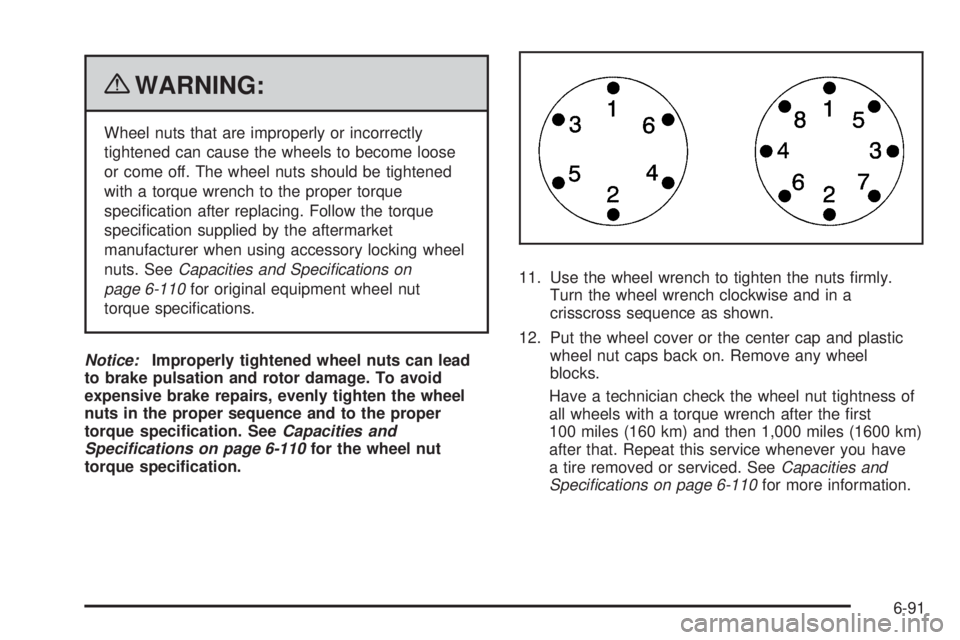
torque specication.11. Use the wheel wrench to tighten the nuts firmly.
Turn the wheel wrench clockwise and in a
crisscross sequence as shown.
12. Put the wheel cover or the center cap and plastic
wheel nut caps back on. Remove any wheel
blocks.
Have a technician check the wheel nut tightness of
all wheels with a torque wrench after the first
100 miles (160 km) and then 1,000 miles (1600 km)
after that. Repeat this service whenever you have
a tire removed or serviced. SeeCapacities and
Specications on page 6-110for more information.
6-91


