Page 102 of 424
Adding Equipment to Your
Airbag-Equipped Vehicle
Q:Is there anything I might add to or change
about the vehicle that could keep the airbags
from working properly?
A:Yes. If you add things that change the vehicle’s
frame, bumper system, height, front end or side
sheet metal, they may keep the airbag system from
working properly. Changing or moving any parts
of the front seats, safety belts, the airbag sensing
and diagnostic module, steering wheel, instrument
panel, roof-rail airbag modules, ceiling headliner
or pillar garnish trim, front sensors, or airbag wiring
can affect the operation of the airbag system.
In addition, the vehicle may have a passenger
sensing system for the right front passenger
position, which includes sensors that are part of the
passenger seat. The passenger sensing system
may not operate properly if the original seat trim is
replaced with non-GM covers, upholstery or
trim, or with GM covers, upholstery or trim designed
for a different vehicle. Any object, such as an
aftermarket seat heater or a comfort enhancing pad
or device, installed under or on top of the seat
fabric, could also interfere with the operation of thepassenger sensing system. This could either
prevent proper deployment of the passenger
airbag(s) or prevent the passenger sensing system
from properly turning off the passenger airbag(s).
SeePassenger Sensing System on page 2-72.
If you have any questions about this, you should
contact Customer Assistance before you modify the
vehicle. The phone numbers and addresses for
Customer Assistance are in Step Two of the
Customer Satisfaction Procedure in this manual.
SeeCustomer Satisfaction Procedure on page 8-2.
If the vehicle has rollover roof-rail airbags, see
Different Size Tires and Wheels on page 6-74for
additional important information.
Q:Because I have a disability, I have to get my
vehicle modied. How can I nd out whether
this will affect my airbag system?
A:If you have questions, call Customer Assistance.
The phone numbers and addresses for Customer
Assistance are in Step Two of the Customer
Satisfaction Procedure in this manual. See
Customer Satisfaction Procedure on page 8-2.
In addition, your dealer/retailer and the service manual
have information about the location of the airbag sensors,
sensing and diagnostic module and airbag wiring.
2-78
Page 157 of 424

Headlamps on Reminder
If a door is open, a reminder chime sounds when the
headlamps or parking lamps are manually turned on and
the key is out of the ignition. To turn off the chime,
turn the headlamp switch to off or auto and then back
on, or close and re-open the door. In the auto mode, the
headlamps turn off once the ignition is in LOCK/OFF
or may remain on until the headlamp delay ends,
if enabled in the Driver Information Center (DIC).
See “Exit Lighting” underDIC Vehicle Customization
on page 4-52.
Daytime Running Lamps (DRL)
Daytime Running Lamps (DRL) can make it easier for
others to see the front of your vehicle during the
day. Fully functional daytime running lamps are required
on all vehicles first sold in Canada.
The DRL system comes on in daylight when the
following conditions are met:
•The ignition is on.
•The exterior lamps control is in the AUTO position.
•The shift lever is not in P (Park).
•The light sensor determines it is daytime.When the DRL are on, the taillamps, sidemarker,
instrument panel and other lamps will not be on.
The automatic headlamp system automatically switches
from DRL to the headlamps depending on the
darkness of the surroundings.
To turn off the DRL, turn the exterior lamp control to the
off position and then release it. For vehicles first sold
in Canada, the transmission must be in the P (Park)
position, before the DRL can be turned off.
Automatic Headlamp System
When it is dark enough outside and the headlamp
switch is in AUTO, the automatic headlamp system turns
on the headlamps, along with the taillamps, sidemarker,
parking lamps, roof marker lamps, and the instrument
panel lights. The radio lights will also be dim.
To turn off the automatic headlamp system, turn the
exterior lamps switch to the off position and then
release. For vehicles first sold in Canada, the
transmission must be in the P (Park) position, before
the automatic headlamp system can be turned off.
The vehicle has a light sensor located on the top of the
instrument panel. Do not cover the sensor or the
system will come on whenever the ignition is on.
The system may also turn on the headlamps when
driving through a parking garage or tunnel.
4-11
Page 190 of 424
Compass Calibration
The compass can be manually calibrated. Only calibrate
the compass in a magnetically clean and safe location,
such as an open parking lot, where driving the vehicle in
circles is not a danger. It is suggested to calibrate
away from tall buildings, utility wires, manhole covers, or
other industrial structures, if possible.
If CAL should ever appear in the DIC display, the
compass should be calibrated.
If the DIC display does not show a heading, for example,
N for North, or the heading does not change after
making turns, there may be a strong magnetic field
interfering with the compass. Such interference may be
caused by a magnetic CB or cell phone antenna
mount, a magnetic emergency light, magnetic note pad
holder, or any other magnetic item. Turn off the
vehicle, move the magnetic item, then turn on the
vehicle and calibrate the compass.
To calibrate the compass, use the following procedure:
Compass Calibration Procedure
1. Before calibrating the compass, make sure the
compass zone is set to the variance zone in
which the vehicle is located. See “Compass
Variance (Zone) Procedure” earlier in this section.
Do not operate any switches such as window,
sunroof, climate controls, seats, etc. during
the calibration procedure.2. Press the vehicle information button until PRESS
V
TO CALIBRATE COMPASS displays.
3. Press the set/reset button to start the compass
calibration.
4. The DIC will display CALIBRATING: DRIVE IN
CIRCLES. Drive the vehicle in tight circles at
less than 5 mph (8 km/h) to complete the calibration.
The DIC will display CALIBRATION COMPLETE
for a few seconds when the calibration is complete.
The DIC display will then return to PRESS
VTO
CALIBRATE COMPASS.
DIC Warnings and Messages
Messages are displayed on the DIC to notify the driver
that the status of the vehicle has changed and that
some action may be needed by the driver to correct the
condition. Multiple messages may appear one after
another.
Some messages may not require immediate action, but
you can press any of the DIC buttons on the instrument
panel to acknowledge that you received the messages
and to clear them from the display.
4-44
Page 314 of 424
4. Turn the bulb clockwise one quarter turn to install it
in the socket.
5. Reinstall the CHMSL assembly and two screws.
Do not block or damage the CHMSL when items
are loaded on the roof of the vehicle.
Taillamps
To replace one of these bulbs:
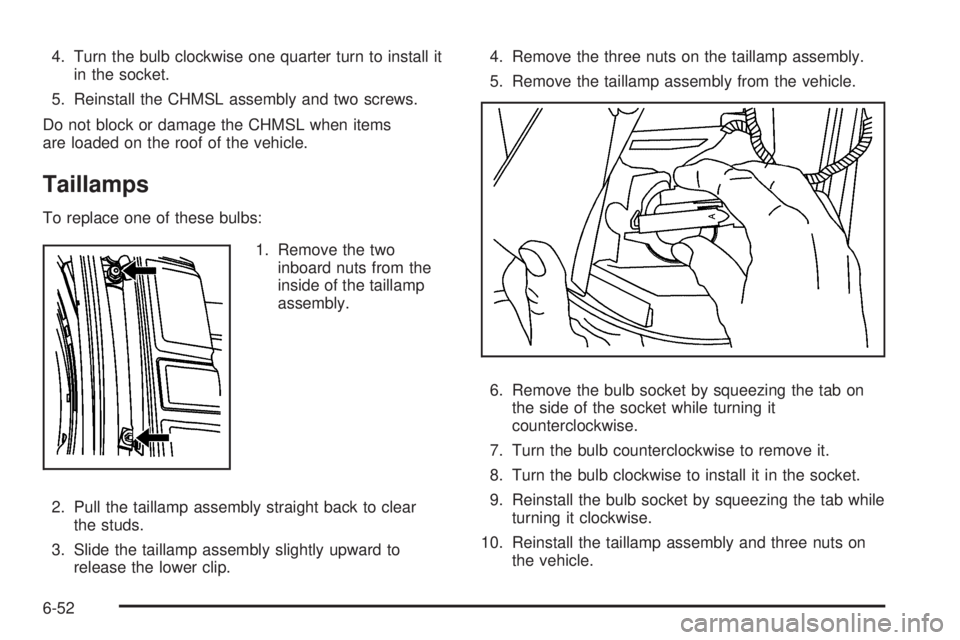
1. Remove the two
inboard nuts from the
inside of the taillamp
assembly.
2. Pull the taillamp assembly straight back to clear
the studs.
3. Slide the taillamp assembly slightly upward to
release the lower clip.4. Remove the three nuts on the taillamp assembly.
5. Remove the taillamp assembly from the vehicle.
6. Remove the bulb socket by squeezing the tab on
the side of the socket while turning it
counterclockwise.
7. Turn the bulb counterclockwise to remove it.
8. Turn the bulb clockwise to install it in the socket.
9. Reinstall the bulb socket by squeezing the tab while
turning it clockwise.
10. Reinstall the taillamp assembly and three nuts on
the vehicle.
6-52