2010 GMC ACADIA POWER OUTLETS
[x] Cancel search: POWER OUTLETSPage 181 of 444

Lighting 6-7
Parade Dimming
This feature automatically prohibits
the dimming of the instrument panel
displays in daylight while the
headlamps are on so that the
displays are still able to be seen.
Battery Load
Management
The vehicle has Electric Power
Management (EPM) that estimates
the battery's temperature and state
of charge. It then adjusts the voltage
for best performance and extended
life of the battery.
When the battery's state of charge
is low, the voltage is raised slightly
to quickly bring the charge back up.
When the state of charge is high,
the voltage is lowered slightly to
prevent overcharging. If the vehicle
has a voltmeter gage or a voltage
display on the Driver Information
Center (DIC), you may see thevoltage move up or down. This is
normal. If there is a problem, an
alert will be displayed.
The battery can be discharged at
idle if the electrical loads are very
high. This is true for all vehicles.
This is because the generator
(alternator) may not be spinning fast
enough at idle to produce all the
power that is needed for very high
electrical loads.
A high electrical load occurs when
several of the following are on, such
as: headlamps, high beams, fog
lamps, rear window defogger,
climate control fan at high speed,
heated seats, engine cooling fans,
trailer loads, and loads plugged into
accessory power outlets.
EPM works to prevent excessive
discharge of the battery. It does this
by balancing the generator's output
and the vehicle's electrical needs.
It can increase engine idle speed to
generate more power, wheneverneeded. It can temporarily reduce
the power demands of some
accessories.
Normally, these actions occur in
steps or levels, without being
noticeable. In rare cases at the
highest levels of corrective action,
this action may be noticeable to the
driver. If so, a Driver Information
Center (DIC) message might be
displayed, such as BATTERY
SAVER ACTIVE, BATTERY
VOLTAGE LOW, or LOW BATTERY.
If one of these messages displays, it
is recommended that the driver
reduce the electrical loads as much
as possible. See
Driver Information
Center (DIC) (With DIC Buttons)
on
page 5‑23or Driver Information
Center (DIC) (Without DIC Buttons)
on page 5‑28.
Page 242 of 444

8-4 Climate Controls
Dual Automatic Climate Control System
The heating, cooling, and ventilation in the vehicle can be controlled with
this system.
A. Fan Control
B. AUTO
C. Defrost
D. Recirculation
E. REAR (Rear Climate Control)
F. Air Delivery Mode Control
G. Driver Side Temperature Control
H. DisplayI. Power (On/Off)
J. Rear Window Defogger
K. Air Conditioning
L. PASS (Passenger)
M. Passenger Side Temperature
Control Display Function
Each time the temperature, mode,
or fan control buttons are pressed,
the climate control display shows
that function along with the inside
temperature setting. The outside
temperature is displayed on the
instrument panel cluster.
O(On/Off):
Press to turn the
climate control system on or off.
While the system is off, outside air
still enters through the floor outlets,
but the air delivery mode can be
adjusted.
The climate control system will also
turn on if either the fan control,
defrost, AUTO, or air conditioning
buttons are pressed.
Page 266 of 444

9-16 Driving and Operating
Ignition Positions
The ignition switch has four different
positions.
In order to shift out of P (Park), the
ignition must be in ON/RUN or ACC/
ACCESSORY and the brake pedal
must be applied.Notice:
Using a tool to force the
key to turn in the ignition could
cause damage to the switch or
break the key. Use the correct
key, make sure it is all the way in,
and turn it only with your hand.
If the key cannot be turned by
hand, see your dealer/retailer.
((LOCK/OFF): This position locks
the ignition and transmission. The
key can be removed in LOCK/OFF.
The shift lever must be in P (Park)
to turn the ignition switch to
LOCK/OFF.
The steering can bind with the
wheels turned off center. If this
happens, move the steering wheel
from right to left while turning the
key to ACC/ACCESSORY. If this
doesn't work, then the vehicle needs
service.
ACC (ACC/ACCESSORY): This is
the position in which you can
operate the electrical accessories or items plugged into the accessory
power outlets. This position unlocks
the ignition and steering wheel. Use
this position if the vehicle must be
pushed or towed.
R(ON/RUN):
This position can be
used to operate the electrical
accessories and to display some
instrument panel warning and
indicator lights. The switch stays in
this position when the engine is
running. The transmission is also
unlocked in this position. If you
leave the key in the ACC/
ACCESSORY or ON/RUN position
with the engine off, the battery could
be drained. You may not be able to
start the vehicle if the battery is
allowed to drain for an extended
period of time.
/(START): This is the position
that starts the engine. When the
engine starts, release the key. The
ignition switch will return to ON/RUN
for driving.
Page 367 of 444

Vehicle Care 10-61
2. Unwrap the sealant/air hose (F)and the power plug (H).
3. Place the kit on the ground. Make sure the tire valve stem is
positioned close to the ground
so the hose will reach it.
4. Remove the valve stem cap from the flat tire by turning it
counterclockwise.
5. Attach the sealant/air hose (F) onto the tire valve stem. Turn it
clockwise until it is tight.
6. Plug the power plug (H) into the accessory power outlet in the
vehicle. Unplug all items from
other accessory power outlets.
See Power Outlets
on
page 5‑8.
If the vehicle has an accessory
power outlet, do not use the
cigarette lighter.
If the vehicle only has a cigarette
lighter, use the cigarette lighter.
Do not pinch the power plug
cord in the door or window. 7. Start the vehicle. The vehicle
must be running while using the
air compressor.
8. Turn the selector switch (A) counterclockwise to the
Sealant + Air position.
9. Press the on/off (B) button to turn the tire sealant and
compressor kit on.
The compressor will inject
sealant and air into the tire.
The pressure gage (C) will
initially show a high pressure
while the compressor pushes the
sealant into the tire. Once the
sealant is completely dispersed
into the tire, the pressure will
quickly drop and start to rise
again as the tire inflates with
air only.
10. Inflate the tire to the recommended inflation
pressure using the pressure
gage (C). The recommended
inflation pressure can be found on the Tire and Loading
Information label. See
Tire
Pressure on page 10‑43.
The pressure gage (C) may
read higher than the actual tire
pressure while the compressor
is on. Turn the compressor off
to get an accurate pressure
reading. The compressor may
be turned on/off until the
correct pressure is reached.
Notice: If the recommended
pressure cannot be reached after
approximately 25 minutes, the
vehicle should not be driven
farther. The tire is too severely
damaged and the tire sealant and
compressor kit cannot inflate the
tire. Remove the power plug from
the accessory power outlet and
unscrew the inflating hose from
the tire valve. See Roadside
Assistance Program on
page 13‑5.
Page 370 of 444

10-64 Vehicle Care
4. Remove the tire valve stem capfrom the flat tire by turning it
counterclockwise.
5. Attach the air only hose (G) onto the tire valve stem by turning it
clockwise until it is tight.
6. Plug the power plug (H) into the accessory power outlet in the
vehicle. Unplug all items from
other accessory power outlets.
See Power Outlets
on
page 5‑8.
If the vehicle has an accessory
power outlet, do not use the
cigarette lighter.
If the vehicle only has a cigarette
lighter, use the cigarette lighter.
Do not pinch the power plug
cord in the door or window.
7. Start the vehicle. The vehicle must be running while using the
air compressor.
8. Turn the selector switch (A) clockwise to the Air Only
position. 9. Press the on/off (B) button to
turn the compressor on.
The compressor will inflate the
tire with air only.
10. Inflate the tire to the recommended inflation
pressure using the pressure
gage (C). The recommended
inflation pressure can be found
on the Tire and Loading
Information label. See Tire
Pressure on page 10‑43.
The pressure gage (C) may
read higher than the actual tire
pressure while the compressor
is on. Turn the compressor off
to get an accurate reading. The
compressor may be turned on/
off until the correct pressure is
reached.
If you inflate the tire higher
than the recommended
pressure you can adjust the
excess pressure by pressing
the pressure deflation
button (D), if equipped, until the
proper pressure reading is reached. This option is only
functional when using the air
only hose (G).
11. Press the on/off button (B) to turn the tire sealant and
compressor kit off.
Be careful while handling the
tire sealant and compressor kit
as it could be warm after
usage.
12. Unplug the power plug (H) from the accessory power outlet in
the vehicle.
13. Disconnect the air only hose (G) from the tire
valve stem, by turning it
counterclockwise, and replace
the tire valve stem cap.
14. Replace the air only hose (G) and the power plug (H) and
cord back in its original
location.
15. Place the equipment in the original storage location in the
vehicle.
Page 384 of 444

10-78 Vehicle Care
Jump Starting
If the vehicle's battery has run
down, you may want to use another
vehicle and some jumper cables to
start your vehicle. Be sure to use
the following steps to do it safely.
{WARNING
Batteries can hurt you. They can
be dangerous because:
.They contain acid that can
burn you.
.They contain gas that can
explode or ignite.
.They contain enough
electricity to burn you.
If you do not follow these steps
exactly, some or all of these
things can hurt you.
Notice: Ignoring these steps
could result in costly damage to
the vehicle that would not be
covered by the warranty. Trying to start the vehicle by
pushing or pulling it will not
work, and it could damage the
vehicle.
1. Check the other vehicle. It must
have a 12-volt battery with a
negative ground system.
Notice: If the other vehicle's
system is not a 12-volt system
with a negative ground, both
vehicles can be damaged. Only
use vehicles with 12-volt systems
with negative grounds to jump
start your vehicle.
2. Get the vehicles close enough
so the jumper cables can reach,
but be sure the vehicles are not
touching each other. If they are,
it could cause a ground
connection you do not want. You
would not be able to start your
vehicle, and the bad grounding
could damage the electrical
systems.
To avoid the possibility of the
vehicles rolling, set the parking
brake firmly on both vehicles involved in the jump start
procedure. Put an automatic
transmission in P (Park) or a
manual transmission in Neutral
before setting the parking brake.
If one of the vehicles is a
four-wheel-drive vehicle, be sure
the transfer case is not in
Neutral.
Notice: If you leave the radio or
other accessories on during the
jump starting procedure, they
could be damaged. The repairs
would not be covered by the
warranty. Always turn off the
radio and other accessories when
jump starting the vehicle.
3. Turn off the ignition on both vehicles. Unplug unnecessary
accessories plugged into the
cigarette lighter or the accessory
power outlets. Turn off the radio
and all lamps that are not
needed. This will avoid sparks
and help save both batteries.
And it could save the radio!
Page 439 of 444
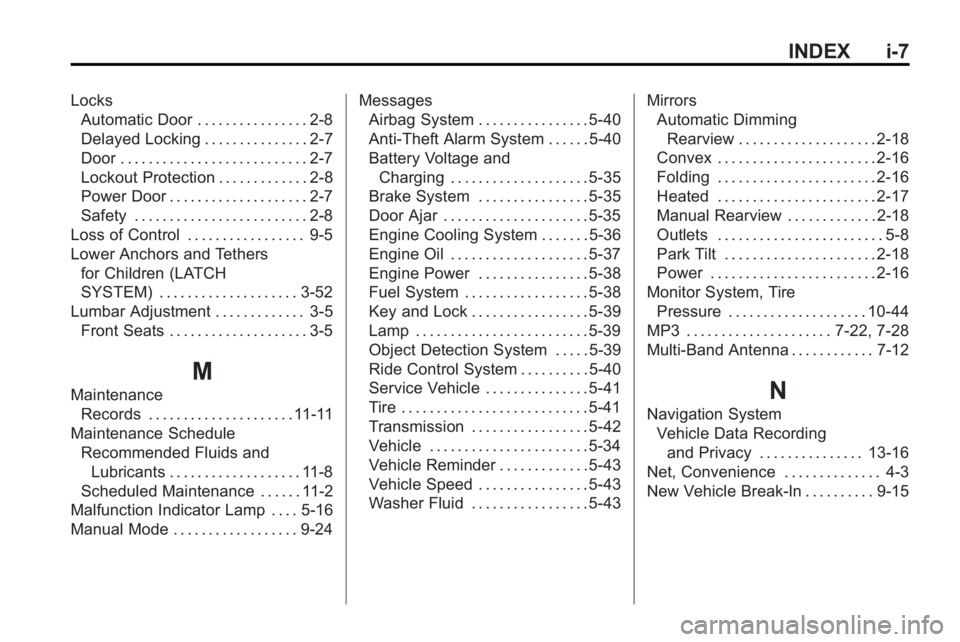
INDEX i-7
LocksAutomatic Door . . . . . . . . . . . . . . . . 2-8
Delayed Locking . . . . . . . . . . . . . . . 2-7
Door . . . . . . . . . . . . . . . . . . . . . . . . . . . 2-7
Lockout Protection . . . . . . . . . . . . . 2-8
Power Door . . . . . . . . . . . . . . . . . . . . 2-7
Safety . . . . . . . . . . . . . . . . . . . . . . . . . 2-8
Loss of Control . . . . . . . . . . . . . . . . . 9-5
Lower Anchors and Tethers for Children (LATCH
SYSTEM) . . . . . . . . . . . . . . . . . . . . 3-52
Lumbar Adjustment . . . . . . . . . . . . . 3-5 Front Seats . . . . . . . . . . . . . . . . . . . . 3-5
M
MaintenanceRecords . . . . . . . . . . . . . . . . . . . . . 11-11
Maintenance Schedule
Recommended Fluids andLubricants . . . . . . . . . . . . . . . . . . . 11-8
Scheduled Maintenance . . . . . . 11-2
Malfunction Indicator Lamp . . . . 5-16
Manual Mode . . . . . . . . . . . . . . . . . . 9-24 Messages
Airbag System . . . . . . . . . . . . . . . . 5-40
Anti-Theft Alarm System . . . . . . 5-40
Battery Voltage and
Charging . . . . . . . . . . . . . . . . . . . . 5-35
Brake System . . . . . . . . . . . . . . . . 5-35
Door Ajar . . . . . . . . . . . . . . . . . . . . . 5-35
Engine Cooling System . . . . . . . 5-36
Engine Oil . . . . . . . . . . . . . . . . . . . . 5-37
Engine Power . . . . . . . . . . . . . . . . 5-38
Fuel System . . . . . . . . . . . . . . . . . . 5-38
Key and Lock . . . . . . . . . . . . . . . . . 5-39
Lamp . . . . . . . . . . . . . . . . . . . . . . . . . 5-39
Object Detection System . . . . . 5-39
Ride Control System . . . . . . . . . . 5-40
Service Vehicle . . . . . . . . . . . . . . . 5-41
Tire . . . . . . . . . . . . . . . . . . . . . . . . . . . 5-41
Transmission . . . . . . . . . . . . . . . . . 5-42
Vehicle . . . . . . . . . . . . . . . . . . . . . . . 5-34
Vehicle Reminder . . . . . . . . . . . . . 5-43
Vehicle Speed . . . . . . . . . . . . . . . . 5-43
Washer Fluid . . . . . . . . . . . . . . . . . 5-43 Mirrors
Automatic Dimming
Rearview . . . . . . . . . . . . . . . . . . . . 2-18
Convex . . . . . . . . . . . . . . . . . . . . . . . 2-16
Folding . . . . . . . . . . . . . . . . . . . . . . . 2-16
Heated . . . . . . . . . . . . . . . . . . . . . . . 2-17
Manual Rearview . . . . . . . . . . . . . 2-18
Outlets . . . . . . . . . . . . . . . . . . . . . . . . 5-8
Park Tilt . . . . . . . . . . . . . . . . . . . . . . 2-18
Power . . . . . . . . . . . . . . . . . . . . . . . . 2-16
Monitor System, Tire
Pressure . . . . . . . . . . . . . . . . . . . . 10-44
MP3 . . . . . . . . . . . . . . . . . . . . . 7-22, 7-28
Multi-Band Antenna . . . . . . . . . . . . 7-12N
Navigation System Vehicle Data Recording
and Privacy . . . . . . . . . . . . . . . 13-16
Net, Convenience . . . . . . . . . . . . . . 4-3
New Vehicle Break-In . . . . . . . . . . 9-15
Page 440 of 444

i-8 INDEX
O
Object Detection SystemMessages . . . . . . . . . . . . . . . . . . . . 5-39
Odometer . . . . . . . . . . . . . . . . . . . . . . 5-12
Off-Road Recovery . . . . . . . . . . . . . . . . . . . . . . 9-5
Oil
Engine . . . . . . . . . . . . . . . . . . . . . . . . 10-8
Engine Oil Life System . . . . . 10-10
Messages . . . . . . . . . . . . . . . . . . . . 5-37
Pressure Light . . . . . . . . . . . . . . . . 5-21
Older Children, Restraints . . . . . 3-45
Online Owner Center . . . . . . . . . . 13-4
Operation, Infotainment System . . . . . . . . . . . . . . . . . . . . . . . . 7-2
Outlets
Power . . . . . . . . . . . . . . . . . . . . . . . . . 5-8
Overheated Engine Protection
Operating Mode . . . . . . . . . . . . . 10-21
Overheating, Engine . . . . . . . . . . 10-19
P
Parade Dimming . . . . . . . . . . . . . . . . 6-7
Park Shifting Into . . . . . . . . . . . . . . . . . . . 9-19
Shifting Out of . . . . . . . . . . . . . . . . 9-20
Park Tilt Mirrors . . . . . . . . . . . . . . . . 2-18
Parking Assist, Ultrasonic . . . . . . . . . . . . . 9-32
Brake . . . . . . . . . . . . . . . . . . . . . . . . . 9-27
Brake and P (Park)Mechanism Check . . . . . . . . 10-27
Over Things That Burn . . . . . . . 9-21
Passenger Airbag Status Indicator . . . . . . . . . . . . . . . . . . . . . 5-15
Passenger Sensing System . . . 3-38
Perchlorate Materials Requirements, California . . . . . 10-3
Phone Bluetooth . . . . . . . . . . . . . . . . . . . . . 7-46
Power
Door Locks . . . . . . . . . . . . . . . . . . . . 2-7
Mirrors . . . . . . . . . . . . . . . . . . . . . . . . 2-16
Protection, Battery . . . . . . . . . . . . . 6-8
Retained Accessory (RAP) . . . 9-17 Power (cont.)
Seat Adjustment . . . . . . . . . . . . . . . 3-3
Steering Fluid . . . . . . . . . . . . . . . 10-21
Windows . . . . . . . . . . . . . . . . . . . . . 2-20
Pregnancy, Using Safety Belts . . . . . . . . . . . . . . . . . . . . . . . . . 3-28
Privacy Radio FrequencyIdentification (RFID) . . . . . . . 13-16
Program Courtesy Transportation . . . . . . 13-8
Proposition 65 Warning, California . . . . . . . . . . . . . . . . . . . . . 10-3
R
Radio FrequencyIdentification (RFID) . . . . . . . . 13-16
Statement . . . . . . . . . . . . . . . . . . 13-16
Radios AM-FM Radio . . . . . . . . . . . . . . . . . . 7-6
CD/DVD Player . . . . . . . . . . . . . . . 7-14
Reception . . . . . . . . . . . . . . . . . . . . 7-11
Satellite . . . . . . . . . . . . . . . . . . . . . . . . 7-8
Reading Lamps . . . . . . . . . . . . . . . . . 6-5