Page 11 of 258
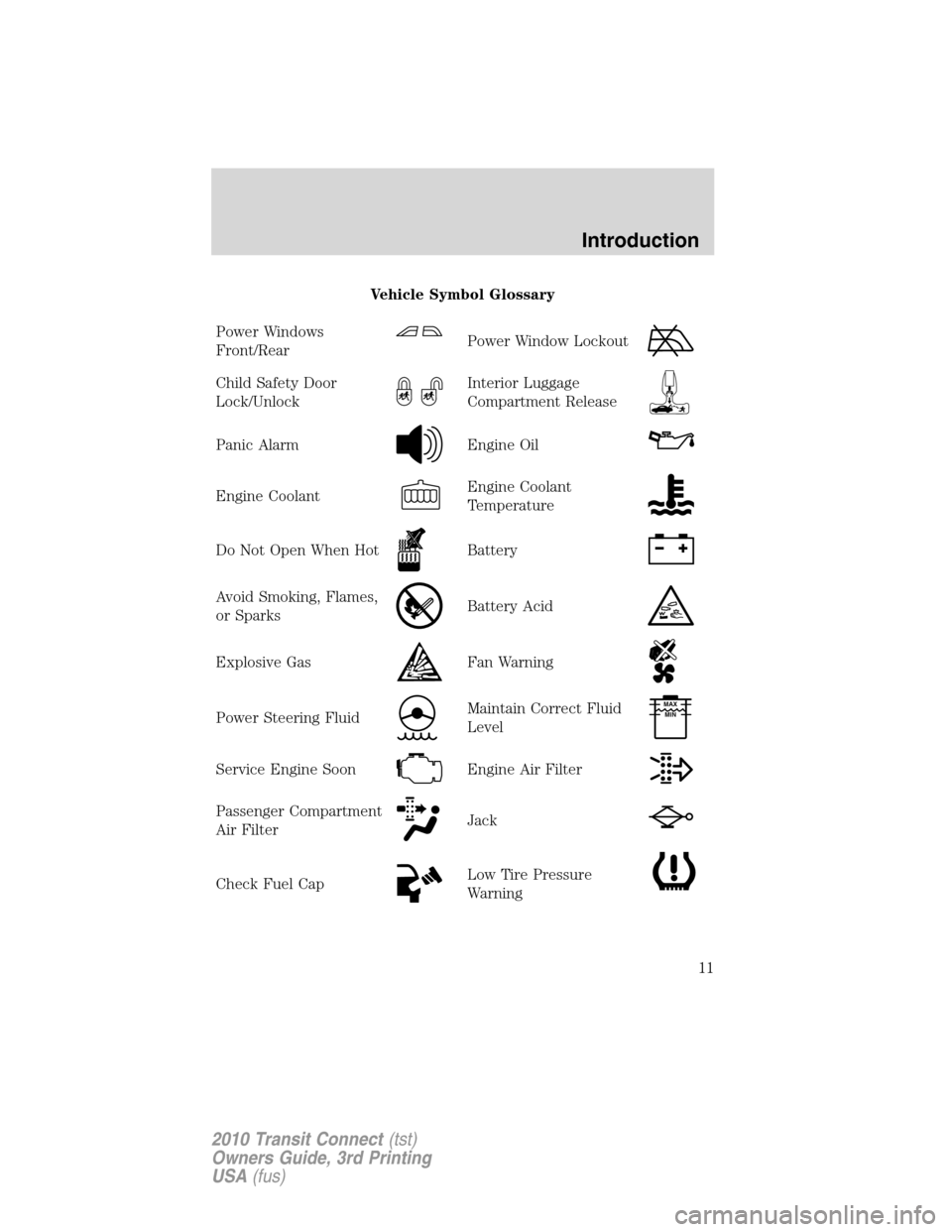
Vehicle Symbol Glossary
Power Windows
Front/Rear
Power Window Lockout
Child Safety Door
Lock/UnlockInterior Luggage
Compartment Release
Panic AlarmEngine Oil
Engine CoolantEngine Coolant
Temperature
Do Not Open When HotBattery
Avoid Smoking, Flames,
or SparksBattery Acid
Explosive GasFan Warning
Power Steering FluidMaintain Correct Fluid
LevelMAX
MIN
Service Engine SoonEngine Air Filter
Passenger Compartment
Air FilterJack
Check Fuel CapLow Tire Pressure
Warning
Introduction
11
2010 Transit Connect(tst)
Owners Guide, 3rd Printing
USA(fus)
Page 43 of 258

Approach lamps (if equipped)
The approach lamps will turn on and off automatically when you open
and close the doors. If you unlock the doors with the remote control,
they will come on. They will go off automatically after a short time.
BULB REPLACEMENT
Lamp assembly condensation
Exterior lamps are vented to accommodate normal changes in pressure.
Condensation can be a natural by-product of this design. When moist air
enters the lamp assembly through the vents, there is a possibility that
condensation can occur when the temperature is cold. When normal
condensation occurs, a thin film of mist can form on the interior of the
lens. The thin mist eventually clears and exits through the vents during
normal operation. Clearing time may take as long as 48 hours under dry
weather conditions.
Examples of acceptable condensation are:
•Presence of thin mist (no streaks, drip marks or droplets)
•Fine mist covers less than 50% of the lens
Examples of unacceptable moisture (usually caused by a lamp water
leak) are:
•Water puddle inside the lamp
•Large water droplets, drip marks or streaks present on the interior of
the lens
Take your vehicle to dealer for service if any of the above conditions of
unacceptable moisture are present.
Using the right bulbs
Replacement bulbs are specified in the chart below. Headlamp bulbs
must be marked with an authorized “D.O.T.” for North America to ensure
lamp performance, light brightness and pattern and safe visibility. The
correct bulbs will not damage the lamp assembly or void the lamp
assembly warranty and will provide quality bulb burn time.
Lights
43
2010 Transit Connect(tst)
Owners Guide, 3rd Printing
USA(fus)
Page 48 of 258
Replacing tail/brake/backup lamps and turn signal bulbs
1. Make sure the headlamp control
is in the off position and then open
the cargo door.
2. Remove the two wing nuts and
gently pull the lamp assembly away
from the vehicle.
3. Remove the bulb socket from the
lamp assembly by turning it
counterclockwise.
Lights
48
2010 Transit Connect(tst)
Owners Guide, 3rd Printing
USA(fus)
Page 49 of 258
4. Pull the bulb straight out of the
socket.
Install in reverse order.
Replacing front and rear side marker bulbs
1. Make sure the headlamp control
is in the off position and then open
the cargo door.
2. Remove the side marker by gently
prying the lamp assembly away from
the vehicle.
3. Remove the bulb socket from the
lamp assembly by turning it
counterclockwise.
4. Pull the bulb straight out of the
socket.
Install in reverse order.
Lights
49
2010 Transit Connect(tst)
Owners Guide, 3rd Printing
USA(fus)
Page 62 of 258

KEYS
The key operates all locks on your vehicle. You should always carry a
second key with you in a safe place in case you require it in an
emergency.
If your vehicle is equipped with the SecuriLock�Passive Anti-theft
system, your keys are electronically coded to your vehicle; using a
non-coded key will not permit your vehicle to start. If you lose your
dealer supplied keys, replacement keys are available through your
authorized dealer.
Central unlocking/locking
•To unlock the front and sliding doors, turn the key towards the front
of the vehicle.
•To lock all doors, turn the key towards the rear of the vehicle.
Note:Your vehicle can be configured to unlock only the front doors, see
your authorized dealer for more details.
CHILDPROOF DOOR LOCKS
•When these locks are set, the
sliding doors cannot be opened
from the inside.
•The sliding doors can be opened
from the outside when the doors
are unlocked.
The childproof locks are located on
rear edge of each sliding door and
must be set separately for each
door. Setting the lock for one door
will not automatically set the lock
for both doors.
•Insert the key and turn to the
lock position to engage the
childproof locks.
•Insert the key and turn to the
unlock position to disengage the
childproof locks.
Locks and Security
62
2010 Transit Connect(tst)
Owners Guide, 3rd Printing
USA(fus)
Page 63 of 258
OPENING THE SLIDING DOOR
Note: the right-hand sliding door is inhibited from opening fully
when the fuel filler flap is unlocked and open.
REMOTE ENTRY SYSTEM (IF EQUIPPED)
This device complies with part 15 of the FCC rules and with RSS-210 of
Industry Canada. Operation is subject to the following two conditions:
(1) This device may not cause harmful interference, and (2) This device
must accept any interference received, including interference that may
cause undesired operation.
Remote entry receiver certification numbersCountry Part Label/Type Approval Canada SIEMENSVDO 5WK4 7899
IC: 267T - 5WK47899
USA SIEMENSVDO 5WK4 7899
FCC ID: KR55WK47899
Changes or modifications not expressly approved by the party
responsible for compliance could void the user’s authority to
operate the equipment.
The typical operating range for your remote entry transmitter is
approximately 33 feet (10 meters). A decrease in operating range could
be caused by:
• weather conditions,
• nearby radio towers,
• structures around the vehicle, or
• other vehicles parked next to
your vehicle.
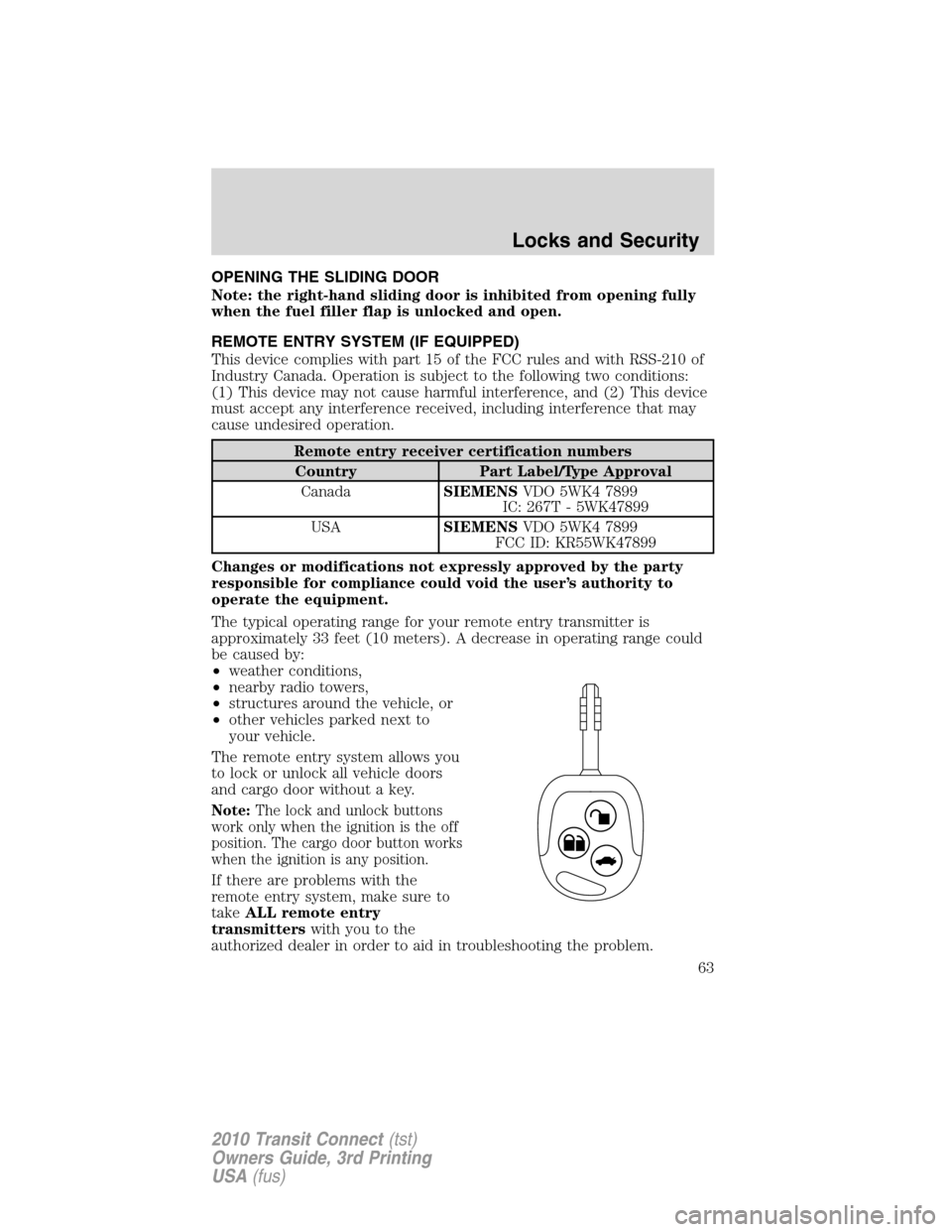
The remote entry system allows you
to lock or unlock all vehicle doors
and cargo door without a key.
Note: The lock and unlock buttons
work only when the ignition is the off
position. The cargo door button works
when the ignition is any position.
If there are problems with the
remote entry system, make sure to
take ALL remote entry
transmitters with you to the
authorized dealer in order to aid in troubleshooting the problem.
Locks and Security
63
2010 Transit Connect (tst)
Owners Guide, 3rd Printing
USA (fus)
Page 64 of 258

Two-step door unlocking
•Press
and release to unlock the front and sliding doors.
•Within three seconds, press
and release again to unlock all the
doors.
Note:The interior lamps will illuminate if the control on the overhead
lamp isnotset to theoffposition.
One-step door unlocking
If the one step door unlocking feature is activated, press
and release
once to unlock all the doors.Note:The interior lamps will illuminate
(refer to theIlluminated entryfeature later in this section), if the
control on the overhead lamp isnotset to theoffposition.
Switching from two step to one step door unlocking
Your vehicle comes with two step unlocking enabled. With the vehicle
locked, unlocking can be switched between two step and one step door
unlocking by pressing and holding both the
andbuttons
simultaneously on the remote entry transmitter for approximately four
seconds and release. The turn signal lamps will flash twice to indicate
that the vehicle has switched to one step unlocking. Repeat the
procedure to switch back to two-step unlocking.
Unlocking cargo doors
•Press
to unlock the cargo doors.
•Within three seconds, press
again to unlock all the vehicle
doors.
Ensure that the cargo doors are closed and latched before driving your
vehicle. Failure to properly latch the cargo doors may cause objects to
fall out.
Locking the doors
•Pressand release to lock all the doors. If all doors are closed the
turn signal lamps will flash twice.
Replacing the battery
The remote entry transmitter uses one coin type three-volt lithium
battery CR2032 or equivalent.
Locks and Security
64
2010 Transit Connect(tst)
Owners Guide, 3rd Printing
USA(fus)
Page 67 of 258

Illuminated entry
The interior lamps illuminate when the remote entry system is used to
unlock the door(s).
The illuminated entry system will turn off the interior lights if:
•the ignition switch is turned to the on position, or
•the remote transmitter lock control is pressed, or
•after 25 seconds of illumination.
The dome lamp control (if equipped) mustnotbe set to the off position
for the illuminated entry system to operate.
The inside lights will not turn off if:
•they have been turned on with the dome lamp control, or
•any door is open.
SECURILOCK�PASSIVE ANTI-THEFT SYSTEM (IF EQUIPPED)
SecuriLock�passive anti-theft system is an engine immobilization
system. This system is designed to help prevent the engine from being
started unless acoded key programmed to your vehicleis used. The
use of the wrong type of coded key may lead to a “no-start” condition.
Your vehicle comes with two coded keys; additional coded keys may be
purchased from your authorized dealer. The authorized dealer can
program your spare keys to your vehicle or you can program the keys
yourself. Refer toProgramming spare keysfor instructions on how to
program the coded key.
Note:The SecuriLock�passive anti-theft system is not compatible with
non-Ford aftermarket remote start systems. Use of these systems may
result in vehicle starting problems and a loss of security protection.
Note:Large metallic objects, electronic devices that are used to
purchase gasoline or similar items, or a second coded key on the same
key chain may cause vehicle starting issues. You need to prevent these
objects from touching the coded key while starting the engine. These
objects will not cause damage to the coded key, but may cause a
momentary issue if they are too close to the key when starting the
engine. If a problem occurs, turn the ignition off, remove all objects on
the key chain away from the coded key and restart the engine.
Note: Do not leave a duplicate coded key in the vehicle. Always
take your keys and lock all doors when leaving the vehicle.
Locks and Security
67
2010 Transit Connect(tst)
Owners Guide, 3rd Printing
USA(fus)