2010 FORD TAURUS radio
[x] Cancel search: radioPage 238 of 378

vehicle from the on mode. If you would like to start the vehicle and you
are in on mode, you must first switch the vehicle off.
4. Start — press the START/STOP button (for any length of time) while
applying the brake pedal.Note:The indicator light on the start button
will illuminate when the vehicle is in on mode and when the engine is
started.
There may be areas inside your vehicle where the IA key is not detected.
If the message NO KEY DETECTED appears on your message center
when you press the START/STOP button, it may be necessary to move
your IA key to another area within the vehicle. The IA key may not be
detected near the roof (between the driver or passenger sunvisor and
the roof, or in the overhead console area) or in the extreme corners of
the rear package tray, near your audio speakers. It is not recommended
that you stow the IA key in these locations. If you move the IA key to a
location where it has been detected before and you still see the NO KEY
DETECTED message, your IA key’s battery may be low or you may be in
an area with excessive radio frequency interference. If this occurs, you
can use the backup method to start your vehicle (see below).
Backup Method of Starting:Your
IA key uses a radio frequency signal
to communicate with your vehicle
and authorize your vehicle to start
when you press the START/STOP
button and apply the brake pedal. If
excessive radio frequency
interference is present in the area,
or if the battery in your IA key is
low, it may be necessary to start
your car by inserting the IA key in
the backup slot, located in your center console utility compartment.
Insert the IA key into the slot with buttons facing out and with key ring
up. After inserting the IA key into the backup slot, use the START/STOP
button and brake pedal to start your vehicle as usual. The vehicle should
respond normally as long as the IA key is in the backup slot in the
center console utility compartment. Once the vehicle is started, the IA
key can be removed from the backup slot, if desired.
Fast Restart Feature:The Fast Restart feature allows you to re-start
your vehicle within 20 seconds of switching the vehicle off, if a valid IA
key is not present when the vehicle is switched off. When you switch
your vehicle off without a IA key in the passenger compartment or trunk,
the message RESTART NOW OR KEY IS NEEDED will be displayed on
Driving
238
2010 Taurus(500)
Owners Guide(own2002), 1st Printing
USA(fus)
Page 257 of 378
WARNING:To help avoid personal injury, always use caution
when in R (Reverse) and when using the RSS.
WARNING:This system is not designed to prevent contact with
small or moving objects. The system is designed to provide a
warning to assist the driver in detecting large stationary objects to
avoid damaging the vehicle. The system may not detect smaller
objects, particularly those close to the ground.
WARNING:Certain add-on devices such as large trailer hitches,
bike or surfboard racks and any device that may block the
normal detection zone of the RSS system may create false beeps.
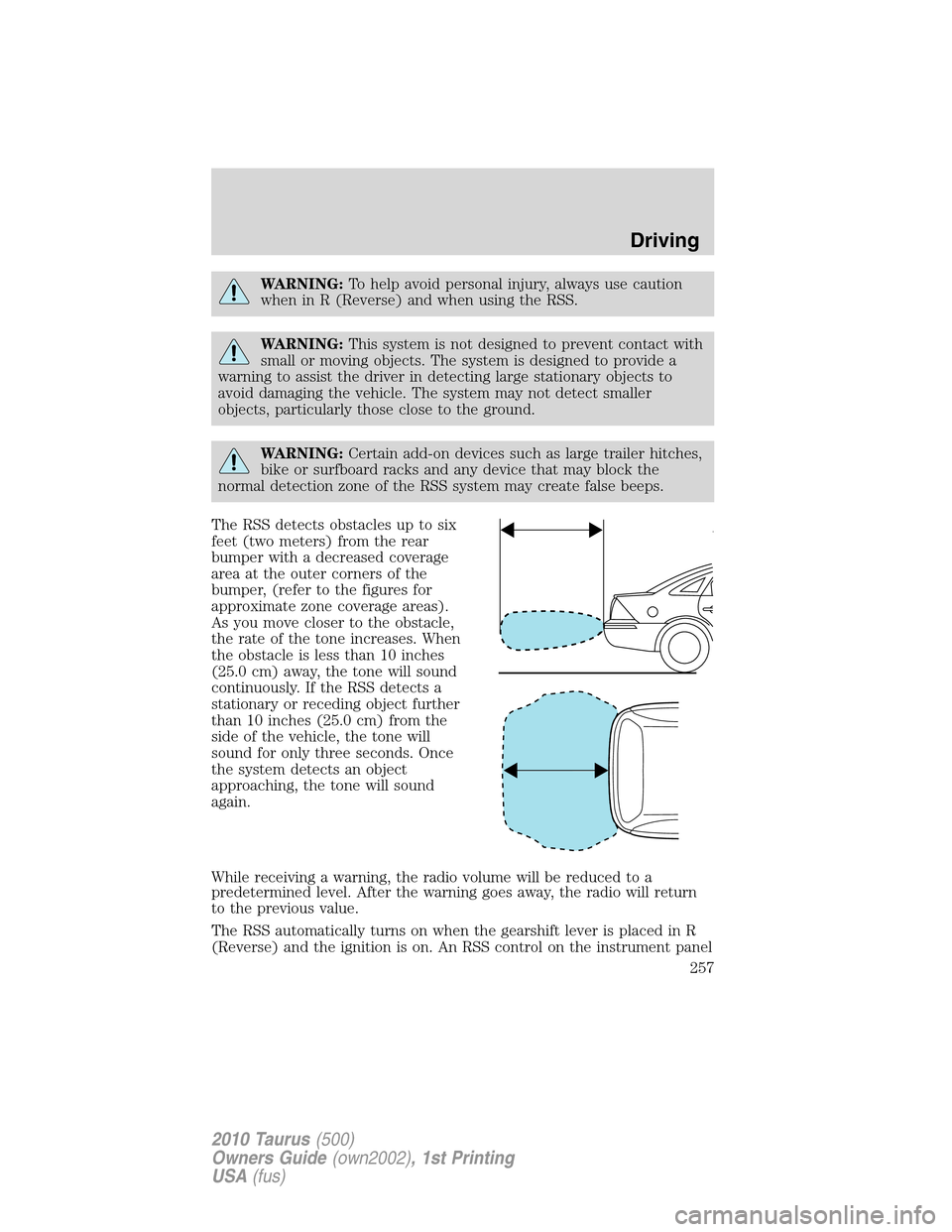
The RSS detects obstacles up to six
feet (two meters) from the rear
bumper with a decreased coverage
area at the outer corners of the
bumper, (refer to the figures for
approximate zone coverage areas).
As you move closer to the obstacle,
the rate of the tone increases. When
the obstacle is less than 10 inches
(25.0 cm) away, the tone will sound
continuously. If the RSS detects a
stationary or receding object further
than 10 inches (25.0 cm) from the
side of the vehicle, the tone will
sound for only three seconds. Once
the system detects an object
approaching, the tone will sound
again.
While receiving a warning, the radio volume will be reduced to a
predetermined level. After the warning goes away, the radio will return
to the previous value.
The RSS automatically turns on when the gearshift lever is placed in R
(Reverse) and the ignition is on. An RSS control on the instrument panel
Driving
257
2010 Taurus(500)
Owners Guide(own2002), 1st Printing
USA(fus)
Page 259 of 378
Image delay if displayed through the rearview mirror:
When shifting out of R (Reverse) and into any other gear, the image in
the rearview mirror will remain on for a few seconds before it shuts off
to assist in parking or trailer hookup.
Image delay if displayed through the Navigation screen:
After shifting out of R (Reverse) and into any gear other than P (Park),
the image in the navigation screen will remain until the vehicle speed
reaches five mph (8 km/h), only if the rear camera delay feature is on, or
until any navigation radio button is pressed.
Note:The default setting for the rear camera delay is off. Press the
“Settings” button found on the navigation screen to set the rear camera
delay feature to on or off. Refer to theNavigation supplementfor more
information.
The camera lens for the camera is located on the trunk. Keep the lens
clean so that the video image remains clear and undistorted. Clean the
lens with a soft, lint-free cloth and non-abrasive cleaner.
Note:If the camera system image is not clear or seems distorted, it may
be covered with water droplets, snow, mud or any other substance. If
this occurs, clean the camera lens before using the reverse camera
system.
WARNING:The camera system is a reverse aid supplement
device that still requires the driver to use it in conjunction with
the rearview mirror and the side mirrors for maximum coverage.
WARNING:Objects that are close to either corner of the
bumper or under the bumper, might not be seen on the screen
due to the limited coverage of the camera system.
WARNING:Backup as slow as possible since higher speeds
might limit your reaction time to stop the vehicle.
WARNING:Do not use the camera system with the trunk open.
If the back end of the vehicle is hit or damaged, then check with your
authorized dealer to have your rear video system checked for proper
coverage and operation.
Driving
259
2010 Taurus(500)
Owners Guide(own2002), 1st Printing
USA(fus)
Page 278 of 378
Canadian customers refer to your Customer Information Guide
for information on:
•coverage period
•exact fuel amounts
•towing of your disabled vehicle
•emergency travel expense reimbursement
•travel planning benefits
In Canada, for uninterrupted Roadside Assistance coverage, you may
purchase extended coverage prior to your Basic Warranty’s Roadside
Assistance expiring. For more information and enrollment, contact
1–877–294–2582 or visit our website at www.ford.ca.
Using roadside assistance
Complete the roadside assistance identification card and place it in your
wallet for quick reference. In the United States, this card is found in the
Owner Guide portfolio in the glove compartment. In Canada, the card is
found in theCustomer Information Guidein the glove compartment.
U.S. Ford, Mercury and Lincoln vehicle customers who require Roadside
Assistance, call 1-800-241-3673.
Canadian customers who require roadside assistance, call
1-800-665-2006.
If you need to arrange roadside assistance for yourself, Ford Motor
Company will reimburse a reasonable amount for towing to the nearest
dealership within 35 miles. To obtain reimbursement information, U.S.
Ford, Mercury and Lincoln vehicle customers call 1-800-241-3673.
Customers will be asked to submit their original receipts.
Canadian customers who need to obtain reimbursement information, call
1–800–665–2006.
HAZARD FLASHER CONTROL
The hazard flasher control is located
on the instrument panel by the
radio. The hazard flashers will
operate when the ignition is in any
position or if the key is not in the
ignition.
Press in the flasher control and all front and rear direction signals will
flash. Press the flasher control again to turn them off. Use it when your
vehicle is disabled and is creating a safety hazard for other motorists.
Roadside Emergencies
278
2010 Taurus(500)
Owners Guide(own2002), 1st Printing
USA(fus)
Page 283 of 378

Fuse/Relay
LocationFuse Amp
RatingProtected Circuits
29 5A Instrument panel cluster, Heads up
display
30 5A Not used (spare)
31 10A Not used (spare)
32 10A Airbag module
33 10A Not used (spare)
34 5A Anti-lock brake system (ABS),
Electronic power steering
35 10A Rear heated seats, AWD, Rear park
assist, Steering angle sensor, Blind
spot information system,
Multi-contour seats
36 5A Passive anti-theft system (PATS)
37 10A Not used (spare)
38 20A Subwoofer, Speaker amplifier
39 20A Radio/navigation
40 20A Not used (spare)
41 15A Delayed accessory feeds
42 10A Not used (spare)
43 10A Rear window defroster, Front wipers,
Automatic high beam controller,
Rainsensor
44 10A Not used (spare)
45 5A Front wiper relay, Blower motor relay
46 7.5A Occupant classification sensor (OCS),
Passenger airbag deactivation
indicator (PADI)
47 30A Circuit
BreakerFront passenger power window, Rear
power windows
48 — Delayed accessory relay
Roadside Emergencies
283
2010 Taurus(500)
Owners Guide(own2002), 1st Printing
USA(fus)
Page 297 of 378

•Operating the temporary mobility kit could cause an electrical
disturbance in radio and DVD player operation.
What to do when a tire is punctured
A tire puncture within the tire’s tread area can be repaired in two stages
with the temporary mobility kit:
•In the first stage, the tire will be reinflated with a sealing compound
and air. After the tire has been reinflated, you will need to drive the
vehicle a short distance (approximately 4 miles [6 km]) to distribute
the sealant in the tire.
•In the second stage, you will need to check the tire pressure and
adjust, if necessary, to the vehicle’s tire inflation pressure.
First stage: Reinflating the tire with sealing compound and air
Preparation
Park the vehicle in a safe, level and secure area, away from moving
traffic. Turn the hazard lights on. Apply the parking brake and turn the
engine off. Inspect the flat tire for visible damage.
Sealant compound contains latex. To avoid any allergic reactions, use the
non-latex gloves located in the accessory box on the underside of the
temporary mobility kit housing.
Do not remove any foreign object that has pierced the tire. If a puncture
is located in the tire sidewall, stop and call roadside assistance.
1. Remove the valve cap from the tire valve.
2. Unwrap the clear tube from the compressor housing.
3. Remove the tube cap and fasten the metal connector of the tube to
the tire valve, turning clockwise. Make sure the connection is tightly
fastened.
Roadside Emergencies
297
2010 Taurus(500)
Owners Guide(own2002), 1st Printing
USA(fus)
Page 336 of 378
Because your vehicle’s engine is electronically controlled by a computer,
some control conditions are maintained by power from the battery. When
the battery is disconnected or a new battery is installed, the engine must
relearn its idle and fuel trim strategy for optimum driveability and
performance. To begin this process:
1. With the vehicle at a complete stop, set the parking brake.
2. Put the gearshift in P (Park), turn off all accessories and start the
engine.
3. Run the engine until it reaches normal operating temperature.
4. Allow the engine to idle for at least one minute.
5. Turn the A/C on and allow the engine to idle for at least one minute.
6. Release the parking brake. With your foot on the brake pedal and with
the A/C on, put the vehicle in D (Drive) and allow the engine to idle for
at least one minute.
7. Drive the vehicle to complete the relearning process.
•The vehicle may need to be driven 10 miles (16 km) or more to
relearn the idle and fuel trim strategy.
•If you do not allow the engine to relearn its idle trim, the idle
quality of your vehicle may be adversely affected until the idle
trim is eventually relearned.
If the battery has been disconnected or a new battery has been installed,
the clock and radio settings must be reset once the battery is
reconnected.
•Always dispose of automotive
batteries in a responsible manner.
Follow your local authorized
standards for disposal. Call your
local authorized recycling center
to find out more about recycling
automotive batteries.
ENGINE COOLANT
Checking engine coolant
The concentration and level of engine coolant should be checked at the
intervals listed inscheduled maintenance information.The coolant
L
E
A
D
RETURN
RECYCLE
Maintenance and Specifications
336
2010 Taurus(500)
Owners Guide(own2002), 1st Printing
USA(fus)
Page 368 of 378
Peace of mind
Remote start
Vehicle security systems
Wheel locks
For maximum vehicle performance, keep the following information in
mind when adding accessories or equipment to your vehicle:
•When adding accessories, equipment, passengers and luggage to your
vehicle, do not exceed the total weight capacity of the vehicle or of
the front or rear axle (GVWR or GAWR as indicated on the Safety
Compliance Certification label). Consult your authorized dealer for
specific weight information.
•The Federal Communications Commission (FCC) and Canadian Radio
Telecommunications Commission (CRTC) regulate the use of mobile
communications systems — such as two-way radios, telephones and
theft alarms - that are equipped with radio transmitters. Any such
equipment installed in your vehicle should comply with FCC or CRTC
regulations and should be installed only by a qualified service
technician.
•Mobile communications systems may harm the operation of your
vehicle, particularly if they are not properly designed for automotive
use.
•To avoid interference with other vehicle functions, such as anti-lock
braking systems, amateur radio users who install radios and antennas
onto their vehicle should not locate the Amateur Radio Antennas in
the area of the driver’s side hood.
•Electrical or electronic accessories or components that are added to
the vehicle by the authorized dealer or the owner may adversely affect
battery performance and durability.
Accessories
368
2010 Taurus(500)
Owners Guide(own2002), 1st Printing
USA(fus)