Page 61 of 318

Flash to pass
Pull toward you, to the first detent,
to activate and release to deactivate.
Note:Vehicles equipped with HID
headlamps will hear an audible click
when activating this feature.
Daytime running lamps (DRL) (if equipped)
Turns the headlamps on with a reduced output. When activated, the DRL
telltale
is illuminated.
To activate:
•the ignition must be in the on position,
•the headlamp control is in the off or parking lamp position and
•the parking brake must be disengaged.
WARNING:Always remember to turn on your headlamps at
dusk or during inclement weather. The Daytime Running Lamp
(DRL) system does not activate the tail lamps and generally may not
provide adequate lighting during these conditions. Failure to activate
your headlamps under these conditions may result in a collision.
PANEL DIMMER CONTROL
Use to adjust the brightness of the
instrument panel and all applicable
switches in the vehicle during
headlamp and parking lamp
operation.
Move the control to the full upright
position, past detent, to turn on the
interior lamps. Move the control
down, past detent, to turn off the
interior lights. Move the control to
the full downward position, to dim
the interior lights to their minimum. The instrument panel/switch lighting
remains lit.
2010 05+ Mustang(197)
Owners Guide, 1st Printing
USA(fus)
Lights
61
Page 65 of 318

Using the right bulbs
Replacement bulbs are specified in the chart below. Headlamp bulbs
must be marked with an authorized “D.O.T.” for North America and an
“E” for Europe to ensure lamp performance, light brightness and pattern
and safe visibility. The correct bulbs will not damage the lamp assembly
or void the lamp assembly warranty and will provide quality bulb burn
time.
Function Trade Number
Headlamp (halogen) H13
* HID (high intensity discharge) headlamp
(if equipped)D3S
Front park lamp, turn lamp (halogen) 3457 or 3457K
Front park, turn lamp (HID) 3457AK (amber)
Sidemarker (front/rear) 194
Fog lamp9145–GT or H11–Pony
(if equipped)
* Tail lamp, brake lamp, turn lamp (LED)L1230R-3N &
L3230R-4CX
* High-mount stoplamp (LED) Non-replaceable LEDs
Backup lamp 912
License plate lamp C5WL
All replacement bulbs are clear in color except where noted.
To replace all instrument panel lights - see your authorized dealer.
* To replace these lamps - see your authorized dealer.
Replacing interior bulbs
Check the operation of all bulbs frequently.
Replacing exterior bulbs
Check the operation of all bulbs frequently.
2010 05+ Mustang(197)
Owners Guide, 1st Printing
USA(fus)
Lights
65
Page 68 of 318
Replacing front sidemarker bulb
1. Make sure the headlamp control is in the off position.
2. Remove the hex head screws
attaching the underbody forward
aeroshield and remove to gain
access to the front sidemarker
assembly.
3. Rotate the socket counterclockwise and remove from the lamp
assembly.
4. Carefully pull the bulb straight
out of socket.
Replacing tail lamp/brake/rear turn signal lamps
The tail lamp, the brake lamp and the turn signal lamp are located in the
tail lamp assembly. Follow the same steps to replace these lamps.
1. Make sure the headlamp switch is
in the off position, then open the
trunk.
2. Carefully remove the fasteners
around the lamp area and then
remove the interior trunk trim.
2010 05+ Mustang(197)
Owners Guide, 1st Printing
USA(fus)
Lights
68
Page 71 of 318
Replacing fog lamp bulbs (V6) (if equipped)
1. Make sure the headlamp control is in the off position and open the
hood.
2. Remove the hex head screws
attaching the underbody forward
aeroshield and remove to gain
access to the foglamp assembly.
3. Disconnect the electrical
connector from the bulb by pulling
it straight off.
4. Rotate the bulb counterclockwise
and remove from the lamp assembly.
Install the new bulb in reverse
order.
Replacing high-mount brake lamp bulbs
For bulb replacement, see your authorized dealer.
Replacing license plate lamp bulbs
1. Make sure the headlamp switch is
in the off position.
2. Remove the two screws and the
lens from the license plate lamp
assembly.
3. Carefully pull the bulb straight
out from the lamp assembly.
Install new bulb(s) in reverse order.
2010 05+ Mustang(197)
Owners Guide, 1st Printing
USA(fus)
Lights
71
Page 82 of 318
•If the vehicle speed increases above the set speed on a downhill, you
may want to apply the brakes to reduce the speed.
•If the vehicle speed decreases more than 10 mph (16 km/h) below
your set speed on an uphill, your speed control will disengage.
Disengaging speed control
To disengage the speed control:
•Tap the brake pedal or clutch pedal (if equipped)
Disengaging the speed control will not erase previous set speed.
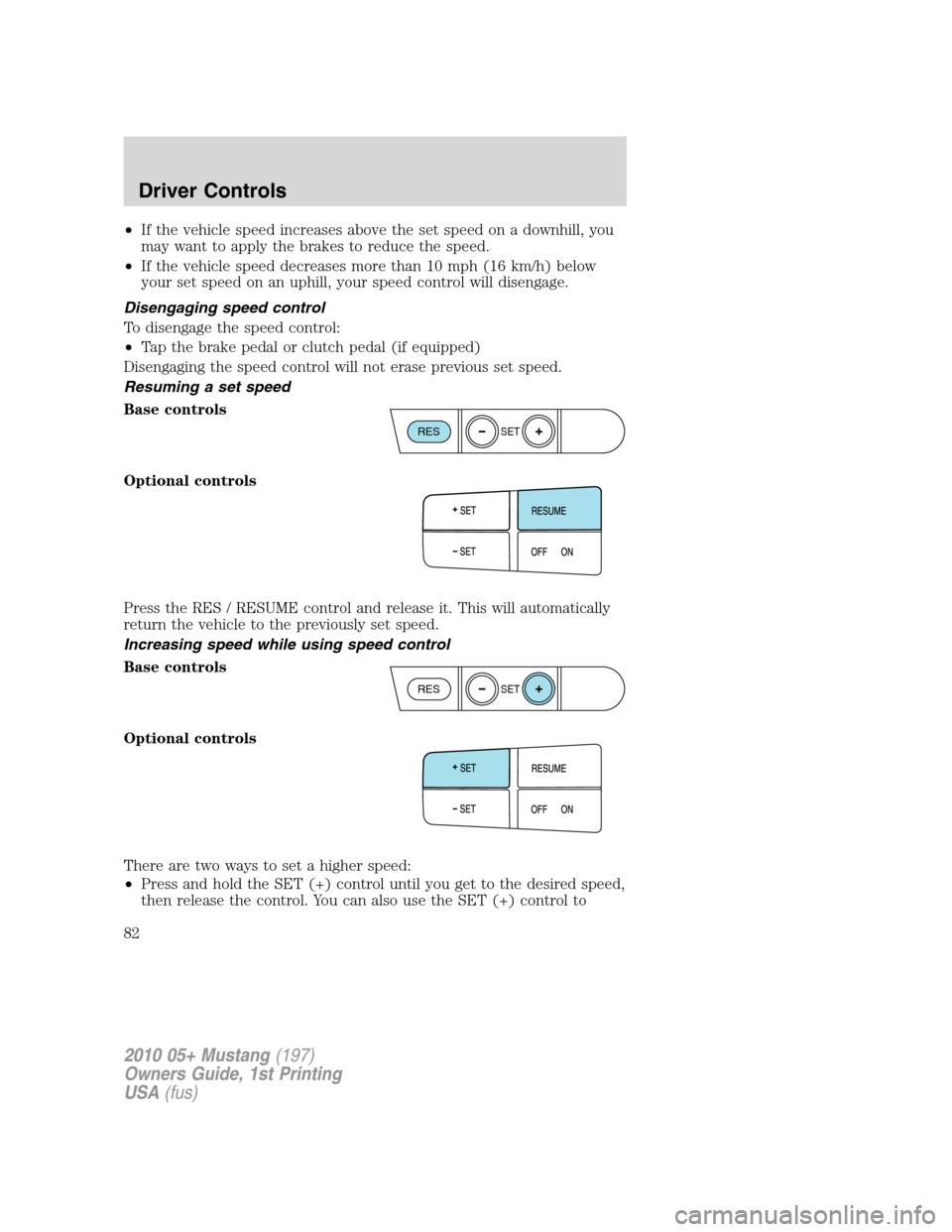
Resuming a set speed
Base controls
Optional controls
Press the RES / RESUME control and release it. This will automatically
return the vehicle to the previously set speed.
Increasing speed while using speed control
Base controls
Optional controls
There are two ways to set a higher speed:
•Press and hold the SET (+) control until you get to the desired speed,
then release the control. You can also use the SET (+) control to
RESSET
RESSET
2010 05+ Mustang(197)
Owners Guide, 1st Printing
USA(fus)
Driver Controls
82
Page 83 of 318
operate the Tap-Up function. Press and release this control to increase
the vehicle set speed in small amounts by 1 mph (1.6 km/h).
•Use the accelerator pedal to get to the desired speed. When the
vehicle reaches that speed press and release the SET (+) control.
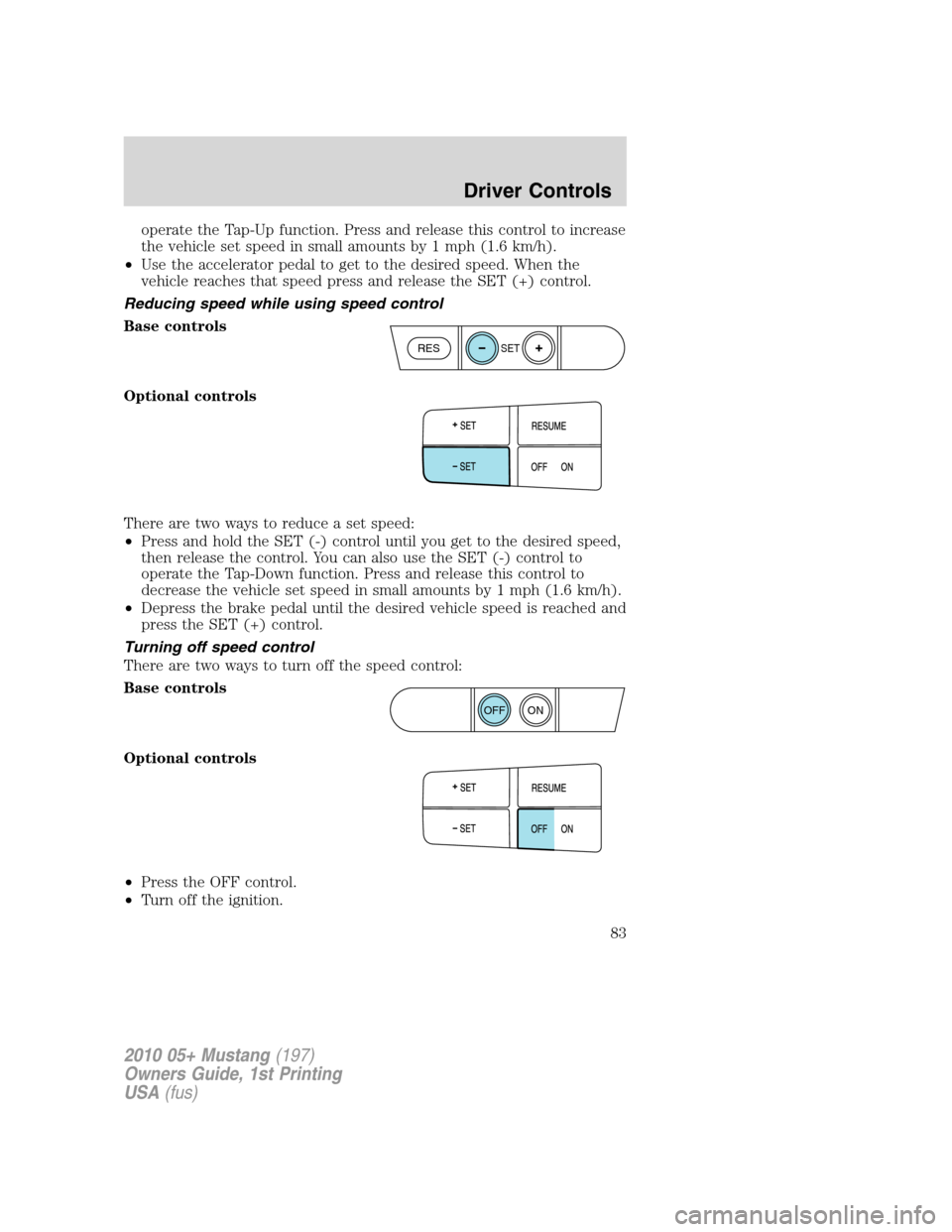
Reducing speed while using speed control
Base controls
Optional controls
There are two ways to reduce a set speed:
•Press and hold the SET (-) control until you get to the desired speed,
then release the control. You can also use the SET (-) control to
operate the Tap-Down function. Press and release this control to
decrease the vehicle set speed in small amounts by 1 mph (1.6 km/h).
•Depress the brake pedal until the desired vehicle speed is reached and
press the SET (+) control.
Turning off speed control
There are two ways to turn off the speed control:
Base controls
Optional controls
•Press the OFF control.
•Turn off the ignition.
RESSET
ON
OFF
2010 05+ Mustang(197)
Owners Guide, 1st Printing
USA(fus)
Driver Controls
83
Page 90 of 318

Interior trunk control lockout (convertible vehicles only)
This feature helps prevent unauthorized access to the trunk when the
convertible top is open, by disabling the interior trunk control.
This is useful when you want to leave the convertible top open, but still
prevent access to the trunk.
To operate this feature (the vehicle must be off and accessory power
delay not active):
Lock the vehicle using the integrated keyhead transmitter or the power
door lock switch. The interior trunk control will now be disabled.
To enable the interior trunk control:
•use the integrated keyhead transmitter to unlock the vehicle.
•or turn the ignition on.
The interior trunk control will now work normally.
POSITIVE RETENTION FLOOR MAT (IF EQUIPPED)
WARNING:Do not install additional floor mats on top of the
factory installed floor mats as they may interfere with the
accelerator or the brake pedals.
Position the floor mat so that the
eyelet is over the pointed end of the
retention post and rotate forward to
lock in. Make sure that the mat does
not interfere with the operation of
the accelerator or the brake pedal.
To remove the floor mat, reverse the
installation procedure.
2010 05+ Mustang(197)
Owners Guide, 1st Printing
USA(fus)
Driver Controls
90
Page 93 of 318

Press thecontrol to unlock all
doors.
Press the
control to lock all
doors.
Locking and unlocking with keys
Your vehicle’s keys are designed to lock and unlock the driver’s door, as
well as open the trunk.
•The driver’s door is unlocked when the key is inserted in the driver
door key cylinder and turned to the unlock position. The driver’s door
is locked when the key is inserted in the driver door key cylinder and
turned to the lock position.
Note:If the vehicle is not equipped with active anti-theft system, locking
the driver door with the key does not lock the passenger door. Use the
power door lock control or manually lock the passenger door to ensure
the vehicle is properly secured.
Smart locks
This feature helps prevent you from locking yourself out of the vehicle if
your key is still in the ignition.
When you open the driver’s door and you lock the vehicle with the
power door lock control, all the doors will lock, then the driver’s door
will automatically unlock reminding you that your key is still in the
ignition.
The vehicle can still be locked, with the key in the ignition, using the
manual lock button on the door, locking the driver’s door with a key or
using the lock button on the remote entry transmitter.
Autolock (if equipped)
The autolock feature will automatically lock all vehicle doors when:
•all doors are closed,
•the ignition is in the on position,
•you shift into any gear putting the vehicle in motion, (for manual
transmission, the park brake should not be engaged) and
•the vehicle attains a speed greater than 12 mph (20 km/h).
2010 05+ Mustang(197)
Owners Guide, 1st Printing
USA(fus)
Locks and Security
93