Page 115 of 226

PRINCIPLE OF OPERATION
Electronic stability programme
(ESP)
WARNING
ESP does not relieve you of your
responsibility to drive with due care
and attention.
without ESP
A
with ESP
B
The ESP supports stability when the
vehicle starts to slide away from your
intended path. This is performed by
braking individual wheels and reducing
engine torque as needed.
The system also provides an enhanced
traction control function by reducing
engine torque if the wheels spin when you
accelerate. This improves your ability to
pull away on slippery roads or loose
surfaces, and improves comfort by limiting
wheel spin in hairpin bends. Stability control (ESP) warning lamp
The ESP warning lamp will flash when the
system is operating. See
Warning
lamps and indicators (page 64).
Emergency brake assist WARNING
Emergency brake assist does not
relieve you of your responsibility to
drive with due care and attention.
Emergency brake assist will detect when
you brake heavily by measuring the rate
at which you press the brake pedal. It will
provide maximum braking efficiency as
long as you press the pedal. Emergency
brake assist can reduce stopping
distances in critical situations.
Trailer stability control
WARNINGS
Trailer stability control does not
relieve you of your responsibility to
tow with due care and attention.
Disabling ESP will turn off the
system.
Trailer stability control is an enhanced
feature of ESP, and automatically detects
when an attached trailer starts to sway.
If this situation occurs, the system will
automatically brake individual wheels to
stabilise the trailer and vehicle. In case a
very severe sway is detected, the engine
torque will be reduced and the vehicle will
be slowed automatically.
USING STABILITY CONTROL
Note:The system will be switched on
automatically every time you switch the ignition on.
113
Stability controlE72903AAABBBB
Page 117 of 226

PRINCIPLE OF OPERATION
WARNING
The parking aid does not relieve you
of your responsibility to drive with
due care and attention.
CAUTIONS
Vehicles fitted with a trailer tow
module not approved by us may not
correctly detect obstacles.
The sensors may not detect objects
in heavy rain or other conditions that
cause disruptive reflections.
The sensors may not detect objects
with surfaces that absorb ultrasonic
waves.
The parking aid does not detect
obstacles moving away from the
vehicle. They will only be detected
shortly after they start to move towards
the vehicle again. Take particular care when reversing
with a tow ball arm or rear fitted
accessories e.g. a bicycle carrier, as
the rear parking aid will only indicate the
distance from the bumper to the obstacle. If you use a high pressure spray to
wash your vehicle, only spray the
sensors briefly from a distance not
less than 20 centimetres (8 inches). Note:On vehicles fitted with a tow ball
arm, the parking aid is deactivated automatically when any trailer lamps (orlighting boards) are connected to the13-pin socket via a trailer tow module wehave approved.
Note:Keep the sensors free from dirt,
ice and snow. Do not clean with sharp objects.
Note:The parking aid may emit false
tones if it detects a signal using the same frequency as the sensors or if the vehicleis fully laden.
Note:The outer sensors may detect the
side walls of a garage. If the distance between the outer sensor and the sidewall remains constant for three seconds,the tone will switch off. As you continue,the inner sensors will detect rearwardobjects.
USING THE PARKING AID
Switching the parking aid on
and off
Note:
The parking aid switches off
automatically when you start the engine or when you exceed 16 km/h (10 mph).
Note:The front and rear sensors are
always activated or deactivated together.
The parking aid is per default off. To
switch the parking aid on, press the switch
in the instrument panel or select reverse
gear.
The light in the switch illuminates when
the parking aid is activated.
To turn it off, press the switch again.
Manoeuvring with the parking
aid 115
Parking aidE72902
Page 119 of 226

PRINCIPLE OF OPERATION
The camera is a visual aid for use when
reversing.
WARNING
The camera does not relieve you of
your responsibility to drive with due
care and attention.
CAUTIONS
If you use a high pressure spray to
wash your vehicle, only spray the
camera briefly from a distance not
less than 20 centimetres (8 inches). Do not apply pressure to the camera.
The position and the angle of the
camera automatically changes.
Note:Keep the camera free from dirt,
ice and snow. Do not clean with sharp objects, degreaser, wax or organicproducts. Use only a soft cloth.
During operation, guide lines appear in
the display which represent your vehicle's
path and approximate distance from
rearward objects.
USING THE REAR VIEW
CAMERA WARNINGS
The operation of the camera may
vary depending on the ambient
temperature, vehicle and road
conditions. The distances shown in the display
may differ from the actual distance.
Do not place objects in front of the
camera. The camera is located on the luggage
compartment lid near the handle.
Activating the rear view camera
CAUTION
The camera may not detect objects
that are close to the vehicle.
With the ignition and the audio unit
switched on, engage reverse gear. The
image is displayed on the screen.
The camera may not operate correctly in
the following conditions:
•
Dark areas.
• Intense light.
• If the ambient temperature increases
or decreases rapidly.
• If the camera is wet, for example in
rain or high humidity.
• If the camera's view is obstructed, for
example by mud.
Using the display CAUTIONS
Obstacles above the camera position
will not be shown. Inspect the area
behind your vehicle if necessary.
117
Rear view cameraE99105
Page 124 of 226
GENERAL INFORMATION
WARNINGS
Use load securing straps to an
approved standard, e.g. DIN.
Make sure that you secure all loose
items properly.
Place luggage and other loads as
low and as far forward as possible
within the luggage or loadspace.
Do not drive with the tailgate or rear
door open. Exhaust fumes may
enter the vehicle.
Do not exceed the maximum front
and rear axle loads for your vehicle.
See
Vehicle identification (page
170). Heavy loads, when placed in the
passenger compartment, should be
on folded rear seats as shown. See
Rear seats (page 94). CAUTIONS
Do not allow items to contact the rear
windows.
Do not use any abrasive materials to
clean the interior of the rear windows.
Do not install stickers or labels to the
interior of the rear windows. LUGGAGE ANCHOR POINTS
LUGGAGE COVERS
WARNING
Do not place objects on the luggage
cover.
122
Load carryingE97377 E86913
Page 133 of 226

RUNNING-IN
Tyres
WARNING
New tyres need to be run-in for
approximately 500 kilometres (300
miles). During this time, you may
experience different driving
characteristics. Brakes and clutch
WARNING
Avoid heavy use of the brakes and
clutch if possible for the first 150
kilometres (100 miles) in town and
for the first 1 500 kilometres (1 000 miles)
on motorways. Engine
CAUTION
Avoid driving too fast during the first
1 500 kilometres (1 000 miles). Vary
your speed frequently and change
up through the gears early. Do not labour
the engine. COLD WEATHER
PRECAUTIONS
The functional operation of some
components and systems can be
affected at temperatures below -30°C
(-22°F). DRIVING THROUGH WATER
Driving through water CAUTIONS
Drive through water in an emergency
only, and not as part of normal
driving.
Engine damage can occur if water
enters the air filter.
In an emergency, the vehicle can be
driven through water to a maximum depth
of 200 mm and at a maximum speed of
10 km/h (6 mph). Extra caution should be
exercised when driving through flowing
water.
When driving in water, maintain a low
speed and do not stop the vehicle. After
driving through water, and as soon as it
is safe to do so:
•
Depress the brake pedal lightly and
check that full brake function is
achieved.
• Check that the horn works.
• Check that the vehicle's lights are fully
operational.
• Check the power assistance
of the steering system.
131
Driving hints
Page 135 of 226
FUEL CUT-OFF SWITCH
Vehicles with a Duratec engine
The fuel supply may be cut off as a result
of an accident or sudden vibrations (e.g.
collision when parking).
The switch is located in the side panel in
front of the driver's door.
Resetting the switch
WARNING
Do not reset the fuel cut-off switch
if you see or smell leaking fuel.
•
Turn the ignition switch to position
0.
• Check fuel system for leaks.
• If no fuel leak is apparent, reset the
switch by pushing in the button (see
illustration). •
Turn the ignition switch to position
II.
After a few seconds return the key to
position I.
• Make a further check for leaks in the
fuel system.
133
Status after a collisionE72531
Page 139 of 226
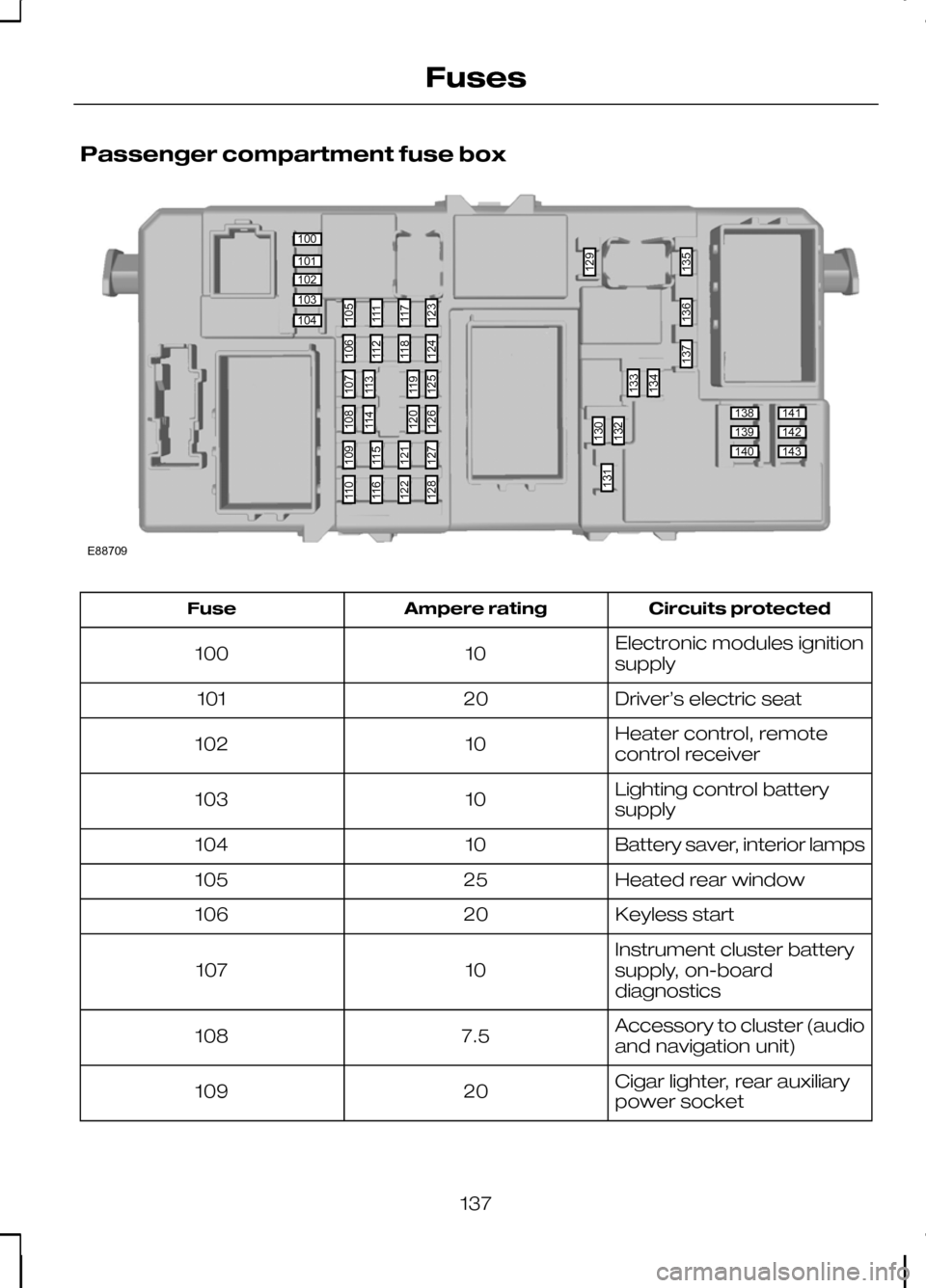
Passenger compartment fuse box
Circuits protected
Ampere rating
Fuse
Electronic modules ignition
supply
10
100
Driver’s electric seat
20
101
Heater control, remote
control receiver
10
102
Lighting control battery
supply
10
103
Battery saver, interior lamps
10
104
Heated rear window
25
105
Keyless start
20
106
Instrument cluster battery
supply, on-board
diagnostics
10
107
Accessory to cluster (audio
and navigation unit)
7.5
108
Cigar lighter, rear auxiliary
power socket
20
109
137
Fuses100101102103104138139140141142143105111117123130132133129134135136137131106112118124109115121127110116122128107113119125108114120126E88709
Page 141 of 226
Circuits protected
Ampere rating
Fuse
Not used
-
127
Not used
-
128
Windscreen wipers
20
129
AWD module
10
130
Rear window wiper
15
131
Brake lamps
15
132
Central locking relays,
passenger door module
25
133
Central locking relays, driver
door module
20
134
Daytime running lamps
20
135
Washer pump, heated
washer jets
15
136
Battery backup sounder
10
137
Powertrain control module,
accelerator pedal, auto-
matic transmission, keyless
module IGN monitor
10
138
Main beam right-hand side
10
139
Main beam left-hand side
10
140
Reversing lamp
10
141
Dipped beam, right-hand
side
15
142
Dipped beam, left-hand
side
15
143
139
Fuses