2010 FORD KUGA climate control
[x] Cancel search: climate controlPage 137 of 226

FUSE SPECIFICATION CHART
Engine compartment fuse box
Circuits protected
Ampere
rating
Fuse
Cooling fan
40
1
Power steering
80
2
Passenger junction box supply 1
60
3
Passenger junction box supply 2
60
4
PTC heater
80
5
Glow plugs (diesel only)
60
6
ESP pump
30
7
ESP valves
20
8
Powertrain control module
20
9
Climate control blower
30
10
Ignition switch
20
11
135
FusesE79716196781091211141316152936283435332225325432120171824213031232627
Page 138 of 226

Circuits protected
Ampere
rating
Fuse
Ignition relay 15l
40
12
Starter solenoid
20
13
Heated windscreen, right-hand side
40
14
Not used
-
15
Heated windscreen, left-hand side
40
16
Not used
-
17
Power converter
30
18
ESP module
10
19
Horn
15
20
Auxiliary heater
20
21
Power steering module
10
22
Headlamp washer
30
23
Diesel fuel heater
15
24
Ignition, relays
10
25
Automatic transmission
15
26
Air conditioning clutch
10
27
Glow plug monitoring (diesel only)
10
28
Dual zone climate control
10
29
Powertrain control module
3
30
Battery sensor smart charging
10
31
Injectors (petrol only)
10
32
Heated oxygen sensors (petrol only)
10
33
Ignition coils, valves
10
34
Powertrain control module, valves, solenoids
10
35
Powertrain control module
10
36
136
Fuses
Page 184 of 226

PRINCIPLE OF OPERATION
CAUTION
Using the system with the engine off
will drain the battery.
Voice recognition enables operation of
the system without the need to divert your
attention from the road ahead in order to
change settings, or receive feedback
from the system.
Whenever you issue one of the defined
commands with the system active, the
voice recognition system converts your
command into a control signal for the
system. Your inputs take the form of
dialogues or commands. You are guided
through these dialogues by
announcements or questions.
Please familiarise yourself with the
functions of the system before using voice
recognition.
Supported commands
The voice control system allows you to
control the following vehicle functions:
•
Bluetooth phone
• radio
• CD Player/CD Changer
• external device (USB)
• external device (iPod)
• automatic climate control
• navigation system (DVD units only -
refer to separate DVD navigation
handbook).
System response
As you work through a voice session the
system will prompt you with a beep tone
each time the system is ready to proceed. Do not try to give any commands until the
beep tone has been heard. The voice
control system will repeat each spoken
command back to you.
If you are not sure how to continue say
"HELP" for assistance or "CANCEL" if you
do not wish to continue.
The "HELP" function provides only a
subset of the available voice commands.
Detailed explanations of all possible voice
commands can be found on the following
pages.
Voice commands
All voice commands should be given using
a natural speaking voice, as if speaking to
a passenger or on the phone. Your voice
level should be dependant on the
surrounding noise level inside or outside
the vehicle but do not shout.
USING VOICE CONTROL
System operation
The order and content of the voice
controls are given in the following lists. The
tables show the sequence of user voice
commands and system responses for
each available function.
<>
indicates a number or stored name tag
to be inserted by the user.
Short cuts
There are a number of voice command
short cuts available, which allow you to
control some vehicle features without
having to follow the complete command
menu. These are:
• phone: "MOBILE NAME", "DIAL
NUMBER", "DIAL NAME", and
"REDIAL"
• CD player/CD changer: "DISC" and
"TRACK"
182
Voice control
Page 185 of 226
•
automatic climate control:
"TEMPERATURE", "AUTO MODE",
"DEFROSTING/DEMISTING ON" and
"DEFROSTING/DEMISTING OFF"
• radio: "TUNE NAME"
• external device (USB): "TRACK"
• external device (iPod): "TRACK"
• SD card: "TRACK".
Start communicating with the
system
Before you can start talking to the system
you first have to press the VOICEor
MODE button for each operation and
wait until the system answers with a beep.
See Voice control (page 40).
Press the button again to cancel the voice
session. Name tag
The name tag functionality can support
the phone, audio and navigation features
by using the "STORE NAME" function. You
can assign name tags to items such as
favourite radio stations and personal
phone contacts. See
Audio unit
commands (page 183). See Telephone
commands (page 192). See
Navigation system commands
(page 197).
• Store up to 20 name tags per function.
• The average recording time for each
name tag is approximately 2-3
seconds.
AUDIO UNIT COMMANDS
CD Player
You can control playback directly by voice
control.
Overview
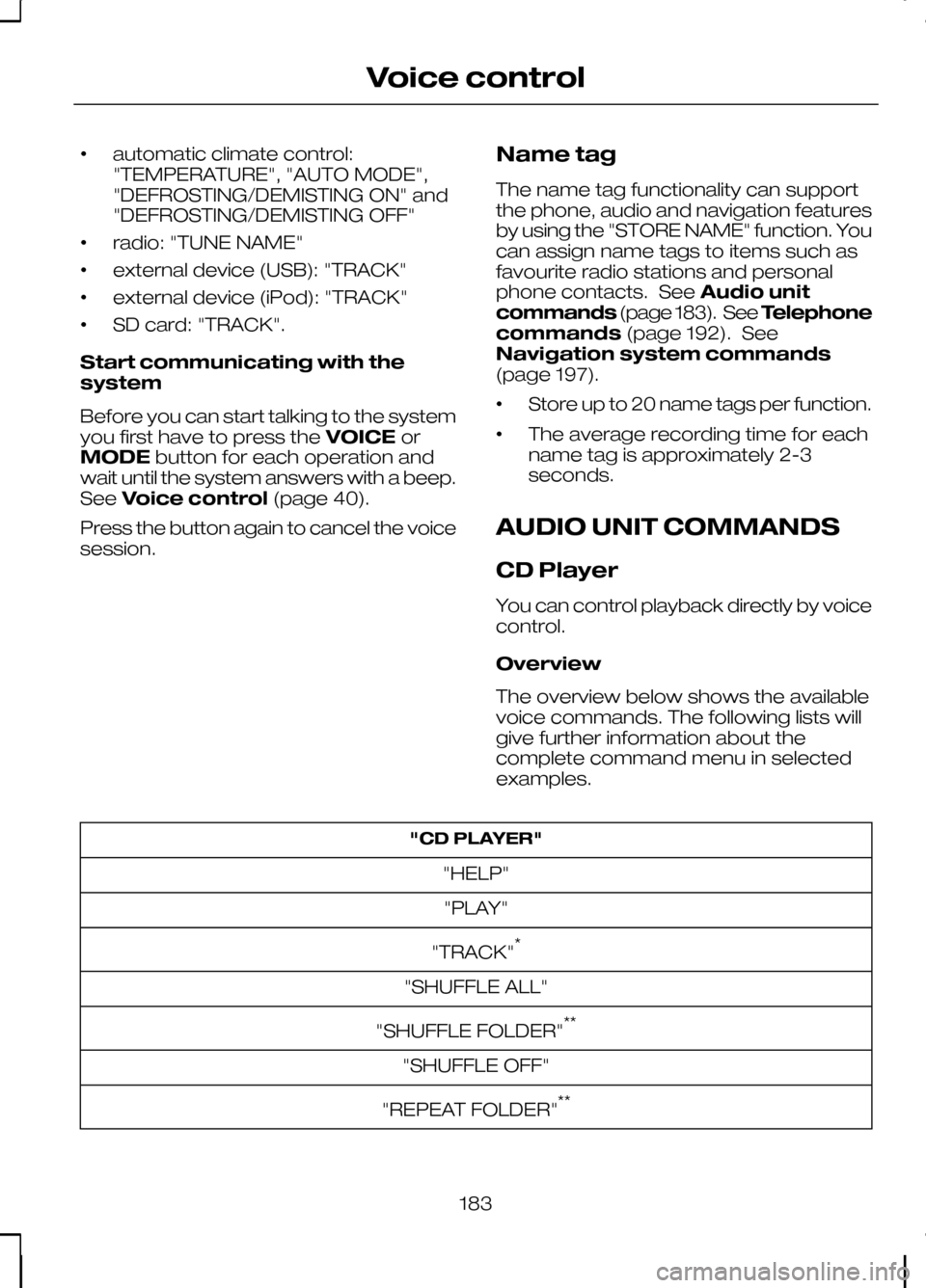
The overview below shows the available
voice commands. The following lists will
give further information about the
complete command menu in selected
examples. "CD PLAYER"
"HELP""PLAY"
"TRACK" *
"SHUFFLE ALL"
"SHUFFLE FOLDER" **
"SHUFFLE OFF"
"REPEAT FOLDER" **
183
Voice control
Page 199 of 226

Main settings
Reject calls
Calls can be set to be automatically
rejected using voice control. System answer
User says
Steps
"PHONE"
"PHONE"
1
"REJECT CALLS"
"REJECT CALLS"
2
"ACCEPT CALLS"
"ACCEPT CALLS" *
* use this command to turn the reject mode off
NAVIGATION SYSTEM
COMMANDS
Please refer to your separate Navigation
handbook for details of the command
menus. CLIMATE CONTROL
COMMANDS
Climate
The climate voice commands supports
the functionality of the fan speed,
temperature and mode settings. Not all
functions are available on all vehicles.
Overview
The overview below shows the available
voice commands. The following lists will
give further information about the
complete command menu in selected
examples."CLIMATE"
"HELP"
"FAN" *
"DEFROSTING/DEMISTING ON" *
"DEFROSTING/DEMISTING OFF" *
"TEMPERATURE" *
197
Voice control
Page 200 of 226

"CLIMATE"
"AUTO MODE" *
* Can be used as a shortcut. On vehicles fitted with an English language module the
"FAN" shortcut is not available.
Fan
This function allows you to adjust the fan
speed. System answer
User says
Steps
"CLIMATE"
"CLIMATE"
1
"FAN SPEED PLEASE"
"‘FAN" *
2
"FAN MINIMUM"
"MINIMUM"
3 "FAN
""
"FAN MAXIMUM"
"MAXIMUM"
* Can be used as a shortcut. On vehicles fitted with an English language module the
"FAN" shortcut is not available.
Defrosting/Demisting System answer
User says
Steps
"CLIMATE"
"CLIMATE"
1
"DEFROSTING ON/DEMISTING ON"
"DEFROSTING ON/DEMISTING
ON"*
2 "DEFROSTING OFF/DEMISTINGOFF"
"DEFROSTING OFF/DEMISTING
OFF"*
* Can be used as a shortcut.
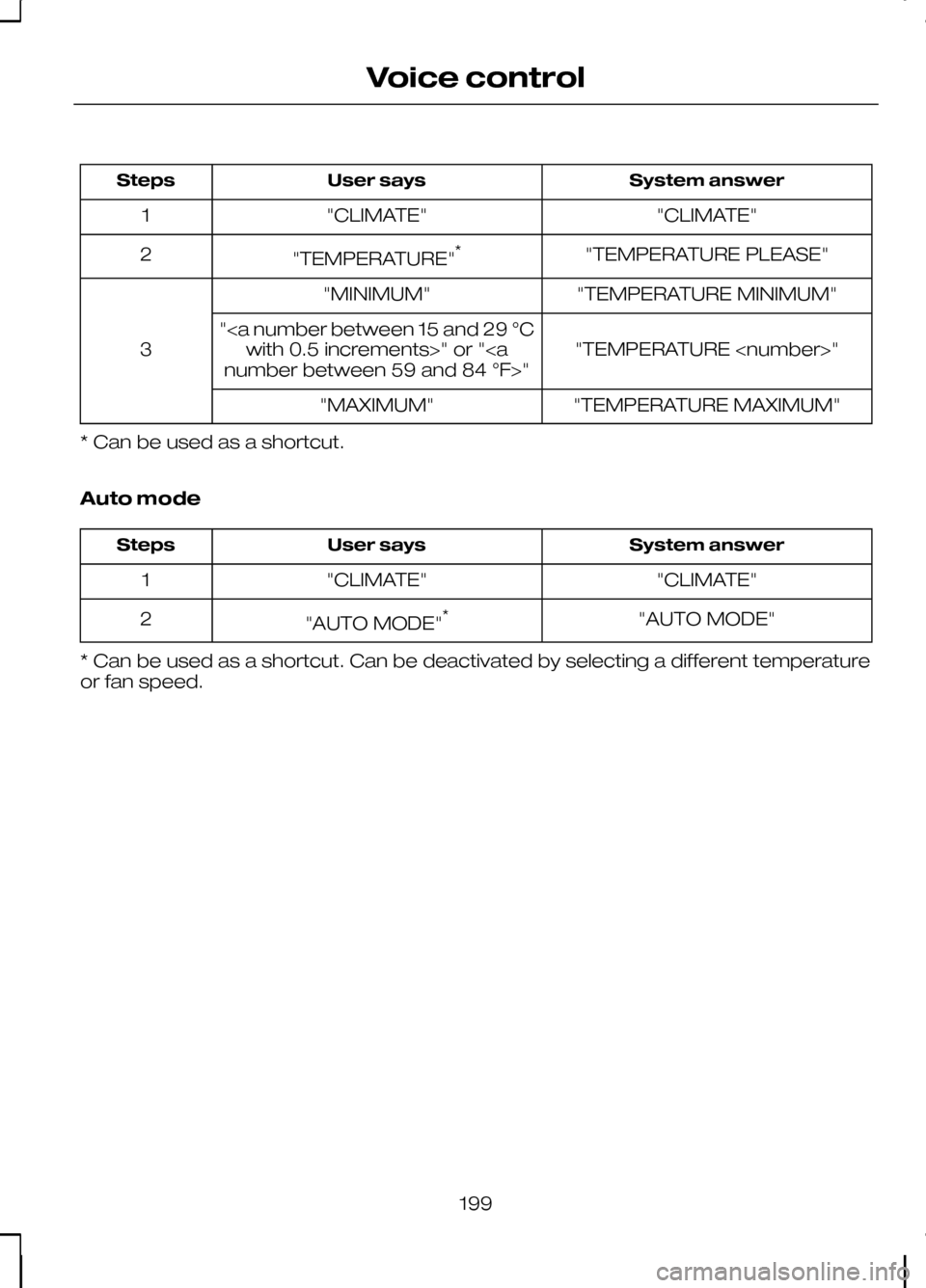
Temperature
This function allows you to adjust the
temperature.
198
Voice control
Page 201 of 226
System answer
User says
Steps
"CLIMATE"
"CLIMATE"
1
"TEMPERATURE PLEASE"
"TEMPERATURE" *
2
"TEMPERATURE MINIMUM"
"MINIMUM"
3 "TEMPERATURE
"
with 0.5 increments>" or "
"TEMPERATURE MAXIMUM"
"MAXIMUM"
* Can be used as a shortcut.
Auto mode System answer
User says
Steps
"CLIMATE"
"CLIMATE"
1
"AUTO MODE"
"AUTO MODE" *
2
* Can be used as a shortcut. Can be deactivated by selecting a different temperature
or fan speed.
199
Voice control
Page 217 of 226

A
A/C
See: Climate control....................................80
About this handbook................................5
ABS See: Brakes..................................................112
ABS driving hints See: Hints on driving with ABS..................112
Accessories See: Parts and accessories..........................5
Adaptive front lighting system (AFS).......................................................49
Adjusting the steering wheel.................39
Adjusting the windscreen washer jets...........................................................43
AFS See: Adaptive front lighting system
(AFS)........................................................... 49
Air conditioning See: Climate control....................................80
Air vents....................................................80
Alarm.........................................................37
All-wheel drive (AWD).............................111
Appendices.............................................211
Arming the alarm.....................................37 Automatic arming delay..............................37
Interior sensors.............................................37
Arming the engine immobiliser.............36
Audible warnings and indicators..........66 Automatic transmission..............................66
Frost............................................................... 66
Key-in-ignition............................................... 67
Key outside car.............................................66
Lights on........................................................67
Low fuel..........................................................67
Seat belt reminder........................................67
Audio control...........................................39 Mode.............................................................. 40
Seek............................................................... 40
Volume........................................................... 39
Audio unit commands..........................183 Auxiliary input...............................................189
CD Changer.................................................184
CD Player.....................................................183
External devices - iPod...............................191
External devices - USB..............................189
Radio............................................................. 186Auto-dimming mirror..............................62
Autolamps................................................47
Automatic climate control.....................83
Air distribution...............................................85
Blower............................................................ 84
Mono mode..................................................84
Recirculated air.............................................85
Setting the temperature.............................84
Switching off the automatic climate control........................................................ 85
Switching the air conditioning on and off................................................................ 85
To switch mono mode back on.................84
To switch mono mode off...........................84
Windscreen defrosting and demisting................................................... 85
Automatic transmission........................108 Emergency park position release
lever........................................................... 110
Hints on driving with an automatic transmission............................................. 110
Manual shifting - Vehicles with a 5 speed transmission............................................ 109
Selector lever positions.............................108
Sport mode and manual shifting - Vehicles with a 6 speed transmission.................109
Autowipers................................................41
Auxiliary heater........................................86 Diesel auxiliary heater (depending on
country)..................................................... 89
Fuel operated heater (depending on country)..................................................... 89
Parking heater..............................................86
Auxiliary input (AUX IN) socket..............99
Auxiliary power sockets.........................97 Power inverter...............................................97
AWD See: All-wheel drive (AWD).........................111
B
Bluetooth setup.....................................176 Handling of phones....................................176
Requirements for Bluetooth
connection............................................... 176
Bonnet lock See: Opening and closing the bonnet.....142
215
Index