Page 73 of 226

PERSONALISED SETTINGS
1. Use the rotary to enter the main
menu.
2. Press the SET/RESET button to
choose a sub-menu and adjust the
settings.
ESP
Select this option to activate or deactivate
ESP.
1. Use the rotary control to enter the main menu. 2.
Highlight ESPand press the
SET/RESET.
3. Highlight Backand repeatedly press
the SET/RESET button to return to
the main menu.
Steering
Note:For road safety reasons, changes
in the Steering menu can only be made
while the vehicle is stationary. If this menu or one of its sub-menus is open when thevehicle begins to move, the informationdisplay will automatically exit the
Steering menu.
Note:When the vehicle is stationary, the
steering assistance is optimized in all three settings and does not differ noticeably.
Standard: The standard setting is
suitable for all driving styles.
Sport: The steering assistance is
reduced. This suits a sportier driving style
by increasing the feedback through the
steering wheel. The sport setting is also
an advantage when driving on icy and
snowy road conditions.
Comfort: The steering assistance is
increased. The steering will feel lighter and
you will not need to exert as much force
on the wheel.
1. Use the rotary control to enter the main menu.
2. Highlight Steering and press the
SET/RESET button.
3. Highlight the desired setting and press
the SET/RESET button to confirm
the setting.
4. Highlight Backand repeatedly press
the SET/RESET button to return to
the main menu.
Clock setting
1. Use the rotary control to enter the main menu.
71
Information displaysAE98884Time1onSetonceActivenowSetTime1MondayTuesdayWednesdayThursdayFridaySaturdaySundayTime2onSetTime1MondayTuesdayWednesdayThursdayFridaySaturdaySundayParkHeater
Page 74 of 226

2.
Highlight Clockand press the
SET/RESET button.
3. Highlight Set Clock and press the
SET/RESET button. The hours start
to flash.
4. Use the rotary control to adjust the hours to the desired setting.
5. Press the SET/RESET button to
confirm the setting. The minutes start
to flash.
6. Proceed in the same way to set the minutes and the date.
7. Press the SET/RESET button to
confirm the setting.
8. Highlight Backand repeatedly press
the SET/RESET button to return to
the main menu.
Help screen and navigation
information
The help screen appears for a few
seconds when you switch the ignition on.
If the navigation is operating, information
relating to this system is displayed in the
information display.
To select which information is displayed
in the information display:
1. Use the rotary control to enter the main menu.
2. Highlight Setupand press the
SET/RESET button.
3. Highlight Display and press the
SET/RESET button.
4. Highlight Configure and press the
SET/RESET button.
5. Highlight the desired setting and press
the SET/RESET button to confirm
the setting.
6. Highlight Backand repeatedly press
the SET/RESET button to return to
the main menu. Navigation information
You can also choose when the navigation
information is displayed in the information
display. Three options are available:
•
Always off: No navigation
information is displayed in the
information display.
• On guidance: The navigation
information will only appear when the
navigation system provides a
guidance instruction. This function is
only available on certain navigation
systems.
• Always on: Navigation information
will always appear in the information
display when the navigation system is
operating.
To set when navigation information should
be displayed:
1. Use the rotary control to enter the main menu.
2. Highlight Setupand press the
SET/RESET button.
3. Highlight Display and press the
SET/RESET button.
4. Highlight Configure and press the
SET/RESET button.
5. Highlight Nav Info and press the
SET/RESET button.
6. Highlight the desired setting and press
the SET/RESET button to confirm
the setting.
7. Highlight Backand repeatedly press
the SET/RESET button to return to
the main menu.
Language setting
A choice of eleven languages are
available.
English, German, Italian, French, Spanish,
Turkish, Russian, Dutch, Polish, Swedish
and Portuguese.
72
Information displays
Page 127 of 226
1. Pull the handle out.
2.
Turn the handle clockwise to bring the
crossbar in contact with the rail. Note:Make sure there is no gap
between crossbar and rail (A).
3. Turn the handle a minimum of 3.5 revolutions. 4. Push the handle in. Turn the key
clockwise to lock.
5. Remove the key.
Accessing the T-notch 1. Pull the handle out.
2. Lower the cover.
3. Remove the sliding bar.
Cycle carrier
CAUTION
The cycle carrier fixtures must only
be fitted to the main luggage
compartment lid.
125
Load carrying12E98207 3E98222A E98208 123E98209
Page 130 of 226
Unlocking the tow ball arm
mechanism
1. Detach the keyhole protective cap.
2. Insert the key and turn it
anti-clockwise to unlock (1).
3. Hold the tow ball arm. Pull the handwheel out and turn it clockwise
until it clicks (2).
4. The red mark on the handwheel must
align with the whitemark on the tow
ball.
5. Release the handwheel. The tow ball arm is unlocked.
Inserting the tow ball arm WARNING
The tow ball arm may only be
inserted when completely unlocked. 1.
Pull out the plug (1).
2. Insert the tow ball arm vertically and press it upwards until it engages (2).
Do not hold your hand near the
handwheel.
3. The green mark on the handwheel
must align with the whitedot on the
tow ball.
4. To lock, turn the key clockwise and remove the key (3).
5. Attach the keyhole protective cap.
128
TowingE9947712 E99484132
Page 131 of 226
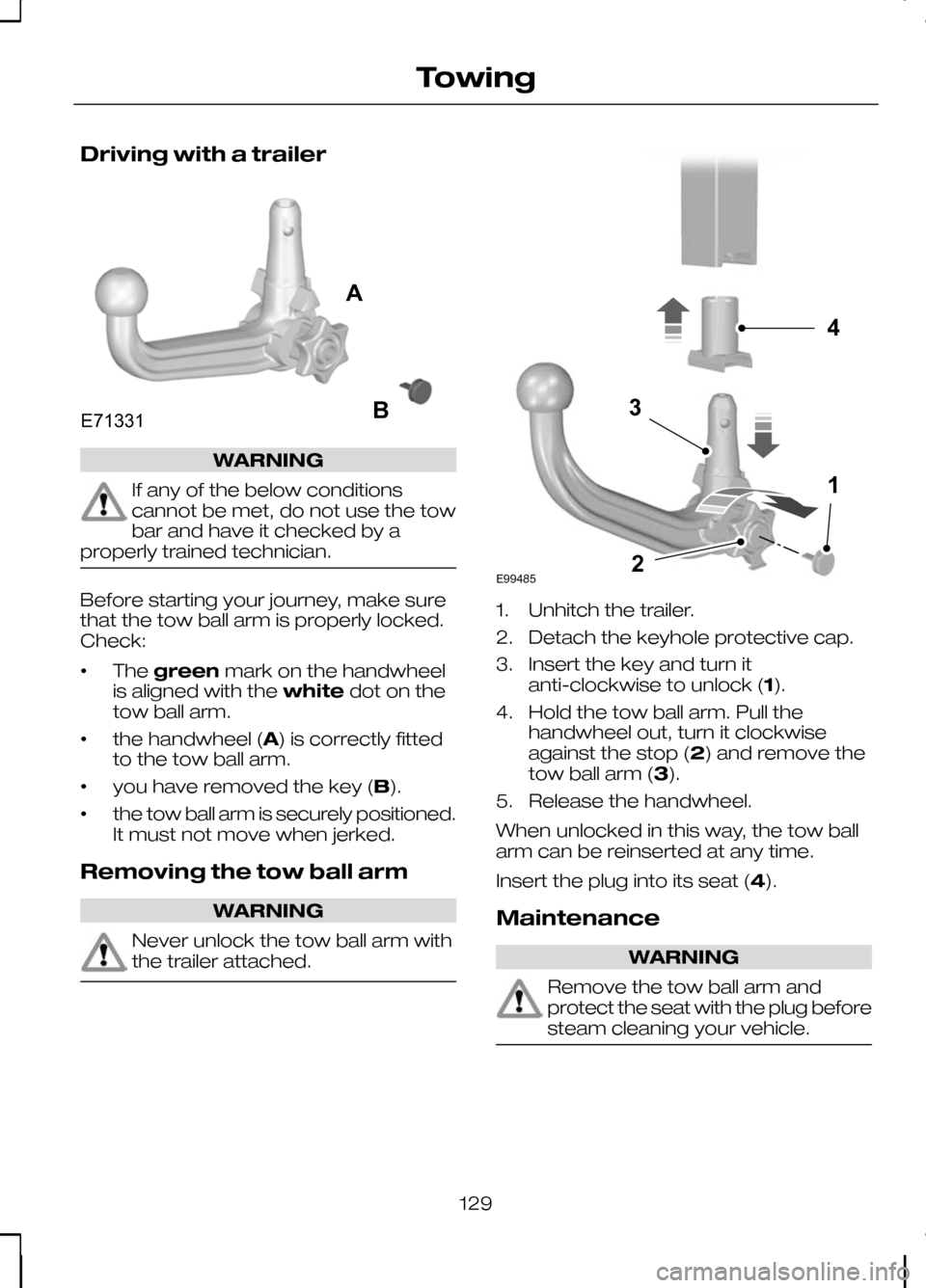
Driving with a trailer
WARNING
If any of the below conditions
cannot be met, do not use the tow
bar and have it checked by a
properly trained technician. Before starting your journey, make sure
that the tow ball arm is properly locked.
Check:
•
The
green mark on the handwheel
is aligned with the whitedot on the
tow ball arm.
• the handwheel (A) is correctly fitted
to the tow ball arm.
• you have removed the key (B).
• the tow ball arm is securely positioned.
It must not move when jerked.
Removing the tow ball arm WARNING
Never unlock the tow ball arm with
the trailer attached. 1. Unhitch the trailer.
2. Detach the keyhole protective cap.
3. Insert the key and turn it
anti-clockwise to unlock (1).
4. Hold the tow ball arm. Pull the handwheel out, turn it clockwise
against the stop (2) and remove the
tow ball arm (3).
5. Release the handwheel.
When unlocked in this way, the tow ball
arm can be reinserted at any time.
Insert the plug into its seat (4).
Maintenance WARNING
Remove the tow ball arm and
protect the seat with the plug before
steam cleaning your vehicle.
129
TowingE71331AB E994854132
Page 142 of 226
TOWING POINTS
Front towing eye
Rear towing eye
Note:On vehicles with a tow bar, the
towing eye cannot be installed at the rear of the vehicle. Use the tow bar to tow avehicle.
Towing eye location The screw-in towing eye is located in the
luggage compartment next to the spare
wheel well.
The towing eye must
alwaysbe carried
in the vehicle.
Prise off the cover and install the towing
eye. CAUTION
The screw-in towing eye has a
left-hand thread. Turn it
anti-clockwise
to install it. TOWING THE VEHICLE ON
FOUR WHEELS
All vehicles
WARNINGS
Switch the ignition on when your
vehicle is being towed. The steering
lock will engage and the direction
indicators and brake lamps will not work
if you do not.
140
Vehicle recoveryE99490 E99491 E99468
Page 160 of 226
Indentations in the sills
Ashow the
location of the jacking points. Vehicles with side skirts
Assembling the wheel brace
Type one
WARNING
When returning the wheel brace
extension to its original position, take
care not to get your fingers caught.
Note:Make sure that the wheel brace is
fully extended. Extend the wheel brace.
Type two
CAUTION
The screw-in towing eye has a
left-hand thread. Turn it
anti-clockwise to install it. Make sure
that the towing eye is fully tightened. 158
Wheels and tyresE93184A E92932 E93020 E95345 E122546
Page 165 of 226

Protective cap
A
Pressure relief valve
B
Hose
C
Orange cap
D
Bottle holder
E
Pressure gauge
F
Power plug with cable
G
Compressor switch
H
Label
I Bottle lid
J
Sealant bottle
K
1. Open the lid of the tyre repair kit.
2. Peel off the label Ishowing the
maximum permissible speed of
80 km/h (50 mph) from the casing
and attach it to the instrument panel
in the driver’s field of view. Make sure
the label does not obscure anything
important.
3. Take the hose Cand the power plug
with cable Gout of the kit.
4. Unscrew the orange cap Dand the
bottle lid J.
5. Screw the sealant bottle Kclockwise
into the bottle holder Efully tight.
6. Remove the valve cap from the damaged tyre.
7. Detach the protective cap Afrom the
hose Cand screw the hose Cfirmly
onto the valve of the damaged tyre.
8. Make sure that the compressor switch
His in position 0.
9. Insert the power plug Ginto the cigar
lighter socket or auxiliary power
socket. See Cigar lighter (page 97).
See Auxiliary power sockets
(page 97).
10. Start the engine.
11. Move the compressor switch Hto
position 1.
12. Inflate the tyre for no longer than seven minutes to an inflation
pressure of minimum 1.8 bar (26 psi)
and a maximum of 3.5 bar (51 psi).
Move the compressor switch Hto
position 0and check the current tyre
pressure with pressure gauge F.
13. Remove the power plug Gfrom the
cigar lighter socket or auxiliary power
socket.
163
Wheels and tyresE94973BJIFECKAGHD


