Page 78 of 226
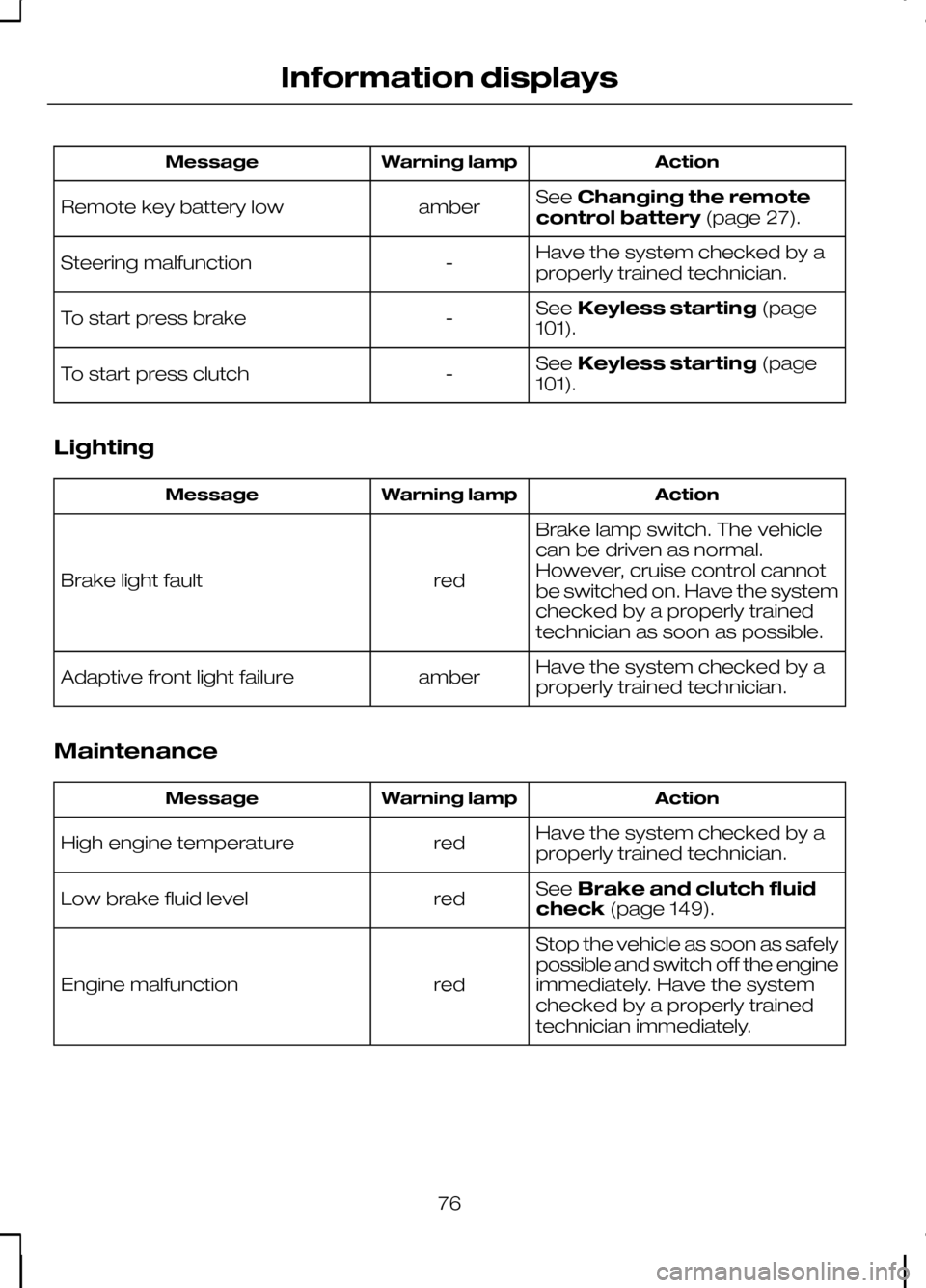
Action
Warning lamp
Message
SeeChanging the remote
control battery (page 27).
amber
Remote key battery low
Have the system checked by a
properly trained technician.
-
Steering malfunction
SeeKeyless starting (page
101).
-
To start press brake
SeeKeyless starting (page
101).
-
To start press clutch
Lighting Action
Warning lamp
Message
Brake lamp switch. The vehicle
can be driven as normal.
However, cruise control cannot
be switched on. Have the system
checked by a properly trained
technician as soon as possible.
red
Brake light fault
Have the system checked by a
properly trained technician.
amber
Adaptive front light failure
Maintenance Action
Warning lamp
Message
Have the system checked by a
properly trained technician.
red
High engine temperature
SeeBrake and clutch fluid
check (page 149).
red
Low brake fluid level
Stop the vehicle as soon as safely
possible and switch off the engine
immediately. Have the system
checked by a properly trained
technician immediately.
red
Engine malfunction
76
Information displays
Page 80 of 226

Transmission
Action
Warning lamp
Message
Automatic transmission. The
vehicle can still be driven but have
the system checked by a properly
trained technician as soon as
possible.
amber
Transmission limited function
Under certain driving conditions
it is possible that the clutches in
the transmission can overheat. In
these circumstances it is neces-
sary to press the brake pedal and
stop the vehicle to prevent
red
Transm. too hot. Press brake
damage to the transmission.
SelectN (NEUTRAL) orP
(PARK) and apply the parking
brake until the transmission has
cooled and the message disap-
pears from the display.
The transmission is too hot. In
these extreme conditions the
transmission will disengage drive
in order to prevent damage. You
will not be able to drive until the
transmission has cooled.
red
Transmission too hot
Have the system checked by a
properly trained technician.
amber
Transmission malfunction
At low outside temperatures, after
starting the engine, it may take
the transmission several seconds
to engageR (REVERSE) orD
(DRIVE). Keep the brake pedal
depressed until these messages
disappear from the display.
-
Engagement in progress
Press brake pedal
SeeAutomatic transmission
(page 108). See Starting the
engine (page 101).
-
Move shifter to P
78
Information displays
Page 103 of 226
GENERAL INFORMATION
General points on starting
If the battery has been disconnected the
vehicle may exhibit some unusual driving
characteristics for approx. 8 kilometres
(5 miles) after reconnecting the battery.
This is because the engine management
system must realign itself with the engine.
Any unusual driving characteristics during
this period may be disregarded.
Starting the engine by towing
or pushing
WARNING
To prevent damage you must not
push or tow start your vehicle. Use
booster cables and a booster
battery. See Using booster cables
(page 154). KEYLESS STARTING
WARNINGS
The keyless starting system may not
function if the key is close to metal
objects or electronic devices such
as mobile phones. Always check that the steering
wheel lock is deactivated before
attempting to move your vehicle.
Note:A valid passive key must be
located inside the vehicle to switch the ignition on and start the engine.
Note:To start your engine you must also
fully depress the brake or clutch pedal, depending on the transmission fitted. Ignition on
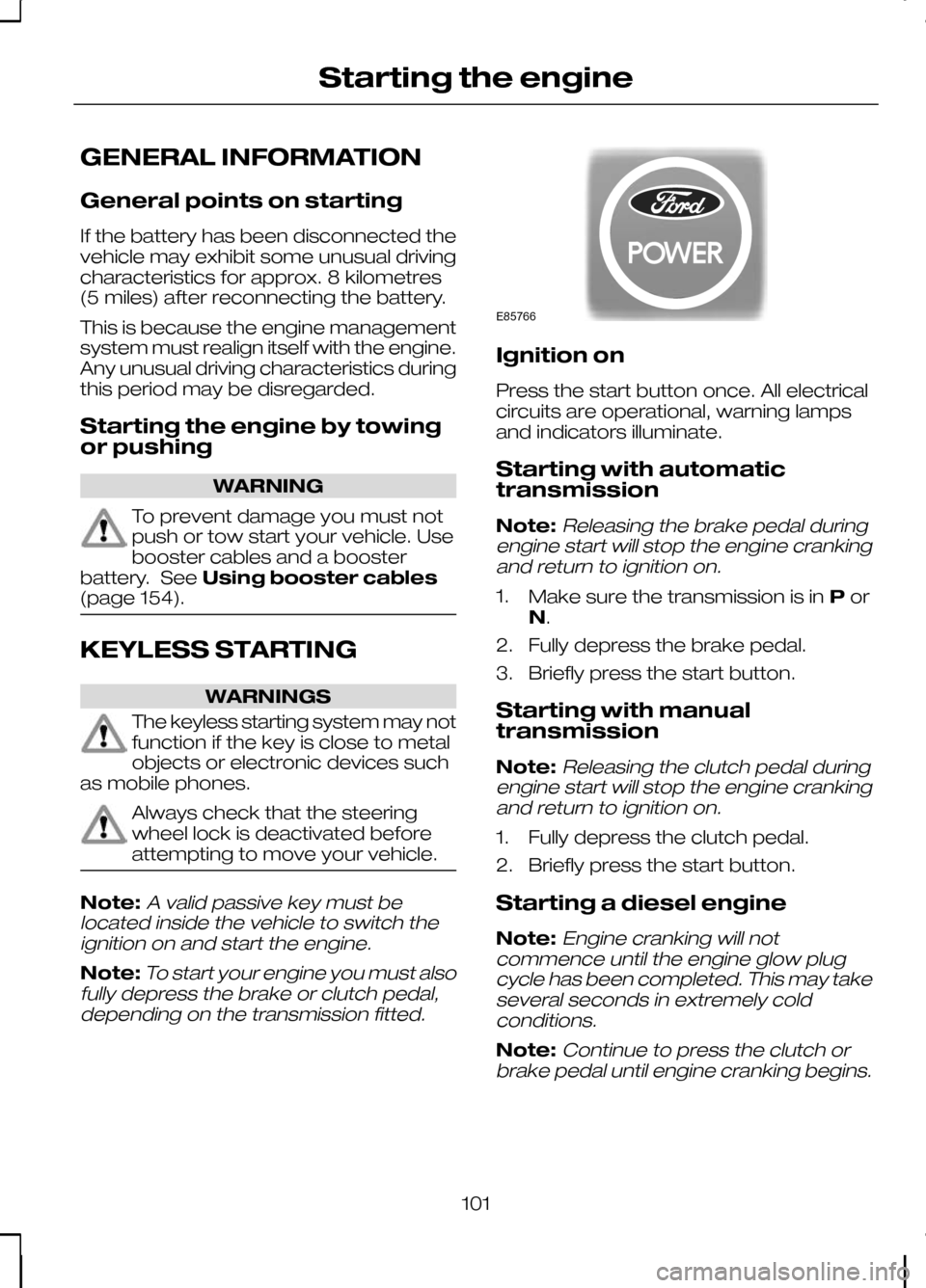
Press the start button once. All electrical
circuits are operational, warning lamps
and indicators illuminate.
Starting with automatic
transmission
Note:
Releasing the brake pedal during
engine start will stop the engine cranking and return to ignition on.
1. Make sure the transmission is in Por
N.
2. Fully depress the brake pedal.
3. Briefly press the start button.
Starting with manual
transmission
Note:
Releasing the clutch pedal during
engine start will stop the engine cranking and return to ignition on.
1. Fully depress the clutch pedal.
2. Briefly press the start button.
Starting a diesel engine
Note:
Engine cranking will not
commence until the engine glow plug cycle has been completed. This may takeseveral seconds in extremely coldconditions.
Note:Continue to press the clutch or
brake pedal until engine cranking begins.
101
Starting the engineE85766
Page 110 of 226

MANUAL TRANSMISSION
CAUTION
Do not engage reverse gear when
the vehicle is moving. This can cause
damage to the transmission.
On some vehicles it is necessary to raise
the collar whilst selecting reverse gear.
AUTOMATIC TRANSMISSION
Selector lever positions
ParkP
Reverse
R Neutral
N
Drive
D
Sport mode and manual shifting
S WARNING
Apply the brakes before moving the
selector lever and keep them
applied until you are ready to move
off. Note:A cold engine has a higher idle
speed. This will increase the tendency for
your vehicle to creepwhen you have
selected a drive gear.
Press the button on the selector lever to
select reverse and park.
The selector lever position will be shown
in the information display.
Park WARNINGS
Select park only when your vehicle
is stationary.
Apply the parking brake and
select park before leaving
your vehicle. Make sure that the
selector lever is latched in position. Note:
An audible warning will sound if you
open the driver's door and you have not selected park.
In this position, power is not transmitted
to the drive wheels and the transmission
is locked. You can start the engine with
the selector lever in this position.
108
TransmissionE99067 E80836S
Page 112 of 226

Hints on driving with an
automatic transmission
Moving off
1. Release the parking brake.
2. Release the brake pedal and press
the accelerator pedal.
Stopping
1. Release the accelerator pedal and press the brake pedal.
2. Apply the parking brake.
Kickdown
Press the accelerator pedal fully with the
selector lever in the drive position to select
the next lowest gear for optimum
performance. Release the accelerator
pedal when you no longer require
kickdown.
Emergency park position
release lever
Use the lever to move the selector lever
from the park position in the event of an
electrical malfunction or if your vehicle has
a flat battery. 1. Insert a small flat-bladed tool into the
slot.
2. Turn the tool through 90 degrees.
3. Push downwards on the tool to detach the gaiter frame from the trim
panel.
4. Push downwards on the gaiter frame to release the lever and move the
selector lever from the park position.
5. Pull upwards on the gaiter until the gaiter frame engages in the trim panel.
Note:If position Pis selected again, this
procedure must be repeated.
110
Transmission1324SE125156
Page 114 of 226

PRINCIPLE OF OPERATION
Disc brakes
Wet brake discs result in reduced braking
efficiency. Dab the brake pedal when
driving from a car wash to remove the film
of water.
ABS
WARNING
The ABS does not relieve you of
your responsibility to drive with due
care and attention.
The ABS helps you to maintain full steering
and directional stability when you brake
heavily in an emergency, by preventing
the road wheels from locking.
HINTS ON DRIVING WITH
ABS
When the ABS is operating, the brake
pedal will pulse. This is normal. Maintain
pressure on the brake pedal.
The ABS will not eliminate the dangers
inherent when:
•
you drive too close to the vehicle in
front of you.
• the vehicle is aquaplaning.
• you take corners too fast.
• the road surface is poor. PARKING BRAKE
All vehicles WARNING
Vehicles with an automatic
transmission should always be left
with the selector lever in position
P. •
Press the foot brake pedal firmly.
• Pull the parking brake lever up smartly
to its fullest extent.
• Do not press the release button while
pulling the lever up.
• If your vehicle is parked on a hill and
facing uphill, select first gear and turn
the steering wheel away from the
kerb.
• If your vehicle is parked on a hill and
facing downhill, select reverse gear
and turn the steering wheel towards
the kerb.
To release the parking brake, press the
brake pedal firmly, pull the lever up slightly,
depress the release button and push the
lever down.
112
Brakes
Page 115 of 226

PRINCIPLE OF OPERATION
Electronic stability programme
(ESP)
WARNING
ESP does not relieve you of your
responsibility to drive with due care
and attention.
without ESP
A
with ESP
B
The ESP supports stability when the
vehicle starts to slide away from your
intended path. This is performed by
braking individual wheels and reducing
engine torque as needed.
The system also provides an enhanced
traction control function by reducing
engine torque if the wheels spin when you
accelerate. This improves your ability to
pull away on slippery roads or loose
surfaces, and improves comfort by limiting
wheel spin in hairpin bends. Stability control (ESP) warning lamp
The ESP warning lamp will flash when the
system is operating. See
Warning
lamps and indicators (page 64).
Emergency brake assist WARNING
Emergency brake assist does not
relieve you of your responsibility to
drive with due care and attention.
Emergency brake assist will detect when
you brake heavily by measuring the rate
at which you press the brake pedal. It will
provide maximum braking efficiency as
long as you press the pedal. Emergency
brake assist can reduce stopping
distances in critical situations.
Trailer stability control
WARNINGS
Trailer stability control does not
relieve you of your responsibility to
tow with due care and attention.
Disabling ESP will turn off the
system.
Trailer stability control is an enhanced
feature of ESP, and automatically detects
when an attached trailer starts to sway.
If this situation occurs, the system will
automatically brake individual wheels to
stabilise the trailer and vehicle. In case a
very severe sway is detected, the engine
torque will be reduced and the vehicle will
be slowed automatically.
USING STABILITY CONTROL
Note:The system will be switched on
automatically every time you switch the ignition on.
113
Stability controlE72903AAABBBB
Page 122 of 226

PRINCIPLE OF OPERATION
Cruise control allows you to control your
speed using the switches on the steering
wheel. You can use cruise control when
you exceed approximately 30 km/h (20
mph).
USING CRUISE CONTROL
WARNING
Do not use cruise control in heavy
traffic, on twisty roads or when the
road surface is slippery.
Switching cruise control on
Note:The system is ready for you to set
a speed.
Setting a speed Press to store and maintain your current
speed. The cruise control indicator will
illuminate. See
Warning lamps and
indicators (page 64).
Changing the set speed WARNING
When you are going downhill, your
speed may increase above the set
speed. The system will not apply the
brakes. Change down a gear and press
the SET- switch to assist the system in
maintaining the set speed. Note:
If you accelerate by pressing the
accelerator pedal, the set speed will not change. When you release theaccelerator pedal, you will return to thespeed that you previously set.
120
Cruise controlE75456 E75452