Page 65 of 340
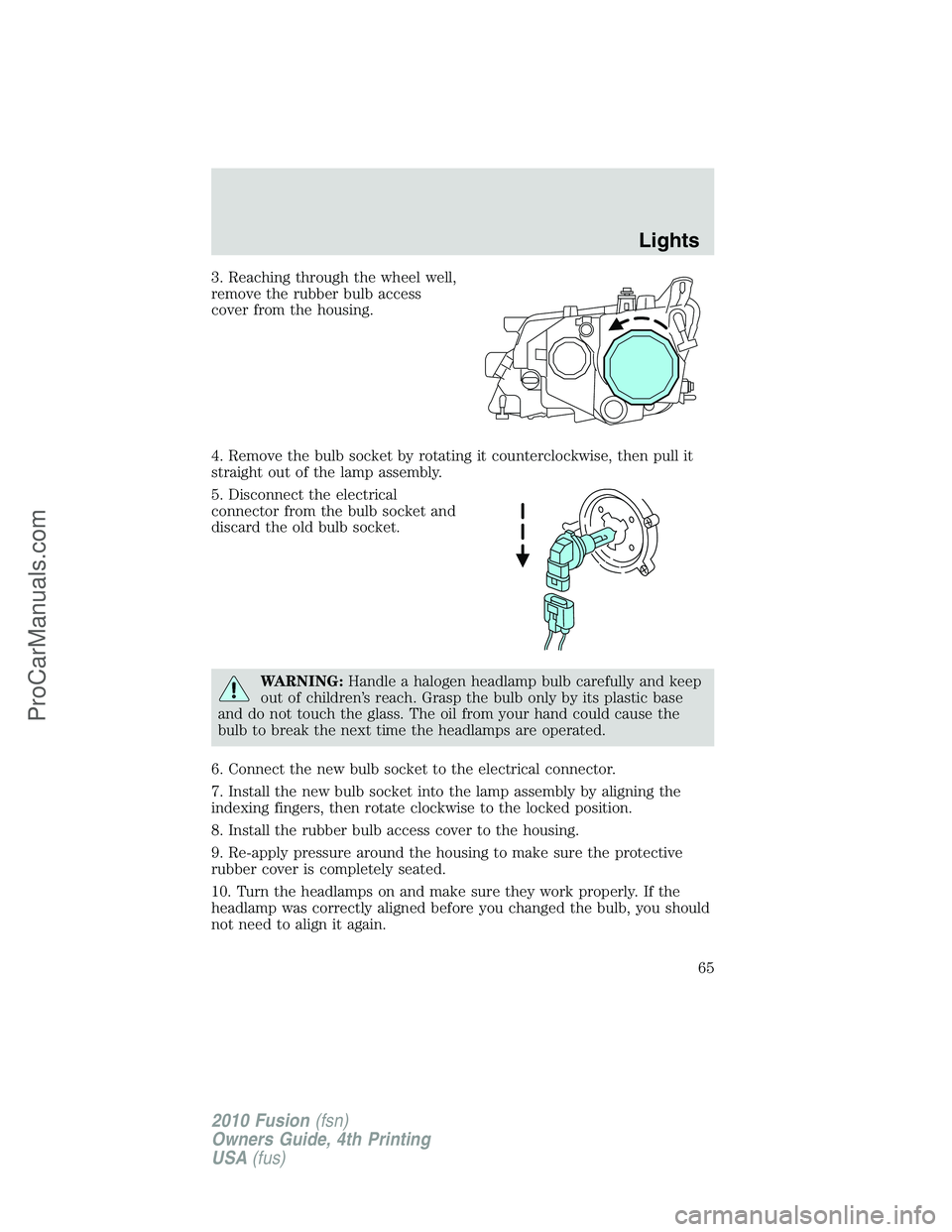
3. Reaching through the wheel well,
remove the rubber bulb access
cover from the housing.
4. Remove the bulb socket by rotating it counterclockwise, then pull it
straight out of the lamp assembly.
5. Disconnect the electrical
connector from the bulb socket and
discard the old bulb socket.
WARNING:Handle a halogen headlamp bulb carefully and keep
out of children’s reach. Grasp the bulb only by its plastic base
and do not touch the glass. The oil from your hand could cause the
bulb to break the next time the headlamps are operated.
6. Connect the new bulb socket to the electrical connector.
7. Install the new bulb socket into the lamp assembly by aligning the
indexing fingers, then rotate clockwise to the locked position.
8. Install the rubber bulb access cover to the housing.
9. Re-apply pressure around the housing to make sure the protective
rubber cover is completely seated.
10. Turn the headlamps on and make sure they work properly. If the
headlamp was correctly aligned before you changed the bulb, you should
not need to align it again.
Lights
65
2010 Fusion(fsn)
Owners Guide, 4th Printing
USA(fus)
ProCarManuals.com
Page 68 of 340
WARNING:To reduce the risk of vehicle damage and/or
personal burn injuries do not start your engine with the air
cleaner removed and do not remove it while the engine is running.
1. Release the clamps (2) that secure the air filter housing cover.
2. Carefully separate the two halves of the air filter housing.
3. Locate the mass air flow sensor electrical connector on the air outlet
tube (1). This connector will need to be unplugged.
4. Remove the air filter assembly.
5. Remove the bolts on the air inlet (3), then remove the air inlet.
6. Reach over the front bolster to access the bulb.
7. Remove the bulb socket by rotating it counterclockwise, then pull it
straight out of the lamp assembly.
Reverse these steps to complete the process.
For passenger side replacement of the front park/turn signal bulb, do
the following:
1. Turn the steering wheel left to gain access to the wheel well.
Lights
68
2010 Fusion(fsn)
Owners Guide, 4th Printing
USA(fus)
ProCarManuals.com
Page 73 of 340
TILT/TELESCOPE STEERING WHEEL
To adjust the steering wheel:
1. Pull the lever down to unlock the
steering column.
2. While the lever is in the down
position, move the steering wheel
up or down and in or out until you
find the desired position.
3. While holding the steering wheel
in place, pull the lever up to its
original position to lock the steering
column.
WARNING:Never adjust the steering wheel when the vehicle is
moving.
ILLUMINATED VISOR MIRROR (IF EQUIPPED)
Lift the mirror cover to turn on the
visor mirror lamps.
Slide-on-rod feature (if
equipped)
Rotate the visor towards the side
window and extend it rearward for
additional sunlight coverage.
Note:To stow the visor back into
the headliner, visor must be
retracted before moving it back
towards the windshield.
Driver Controls
73
2010 Fusion(fsn)
Owners Guide, 4th Printing
USA(fus)
ProCarManuals.com
Page 76 of 340
2. To calibrate, press and hold the 7
and 9 radio preset buttons together
for approximately 10 seconds until
CAL appears. Release the buttons.
3. Slowly drive the vehicle in a
circle (less than 3 mph [5 km/h])
until the CAL display changes to the
direction value (N, S, E, W, etc.). It
may take up to five circles to
complete calibration.
4. The compass is now calibrated.
CENTER CONSOLE
Your vehicle may be equipped with a
variety of console features. These
include:
1. Cupholders (with ambient lighting
[if equipped]).
2. Secondary storage bin (on hinges
inside utility compartment).
3. Utility compartment with power
point, auxiliary input jack (AIJ),
USB port (if equipped), and coin
holder inside.
WARNING:Use only soft cups in the cup holder. Hard objects
can injure you in a collision.
Driver Controls
76
2010 Fusion(fsn)
Owners Guide, 4th Printing
USA(fus)
ProCarManuals.com
Page 78 of 340

POWER WINDOWS
WARNING:Do not leave children unattended in the vehicle and
do not let children play with the power windows. They may
seriously injure themselves.
WARNING:When closing the power windows, you should verify
they are free of obstructions and ensure that children and/or
pets are not in the proximity of the window openings.
Press and pull the window switches
to open and close windows.
•Press down (to the first detent)
and hold the switch to open.
•Pull up (to the first detent) and
hold the switch to close.
Rear Window Buffeting:When one or both of the rear windows are
open, the vehicle may demonstrate a wind throb or buffeting noise. This
noise can be alleviated by lowering a front window approximately
2–3 inches (5–8 cm).
One-touch up or down (driver’s window only)
This feature allows the driver’s window to open or close fully without
holding the control down.
To operate one-touch down:
•Press the switch completely down
to the second detent and release
quickly. The window will open
fully. Momentarily press the
switch to any position to stop the
window operation.
If the switch is pressed and held to
the normal close or one-touch up position during a one-touch down
event, the window will stop. If, after 1/2 second the switch is still held,
the window will perform a normal close or one-touch up.
A
U
T
O
Driver Controls
78
2010 Fusion(fsn)
Owners Guide, 4th Printing
USA(fus)
ProCarManuals.com
Page 80 of 340

INTERIOR MIRROR
The interior rear view mirror has two pivot points on the support arm
which lets you adjust the mirror up or down and from side to side.
WARNING:Do not adjust the mirror while the vehicle is in
motion.
Automatic dimming interior rear view mirror (if equipped)
Your vehicle may be equipped with an interior rear view mirror that has
an auto-dimming function. The electronic day/night mirror will change
from the normal (high reflective) state to the non-glare (darkened) state
when bright lights (glare) reach the mirror. When the mirror detects
bright light from behind the vehicle, it will automatically adjust (darken)
to minimize glare.
The mirror will automatically return to the normal state whenever the
vehicle is placed in R (Reverse) to ensure a bright clear view when
backing up.
Do not block the sensors on the front and back of the interior
rear view mirror since this may impair proper mirror
performance.
Do not clean the housing or glass of any mirror with harsh
abrasives, fuel or other petroleum-based cleaning products.
Note:If equipped with a rearview camera system, a video image will be
displayed in the mirror or the navigation system display (if equipped)
when the vehicle is put in (R) Reverse. Refer toRearview camera
systemin theDrivingchapter.
Driver Controls
80
2010 Fusion(fsn)
Owners Guide, 4th Printing
USA(fus)
ProCarManuals.com
Page 81 of 340

EXTERIOR MIRRORS
Power side view mirrors
WARNING:Do not adjust the mirror while the vehicle is in
motion.
To adjust your mirrors:
1. Rotate the control clockwise to
adjust the right mirror and rotate
the control counterclockwise to
adjust the left mirror.
2. Move the control in the direction
you wish to tilt the mirror.
3. Return to the center position to lock mirrors in place.
Heated mirrors (if equipped)
Both mirrors are heated automatically to remove ice, mist and fog when
the rear window defrost is activated.
Do not remove ice from the mirrors with a scraper or attempt to
readjust the mirror glass if it is frozen in place. These actions
could cause damage to the glass and mirrors.
Blind spot mirrors (if equipped)
Your vehicle may be equipped with blind spot information mirrors. See
Blind spot information system (BLIS�) with cross traffic alert (CTA)
in theDrivingsection.
SPEED CONTROL
With speed control set, you can maintain a set speed without keeping
your foot on the accelerator pedal.
WARNING:Do not use the speed control in heavy traffic or on
roads that are winding, slippery or unpaved.
Driver Controls
81
2010 Fusion(fsn)
Owners Guide, 4th Printing
USA(fus)
ProCarManuals.com
Page 85 of 340

Pressto scroll through various menus and selections. Press
OK to confirm your selection.
For further information on the SYNC�system, refer to theSYNC�
supplement.
Navigation system/SYNC�hands
free control features (if
equipped)
Press
control briefly until the
voice
icon appears on the
Navigation display to use the voice
command feature.
Press
to activate phone mode or
answer a phone call. Press and
hold
to exit phone mode or end
a call.
For further information on the Navigation system/SYNC�system, refer to
theNavigation SystemandSYNC�supplements.
MOON ROOF (IF EQUIPPED)
You can move the glass panel of the moon roof back to open or tilt up
(from the closed position) to ventilate the vehicle.
WARNING:Do not let children play with the moon roof or leave
children unattended in the vehicle. They may seriously hurt
themselves.
To open the moon roof:
The moon roof is equipped with an
automatic, one-touch, express
opening, closing and venting feature.
Press and release the rear portion of
the control. To stop motion at any
time during the one-touch
operation, press the control a
second time.
Driver Controls
85
2010 Fusion(fsn)
Owners Guide, 4th Printing
USA(fus)
ProCarManuals.com


