Page 83 of 275
5. Press SETUP to enter your choice. The next optional setting will be
displayed.
6. Repeat steps 4 and 5 until you are done changing the optional
settings.
Disable MyKey™
To reset all MyKeys™ as Admin keys do the following:
1. Turn the vehicle on using the Admin key.
2. Press SETUP until PRESS RESET TO CLEAR MYKEY is displayed.
3. Press and release the RESET button. HOLD RESET TO CONFIRM
CLEAR is displayed.
4. Press and hold the RESET button for two seconds until ALL MYKEYS
CLEARED is displayed.
Check MyKey™ System Status
The vehicle System Check will provide the status of the following
MyKey™ parameters:
•MYKEY MILES — This odometer only tracks mileage when a MyKey™
is used. If mileage does not accumulate as expected, then the
MyKey™ is not being used by the intended user. The only way to
reset this odometer to zero is by disabling MyKey™. If this odometer
is lower than the last time you checked, then the MyKey™ system has
been recently cleared.
•# MYKEY(S) PROGRAMMED — Indicates how many MyKeys™ are
programmed to the vehicle. Can be used to detect deletion of a
MyKey™.
•# ADMIN KEYS PROGRAMMED — Indicates how many Admin keys
are programmed to the vehicle. Can be used to detect if an additional
spare key has been programmed to the vehicle
Refer toMessage centerin theInstrument Clusterchapter for MyKey™
system warnings displays.
Locks and Security
83
2010 Focus(foc)
Owners Guide, 1st Printing
USA(fus)
Page 84 of 275
Using MyKey™ with Remote Start Systems
MyKey™ is not compatible with non-Ford approved aftermarket remote
start systems. If you choose to install a remote start system please see
your authorized dealer for a Ford approved remote start system.
When using a Ford-approved remote start system, the default settings
will recognize the remote start system as an additional Admin Key with
its associated privileges. You should program the remote start system as
a MyKey™ in addition to the key that you have already programmed as a
MyKey™. To program the remote start system as MyKey™, do the
following:
1. Enter the vehicle and close all doors.
2. Remote start the vehicle using a remote start fob.
3. Follow steps 1-4 in theCreate a MyKey™section.
Note:For all vehicles, the number of MYKEY(S) PROGRAMMED or
ADMIN KEYS PROGRAMMED that is displayed in the MyKey™ System
Status menus will include the remote start system as an additional key in
the total count. See theCheck MyKey™ System Statussection.
Note:For all vehicles with remote start installed, it is possible to
program all original vehicle keys as MyKeys™, in which case, you will
need to use your remote start system to reset all MyKeys™ as Admin
keys by doing the following:
1. Enter the vehicle, close all doors.
2. Remote start the vehicle using your remote start fob.
3. Follow steps 1-4 in theDisable MyKey™section.
Locks and Security
84
2010 Focus(foc)
Owners Guide, 1st Printing
USA(fus)
Page 85 of 275
Troubleshooting
Condition Potential Causes
Can’t create a MyKey™•Key in the ignition is already a
MyKey™
•Key in the ignition is the last
remaining Admin key (there always
has to be at least one Admin key)
•SecuriLock�Passive Anti-Theft
System is disabled or in unlimited
mode
•Vehicle has been started using a
remote start system that is
programmed as MyKey™. Refer to
MyKey™ with Remote Start Systems
section.
Cannot program the MyKey™
optional settings•Key in the ignition is a MyKey™
•No MyKeys™ are programmed to
the vehicle. Refer toCreate a
MyKey™section
•Vehicle has been started using a
remote start system that is
programmed as MyKey™. Refer to
MyKey™ with Remote Start Systems
section.
Cannot disable MyKey™•Key in the ignition is a MyKey™
•No MyKeys™ are programmed to
the vehicle. Refer toCreate a
MyKey™section
•Vehicle has been started using a
remote start system that is
programmed as MyKey™. Refer to
MyKey™ with Remote Start Systems
section.
Lost the only Admin key•Purchase a new key from your
authorized dealer
Locks and Security
85
2010 Focus(foc)
Owners Guide, 1st Printing
USA(fus)
Page 86 of 275
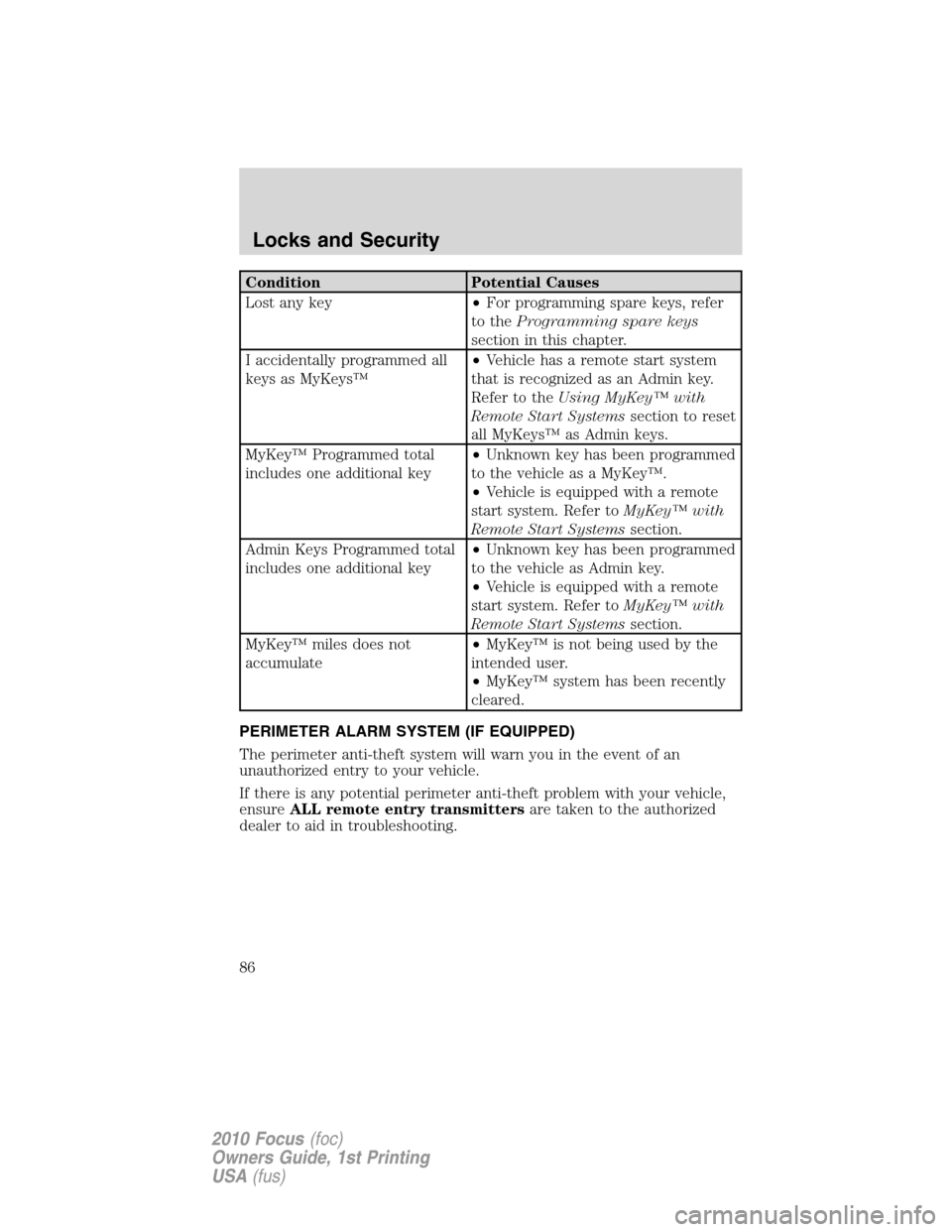
Condition Potential Causes
Lost any key•For programming spare keys, refer
to theProgramming spare keys
section in this chapter.
I accidentally programmed all
keys as MyKeys™•Vehicle has a remote start system
that is recognized as an Admin key.
Refer to theUsing MyKey™ with
Remote Start Systemssection to reset
all MyKeys™ as Admin keys.
MyKey™ Programmed total
includes one additional key•Unknown key has been programmed
to the vehicle as a MyKey™.
•Vehicle is equipped with a remote
start system. Refer toMyKey™ with
Remote Start Systemssection.
Admin Keys Programmed total
includes one additional key•Unknown key has been programmed
to the vehicle as Admin key.
•Vehicle is equipped with a remote
start system. Refer toMyKey™ with
Remote Start Systemssection.
MyKey™ miles does not
accumulate•MyKey™ is not being used by the
intended user.
•MyKey™ system has been recently
cleared.
PERIMETER ALARM SYSTEM (IF EQUIPPED)
The perimeter anti-theft system will warn you in the event of an
unauthorized entry to your vehicle.
If there is any potential perimeter anti-theft problem with your vehicle,
ensureALL remote entry transmittersare taken to the authorized
dealer to aid in troubleshooting.
Locks and Security
86
2010 Focus(foc)
Owners Guide, 1st Printing
USA(fus)
Page 87 of 275
Arming the system
When armed, this system will respond if unauthorized entry is
attempted. When unauthorized entry occurs, the system will flash the
park/turn lamps and will sound the horn.
The system is ready to arm whenever the key is removed from the
ignition. Either of the following actions will prearm the alarm system:
•Press the lock control on the remote entry transmitter.
•Open a door and press the power door lock control to lock all the
doors, and then close the door.
Disarming the system
You can disarm the system by any of the following actions:
•Unlock the doors by pressing the
control on your remote entry
transmitter.
•Unlock the doors with a key. Turn the key full travel (toward the front
of the vehicle) to ensure the alarm disarms.
•Turn the ignition to the on or start position with a programmed coded
ignition key.
•Press the panic control on the remote entry transmitter. This will only
shut off the horn and turn lamps when the alarm is sounding. The
alarm system will still be armed.
•If using a key in the driver’s door to unlock the vehicle, a chime will
sound when you open the door and you will have 12 seconds to
disarm the alarm system using any of the actions above, otherwise the
alarm will trigger.
Pressing the power door unlock control within the 20 second prearmed
mode will return the vehicle to a disarmed state.
Triggering the anti-theft system
The armed system will be triggered if any door, trunk or the hood is
opened without using the key or the remote entry transmitter.
Locks and Security
87
2010 Focus(foc)
Owners Guide, 1st Printing
USA(fus)
Page 94 of 275
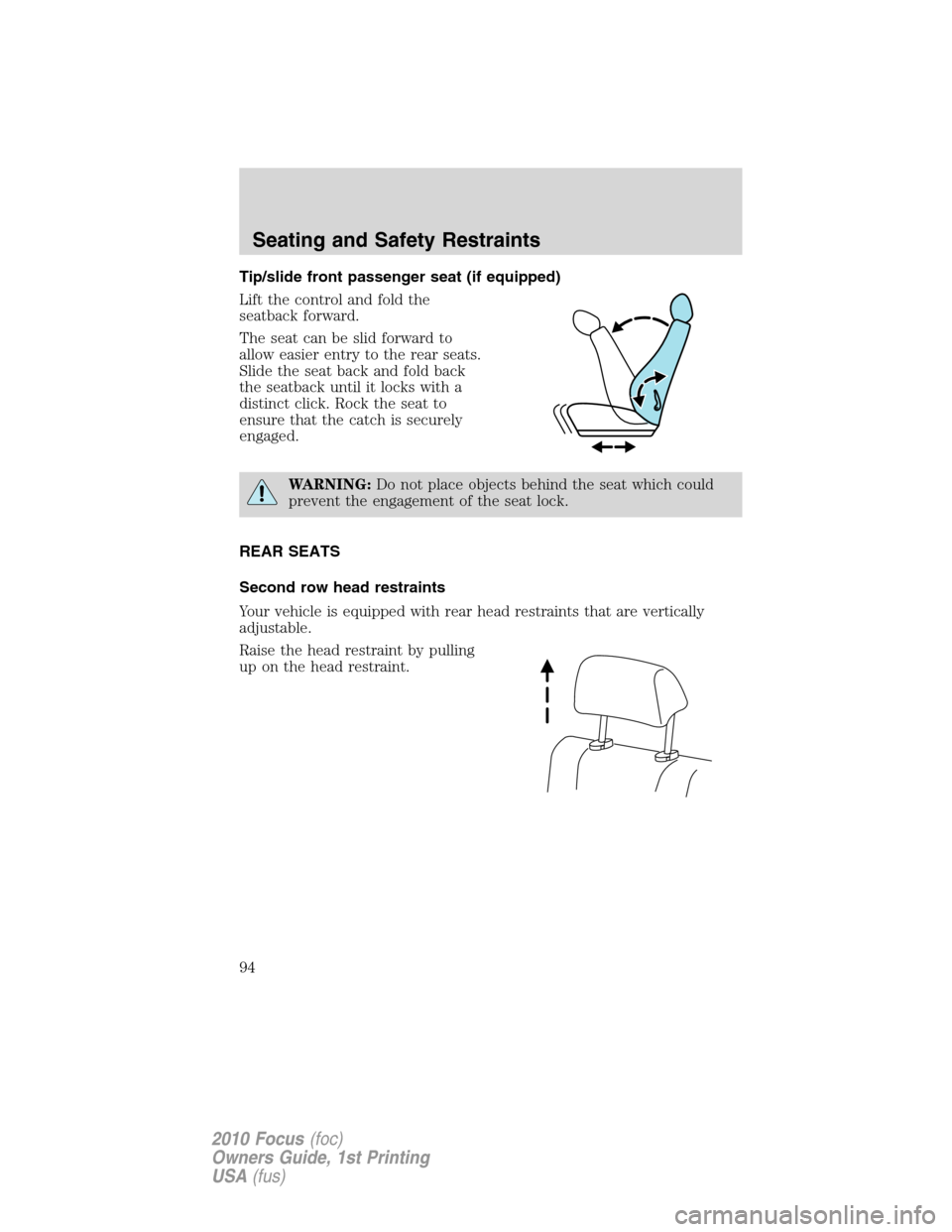
Tip/slide front passenger seat (if equipped)
Lift the control and fold the
seatback forward.
The seat can be slid forward to
allow easier entry to the rear seats.
Slide the seat back and fold back
the seatback until it locks with a
distinct click. Rock the seat to
ensure that the catch is securely
engaged.
WARNING:Do not place objects behind the seat which could
prevent the engagement of the seat lock.
REAR SEATS
Second row head restraints
Your vehicle is equipped with rear head restraints that are vertically
adjustable.
Raise the head restraint by pulling
up on the head restraint.
Seating and Safety Restraints
94
2010 Focus(foc)
Owners Guide, 1st Printing
USA(fus)
Page 100 of 275
WARNING:In a rollover crash, an unbelted person is
significantly more likely to die than a person wearing a seat belt.
WARNING:Each seating position in your vehicle has a specific
safety belt assembly which is made up of one buckle and one
tongue that are designed to be used as a pair. 1) Use the shoulder belt
on the outside shoulder only. Never wear the shoulder belt under the
arm. 2) Never swing the safety belt around your neck over the inside
shoulder. 3) Never use a single belt for more than one person.
WARNING:When possible, all children 12 years old and under
should be properly restrained in a rear seating position.
WARNING:Front and rear seat occupants, including pregnant
women, should wear safety belts for optimum protection in an
accident.
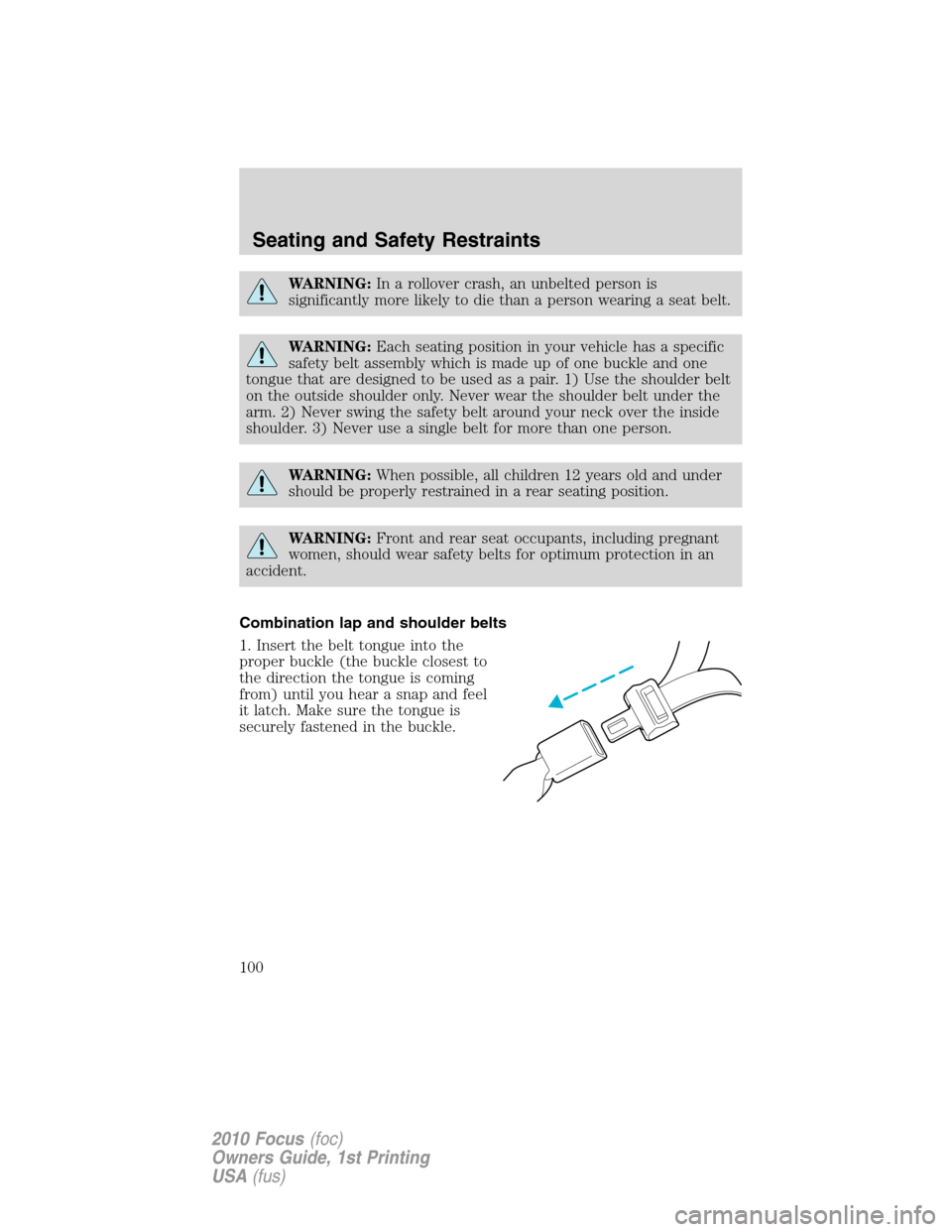
Combination lap and shoulder belts
1. Insert the belt tongue into the
proper buckle (the buckle closest to
the direction the tongue is coming
from) until you hear a snap and feel
it latch. Make sure the tongue is
securely fastened in the buckle.
Seating and Safety Restraints
100
2010 Focus(foc)
Owners Guide, 1st Printing
USA(fus)
Page 103 of 275
Safety belts with locking cinch tongue (rear center position only)
The locking cinch tongue will slide up and down the belt webbing when
the belt is in the stowed position or while putting safety belts on. When
the locking cinch tongue of the lap/shoulder combination safety belt is
latched into the buckle, the cinch tongue will allow the lap portion to
become shorter, but locks the webbing in place to restrict it from
becoming longer.
Before you can reach and latch a combination lap and shoulder belt
having a cinch tongue into the buckle, you may have to lengthen the lap
belt portion of it.
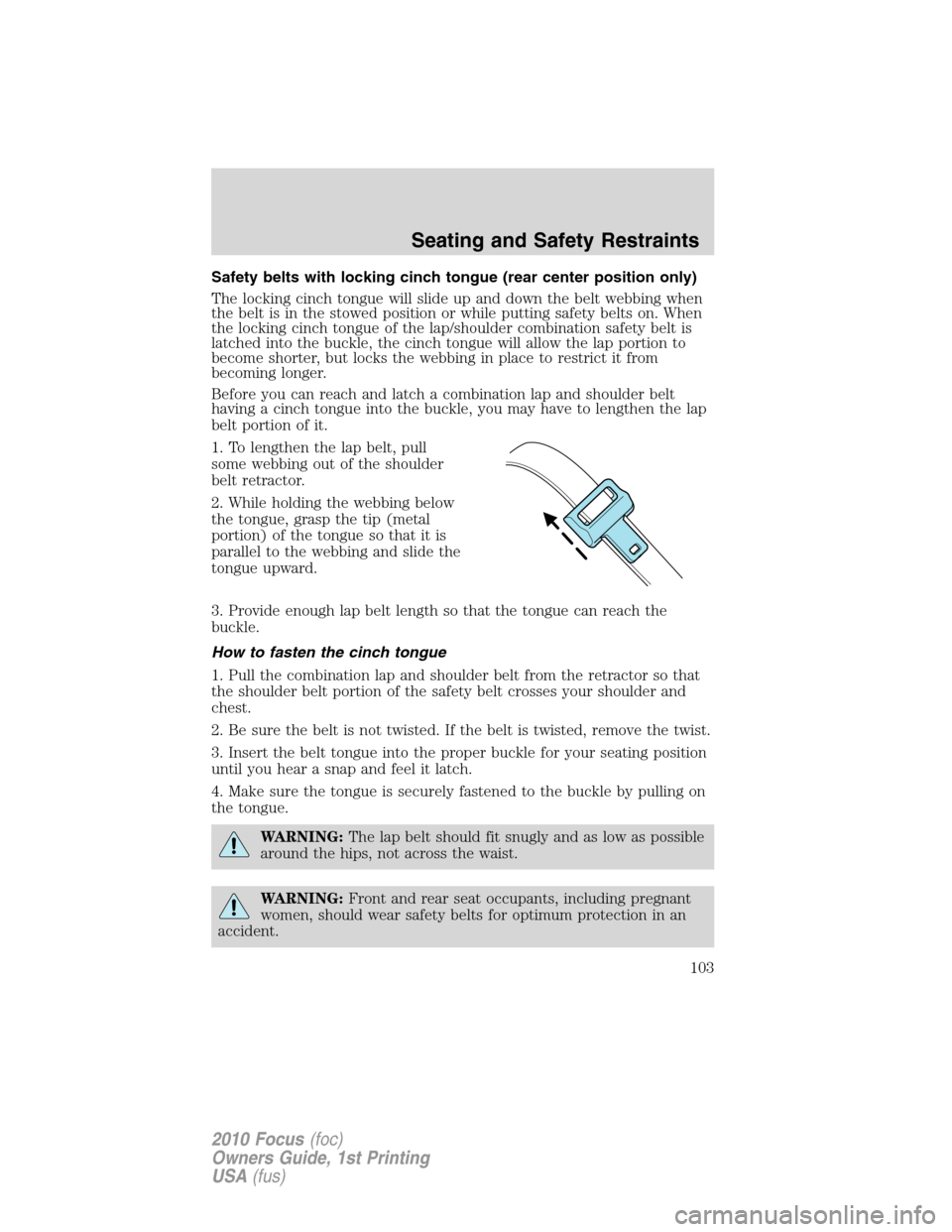
1. To lengthen the lap belt, pull
some webbing out of the shoulder
belt retractor.
2. While holding the webbing below
the tongue, grasp the tip (metal
portion) of the tongue so that it is
parallel to the webbing and slide the
tongue upward.
3. Provide enough lap belt length so that the tongue can reach the
buckle.
How to fasten the cinch tongue
1. Pull the combination lap and shoulder belt from the retractor so that
the shoulder belt portion of the safety belt crosses your shoulder and
chest.
2. Be sure the belt is not twisted. If the belt is twisted, remove the twist.
3. Insert the belt tongue into the proper buckle for your seating position
until you hear a snap and feel it latch.
4. Make sure the tongue is securely fastened to the buckle by pulling on
the tongue.
WARNING:The lap belt should fit snugly and as low as possible
around the hips, not across the waist.
WARNING:Front and rear seat occupants, including pregnant
women, should wear safety belts for optimum protection in an
accident.
Seating and Safety Restraints
103
2010 Focus(foc)
Owners Guide, 1st Printing
USA(fus)