Page 39 of 275
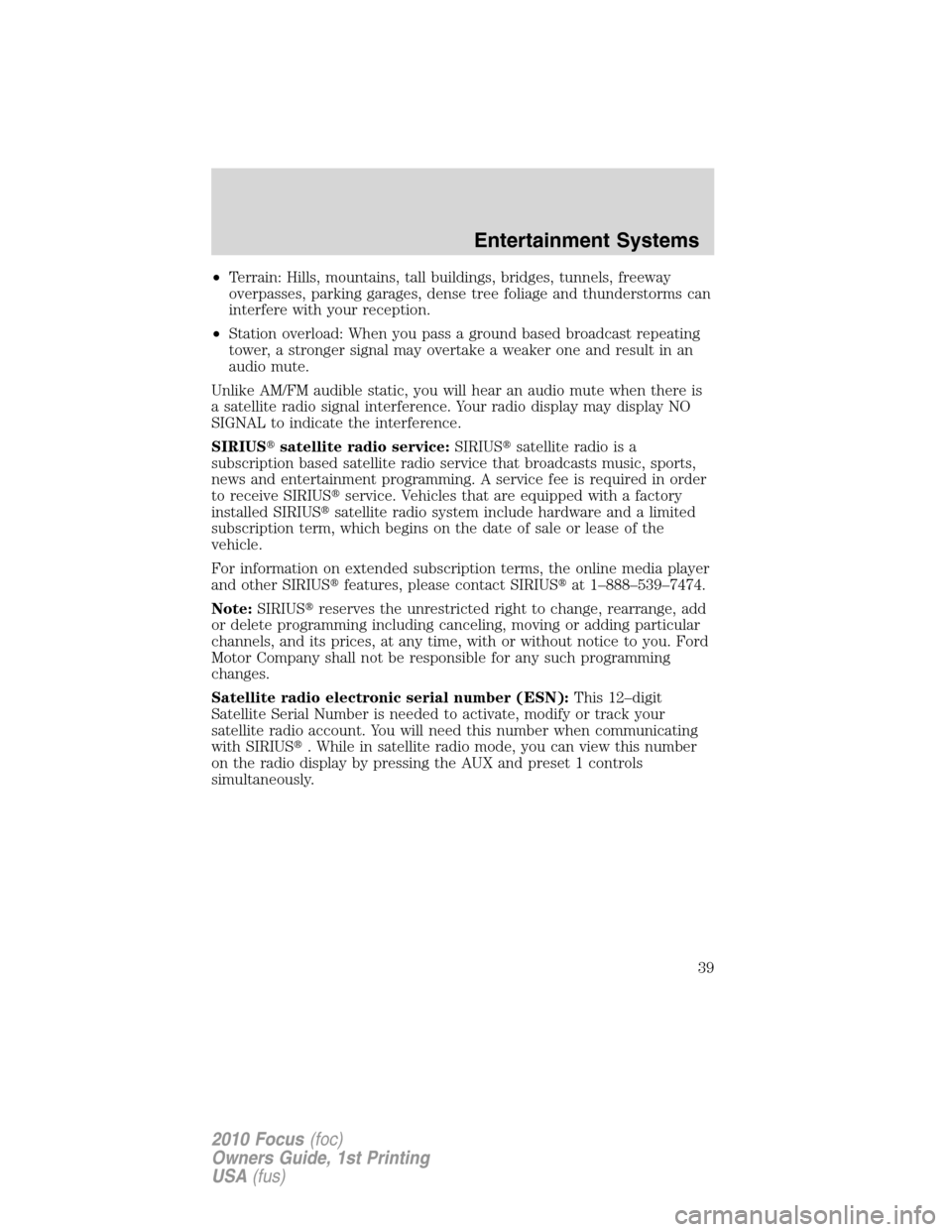
•Terrain: Hills, mountains, tall buildings, bridges, tunnels, freeway
overpasses, parking garages, dense tree foliage and thunderstorms can
interfere with your reception.
•Station overload: When you pass a ground based broadcast repeating
tower, a stronger signal may overtake a weaker one and result in an
audio mute.
Unlike AM/FM audible static, you will hear an audio mute when there is
a satellite radio signal interference. Your radio display may display NO
SIGNAL to indicate the interference.
SIRIUS�satellite radio service:SIRIUS�satellite radio is a
subscription based satellite radio service that broadcasts music, sports,
news and entertainment programming. A service fee is required in order
to receive SIRIUS�service. Vehicles that are equipped with a factory
installed SIRIUS�satellite radio system include hardware and a limited
subscription term, which begins on the date of sale or lease of the
vehicle.
For information on extended subscription terms, the online media player
and other SIRIUS�features, please contact SIRIUS�at 1–888–539–7474.
Note:SIRIUS�reserves the unrestricted right to change, rearrange, add
or delete programming including canceling, moving or adding particular
channels, and its prices, at any time, with or without notice to you. Ford
Motor Company shall not be responsible for any such programming
changes.
Satellite radio electronic serial number (ESN):This 12–digit
Satellite Serial Number is needed to activate, modify or track your
satellite radio account. You will need this number when communicating
with SIRIUS�. While in satellite radio mode, you can view this number
on the radio display by pressing the AUX and preset 1 controls
simultaneously.
Entertainment Systems
39
2010 Focus(foc)
Owners Guide, 1st Printing
USA(fus)
Page 40 of 275
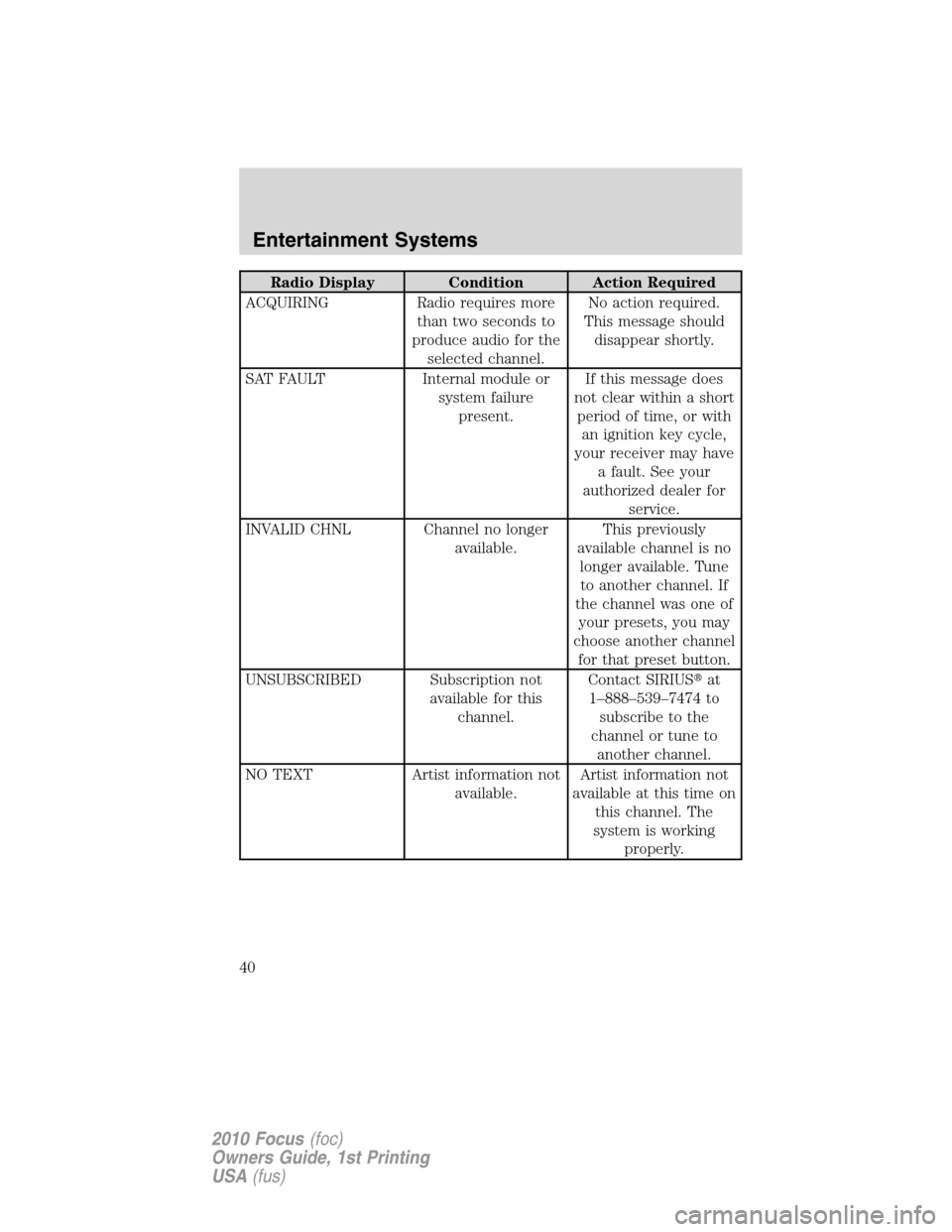
Radio Display Condition Action Required
ACQUIRING Radio requires more
than two seconds to
produce audio for the
selected channel.No action required.
This message should
disappear shortly.
SAT FAULT Internal module or
system failure
present.If this message does
not clear within a short
period of time, or with
an ignition key cycle,
your receiver may have
a fault. See your
authorized dealer for
service.
INVALID CHNL Channel no longer
available.This previously
available channel is no
longer available. Tune
to another channel. If
the channel was one of
your presets, you may
choose another channel
for that preset button.
UNSUBSCRIBED Subscription not
available for this
channel.Contact SIRIUS�at
1–888–539–7474 to
subscribe to the
channel or tune to
another channel.
NO TEXT Artist information not
available.Artist information not
available at this time on
this channel. The
system is working
properly.
Entertainment Systems
40
2010 Focus(foc)
Owners Guide, 1st Printing
USA(fus)
Page 81 of 275

If the key was not successfully programmed, it will not start your
vehicle’s engine and the theft indicator light will flash on and off, or stay
on for more than three seconds. If failure repeats, bring your vehicle to
your authorized dealer to have the new key(s) programmed.
To program additional new unprogrammed key(s), repeat this procedure
from Step 1 for each additional key.
Note:To program MyKey features, refer toMyKeyin this chapter.
MYKEY™
The MyKey™ feature allows you to program a restricted driving mode to
promote good driving habits. All but one of the keys programmed to the
vehicle can be activated as a MyKey™. The key will remain restricted
until MyKey™ is disabled. Any remaining keys are referred to as an
“Administrator key” or Admin key. The Admin key can be used to create
a MyKey™, program optional MyKey™ settings, and disable the
MyKey™ feature. When the MyKey™ feature is enabled the user can use
System Check in the message center to see how many MyKeys™ and
Admin keys are programmed to the vehicle, and how many total miles
have been driven with the MyKey™ active.
MyKey™ Restricted Features
Standard settings – These settings cannot be changed
•
The audio system will be muted whenever Belt-Minder�is activated
until the safety belts are buckled. Refer to theSeating and Safety
Restraintschapter for a detailed description of Belt-Minder�operation.
•Low fuel warnings are displayed in the message center followed by a
chime when the Distance to Empty value reaches 75 miles (120 km).
•The reverse sensing system cannot be turned off.
Optional settings – These settings can be changed
•Vehicle speed is limited to 80 mph (130 km/h). Visual warnings are
displayed followed by a chime when the vehicle speed has reached
80 mph (130 km/h).
•Visual warnings are displayed followed by a chime when a preselected
vehicle speed of 45, 55 or 65 mph (75, 90, or 105 km/h) is exceeded
•The maximum volume of the audio system is limited to 45%. MYKEY
VOLUME LIMITED will be displayed in the radio or (if equipped)
navigation screen when attempting to exceed the limited volume
Locks and Security
81
2010 Focus(foc)
Owners Guide, 1st Printing
USA(fus)
Page 270 of 275

A
AdvanceTrac ..............................179
Air cleaner filter ...............256–257
Air conditioning
manual heating and air
conditioning system .................42
Airbag supplemental restraint
system ........................110, 119, 121
and child safety seats ............112
description ..............110, 119, 121
disposal ....................................125
driver airbag ............112, 120, 122
indicator light .................118, 124
operation .................112, 120, 122
passenger airbag .....112, 120, 122
side airbag ...............................119
Ambient mood/lighting ...............49
AM/FM .........................................25
Antifreeze
(see Engine coolant) ................236
Anti-lock brake system
(see Brakes) ..............................177
Anti-theft system ..................78, 86
arming the system ....................87
disarming a triggered system ..87
triggering ...................................87
Audio system (see Radio) .........25
Automatic transmission ............184
driving an automatic
overdrive .................................184
fluid, adding ............................253
fluid, checking ........................253
fluid, refill capacities ..............258
fluid, specification ..................258
Auxiliary input jack (Line in) ....33
Auxiliary power point .................58Axle
refill capacities ........................258
B
Battery .......................................234
acid, treating emergencies .....234
jumping a disabled battery ....205
maintenance-free ....................234
replacement, specifications ...257
servicing ..................................234
Belt-Minder�.............................105
Booster seats .............................140
Brakes ................................176–177
anti-lock ...................................177
anti-lock brake system (ABS)
warning light ...........................177
fluid, checking and adding ....253
fluid, refill capacities ..............258
fluid, specifications .................258
lubricant specifications ..........258
parking ....................................178
shift interlock ..........................183
Break-in period .............................5
Bulbs ............................................49
C
Capacities for refilling fluids ....258
CD ................................................25
Cell phone use ..............................8
Child safety seats ......................129
attaching with tether straps ..138
in front seat ....................130, 133
in rear seat ......................130, 133
LATCH .....................................135
recommendations ...................127
Child safety seats - booster
seats ...........................................140
Index
270
2010 Focus(foc)
Owners Guide, 1st Printing
USA(fus)