Page 56 of 419
•Terrain: Hills, mountains, tall buildings, bridges, tunnels, freeway
overpasses, parking garages, dense tree foliage and thunderstorms can
interfere with your reception.
•Station overload: When you pass a ground based broadcast repeating
tower, a stronger signal may overtake a weaker one and result in an
audio mute.
Unlike AM/FM audible static, you will hear an audio mute when there is
a satellite radio signal interference. Your radio display may display NO
SIGNAL to indicate the interference.
SIRIUS�satellite radio service:SIRIUS�Satellite Radio is a
subscription based satellite radio service that broadcasts music, sports,
news and entertainment programming. A service fee is required in order
to receive SIRIUS�service. Vehicles that are equipped with a factory
installed SIRIUS�Satellite Radio system include:
•Hardware and limited subscription term, which begins on the date of
sale or lease of the vehicle.
•Use of online media player providing access to all SIRIUS�music
channels over the internet using any computer connected to the
internet (U.S. customers only).
For information on extended subscription terms, contact SIRIUS�at
1–888–539–7474.
Note:SIRIUS�reserves the unrestricted right to change, rearrange, add
or delete programming including canceling, moving or adding particular
channels, and its prices, at any time, with or without notice to you. Ford
Motor Company shall not be responsible for any such programming
changes.
Satellite Radio Electronic Serial Number (ESN):This 12–digit
Satellite Serial Number is needed to activate, modify or track your
satellite radio account. You will need this number when communicating
with SIRIUS�. While in Satellite Radio mode, you can view this number
on the radio display by pressing AUX and Preset 1 control
simultaneously.
Entertainment Systems
56
2010 F-150(f12)
Owners Guide, 1st Printing
USA(fus)
Page 57 of 419
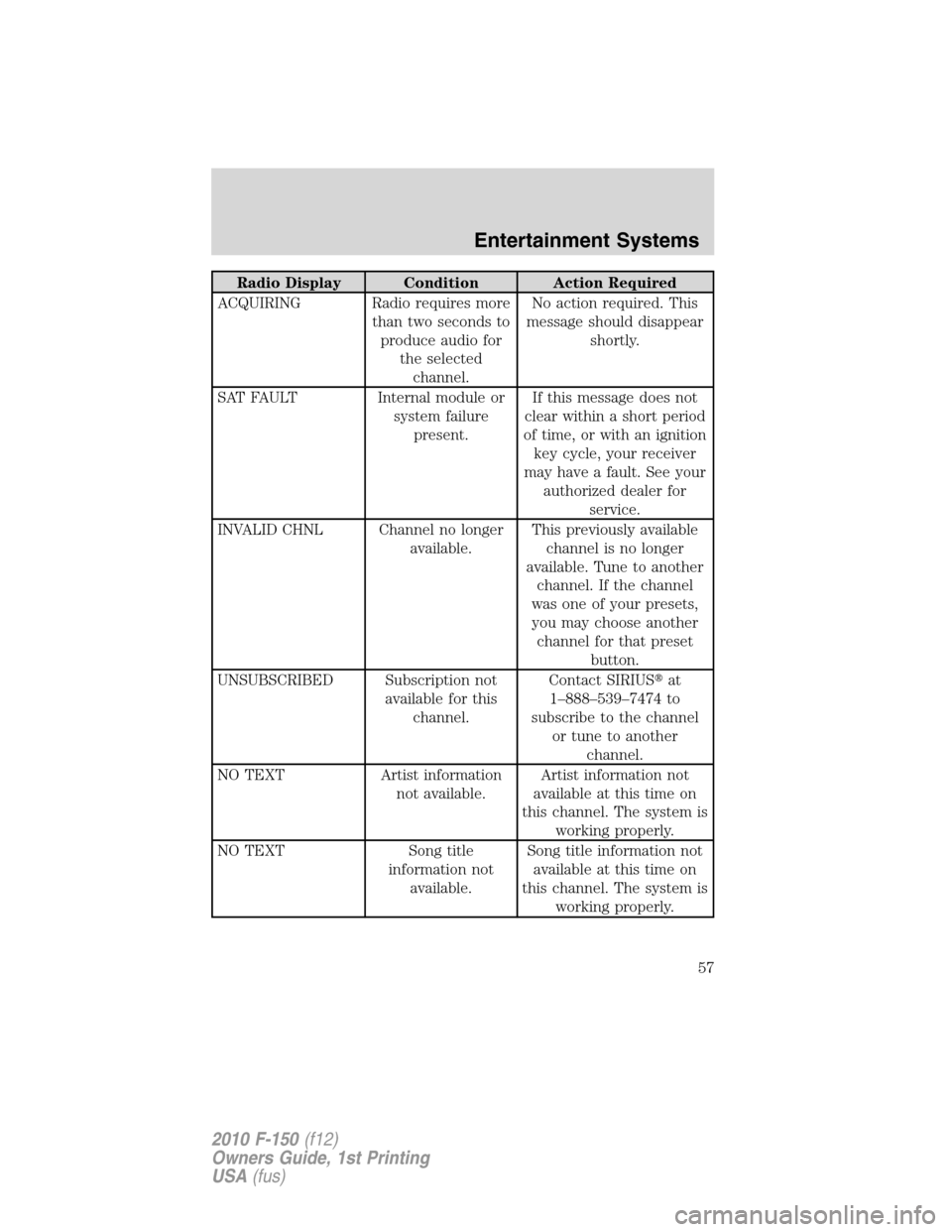
Radio Display Condition Action Required
ACQUIRING Radio requires more
than two seconds to
produce audio for
the selected
channel.No action required. This
message should disappear
shortly.
SAT FAULT Internal module or
system failure
present.If this message does not
clear within a short period
of time, or with an ignition
key cycle, your receiver
may have a fault. See your
authorized dealer for
service.
INVALID CHNL Channel no longer
available.This previously available
channel is no longer
available. Tune to another
channel. If the channel
was one of your presets,
you may choose another
channel for that preset
button.
UNSUBSCRIBED Subscription not
available for this
channel.Contact SIRIUS�at
1–888–539–7474 to
subscribe to the channel
or tune to another
channel.
NO TEXT Artist information
not available.Artist information not
available at this time on
this channel. The system is
working properly.
NO TEXT Song title
information not
available.Song title information not
available at this time on
this channel. The system is
working properly.
Entertainment Systems
57
2010 F-150(f12)
Owners Guide, 1st Printing
USA(fus)
Page 58 of 419
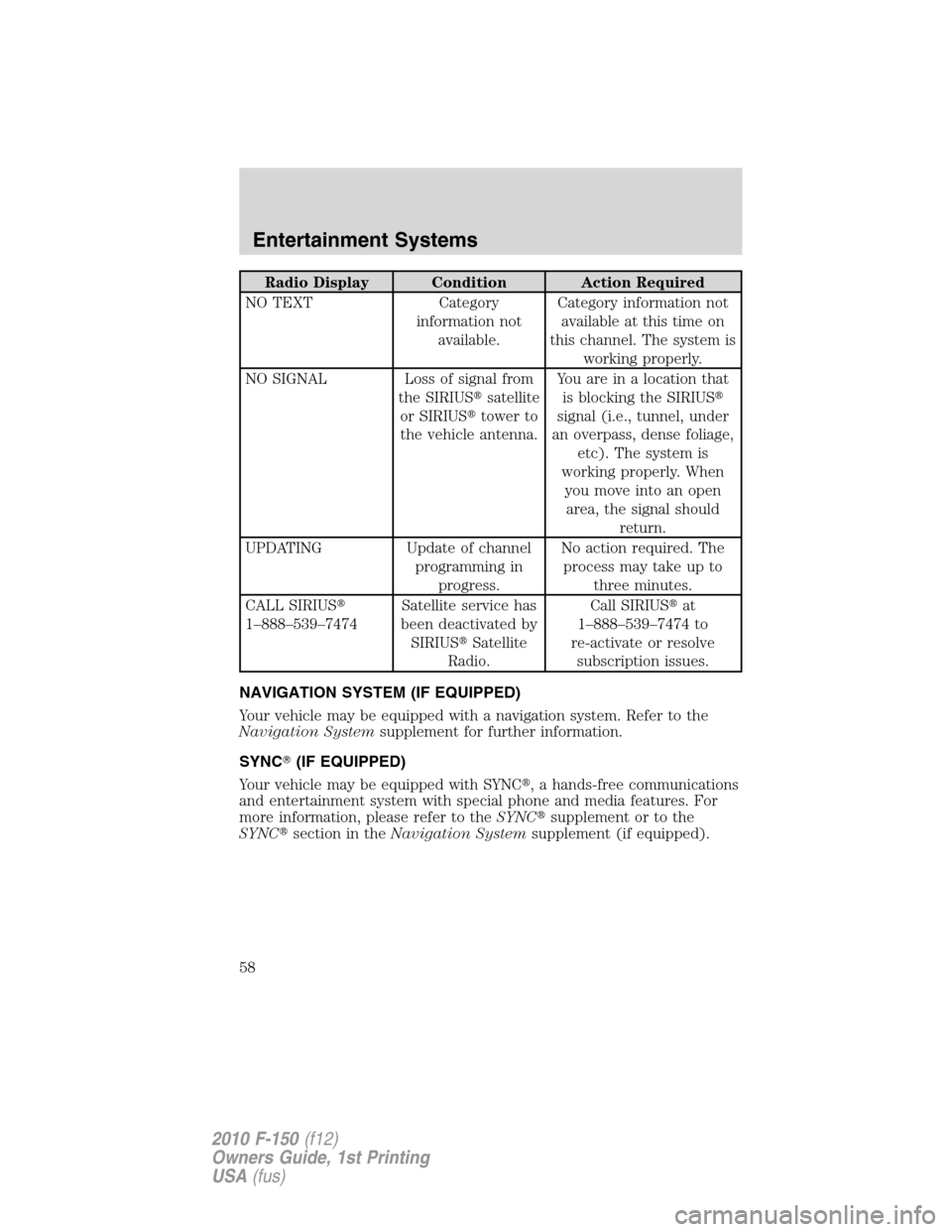
Radio Display Condition Action Required
NO TEXT Category
information not
available.Category information not
available at this time on
this channel. The system is
working properly.
NO SIGNAL Loss of signal from
the SIRIUS�satellite
or SIRIUS�tower to
the vehicle antenna.Youareinalocationthat
is blocking the SIRIUS�
signal (i.e., tunnel, under
an overpass, dense foliage,
etc). The system is
working properly. When
you move into an open
area, the signal should
return.
UPDATING Update of channel
programming in
progress.No action required. The
process may take up to
three minutes.
CALL SIRIUS�
1–888–539–7474Satellite service has
been deactivated by
SIRIUS�Satellite
Radio.Call SIRIUS�at
1–888–539–7474 to
re-activate or resolve
subscription issues.
NAVIGATION SYSTEM (IF EQUIPPED)
Your vehicle may be equipped with a navigation system. Refer to the
Navigation Systemsupplement for further information.
SYNC�(IF EQUIPPED)
Your vehicle may be equipped with SYNC�, a hands-free communications
and entertainment system with special phone and media features. For
more information, please refer to theSYNC�supplement or to the
SYNC�section in theNavigation Systemsupplement (if equipped).
Entertainment Systems
58
2010 F-150(f12)
Owners Guide, 1st Printing
USA(fus)
Page 89 of 419
Compass zone adjustment
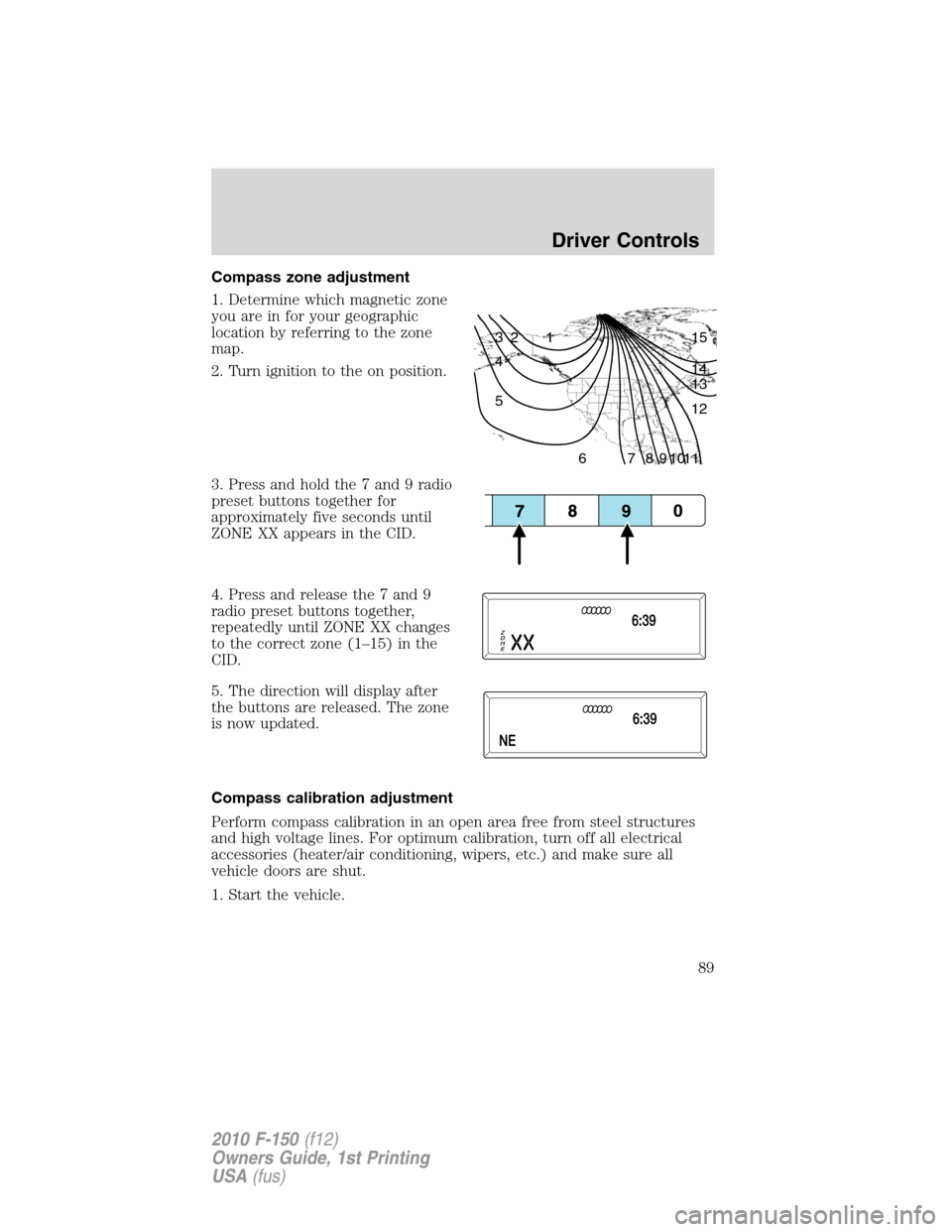
1. Determine which magnetic zone
you are in for your geographic
location by referring to the zone
map.
2. Turn ignition to the on position.
3. Press and hold the 7 and 9 radio
preset buttons together for
approximately five seconds until
ZONE XX appears in the CID.
4. Press and release the 7 and 9
radio preset buttons together,
repeatedly until ZONE XX changes
to the correct zone (1–15) in the
CID.
5. The direction will display after
the buttons are released. The zone
is now updated.
Compass calibration adjustment
Perform compass calibration in an open area free from steel structures
and high voltage lines. For optimum calibration, turn off all electrical
accessories (heater/air conditioning, wipers, etc.) and make sure all
vehicle doors are shut.
1. Start the vehicle.
1 2 3
4
5
6 7 8 9 101112 13 14 15
Driver Controls
89
2010 F-150(f12)
Owners Guide, 1st Printing
USA(fus)
Page 90 of 419

2. To calibrate, press and hold the 7
and 9 radio preset buttons together
for approximately 10 seconds until
CAL appears. Release the buttons.
3. Slowly drive the vehicle in a
circle (less than 3 mph [5 km/h])
until the CAL display changes to the
direction value (N, S, E, W, etc.). It
may take up to five circles to
complete calibration.
4. The compass is now calibrated.
AUXILIARY POWER POINT (12VDC)
Power outlets are designed for accessory plugs only. Do not insert
any other object in the power outlet as this will damage the
outlet and blow the fuse. Do not hang any type of accessory or
accessory bracket from the plug. Improper use of the power
outlet can cause damage not covered by your warranty.
Auxiliary power points can be found in the following locations:
•On the instrument panel
•Inside the center console storage area (if equipped)
•On the rear of the center console (if equipped) accessible from the
rear seat
Always keep the power point caps closed when not being used.
Do not use the power point for operating the cigarette lighter element (if
equipped).
To prevent the fuse from being blown, do not use the power point(s)
over the vehicle capacity of 12 VDC/180W. If the power point or cigar
lighter socket is not working, a fuse may have blown. Refer toFuses and
relaysin theRoadside Emergencieschapter for information on
checking and replacing fuses.
To have full capacity usage of your power point, the engine is required to
be running to avoid unintentional discharge of the battery. To prevent
the battery from being discharged:
•do not use the power point longer than necessary when the engine is
not running,
Driver Controls
90
2010 F-150(f12)
Owners Guide, 1st Printing
USA(fus)
Page 101 of 419
Turning off speed control
There are two ways to turn off the speed control:
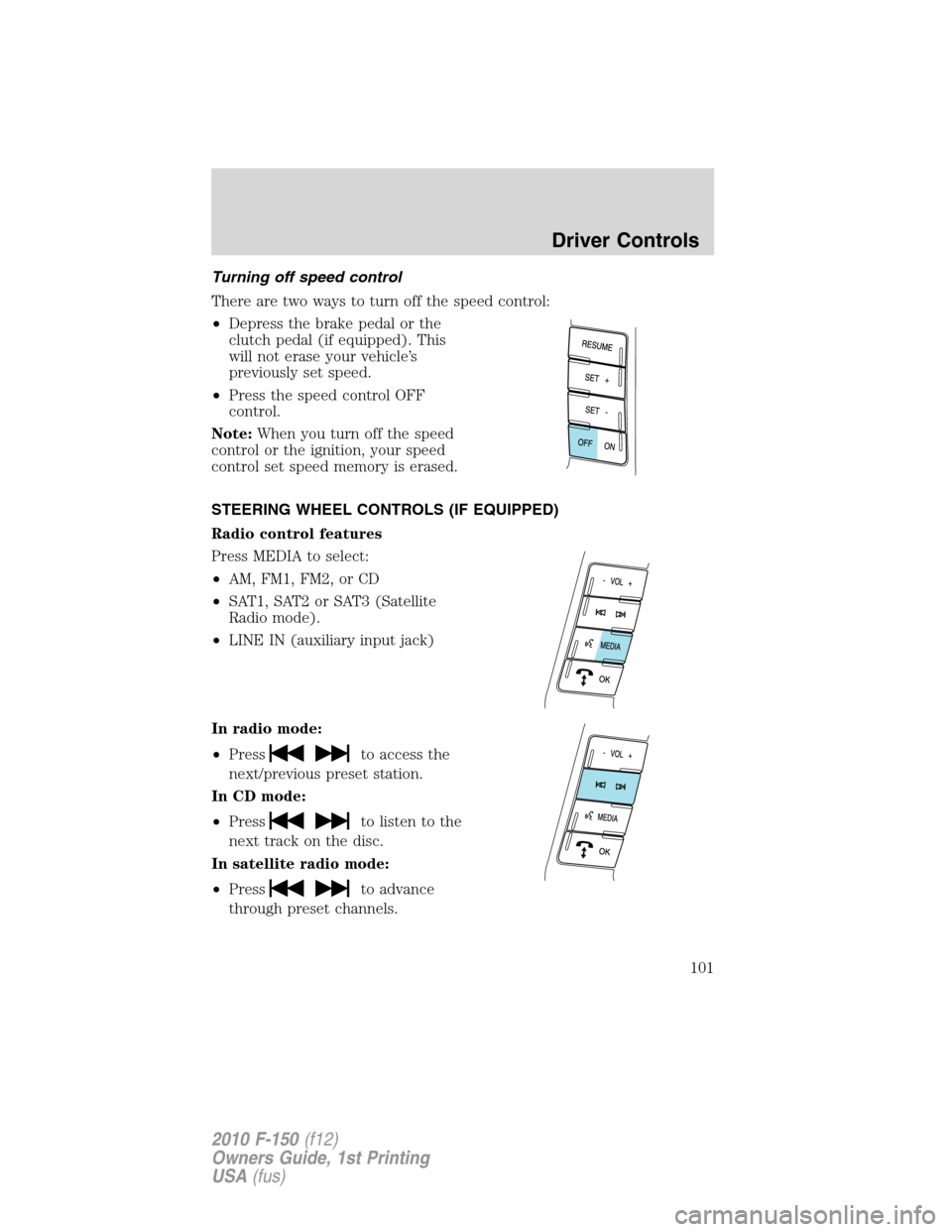
•Depress the brake pedal or the
clutch pedal (if equipped). This
will not erase your vehicle’s
previously set speed.
•Press the speed control OFF
control.
Note:When you turn off the speed
control or the ignition, your speed
control set speed memory is erased.
STEERING WHEEL CONTROLS (IF EQUIPPED)
Radio control features
Press MEDIA to select:
•AM, FM1, FM2, or CD
•SAT1, SAT2 or SAT3 (Satellite
Radio mode).
•LINE IN (auxiliary input jack)
In radio mode:
•Press
to access the
next/previous preset station.
In CD mode:
•Press
to listen to the
next track on the disc.
In satellite radio mode:
•Press
to advance
through preset channels.
Driver Controls
101
2010 F-150(f12)
Owners Guide, 1st Printing
USA(fus)
Page 102 of 419
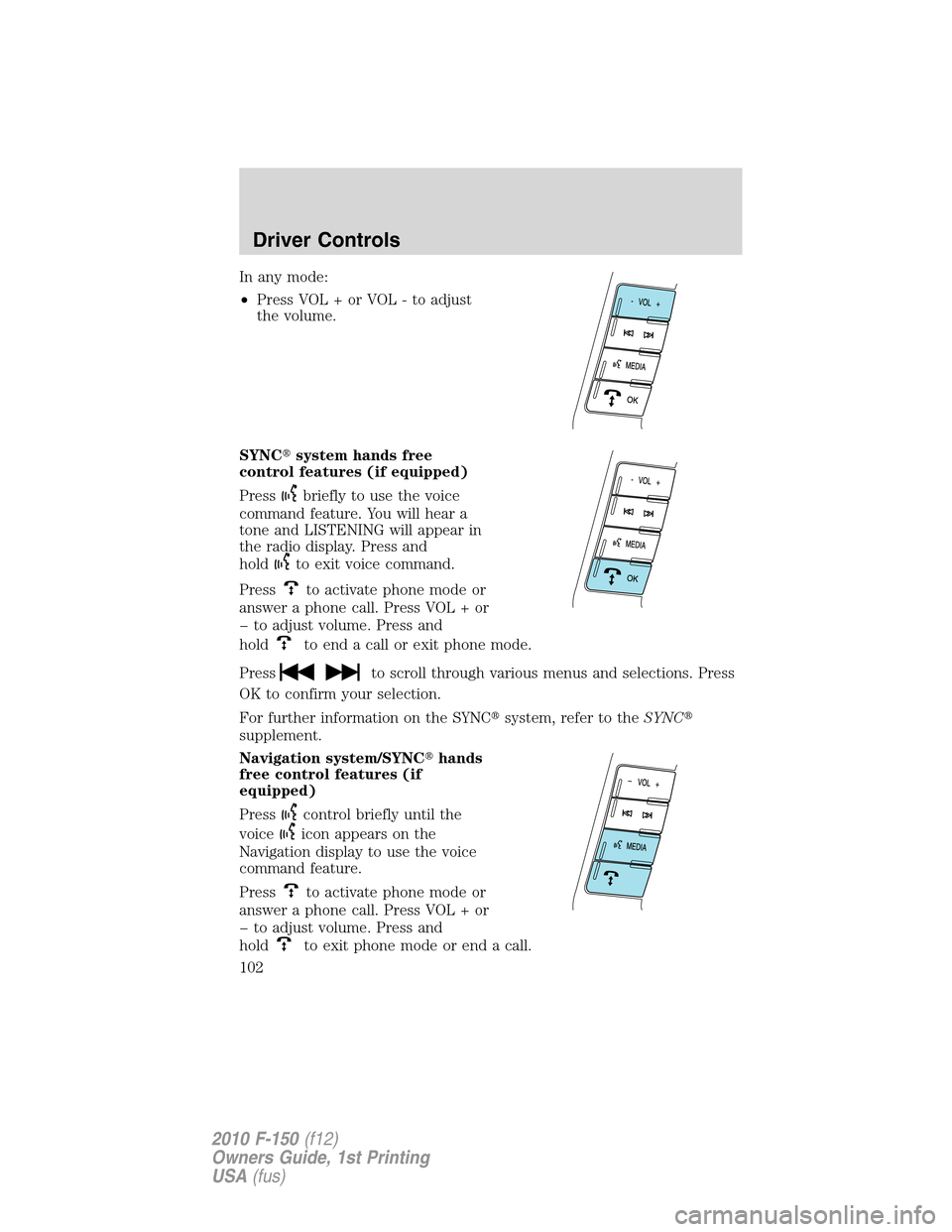
In any mode:
•Press VOL + or VOL - to adjust
the volume.
SYNC�system hands free
control features (if equipped)
Press
briefly to use the voice
command feature. You will hear a
tone and LISTENING will appear in
the radio display. Press and
hold
to exit voice command.
Press
to activate phone mode or
answer a phone call. Press VOL + or
to adjust volume. Press and
hold
to end a call or exit phone mode.
Press
to scroll through various menus and selections. Press
OK to confirm your selection.
For further information on the SYNC�system, refer to theSYNC�
supplement.
Navigation system/SYNC�hands
free control features (if
equipped)
Press
control briefly until the
voice
icon appears on the
Navigation display to use the voice
command feature.
Press
to activate phone mode or
answer a phone call. Press VOL + or
to adjust volume. Press and
hold
to exit phone mode or end a call.
Driver Controls
102
2010 F-150(f12)
Owners Guide, 1st Printing
USA(fus)
Page 104 of 419
The moon roof has a built-in sliding shade that can be manually opened
or closed when the glass panel is shut. To close the shade, pull it toward
the front of the vehicle.
UNIVERSAL GARAGE DOOR OPENER (IF EQUIPPED)
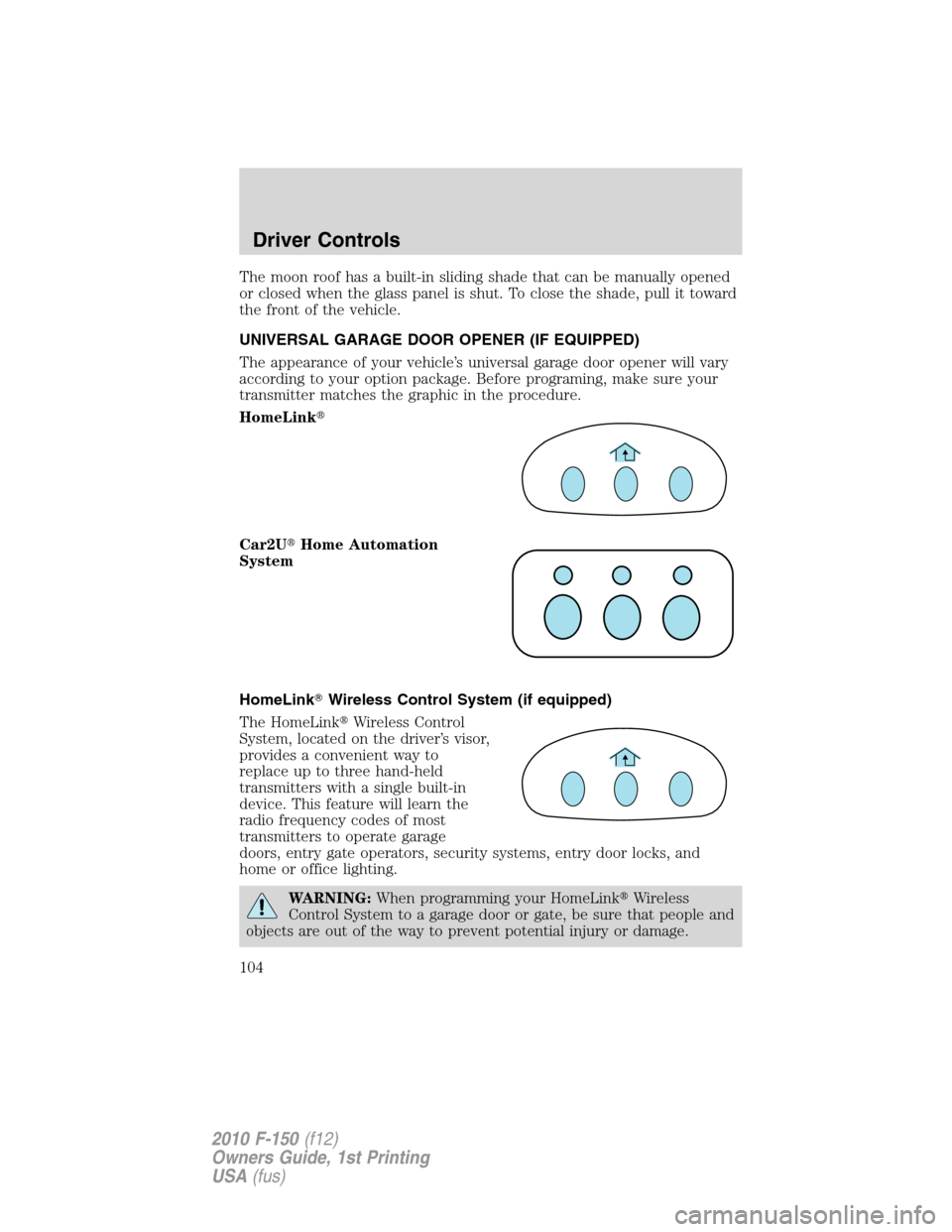
The appearance of your vehicle’s universal garage door opener will vary
according to your option package. Before programing, make sure your
transmitter matches the graphic in the procedure.
HomeLink�
Car2U�Home Automation
System
HomeLink�Wireless Control System (if equipped)
The HomeLink�Wireless Control
System, located on the driver’s visor,
provides a convenient way to
replace up to three hand-held
transmitters with a single built-in
device. This feature will learn the
radio frequency codes of most
transmitters to operate garage
doors, entry gate operators, security systems, entry door locks, and
home or office lighting.
WARNING:When programming your HomeLink�Wireless
Control System to a garage door or gate, be sure that people and
objects are out of the way to prevent potential injury or damage.
Driver Controls
104
2010 F-150(f12)
Owners Guide, 1st Printing
USA(fus)