2010 FORD EXPLORER instrument cluster
[x] Cancel search: instrument clusterPage 35 of 404
Usually, when something affects the compass readings, the compass will
correct itself after a few days of operating your vehicle in normal
conditions. If the compass still appears to be inaccurate, a manual
calibration may be necessary. Refer toRESET FOR ZONE SETTING /
PRESS RESET FOR CALIBRATIONfollowing.
Most geographic areas (zones) have a magnetic north compass point that
varies slightly from the northerly direction on maps. This variation is four
degrees between adjacent zones and will become noticeable as the
vehicle crosses multiple zones. A correct zone setting will eliminate this
error. Refer toRESET FOR ZONE SETTING / PRESS RESET FOR
CALIBRATIONfollowing.
RESET FOR ZONE SETTING
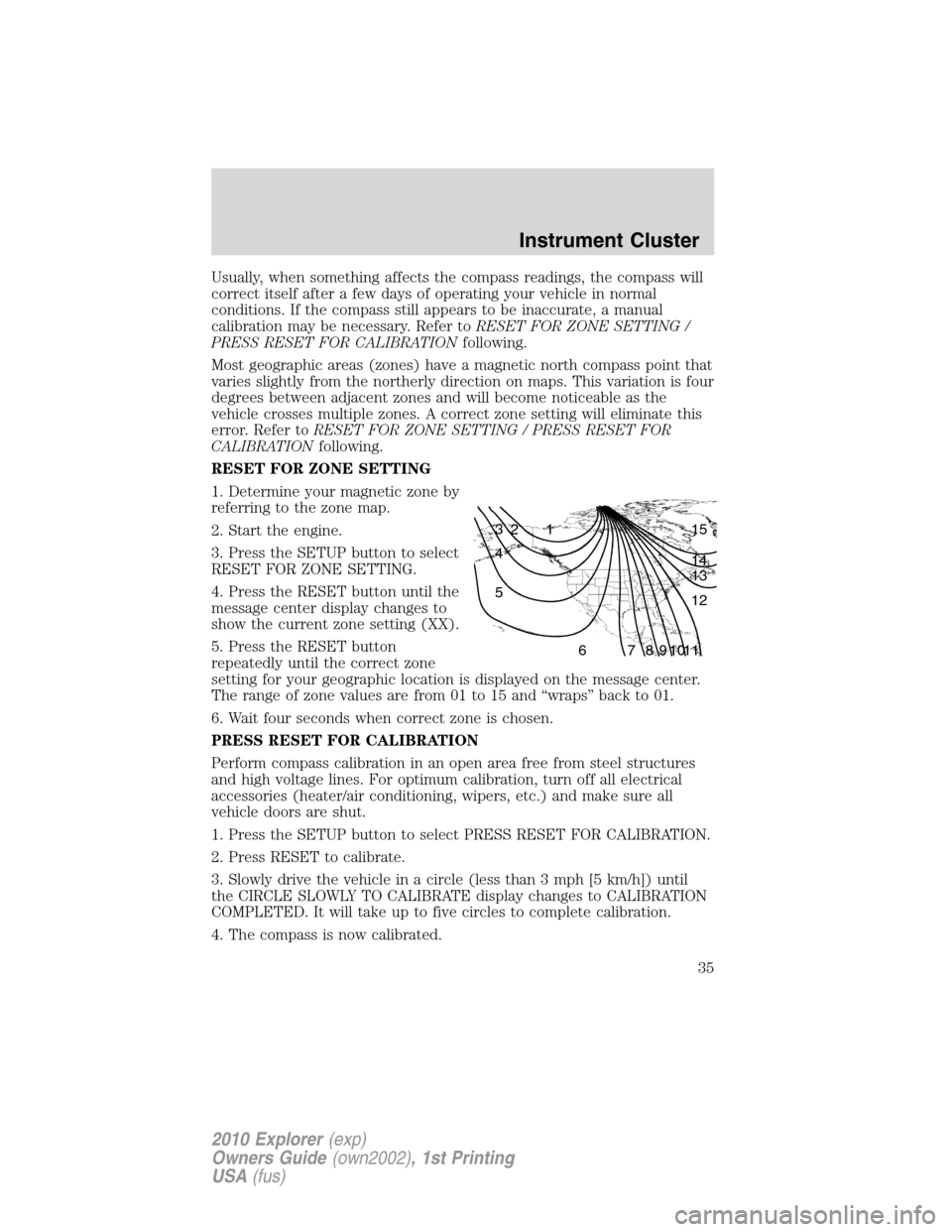
1. Determine your magnetic zone by
referring to the zone map.
2. Start the engine.
3. Press the SETUP button to select
RESET FOR ZONE SETTING.
4. Press the RESET button until the
message center display changes to
show the current zone setting (XX).
5. Press the RESET button
repeatedly until the correct zone
setting for your geographic location is displayed on the message center.
The range of zone values are from 01 to 15 and “wraps” back to 01.
6. Wait four seconds when correct zone is chosen.
PRESS RESET FOR CALIBRATION
Perform compass calibration in an open area free from steel structures
and high voltage lines. For optimum calibration, turn off all electrical
accessories (heater/air conditioning, wipers, etc.) and make sure all
vehicle doors are shut.
1. Press the SETUP button to select PRESS RESET FOR CALIBRATION.
2. Press RESET to calibrate.
3. Slowly drive the vehicle in a circle (less than 3 mph [5 km/h]) until
the CIRCLE SLOWLY TO CALIBRATE display changes to CALIBRATION
COMPLETED. It will take up to five circles to complete calibration.
4. The compass is now calibrated.
1 2 3
4
5
6 7 8 9 101112 13 14 15
Instrument Cluster
35
2010 Explorer(exp)
Owners Guide(own2002), 1st Printing
USA(fus)
Page 36 of 404
![FORD EXPLORER 2010 4.G Owners Manual HOLD RESET IF NEW OIL
To reset the oil monitoring system to 100% after each oil change
(approximately 7,500 miles [12,000 km] or six months) perform the
following:
1. Press RESET button to display HOL](/manual-img/11/4980/w960_4980-35.png "FORD EXPLORER 2010 4.G Owners Manual HOLD RESET IF NEW OIL
To reset the oil monitoring system to 100% after each oil change
(approximately 7,500 miles [12,000 km] or six months) perform the
following:
1. Press RESET button to display HOL")
HOLD RESET IF NEW OIL
To reset the oil monitoring system to 100% after each oil change
(approximately 7,500 miles [12,000 km] or six months) perform the
following:
1. Press RESET button to display HOLD RESET IF NEW OIL.
2. Press and hold the RESET button for more than two seconds. Oil life
is set to 100% and OIL CHANGE SET TO 100% is displayed.
Note:To change oil life 100% miles value from 7,500 miles (12,000 km)
or six months to another value, proceed to Step 3.
3. Once OIL LIFE SET TO XXX% is displayed, release and press the
RESET button to change the Oil Life Start Value. Each release and press
will reduce the value by 10%.
Note:Oil Life Start Value of 100% equals 7,500 miles (12,000 km) or six
months. For example, setting Oil Life Start Value to 60% sets the Oil Life
Start Value to 3,000 miles (4,800 km) and 120 days.
System warnings
System warnings alert you to possible problems or malfunctions in your
vehicle’s operating systems.
In the event of a multiple warning situation, the message center will
cycle the display to show all warnings by displaying each one for four
seconds.
The message center will display the last selected feature if there are no
more warning messages.
Types of messages and warnings:
•Some messages will appear briefly to inform you of something you
may need to take action on or be informed of.
•Some messages will appear once and then again when the vehicle is
restarted.
•Some messages will reappear after clearing or being reset if a problem
or condition is still present and needs your attention.
•Some messages can be acknowledged and reset by pressing RESET.
This allows you to use the full message center functionality by clearing
the message.
DOOR AJAR— Displayed when a door is not completely closed.
Instrument Cluster
36
2010 Explorer(exp)
Owners Guide(own2002), 1st Printing
USA(fus)
Page 37 of 404

REMOVE OBJECTS NEAR PASS SEAT— Displayed when objects
are by the passenger seat. After the objects are moved away from the
seat, if the warning stays on or continues to come on, contact your
authorized dealer as soon as possible.
SERVICE RSC NOW— Displayed when the system is not operating
properly. If the warning stays on or continues to come on, contact your
authorized dealer as soon as possible.
CHECK FUEL FILL INLET— Displayed when the fuel fill inlet may
not be properly closed. Refer toEasy Fuel™ “no cap” fuel systemin
theMaintenance and Specificationschapter.
CHECK CHARGING SYSTEM— Displayed when the electrical system
is not maintaining proper voltage when the engine is running. If you are
operating electrical accessories when the engine is idling at a low speed,
turn off as many of the electrical loads as soon as possible. If the
warning stays on or comes on when the engine is operating at normal
speeds, contact your authorized dealer as soon as possible.
FUEL LEVEL LOW— Displayed as an early reminder of a low fuel
condition.
PARK BRAKE ENGAGED— Displayed when the parking brake is set,
the engine is running and the vehicle is driven more than 3 mph
(5 km/h). If the warning stays on after the parking brake is released,
contact your authorized dealer as soon as possible.
CHECK BRAKE SYSTEM— Displayed when the braking system is not
operating properly. If the warning stays on or continues to come on,
contact your authorized dealer as soon as possible.
CHECK PARK AID (if equipped)— Displayed when the transmission
is in R (Reverse) and the reverse sensing system (park aid) is disabled.
LOW TIRE PRESSURE— Displayed when one or more tires on your
vehicle have low tire pressure. Refer toInflating your tiresin theTires,
Wheels and Loadingchapter.
TIRE PRESSURE MONITOR FAULT— Displayed when the Tire
Pressure Monitoring System is malfunctioning. If the warning stays on or
continues to come on, contact your authorized dealer as soon as
possible.
TIRE PRESSURE SENSOR FAULT— Displayed when a tire pressure
sensor is malfunctioning, or your spare tire is in use. For more
information on how the system operates under these conditions, refer to
Understanding your Tire Pressure Monitoring System (TPMS)in the
Tires, Wheels and Loadingchapter. If the warning stays on or
continues to come on, contact your authorized dealer as soon as
possible.
Instrument Cluster
37
2010 Explorer(exp)
Owners Guide(own2002), 1st Printing
USA(fus)
Page 38 of 404

BRAKE FLUID LEVEL LOW— Indicates the brake fluid level is low
and the brake system should be inspected immediately. Refer toBrake
fluidin theMaintenance and Specificationschapter.
WASHER FLUID LEVEL LOW— Indicates the washer fluid reservoir
is less than one quarter full. Check the washer fluid level. Refer to
Windshield washer fluidin theMaintenance and Specifications
chapter.
OIL LIFE CHANGE SOON— Displayed when the engine oil life
remaining is 10% or less.
OIL CHANGE REQUIRED— Displayed when the oil life left reaches
0%.
LIFTGATE / GLASS AJAR— Displayed when the liftgate or the
liftgate glass is not completely closed.
TRAILER SWAY REDUCE SPEED— Displayed when your trailer
starts to sway when towing. Refer toTrailer sway controlin the
Drivingchapter for more information.
FOR 4X4 LOW STOP VEHICLE (if equipped)— Displayed when
4X4 LOW is selected while the vehicle is moving. For more information,
refer toUsing the Control Trac 4WD systemin theDrivingchapter.
FOR 4X4 LOW SHIFT TO N (if equipped)— Displayed when 4X4
LOW is selected and the vehicle is stopped. For more information, refer
toUsing the Control Trac 4WD systemin theDrivingchapter.
TO EXIT 4X4 LOW STOP VEHICLE (if equipped)— Displayed
when 2WD is selected while the vehicle is operating in 4X4 LOW. For
more information, refer toUsing the Control Trac 4WD systemin the
Drivingchapter.
TO EXIT 4X4 LOW SHIFT TO N (if equipped)— Displayed when
2WD is selected while the vehicle has been stopped in 4X4 LOW. For
more information, refer toUsing the Control Trac 4WD systemin the
Drivingchapter.
Instrument Cluster
38
2010 Explorer(exp)
Owners Guide(own2002), 1st Printing
USA(fus)
Page 126 of 404
POWER ADJUSTABLE FOOT PEDALS (IF EQUIPPED)
The accelerator and brake pedal
should only be adjusted when the
vehicle is stopped and the gearshift
lever is in the P (Park) position.
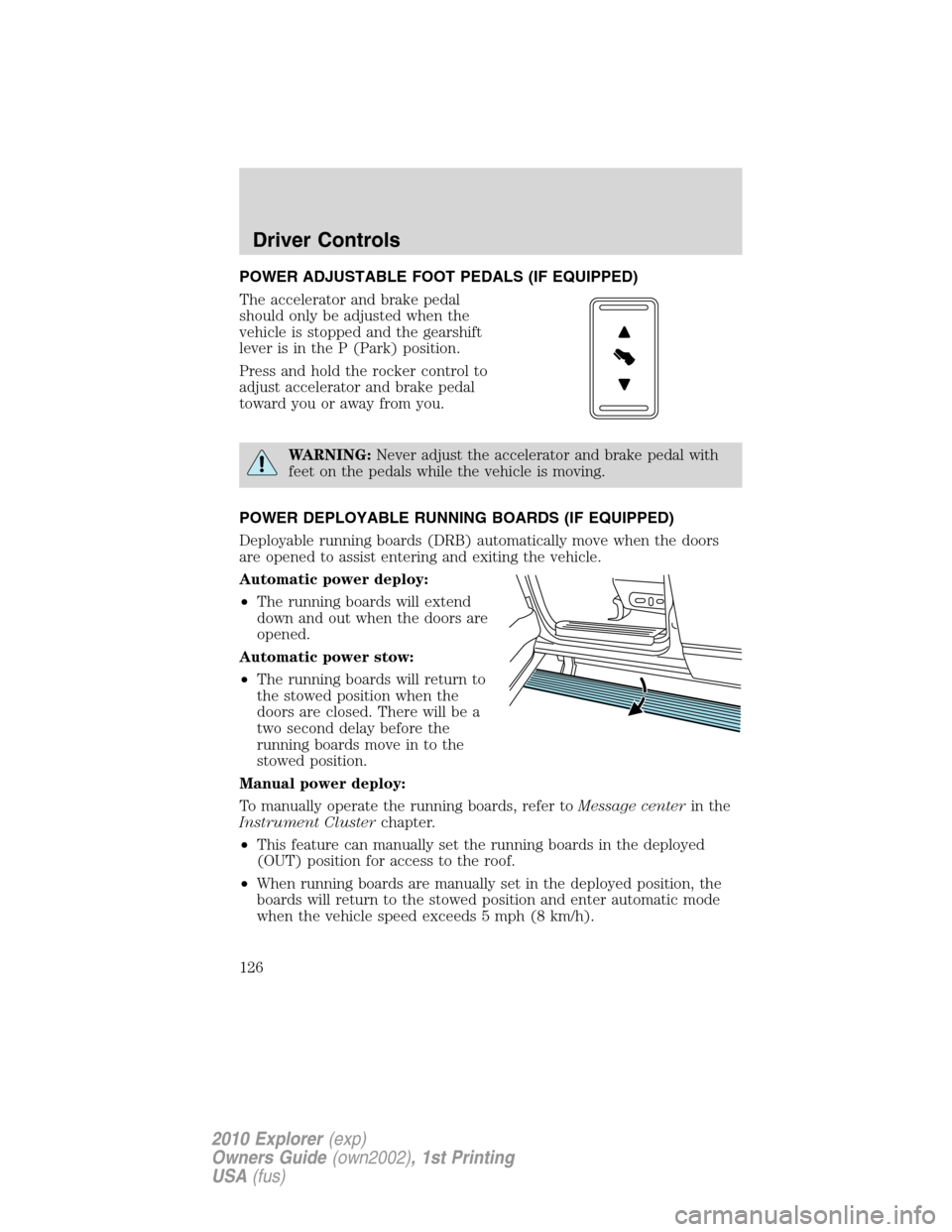
Press and hold the rocker control to
adjust accelerator and brake pedal
toward you or away from you.
WARNING:Never adjust the accelerator and brake pedal with
feet on the pedals while the vehicle is moving.
POWER DEPLOYABLE RUNNING BOARDS (IF EQUIPPED)
Deployable running boards (DRB) automatically move when the doors
are opened to assist entering and exiting the vehicle.
Automatic power deploy:
•The running boards will extend
down and out when the doors are
opened.
Automatic power stow:
•The running boards will return to
the stowed position when the
doors are closed. There will be a
two second delay before the
running boards move in to the
stowed position.
Manual power deploy:
To manually operate the running boards, refer toMessage centerin the
Instrument Clusterchapter.
•This feature can manually set the running boards in the deployed
(OUT) position for access to the roof.
•When running boards are manually set in the deployed position, the
boards will return to the stowed position and enter automatic mode
when the vehicle speed exceeds 5 mph (8 km/h).
Driver Controls
126
2010 Explorer(exp)
Owners Guide(own2002), 1st Printing
USA(fus)
Page 127 of 404
Enable/disable:
To enable/disable the power running board feature, refer toMessage
centerin theInstrument Clusterchapter.
•When this feature is disabled (OFF), the running boards will move to
the stowed position regardless of the position of the doors.
•When this feature is enabled (AUTO), the running boards will move
back to the correct positions based off of the door positions.
Bounce-back:
•If an object is in the way of the moving running board, the running
board will automatically bounce back in the reverse direction and
move to the end of travel.
Note:The running boards may operate slower in cooler temperatures. In
adverse conditions, debris such as mud, dirt, and salt may become
trapped in the running board mechanism, possibly leading to unwanted
noise. If this occurs, manually set the running boards to the deployed
position and flush the system (in particular the front and rear hinge
arms) with a high-pressure car wash wand.
Note:Do not use the running boards, front and rear hinge assemblies,
running board motors, or the running board under body mounts to lift
the vehicle when jacking. Please utilize proper jacking points. Refer to
Changing the tiresin theRoadside Emergencieschapter.
WARNING:In extreme climates, excessive ice buildup may
occur, causing the running boards not to deploy. Be sure that the
running boards have deployed, and have finished moving before
attempting to step on them. Note: The running boards will resume
normal function once the blockage is cleared.
WARNING:Turn off the running boards before jacking or
placing any object under the vehicle. Never place your hand
between the extended running board and the vehicle. A moving
running board may cause injury.
Driver Controls
127
2010 Explorer(exp)
Owners Guide(own2002), 1st Printing
USA(fus)
Page 128 of 404
SPEED CONTROL (IF EQUIPPED)
With speed control set, you can maintain a set speed without keeping
your foot on the accelerator pedal.
WARNING:Do not use the speed control in heavy traffic or on
roads that are winding, slippery or unpaved.
Setting speed control
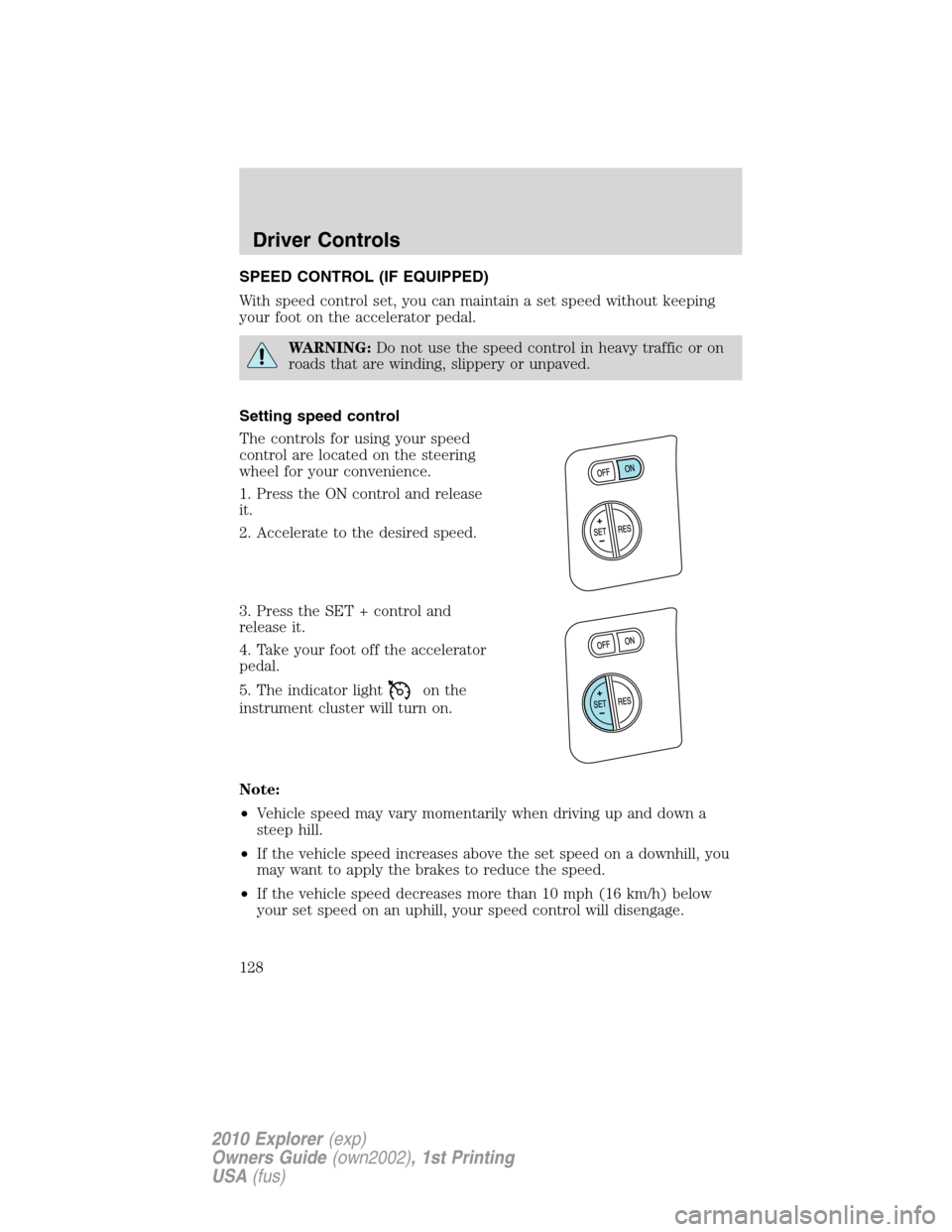
The controls for using your speed
control are located on the steering
wheel for your convenience.
1. Press the ON control and release
it.
2. Accelerate to the desired speed.
3. Press the SET + control and
release it.
4. Take your foot off the accelerator
pedal.
5. The indicator light
on the
instrument cluster will turn on.
Note:
•Vehicle speed may vary momentarily when driving up and down a
steep hill.
•If the vehicle speed increases above the set speed on a downhill, you
may want to apply the brakes to reduce the speed.
•If the vehicle speed decreases more than 10 mph (16 km/h) below
your set speed on an uphill, your speed control will disengage.
Driver Controls
128
2010 Explorer(exp)
Owners Guide(own2002), 1st Printing
USA(fus)
Page 152 of 404
Keyless entry keypad procedure
1. Turn the ignition to the off position.
2. Close all doors, the liftgate and liftgate window.
3. Enter 5–digit entry code
4. Press and hold the 3•4. While holding the 3•4pressthe7•8.
5. Release the 7•8.
6. Release the 3•4.
The user should receive a horn chirp to indicate the system has been
disabled or a chirp followed by a honk to indicate the system has been
enabled.
Message center procedure
For information on activating/deactivating the autolock feature using the
vehicle’s message center (if equipped), refer toMessage center
information in theInstrument clusterchapter.
Autounlock
The autounlock feature will unlock all the doors when:
•the ignition is in the on position, all the doors are closed, and the
vehicle has been in motion at a speed greater than 12 mph (20 km/h);
•the vehicle has then come to a stop and the ignition is turned to the
off or accessory position; and
•the driver door is opened within 10 minutes of the ignition being
transitioned to the off or accessory position.
Note:The doors will not autounlock if the vehicle has been
electronically locked before the driver door is opened.
Deactivating/activating autounlock
Your vehicle comes with the autounlock feature activated. There are four
methods to enable/disable this feature:
•Through your authorized dealer, or
•Performing the power door lock control procedure, or
•Performing the keyless entry keypad (if equipped) procedure, or
•Performing the message center (if equipped) procedure.
Before following the activation or deactivation procedures, make sure
that the anti-theft system is not armed, ignition is in the off position, and
all vehicle doors, liftgate and liftgate window are closed.
Locks and Security
152
2010 Explorer(exp)
Owners Guide(own2002), 1st Printing
USA(fus)