Page 107 of 345

Note:The MyKey™ can be cleared within the same key cycle that it was
created, otherwise a standard key (Administrator key) is required to
disable the MyKey™ programming. To clear all MyKeys™ go to step 2 in
theDisable MyKey™section.
Programming MyKey™ Optional Settings
Turn the ignition on using an Admin key. To program the optional
settings, use the message center buttons to do the following:
1. Press SETUP until RESET FOR MYKEY SETUP is displayed.
2. Press and release the RESET button to display MyKey™ setup menus.
The first menu shown is:
MYKEY MAX MPH <80 MPH> OFF
3. If you don’t want to change the maximum speed setting, press the
SETUP button to display the next menu. The remaining menus appear as
follows with the default settings shown:
MYKEY MPH TONES 45 55 65
MYKEY VOLUME LIMIT OFF
MYKEY ADVTRAC CTRL ON .
4. On any of the menus press RESET to highlight your choice with the
<…>.
5. Press SETUP to enter your choice. The next optional setting will be
displayed.
6. Repeat steps 4 and 5 until you are done changing the optional
settings.
Disable MyKey™
To reset all MyKeys™ as Admin keys do the following:
1. Turn the vehicle on using the Admin key.
2. Press SETUP until PRESS RESET TO CLEAR MYKEY is displayed.
3. Press and release the RESET button. HOLD RESET TO CONFIRM
CLEAR is displayed.
4. Press and hold the RESET button for two seconds until ALL MYKEYS
CLEARED is displayed.
Check MyKey™ System Status
The vehicle System Check will provide the status of the following
MyKey™ parameters:
•MYKEY MILES — This odometer only tracks mileage when a MyKey™
is used. If mileage does not accumulate as expected, then the
Locks and Security
107
2010 Escape(204)
Owners Guide, 1st Printing
USA(fus)
Page 108 of 345

MyKey™ is not being used by the intended user. The only way to
reset this odometer to zero is by disabling MyKey™. If this odometer
is lower than the last time you checked, then the MyKey™ system has
been recently cleared.
•# MYKEY(S) PROGRAMMED — Indicates how many MyKeys™ are
programmed to the vehicle. Can be used to detect deletion of a
MyKey™.
•# ADMIN KEYS PROGRAMMED — Indicates how many Admin keys
are programmed to the vehicle. Can be used to detect if an additional
spare key has been programmed to the vehicle
Refer toMessage centerin theInstrument Clusterchapter for MyKey™
system warnings displays.
Using MyKey™ with Remote Start Systems
MyKey™ is not compatible with non-Ford approved aftermarket remote
start systems. If you choose to install a remote start system please see
your authorized dealer for a Ford approved remote start system.
When using a Ford-approved remote start system, the default settings
will recognize the remote start system as an additional Admin Key with
its associated privileges. Owners of vehicles equipped with traditional
keys should program the remote start system as a MyKey™ in addition
to the key that they have already programmed as a MyKey™. To
program the remote start system as MyKey™, do the following:
1. Enter the vehicle and close all doors.
2. Remote start the vehicle using a remote start fob.
3. Follow steps 1-4 in theCreate a MyKey™section.
Note:For all vehicles, the number of MYKEY(S) PROGRAMMED or
ADMIN KEYS PROGRAMMED that is displayed in the MyKey™ System
Status menus will include the remote start system as an additional key in
the total count. See theCheck MyKey™ System Statussection.
Note:For all vehicles with remote start installed, it is possible to
program all ’real’ keys as MyKeys™, in which case, you will need to use
your remote start system to reset all MyKeys™ as Admin keys by doing
the following:
1. Enter the vehicle, close all doors.
2. Remote start the vehicle using your remote start fob.
3. Follow steps 1-4 in theDisable MyKey™section.
Locks and Security
108
2010 Escape(204)
Owners Guide, 1st Printing
USA(fus)
Page 109 of 345

Troubleshooting
Condition Potential Causes
Can’t create a MyKey™•Key in the ignition is already a
MyKey™
•Key in the ignition is the last remaining
Admin key (there always has to be at
least one Admin key)
•SecuriLock�Passive Anti-Theft System
is disabled or in unlimited mode
•Vehicle has been started using a remote
start system that is programmed as
MyKey™. Refer toUsing MyKey™ with
Remote Start Systemssection.
Cannot program the
MyKey™ optional settings•Key in the ignition is a MyKey™
•No MyKeys™ are programmed to the
vehicle. Refer toCreate a MyKey™
section
•Vehicle has been started using a remote
start system that is programmed as
MyKey™. Refer toUsing MyKey™ with
Remote Start Systemssection.
Cannot disable MyKey™•Key in the ignition is a MyKey™
•No MyKeys™ are programmed to the
vehicle. Refer toCreate a MyKey™
section
•Vehicle has been started using a remote
start system that is programmed as
MyKey™. Refer toUsing MyKey™ with
Remote Start Systemssection.
Lost the only Admin key•Purchase a new key from your
authorized dealer
Lost any key•For programming spare keys, refer to
theProgramming spare keyssection in
this chapter.
Locks and Security
109
2010 Escape(204)
Owners Guide, 1st Printing
USA(fus)
Page 110 of 345
Condition Potential Causes
I accidentally programmed
all keys as MyKeys™•Vehicle has a remote start system that
is recognized as an Admin key. Refer to
theUsing MyKey™ with Remote Start
Systemssection to reset all MyKeys™ as
Admin keys.
MyKey™ Programmed total
includes one additional key•Unknown key has been programmed to
the vehicle as a MyKey™.
•Vehicle is equipped with a remote start
system. Refer toUsing MyKey™ with
Remote Start Systemssection.
Admin Keys Programmed
total includes one
additional key•Unknown key has been programmed to
the vehicle as Admin key.
•Vehicle is equipped with a remote start
system. Refer toUsing MyKey™ with
Remote Start Systemssection.
MyKey™ miles does not
accumulate•MyKey™ is not being used by the
intended user.
•MyKey™ system has been recently
cleared.
Locks and Security
110
2010 Escape(204)
Owners Guide, 1st Printing
USA(fus)
Page 111 of 345
FRONT SEATS
WARNING:Reclining the seatback can cause an occupant to
slide under the seat’s safety belt, resulting in severe personal
injuries in the event of a collision.
WARNING:Do not pile cargo higher than the seatbacks to
reduce the risk of injury in a collision or sudden stop.
WARNING:Before returning the seatback to its original
position, make sure that cargo or any objects are not trapped
behind the seatback. After returning the seatback to its original
position, pull on the seatback to ensure that it has fully latched. An
unlatched seat may become dangerous in the event of a sudden stop or
collision.
Adjustable head restraints
Your vehicle is equipped with front row outboard head restraints that are
vertically adjustable.
WARNING:To minimize the risk of neck injury in the event of a
crash, the driver and passenger occupants should not sit in
and/or operate the vehicle, until the head restraint is placed in its
proper position. The driver should never adjust the head restraint
while the vehicle is in motion.
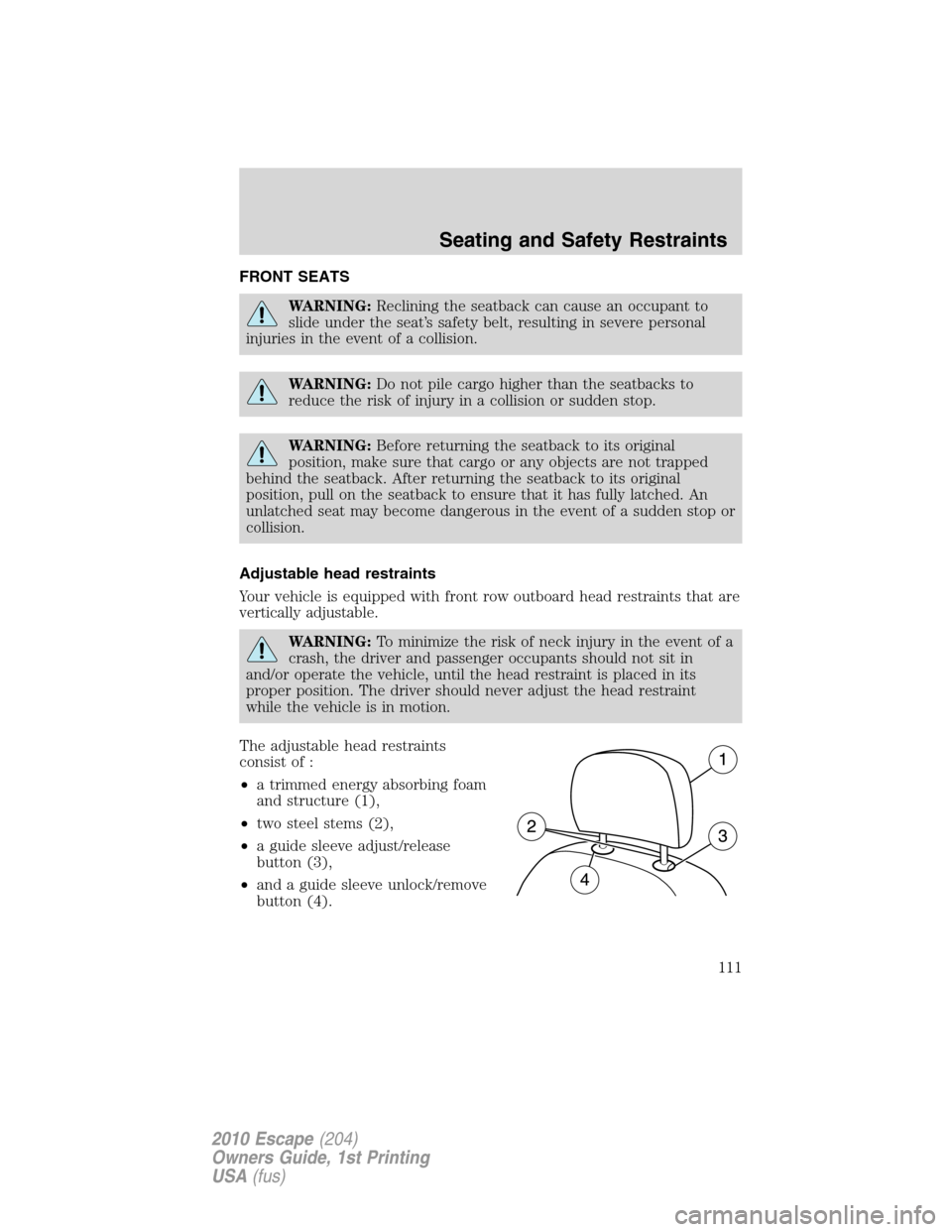
The adjustable head restraints
consist of :
•a trimmed energy absorbing foam
and structure (1),
•two steel stems (2),
•a guide sleeve adjust/release
button (3),
•and a guide sleeve unlock/remove
button (4).
Seating and Safety Restraints
111
2010 Escape(204)
Owners Guide, 1st Printing
USA(fus)
Page 113 of 345
To remove the adjustable head restraint, do the following:
1. Pull up the head restraint until it
reaches the highest adjustment
position.
2. Simultaneously press and hold
both the adjust/release button and
the unlock/remove button, then pull
up on the head restraint.
To reinstall the adjustable head restraint, do the following:
1. Insert the two stems into the
guide sleeve collars.
2. Push the head restraint down
until it locks.
Properly adjust the head restraint so that the top of the head restraint is
even with the top of your head and positioned as close as possible to the
back of your head. For occupants of extremely tall stature, adjust the
head restraint to its full up position.
Seating and Safety Restraints
113
2010 Escape(204)
Owners Guide, 1st Printing
USA(fus)
Page 119 of 345
To reinstall the adjustable head restraint, do the following:
1. Insert the two stems into the
guide sleeve collars.
2. Push the head restraint down
until it locks.
Properly adjust the head restraint so that the top of the head restraint is
even with the top of your head and positioned as close as possible to the
back of your head. For occupants of extremely tall stature, adjust the
head restraint to its full up position.
WARNING:To minimize the risk of neck injury in the event of a
crash, head restraints must be installed properly.
Folding down second row seats
1. Remove the second row head restraint. SeeSecond row adjustable
head restraintsin this chapter.
Note:Place the head restraint underneath the back of the front seat
for storage.
2. Pull the seat release strap.
Note:Make sure the floor is clear of all objects before folding the seat.
Seating and Safety Restraints
119
2010 Escape(204)
Owners Guide, 1st Printing
USA(fus)
Page 121 of 345
5. Rotate seatback down into load
floor position.
Returning the second row seats to upright position
1. Pull seatback up and into upright
position making sure seatback locks
into place and the red seat
unlatched indicator on release
paddle is not visible.
2. Rotate seat cushion down into the
seating position making sure that
the seat cushion is locked into place
and that the safety belt buckles are
exposed.
Seating and Safety Restraints
121
2010 Escape(204)
Owners Guide, 1st Printing
USA(fus)


